10 Best Final Cut Pro Alternatives for Video Editing in 2025

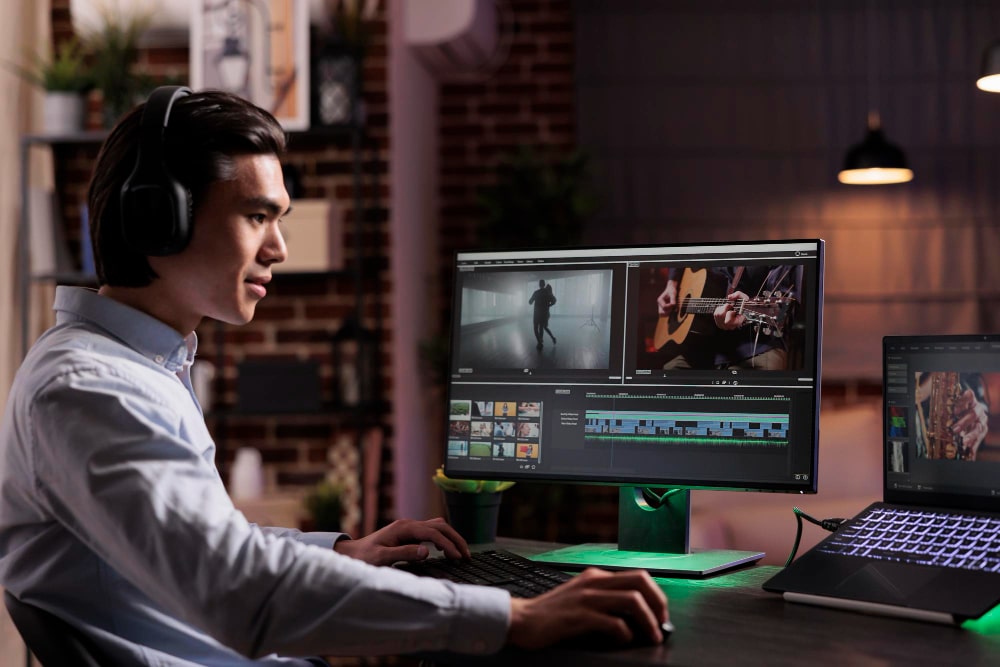
Final Cut Pro earns its reputation as one of the most capable video editors available, but “most capable” and “right for you” are not the same thing. Its macOS exclusivity locks out every Windows and Linux editor by default, the upfront price is steep for anyone just starting out, and the interface has a real learning curve that trips up beginners moving over from simpler tools. None of that makes it a bad editor. It makes it one option among several worth comparing before you commit.
Whether you need a beginner-friendly tool for social content, a professional-grade suite for client work, or a free open-source option to learn on, there is a genuine alternative on this list built for that specific situation.

What Makes a Great Final Cut Pro Alternative?
A few factors should drive the decision more than brand recognition. Pricing structure matters first: Final Cut Pro is a one-time purchase, while many competitors run on subscriptions, and a few offer genuinely capable free tiers. Ease of use matters just as much, particularly for beginners who do not want to spend their first week learning software instead of editing footage.
Platform compatibility is the factor Final Cut Pro simply cannot answer for Windows and Linux users, since it is locked to macOS with no workaround. A solid alternative should run wherever your team actually works. Finally, look at the feature set against your real workflow. Some tools focus on quick, approachable editing for social content, while others are built for color grading, motion graphics, and AI-assisted editing at a professional level. Matching the tool to the work you actually do, rather than the work you might someday do, keeps the decision simple.
1. DaVinci Resolve – Best for Color Grading & Professional Editing
DaVinci Resolve is widely recognized as one of the most powerful video editing software available today. Developed by Blackmagic Design, this software is famous for its Hollywood-level color grading tools, making it a top choice for professional filmmakers and editors.
One of DaVinci Resolve’s biggest strengths is that it offers a feature-rich free version, which includes professional-grade editing tools, motion graphics, and audio post-production features. The software also supports AI-powered enhancements, which can automate tasks such as facial recognition, object removal, and smart reframing.
While DaVinci Resolve is a powerhouse, it does come with a learning curve. Beginners may find the interface overwhelming, especially when compared to simpler alternatives. However, for those willing to invest time in learning the software, DaVinci Resolve provides unmatched flexibility and high-end features at no cost.
2. Adobe Premiere Pro – Industry Standard for Professionals
Adobe Premiere Pro has long been considered the gold standard in video editing. Used by filmmakers, content creators, and professionals worldwide, this software offers a deep set of tools for editing, color correction, motion graphics, and audio post-production.
One of its key advantages is tight integration with Adobe Creative Cloud, allowing users to move files directly between software like After Effects, Photoshop, and Audition without exporting and re-importing. This makes Premiere Pro a favorite for those who rely on multiple Adobe applications for their workflow.
However, one downside of Premiere Pro is its subscription-based pricing model. Unlike Final Cut Pro’s one-time purchase, Adobe requires users to pay a monthly fee, which can be costly over time. That said, its regular updates, cloud-based collaboration features, and extensive plugin ecosystem make it a strong contender for professional editors.
Also Read: 10 Best LuckyCrush Alternatives for Random Video Chat in 2025
3. HitFilm Express – Best Free Alternative for VFX & Motion Graphics
For creators who love incorporating stunning visual effects and motion graphics, HitFilm Express is an excellent choice. This software is packed with Hollywood-style VFX tools, allowing users to create everything from realistic explosions to 3D animations.
One of the biggest advantages of HitFilm Express is that it’s free to use, making it accessible to indie filmmakers, YouTubers, and video enthusiasts. While the free version is powerful, it does come with some limitations, as advanced effects and premium features require additional purchases.
If you’re looking for an affordable alternative to Final Cut Pro that includes strong VFX and compositing tools, HitFilm Express is definitely worth considering.
4. Filmora – Best for Beginners & Casual Editors
Not everyone needs high-end professional editing software. Some users simply want an easy-to-use program that lets them create fun, engaging videos without a steep learning curve. That’s where Filmora comes in.
Filmora is designed with beginners in mind, featuring a drag-and-drop interface, pre-built templates, and AI-powered tools that automate editing tasks. It offers a wide range of effects, transitions, and text animations, making it a great choice for vloggers, social media creators, and casual editors.
The downside of Filmora is that it lacks some of the advanced features found in professional editing software. However, for those who prioritize ease of use and quick edits, Filmora is an excellent choice.
5. Sony Vegas Pro – User-Friendly Yet Powerful
Sony Vegas Pro is known for its intuitive interface and fast rendering speeds, making it a popular choice for both intermediate and professional editors. Unlike many other high-end video editing tools, Vegas Pro offers a straightforward timeline editing experience, reducing the learning curve for new users.
One of its standout features is its strong audio editing capabilities, making it an excellent choice for YouTubers and content creators who need precise sound control. However, while Sony Vegas Pro is powerful, its pricing can be steep, especially for those on a budget.
6. Avid Media Composer – Best for Hollywood-Level Editing
If you’re looking for a video editing software used in big-budget Hollywood films, Avid Media Composer is the answer. This software is designed for professional editors who work on complex, large-scale productions, offering advanced tools for color correction, audio editing, and multi-camera editing.
The biggest drawback of Avid Media Composer is its complex interface, which can be intimidating for beginners. However, for those working in film and television, this software remains one of the best options available.
7. Lightworks – Best Free Alternative for Professional Use
Lightworks is another fantastic free alternative to Final Cut Pro, offering a professional-grade editing experience without a high price tag. This software has been used in major film productions, proving that free software can still deliver high-quality results.
While Lightworks provides high-end editing tools, its free version has export limitations, which may require users to upgrade to a paid plan for full functionality.
Also Read: 10 Best Storyworth Alternatives for Preserving Family Memories in 2025
8. Camtasia – Best for Screen Recording & Tutorials
For educators, trainers, and YouTubers who create tutorials, Camtasia is a top choice. This software combines screen recording and video editing tools, making it ideal for instructional content.
While Camtasia excels in creating educational videos, it lacks some of the high-end cinematic effects found in more advanced editing software. However, for tutorial creators, it remains one of the best choices available.
9. OpenShot – Best Open-Source & Free Editor
OpenShot is a 100% free, open-source video editing software that provides a simple yet effective editing experience. It’s a great option for users who want a basic editor without paying a dime.
While OpenShot is easy to use, it lacks professional-level features, making it more suitable for casual video editing rather than high-end productions.
10. Kdenlive – Best Free and Open-Source Alternative
Kdenlive is an excellent choice for those looking for a free, open-source, and cross-platform video editing software. Unlike Final Cut Pro, which is limited to macOS, Kdenlive runs on Windows, macOS, and Linux, making it a versatile option for editors who work across different operating systems.
One of Kdenlive’s biggest strengths is its customizability. Since it’s open-source, users can tweak the software, add plugins, and modify the interface to match their workflow. It offers a multi-track timeline, professional-grade effects, and support for a wide range of video formats. Additionally, Kdenlive has an active community that continuously updates the software, ensuring bug fixes and new features.
While Kdenlive is a powerful tool, it lacks some of the AI-powered automation and real-time collaboration features found in premium alternatives like Adobe Premiere Pro or DaVinci Resolve. However, for those seeking a completely free, capable video editing solution, Kdenlive remains one of the best options available in 2025.

What Final Cut Pro still does better than most alternatives
It is worth being honest about what gets lost in a switch, since pretending Final Cut Pro has no real advantages sets up an unfair comparison. Its magnetic timeline, which automatically ripples clips to avoid gaps and collisions, remains one of the more intuitive editing paradigms once you learn it, and few competitors replicate it exactly. Performance on Apple Silicon Macs is also genuinely excellent, with render and export times that regularly beat comparable projects in Premiere Pro on the same hardware.
Optimized media and proxy workflows are another area where Final Cut Pro has a head start, letting editors work smoothly with high-resolution footage on modest hardware. None of this means switching is a mistake. It means the decision should weigh what you personally use against what you would be giving up, rather than assuming every alternative on this list matches Final Cut Pro feature for feature.
Quick comparison at a glance
| Editor | Best For | Platform | Pricing |
|---|---|---|---|
| DaVinci Resolve | Color grading and professional editing | Windows, macOS, Linux | Free, paid Studio version available |
| Adobe Premiere Pro | Industry-standard professional workflows | Windows, macOS | Monthly subscription |
| HitFilm Express | Free VFX and motion graphics | Windows, macOS | Free, paid add-ons available |
| Filmora | Beginners and casual editors | Windows, macOS | Subscription or one-time license |
| Sony Vegas Pro | Fast, intuitive timeline editing | Windows | One-time purchase |
| Avid Media Composer | Hollywood-level, large-scale productions | Windows, macOS | Subscription or perpetual license |
| Lightworks | Free professional-grade editing | Windows, macOS, Linux | Free, paid upgrade for full export |
| Camtasia | Screen recording and tutorials | Windows, macOS | One-time purchase |
| OpenShot | Basic, casual editing | Windows, macOS, Linux | Free, open-source |
| Kdenlive | Free, customizable cross-platform editing | Windows, macOS, Linux | Free, open-source |
Matching the editor to what you actually make
The mistake most people make is picking the editor with the most features rather than the one that fits their actual output. A creator posting short-form content to Instagram and TikTok rarely needs Avid Media Composer’s multi-camera film production tools. A colorist working on client footage rarely wants to fight Filmora’s beginner-focused interface to get precise grading control.
YouTubers and content creators publishing regularly are usually best served by Filmora or DaVinci Resolve, depending on how deep their editing needs go. Filmora gets you moving fast with templates and AI-assisted tools; DaVinci Resolve costs nothing for its full-featured version and rewards the time investment with genuinely professional output. Educators and tutorial creators, especially anyone recording software walkthroughs, should look first at Camtasia, since its screen-recording and editing tools are built specifically for that workflow rather than adapted from general video editing.
Professional editors working on client deliverables or film projects should weigh Adobe Premiere Pro against DaVinci Resolve carefully. Premiere Pro wins if you already rely on After Effects or Photoshop and want files moving between them without friction. DaVinci Resolve wins on what you actually pay over time and on color grading depth. Budget-conscious editors and students learning the craft have real options in Lightworks, HitFilm Express, and Kdenlive, none of which require a monthly fee to produce genuinely usable work.
Switching platforms without losing your existing projects
Moving off Final Cut Pro is rarely as simple as opening an old project file in new software. Final Cut Pro’s project format (.fcpxml) has some cross-compatibility with other editors, but color grades, complex effects, and custom titles frequently do not translate cleanly. A few practices make the switch less painful.
- Export finished projects before switching, not after. Render out final versions of completed work in a standard format like ProRes or H.264 so you are not depending on a successful project-file import for anything already delivered to a client.
- Test with a small project first. Before committing an entire in-progress production to a new editor, migrate a short, simple project to see what translates cleanly and what needs to be rebuilt.
- Rebuild color grades rather than assuming a perfect match. Grading tools differ enough between platforms, especially between Final Cut Pro’s built-in color tools and DaVinci Resolve’s node-based system, that manual verification is worth the time.
- Keep Final Cut Pro installed during the transition. Running both editors in parallel for a project or two removes the pressure of an all-or-nothing switch and gives you a fallback if something does not translate as expected.
Frequently asked questions
Is DaVinci Resolve really free, or is there a catch?
The free version of DaVinci Resolve is genuinely full-featured, including professional color grading, editing, and audio tools. The paid Studio version adds features like advanced noise reduction, additional collaboration tools, and higher-resolution export options, which matter mainly for large studio or broadcast workflows rather than most independent creators.
Which alternative is closest to Final Cut Pro in terms of interface and workflow?
DaVinci Resolve and Adobe Premiere Pro both offer a similarly professional, timeline-based editing experience, though neither replicates Final Cut Pro’s unique magnetic timeline exactly. Editors coming from Final Cut Pro typically find Premiere Pro’s layout slightly more familiar, while DaVinci Resolve requires a bit more adjustment but offers stronger built-in color tools.
Can I run any of these on an older, lower-spec computer?
OpenShot, Kdenlive, and Lightworks are the most forgiving options for older hardware, since they place less demand on GPU-accelerated rendering than DaVinci Resolve or Premiere Pro. HitFilm Express sits in the middle, running acceptably on mid-range machines but slowing down noticeably with heavy VFX work.
Do any of these alternatives support the same plugins and effects as Final Cut Pro?
Not directly. Final Cut Pro plugins are built specifically for its architecture and do not carry over to other editors. Most competing platforms, particularly Premiere Pro and DaVinci Resolve, have their own large third-party plugin ecosystems, but migrating a plugin-heavy Final Cut Pro workflow means researching equivalent tools on the new platform rather than expecting a direct match.
Is it worth paying for a subscription editor if I only edit occasionally?
Probably not. Adobe Premiere Pro and other subscription tools make the most financial sense for editors working regularly enough to justify a recurring monthly cost. Occasional editors, students, and hobbyists are generally better served by a free tool like DaVinci Resolve or Kdenlive, or a one-time purchase like Filmora’s license option, since the total cost stays predictable regardless of how often the software actually gets used.
Choosing the best Final Cut Pro alternative for video editing depends on your needs. Professionals looking for high-end tools should consider DaVinci Resolve or Adobe Premiere Pro, while beginners and casual editors may find Filmora or Camtasia more suitable. Those on a budget can explore free options like Lightworks, HitFilm Express, or OpenShot.
Regardless of your skill level, there is editing software out there that fits your workflow. Test a few options against a real project from your own work, not just a demo file, and let that experience guide the final decision.
The editors who end up frustrated with a new tool are usually the ones who picked based on a features comparison chart alone. Download a trial, import an actual clip you have edited before, and see how the workflow feels in practice. That fifteen-minute test tells you more than any spec sheet ever will.
Interesting Reads
10 Best Wattpad Alternatives for Reading and Writing Stories in 2025
10 Best Synergy Alternatives for Multi-Device and Multi-Monitor Control in 2025
10 Best Cinema HD Alternatives for Streaming Movies and TV Shows in 2025