Build a Social Announcement Wall for Your Digital Store


The Dead Storefront Problem Between Product Launches
Visit most digital product stores between launches and you will find a ghost town. The homepage shows the same products with the same descriptions. The blog has not been updated in weeks. There is no indication that anyone is actively working on the products, responding to customers, or improving the platform.
This dead storefront problem is one of the most underestimated revenue killers in digital commerce. It affects stores selling WordPress plugins, online courses, design templates, software tools, and every other category of downloadable products.
The problem is not that store owners are inactive. Most are constantly updating their products, fixing bugs, adding features, and engaging with customers through email and support tickets. The problem is that none of this activity is visible on the storefront. The store looks static even when the business behind it is dynamic.
Static storefronts create three specific problems:
- Reduced repeat visits: Returning customers have no reason to come back if nothing appears to change. They buy once and forget your store exists until they need something specific.
- Lower trust for new visitors: A store that looks unchanged for months raises questions about whether the products are still maintained and supported.
- Missed upsell opportunities: Existing customers who would buy your new products never see them because they stopped visiting your store after their initial purchase.
The solution is not more blog posts. Writing a full blog article every week requires substantial effort, and most store owners cannot sustain that pace alongside product development and customer support. The solution is lighter-weight content that communicates activity and relevance without demanding hours of production time.
That is where a social announcement wall comes in.
How a Social Announcement Wall Keeps Your Store Alive
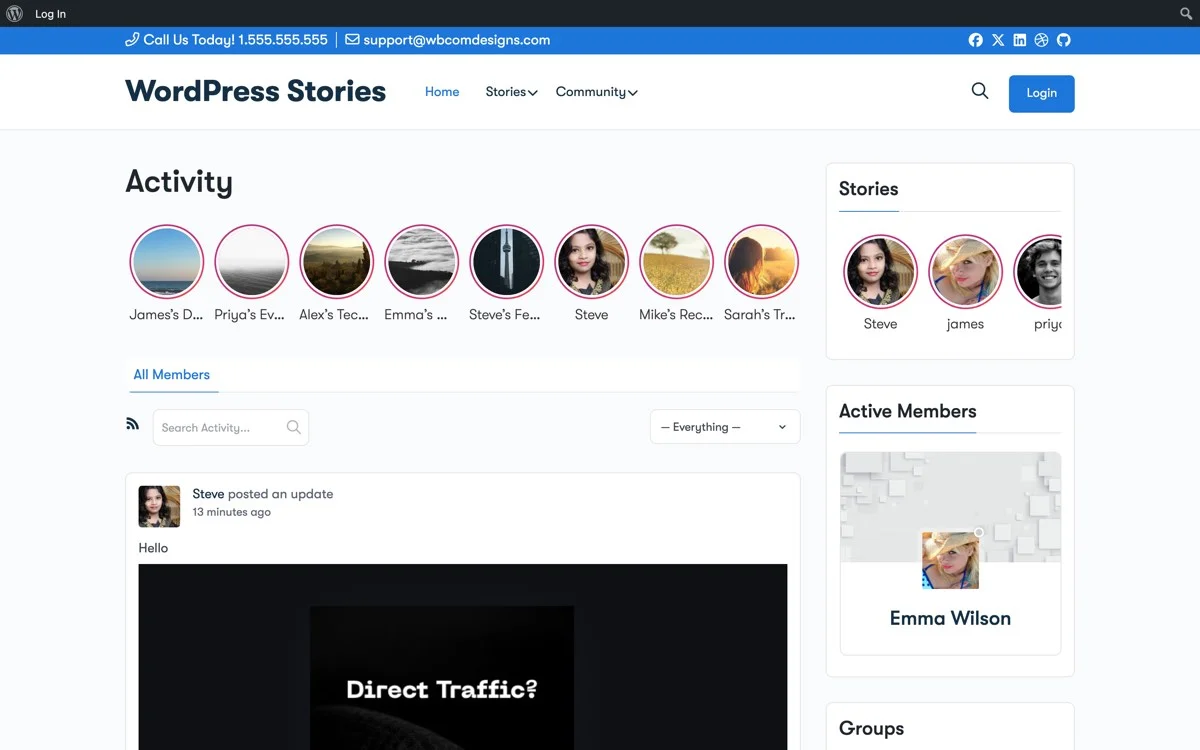
A social announcement wall is a stream of short, visual updates displayed prominently on your storefront. Think of it as a news ticker for your digital store: a constant flow of information that tells visitors this store is alive, active, and worth paying attention to.
Unlike a blog, a social wall does not require long-form content. Each update is a single image, a short text caption, or a brief announcement. The individual pieces are lightweight, but together they create an impression of activity and momentum that transforms a static storefront into a living one.
A well-maintained social wall accomplishes several goals simultaneously:
- Signals active maintenance: Regular updates show that your products are being improved and supported
- Encourages repeat visits: Visitors come back to check what is new, creating a habit loop
- Provides social proof: Community spotlights and customer stories show that real people use and value your products
- Drives discovery: Quick tips and feature highlights introduce existing customers to capabilities they may not know about
- Creates urgency: Time-limited announcements and expiring stories add urgency that static product pages lack
The format matters. A social wall should feel casual and current, not polished and permanent. The ephemeral nature of story content is an advantage here: it communicates “this is happening now” in a way that blog posts and product pages cannot.
This approach is especially effective for stores that have already invested in EDD store optimization. A fast, well-optimized store paired with a living social wall creates the kind of experience that brings customers back again and again.
Changelog Stories That Make Product Updates Interesting
Every digital product seller publishes changelogs. Most changelogs are unreadable. They are dense lists of version numbers, bug fixes, and technical jargon that only developers understand. The result is that most customers never read them, which means they never learn about the improvements you ship.
Changelog stories solve this by translating technical updates into visual, accessible content that anyone can understand. Instead of writing “Fixed issue with widget rendering in sidebar contexts,” you post a story showing the before-and-after: “Your sidebar widgets now display correctly on all screen sizes. Here is what changed.”
Effective changelog stories follow a simple pattern:
- Show the improvement visually: A screenshot, a short GIF, or a side-by-side comparison
- Explain the benefit in plain language: What this means for the person using your product
- Link to the update: Where to download the latest version or access the new feature
This pattern works for every type of update:
- New features: “You asked for dark mode. We built it. Here is how it looks.”
- Bug fixes: “Some users reported slow loading on mobile. We found the cause and fixed it. Pages now load 40% faster.”
- Performance improvements: “We optimized the database queries behind the scenes. Here is the benchmark comparison.”
- Compatibility updates: “Tested and confirmed: fully compatible with WordPress 6.8 and PHP 8.3.”
When you present updates as stories rather than changelog entries, two things happen. First, more customers actually see and understand the improvements. Second, each update reinforces the perception that your product is actively maintained, which is one of the most important buying criteria for digital products.
Quick Tip Stories That Increase Product Usage and Satisfaction
Most digital products are used at a fraction of their capability. Customers buy your plugin, course, or template pack and use the most obvious features while remaining unaware of the advanced capabilities that would make the product far more valuable to them.
This is not a documentation problem. Most buyers never read documentation unless they are stuck. It is a discovery problem. People do not know what they do not know, and they are not going to search for features they have never heard of.
Quick tip stories solve the discovery problem by proactively surfacing capabilities in a format that requires almost no effort to consume. Each tip is a single story: one screenshot, one sentence, one actionable insight.
Here are examples of effective quick tip stories for different product types:
For WordPress Plugins
- “Did you know you can customize the notification email? Go to Settings > Notifications > Templates.”
- “Pro tip: Use shortcodes to embed your plugin output anywhere. Here are the three most useful ones.”
- “Speed boost: Enable the built-in caching option to reduce page load times by up to 30%.”
For Online Courses
- “The downloadable workbook in Module 3 has a bonus section most students miss. Check page 12.”
- “Quick recap of the key framework from this week’s lesson. Save this story for reference.”
- “Try this exercise before moving to Module 5. It will make the advanced content click faster.”
For Template Packs
- “This template works great for landing pages, but try it for your About page too. Here is how it looks.”
- “Quick customization: Change the accent color variable to match your brand in under 30 seconds.”
- “Combine templates #4 and #12 for a killer portfolio layout. Here is the result.”
Quick tip stories serve double duty. They increase customer satisfaction by helping people get more value from what they already own. And they reduce support requests by proactively answering questions before customers need to ask.
The cumulative effect is powerful. A customer who sees a useful tip every few days develops a positive association with your brand. Your store becomes a source of ongoing value rather than a place they visited once and left.
If you are running an online course store with EDD, quick tip stories about course content are a particularly strong retention tool that keeps students engaged between modules.
Community Spotlight Stories for Customer Retention
Your existing customers are your most valuable marketing asset. Their projects, results, and experiences with your products are more persuasive than anything you could write about yourself. Community spotlight stories put these customer voices front and center on your storefront.
A community spotlight is a story that features one of your customers: what they built with your product, what results they achieved, or how they use your product in a creative or unexpected way. Each spotlight serves multiple purposes:
- Social proof: New visitors see real people using your product successfully
- Inspiration: Existing customers get ideas for how to use the product in new ways
- Community building: Featured customers feel valued and become stronger advocates
- Content creation: Your customers create the content for you, reducing your production burden
Effective community spotlight stories are easy to produce. Reach out to customers who have shared positive feedback, asked interesting support questions, or built notable projects with your product. Ask if you can feature their work in a story. Most will say yes enthusiastically.
The spotlight story itself is straightforward: a screenshot of their project, a brief quote or description, and a link to their site or social profile. The entire production process takes five to ten minutes, but the impact on both the featured customer and your store visitors is significant.
Establish a regular cadence for spotlights. One per week is a good starting point. Over time, your spotlight archive becomes a portfolio of customer success stories that provides social proof far more convincing than any testimonial carousel.
Permanent vs. Disappearing Announcements: When to Use Each
An effective social announcement wall uses both permanent and disappearing content. Understanding when to use each format is key to maintaining an active store presence without cluttering your site with outdated information.
Use Disappearing Stories For:
- Time-sensitive announcements: Flash sales, limited-time discounts, and expiring offers that should naturally disappear when the promotion ends
- Daily or weekly updates: Development progress, quick tips, and team moments that are interesting in the moment but do not need to persist
- Polls and questions: Quick audience engagement that loses relevance after the responses are collected
- Bug fix notifications: Alerts about issues that have been resolved and no longer need visibility
- Event countdowns: Announcements tied to specific dates that become irrelevant afterward
Use Permanent Highlights For:
- Major feature announcements: New capabilities that buyers should know about regardless of when they visit your store
- Customer spotlights: Success stories that serve as ongoing social proof
- Tutorials and tips: Evergreen instructional content that remains useful over time
- Product launch sequences: Curated collections that tell the story of how a product was built and launched
- Version release notes: Compilations of updates that document your product’s evolution
The mix of temporary and permanent content creates a layered experience. First-time visitors see your permanent highlights and get a comprehensive overview of your store’s activity. Returning visitors see fresh disappearing stories that give them a reason to come back regularly.
Content Calendar for Your Social Announcement Wall
Consistency is more important than volume. A predictable publishing rhythm trains your audience to expect and look for new content. Here is a practical weekly calendar for a digital store’s social announcement wall:
- Monday: Product update or changelog story highlighting what shipped last week
- Tuesday: Quick tip story showing a useful feature or workflow
- Wednesday: Behind-the-scenes story from current development work
- Thursday: Community spotlight featuring a customer project or result
- Friday: Casual or fun story. Team moment, weekend reading recommendation, or poll
This schedule produces five stories per week, each taking 10-15 minutes to create. That is roughly one hour per week of content production for a storefront that feels alive and engaging every day.
Adjust the schedule based on your product cycle. During launch weeks, increase frequency and shift the content mix toward launch-related stories. During quiet development periods, reduce to three stories per week focusing on tips, spotlights, and progress updates.
Setting Up Your Social Announcement Wall with WP Stories
WP Stories provides the foundation for building a social announcement wall on your WordPress-powered digital store. Here is a step-by-step setup guide:
Step 1: Install and Configure WP Stories
Install WP Stories on your WordPress site. Configure the story bar position and appearance to match your store’s design. The story bar should be prominently placed, typically at the top of your homepage or shop page, where every visitor sees it.
Step 2: Create Your Content Categories
Set up story categories that match your content types: Product Updates, Quick Tips, Community Spotlights, Behind the Scenes, Announcements. Categories help you organize content and let visitors filter for the types of updates they care about most.
Step 3: Build Your First Week of Content
Before going live, prepare your first week of stories. Having five to seven stories ready ensures your announcement wall looks active from day one. Include a mix of content types to demonstrate the variety visitors can expect.
Step 4: Establish Your Publishing Workflow
Integrate story creation into your weekly routine. The most sustainable approach is to batch-create stories during a dedicated 30-60 minute block each week. Capture screenshots and notes throughout the week, then assemble them into stories during your production block.
Step 5: Set Up Story Highlights
Create highlight collections for your best evergreen content. Place these highlights on key pages: your homepage, your product pages, and your about page. Highlights give new visitors instant access to your store’s story history.
Step 6: Add CTAs to Every Story
Every story should include a call to action, even if it is subtle. Product update stories link to the product page. Tips link to documentation. Spotlights link to the customer’s project. Announcements link to the relevant landing page. WP Stories supports clickable links within stories, making every piece of content actionable.
Measuring the Impact of Your Social Announcement Wall
A social announcement wall delivers value across multiple business metrics. Here is what to track:
Repeat visit rate: The primary metric. Track whether the percentage of returning visitors increases after launching your announcement wall. A well-maintained wall should increase repeat visits by 20-40% within the first month.
Time on site: Story viewers typically spend more time on your site than non-viewers. Track the average session duration for visitors who interact with your story content.
Cross-sell and upsell rates: Monitor whether existing customers are discovering and purchasing additional products through your announcement wall. Changelog and tip stories often introduce customers to products they did not know you offered.
Support ticket volume: Quick tip stories should reduce the number of basic how-to questions in your support queue. Track ticket volume and categorize by topic to measure the impact.
Customer lifetime value: Over time, an active storefront should increase customer retention and lifetime value. Track cohort data comparing customers acquired before and after your announcement wall launch.
Email signup conversion: Use your announcement wall to promote your email list. Track whether story viewers convert to email subscribers at a higher rate than non-viewers.
Common Mistakes to Avoid
Building a social announcement wall is straightforward, but there are a few pitfalls that can undermine its effectiveness:
- Inconsistency: Posting ten stories one week and none the next is worse than posting two stories every week. Consistency builds the habit loop that drives repeat visits.
- Over-promotion: Not every story should be a sales pitch. Follow the 80/20 rule: 80% value content (tips, updates, spotlights) and 20% promotional content (launches, offers, CTAs).
- Low quality images: Stories are a visual format. Blurry screenshots and poorly cropped images undermine your brand. Take an extra minute to ensure your images are clear and well-framed.
- Ignoring engagement: If your stories get replies or reactions, respond to them. The social element of your announcement wall only works if it is actually social.
- Forgetting mobile: Most story views happen on mobile devices. Always preview your stories on a phone before publishing to ensure text is readable and images are properly sized.
From Dead Storefront to Living Brand
The difference between a dead storefront and a living brand is not the products you sell. It is the activity you show. A social announcement wall transforms your digital store from a static catalog into a dynamic destination that visitors return to, engage with, and buy from repeatedly.
Your competitors are updating their products, fixing bugs, and shipping improvements just like you are. The question is whether your customers can see that activity. A social announcement wall makes the invisible visible. It turns routine maintenance into marketing content, customer interactions into social proof, and product knowledge into engagement bait.
The same principle applies whether you run a music and audio store or a digital course marketplace. Every store benefits from visible activity.
WP Stories gives you the tools to build this on your WordPress site. No third-party platform, no algorithm changes, no audience you do not own. Your content, your store, your relationship with your customers.
Start with five stories this week. A product update, a quick tip, a behind-the-scenes moment, a customer spotlight, and an announcement. See how it feels. See how your visitors respond. Then build the habit that keeps your storefront alive between every launch.
Get WP Stories today and turn your digital store into a destination your customers visit every week.