10 Best Software to Integrate All Blink Cameras


Blink cameras are popular because they are cheap, battery-friendly, and easy to set up. That same simplicity is also why “integrating” them with other software is more limited than most buyers expect. Blink runs a closed, cloud-based system that Amazon (which owns Blink) keeps tightly controlled for security reasons, so the sprawling lists of “integration software” you find online tend to mix a handful of real, working connections with products that have no actual link to Blink at all.
This guide sticks to what actually works today. We checked each entry against the vendor’s own documentation, support pages, and (where relevant) the open-source project that maintains it, and dropped anything we could not verify. If you own Blink cameras and want to know what you can genuinely connect them to, and just as importantly what you cannot, this is the honest version.
Why Blink Integration Is More Limited Than It Looks
Most consumer security cameras from brands like Reolink, Amcrest, or Hikvision expose an RTSP or ONVIF video stream on your local network. That open standard is what lets tools such as Blue Iris, Frigate, or Synology Surveillance Station pull in footage from dozens of camera brands at once. Blink cameras do not do this. Every Blink camera, including models paired with a Blink Sync Module, sends its video straight to Blink’s cloud servers over an encrypted connection, and the only supported way to view or manage that footage is through Blink’s own app or through Blink’s public API partners.
That single design choice explains almost everything else on this page. It is why local NVR software cannot pull a Blink stream directly, why most “smart hub” integrations are really just voice-command shortcuts rather than deep camera control, and why a few well-known third-party names get associated with Blink online even though no real product connection exists.
What Actually Integrates With Blink Cameras
1. Blink Sync Module 2 – The Official Hardware Hub
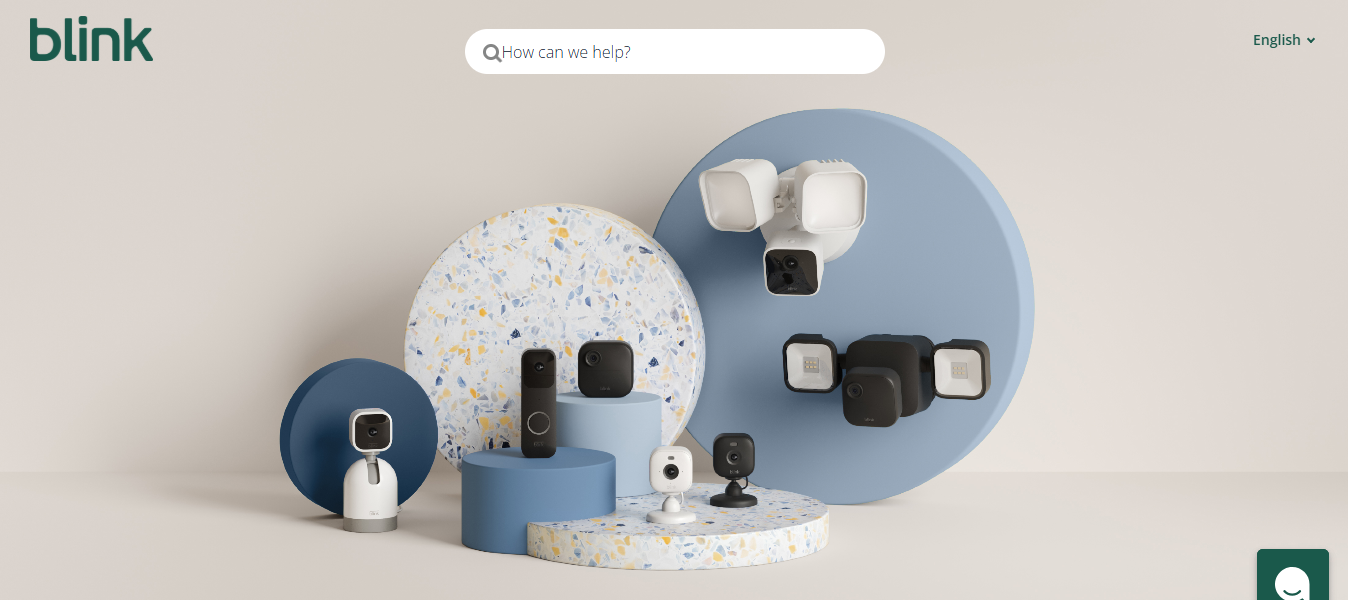
This is the piece of hardware, not third-party software, that most Blink setups rely on. The Sync Module 2 sits between your battery-powered Blink cameras (Outdoor, Indoor, and the older Blink XT2 line) and your home Wi-Fi network, relaying motion clips and live view requests to Blink’s servers. It also accepts a USB flash drive for local clip backup, which is the closest thing Blink offers to on-site storage without a cloud subscription.
Blink Mini and Blink Mini 2 cameras connect straight to Wi-Fi and do not need a Sync Module at all, so if your whole setup is Mini cameras, this device is not required.
What it does well: reliably links multiple battery cameras to one Wi-Fi connection and enables local USB backup.
What it does not do: integrate with non-Blink hardware, or act as a general smart-home hub.
2. Amazon Alexa – Native Voice Control
Because Amazon owns Blink outright, Alexa integration is the deepest and most reliable connection on this list. Enabling the Blink skill in the Alexa app lets you view live camera feeds on Echo Show devices and Fire TV, arm or disarm your system by voice, and receive spoken motion announcements on compatible Echo speakers. This is a first-party integration maintained directly by Amazon, not a third-party workaround, so it tends to stay stable across Blink app updates.
Good for: households already using Echo devices who want hands-free camera checks and system arming.
Limitation: Alexa routines built around Blink motion events are less flexible than what IFTTT offers below.
3. IFTTT – Official Blink Applets
IFTTT (If This Then That) runs an active, official Blink service with a “motion detected” trigger and “arm system” / “disarm system” actions, confirmed directly on IFTTT’s own Blink service page. Paired with the thousands of other services on IFTTT, you can build simple automations such as texting yourself when a Blink camera detects motion, logging events to a Google Sheet, or turning on smart lights through a separate brand when your Blink camera sees movement after dark. IFTTT does not give you live video inside the applet itself, but the trigger and action layer is genuinely functional and still maintained.
Good for: lightweight, no-code automations that react to Blink motion events.
Limitation: some advanced Blink features, like clip history queries, are gated behind IFTTT Pro or a Blink Subscription Plus plan.
4. Home Assistant – Official Open-Source Integration
Home Assistant, the popular open-source home automation platform, ships an official Blink integration maintained by its core contributor community. According to Home Assistant’s own documentation, the integration exposes camera snapshot entities, motion and battery sensors, Wi-Fi strength per camera, and an alarm control panel to arm or disarm the whole Blink system, and it can trigger new video clips or save the most recent recording locally. The one thing it explicitly does not support is live video streaming inside Home Assistant itself. It works by polling Blink’s cloud API on a schedule rather than opening a direct video connection, and Home Assistant deliberately throttles that polling to avoid draining battery cameras.
Good for: technically comfortable users who already run Home Assistant and want Blink events feeding into broader automations (lights, locks, notifications).
Limitation: no true live view, and setup requires comfort with Home Assistant’s configuration flow.
What Does Not Actually Integrate With Blink (Despite What You May Have Read)
A lot of “best Blink integration software” roundups online repeat the same handful of unverified claims. Before you spend money assuming a product will work with your Blink cameras, here is what we could not confirm through any official source:
- Blue Iris and similar local NVR software (Shinobi, iSpy) work with ONVIF and RTSP camera streams. Blink’s cameras do not expose either, so there is no supported way to add a Blink camera feed to Blue Iris. Any claim that it “supports Blink” is not backed by Blue Iris’s own camera compatibility documentation.
- Samsung SmartThings does not list Blink among its official “Works With SmartThings” partners, and Blink does not list SmartThings as a supported platform. There is no first-party bridge between the two ecosystems.
- Arlo is a direct competitor to Blink, made by a different company (Arlo Technologies) with its own closed cloud system. There is no “Arlo Smart Hub” feature that connects to Blink cameras, and it would be commercially unusual for a rival brand to support it.
- Vivint is a professionally installed, subscription-locked smart home system built around Vivint’s own cameras and sensors. It does not offer a supported path to add third-party Blink cameras into its dashboard.
- Ring Alarm is also owned by Amazon, but Ring and Blink remain separate apps and separate device ecosystems. Common ownership does not mean shared control. As of this writing there is no official way to arm a Ring Alarm system from Blink motion events, or view Blink footage inside the Ring app, without a third-party automation layer like IFTTT bridging the two.
- Generic-sounding “hub” products with no verifiable manufacturer, support page, or independent reviews anywhere online should be treated as filler entries in a list, not real purchasing options. If you cannot find the product on the maker’s own site, do not buy it expecting Blink compatibility.
Comparison Table: Verified Blink Integrations
| Option | Type | What It Actually Does | Live Video? | Cost |
|---|---|---|---|---|
| Blink Sync Module 2 | Required hardware hub | Connects battery cameras to Wi-Fi, enables USB local backup | Yes (through Blink app) | Sold separately or bundled with camera kits |
| Amazon Alexa | First-party voice integration | Voice-activated live view on Echo Show, arm/disarm by voice | Yes, on Echo Show/Fire TV | Free with an Echo device |
| IFTTT | Official automation service | Motion-triggered automations, arm/disarm actions | No | Free tier available; Pro unlocks more applets |
| Home Assistant | Official open-source integration | Sensors, snapshots, arm/disarm panel, clip triggers | No live stream | Free (self-hosted) |
How to Choose the Right Setup for Your Blink Cameras
If you just bought your first battery-powered Blink camera, start with the Sync Module 2. It is not optional software you can skip; it is the piece of hardware that makes multi-camera setups reliable and adds local backup. From there, the choice comes down to how hands-on you want to be.
If you want the least amount of setup, enabling the Blink skill in Alexa gets you voice control and Echo Show viewing in a few minutes, with no third-party accounts involved. If you want your cameras to trigger actions outside Blink’s own app, such as sending yourself a text or logging events to a spreadsheet, IFTTT’s official Blink service is the more flexible option and it costs nothing to start.
Home Assistant is worth the extra setup time only if you are already running it for other devices (lighting, locks, thermostats) and want Blink motion events feeding into those routines. Going in blind, without other Home Assistant hardware already in place, is a lot of configuration for a camera system that will still route through Blink’s own cloud either way.
It is also fine to skip third-party integrations entirely. A large share of Blink owners never touch Alexa, IFTTT, or Home Assistant and simply use the Blink app on its own, arming and disarming manually and checking clips when a notification arrives. The app alone covers live view, motion history, two-way audio, and system arming without any extra setup, so treat everything above as optional layers for households that specifically want voice control or cross-device automation, not as steps every Blink owner needs to complete.
Frequently Asked Questions
Can I view Blink cameras without the Blink app?
Not for true live streaming. Alexa’s Echo Show integration is the closest official alternative, and it still authenticates through your Blink account. Home Assistant can show recent snapshots but not a live feed.
Does Blink work with Google Home?
Blink does not currently offer an official Google Home integration comparable to its Alexa skill. Some users route around this using IFTTT applets that bridge to Google-compatible services, but that is a workaround, not a native connection.
Why can’t I add my Blink camera to a local NVR like Blue Iris or Frigate?
Those tools need an ONVIF or RTSP video stream from the camera itself. Blink cameras only send video to Blink’s cloud over a proprietary, encrypted connection, so there is no local stream for other software to pull from.
Is the Blink Sync Module 2 required for every Blink camera?
Only for the battery-powered Outdoor, Indoor, and XT2 lines. Blink Mini and Blink Mini 2 plug into power and connect to Wi-Fi directly, so they do not need a Sync Module.
Does a Blink Subscription Plan change what integrates with it?
A paid Blink plan mainly unlocks longer cloud video history and person detection, not new third-party integrations. The core connections covered in this guide (Alexa, IFTTT, Home Assistant) work with or without a subscription, though some IFTTT applets query features that require Blink’s paid tier.
Current Blink Camera Lineup and Where the Sync Module Fits
Blink’s product range has grown since the original Sync Module days, and knowing which camera you own changes what “integration” even means for your setup. As of this writing, Blink’s outdoor lineup includes the Outdoor 4 and the Outdoor 4 Floodlight Camera, both of which pair with a Sync Module for Wi-Fi relay and local USB backup. The indoor side includes the Mini 2K+ and the newer Mini Pan-Tilt, both of which plug into power and connect straight to your home Wi-Fi without needing a Sync Module at all. Blink also sells doorbell cameras (Battery Doorbell 2K+ and Wired Doorbell 2K+) and a two-camera mounting accessory called Blink Arc.
Blink has also introduced a newer hub, the Sync Module XR, alongside the original Sync Module 2. Both perform the same core job of relaying battery-camera footage to Blink’s cloud and enabling local USB backup, with the XR aimed at larger properties needing extended range. Neither module changes which third-party services your cameras can talk to; Alexa, IFTTT, and Home Assistant all connect at the account level through Blink’s cloud API, not through the Sync Module itself. In practice this means a mixed household running a Mini 2K+ indoors and an Outdoor 4 with a Sync Module XR outside gets identical Alexa, IFTTT, and Home Assistant options for both cameras, since the integration layer sits above the hardware.
Setting Up Your Blink System for the Best Integration Results
The order you set things up in matters more than most guides admit. Start with the Blink app itself and get every camera showing a stable connection before adding anything else. A camera that drops Wi-Fi intermittently will cause the same problem in Alexa, IFTTT, or Home Assistant, so it is worth chasing down router placement and signal strength issues at the source rather than troubleshooting them three layers downstream.
Once your cameras are stable, connect the Sync Module (if your cameras require one) and confirm local USB backup is working before you touch any third-party service. This step gets skipped constantly, and it is the one piece of “integration” that is genuinely local rather than cloud-dependent. Plug in a USB drive formatted to FAT32 or exFAT, enable local storage in the Sync Module settings, and test a manual clip save.
From there, add Alexa first if you use Echo devices, since it is the most stable, first-party connection and takes only a few minutes through the Alexa app’s skill directory. IFTTT comes next if you want event-based automations; create one applet at a time and test it before stacking several together, since overlapping triggers on the same motion event can create duplicate notifications. Home Assistant should be the last step, reserved for households that are already running it for other devices, because its setup involves generating a Blink login token and configuring polling intervals that are easy to get wrong on a first attempt.
A Note on Privacy With Cloud-Only Cameras
Because every Blink camera routes footage through Amazon’s servers rather than staying on your local network, it is worth understanding what that trade-off means before treating any third-party “integration” claim at face value. Cloud-only systems mean your video briefly transits the internet even for local viewing, which is standard for this category of consumer camera (Ring, Nest, and Wyze work the same way) but different from a fully local NVR setup like Blue Iris paired with ONVIF cameras, where footage never has to leave your house.
This is also exactly why “add Blink to Blue Iris” or “connect Blink to SmartThings” claims deserve skepticism. A closed cloud architecture is a deliberate security boundary, not a missing feature waiting for the right plugin. Any product claiming to bypass that boundary without going through Blink’s own API, Alexa, or IFTTT should be treated as unverified until you can find it documented on the vendor’s own site.
Frequently Asked Questions
Can I view Blink cameras without the Blink app?
Not for true live streaming. Alexa’s Echo Show integration is the closest official alternative, and it still authenticates through your Blink account. Home Assistant can show recent snapshots but not a live feed.
Does Blink work with Google Home?
Blink does not currently offer an official Google Home integration comparable to its Alexa skill. Some users route around this using IFTTT applets that bridge to Google-compatible services, but that is a workaround, not a native connection.
Why can’t I add my Blink camera to a local NVR like Blue Iris or Frigate?
Those tools need an ONVIF or RTSP video stream from the camera itself. Blink cameras only send video to Blink’s cloud over a proprietary, encrypted connection, so there is no local stream for other software to pull from.
Is the Blink Sync Module 2 required for every Blink camera?
Only for the battery-powered Outdoor, Indoor, and XT2 lines. Blink Mini and Blink Mini 2 plug into power and connect to Wi-Fi directly, so they do not need a Sync Module.
Does a Blink Subscription Plan change what integrates with it?
A paid Blink plan mainly unlocks longer cloud video history and person detection, not new third-party integrations. The core connections covered in this guide (Alexa, IFTTT, Home Assistant) work with or without a subscription, though some IFTTT applets query features that require Blink’s paid tier.
Will Ring and Blink ever share one app since Amazon owns both?
There is no announced timeline for merging the two ecosystems. They currently ship as separate apps with separate accounts, and any workflow that treats them as unified is being built manually through IFTTT rather than through an official Amazon feature.
Is there a safe way to try a lesser-known “Blink hub” product?
Check for a real support page, a listed manufacturer, and independent reviews outside the seller’s own marketing before buying. If none of those exist, treat the compatibility claim as unverified rather than assuming it works.
Also Read: 10 Best Software for Home Automation That Integrates SmartThings