Micro-Content Marketing for Digital Product Launches

Why Single-Blast Product Launches Fall Flat
You have spent months building your digital product. The course is recorded, the plugin is tested, the template pack is polished. Launch day arrives, and you do what every digital product seller does: you write one long announcement post, blast it to your email list, and share it across social media.
Then you wait.
There is an initial spike of traffic and maybe a handful of sales, but within 48 hours the excitement evaporates. Your launch post gets buried under newer content. People who missed the announcement never see it. And those who did see it but were not ready to buy have already forgotten about it by the time they are ready.
This is the single-blast launch problem, and it affects digital product sellers across every niche. The data tells a consistent story: product launches that rely on a single announcement convert at a fraction of the rate of multi-touch campaigns. Marketing research on the “rule of seven” holds up surprisingly well in practice: buyers typically need somewhere between five and seven touchpoints before making a purchase decision. A single announcement, no matter how well-crafted, can only deliver one of those touches.
The root cause is not your product or your audience. It is the format itself. Long-form announcements demand a commitment of time and attention that most visitors are not willing to give to a product they have never heard of. They land on your launch post, skim the first paragraph, and bounce. Not because they are uninterested, but because you are asking too much too soon.
Consider the contrast with how people actually consume content today. They scroll through short, visual updates. They tap through stories. They consume information in bite-sized pieces while waiting in line, riding the train, or taking a break between tasks. The format that already works for content consumption should also work for product marketing, and yet most digital product sellers still launch like it is 2015.
Whether you are selling online courses or distributing plugin licenses, the launch strategy matters as much as the product itself. A brilliant product with a weak launch sequence will underperform a mediocre product backed by a sequence that builds real anticipation.
The Drip-Feed Launch: A Better Approach with Micro-Content
A drip-feed launch replaces the single-blast announcement with a sequence of short, focused content pieces spread across multiple days. Each piece serves a specific purpose in the buyer journey: awareness, education, social proof, objection handling, and conversion.
Instead of cramming everything into one post, you break your launch into digestible moments. Each moment tells a small part of the story. Together, they build a narrative that moves your audience from curiosity to confidence to purchase.
Here is what a typical drip-feed launch sequence looks like for a digital product:
- Day 1-2: Teaser stories that hint at what is coming without revealing details
- Day 3-4: Problem-awareness stories that surface the pain point your product solves
- Day 5-6: Feature reveal stories that show specific capabilities one at a time
- Day 7: Social proof stories with early tester feedback or beta results
- Day 8: Quick tutorial stories that demonstrate ease of use
- Day 9: Launch day story with direct purchase link
- Day 10+: Post-launch update stories that sustain momentum
This approach works because it respects how people actually make buying decisions. Each story is low-commitment. It takes five seconds to view. But collectively, those five-second touchpoints accumulate into genuine familiarity and trust with your product, in a way a single wall of announcement text simply cannot replicate.
Teaser Stories That Build Genuine Anticipation
The first phase of your launch sequence is about creating curiosity without satisfying it. Teaser stories work because they activate what psychologists call the information gap theory. When people encounter incomplete information, they feel compelled to seek closure. A cropped screenshot or a blurred demo taps into that same instinct that makes a half-heard conversation impossible to ignore.
Effective teaser stories for digital products share a few characteristics. They are visual, showing just enough of the product to intrigue without explaining. They are brief, delivering a single image or a short caption. And they are frequent enough to establish a pattern without becoming annoying.
For a WordPress plugin launch, a teaser sequence might look like this:
- Story 1: A cropped screenshot showing one corner of the settings panel with the caption “Something new is coming to your dashboard”
- Story 2: A short video of a cursor clicking through a feature, blurred out so you can see movement but not details
- Story 3: A poll asking “What is your biggest frustration with [problem area]?” to prime the audience for the solution
The goal is not to inform. It is to create a mental bookmark. When your audience sees the full reveal later, they already have context. They have been thinking about the problem you solve. The announcement lands on prepared ground rather than cold attention, which is the entire point of running a sequence instead of a single post.
Feature Reveal Sequences That Educate While Selling
Once you have established curiosity, the next phase shifts to education. Feature reveal stories show your product one capability at a time, giving each feature room to breathe and register.
This is where most digital product sellers make a critical mistake with traditional launches. They list every feature in a bullet-pointed wall of text and expect buyers to understand the value of each one. But feature lists are abstract. They tell people what your product does without showing why it matters to the person actually reading them at 11pm on their phone.
Story-based feature reveals solve this by embedding each feature in a mini-narrative. Instead of writing “Includes 50+ pre-built templates,” you show a story of someone opening the template browser, scrolling through options, and selecting one that transforms their project in seconds. The story format makes the feature concrete and relatable in a way a spec sheet never will.
A well-structured feature reveal sequence for a digital product might follow this pattern:
- Problem frame: A story that shows the frustration of doing things the old way
- Feature introduction: A story that reveals how your product handles the same task
- Result showcase: A story that shows the end result, emphasizing the time or effort saved
Repeat this three-story pattern for each major feature across your launch window. Your audience absorbs the value proposition gradually, feature by feature, without feeling overwhelmed by a feature dump.
Quick Tutorial Stories That Reduce Pre-Purchase Anxiety
One of the biggest conversion killers for digital products is uncertainty about usability. Buyers wonder: will I be able to figure this out? Is it going to be worth the learning curve? Will it work with my existing setup?
Quick tutorial stories address these fears directly by showing real usage in real time. A 15-second story showing someone installing your plugin, configuring a setting, or completing a task with your template pack does more to reduce anxiety than a thousand words of documentation ever could.
The key is to make tutorial stories feel effortless rather than instructional. You are not creating a help doc. You are showing that your product is so straightforward that the entire process fits inside a story that disappears in seconds.
Effective tutorial stories for pre-launch typically cover:
- Installation and setup: Show that getting started takes minutes, not hours
- First-use experience: Demonstrate the moment a new user gets their first result
- Integration points: Show your product working alongside popular tools your audience already uses
- Customization: Demonstrate how users can adapt the product to their specific needs
Each tutorial story should end with a clear takeaway: this product is accessible, this product works as advertised, this product fits into your workflow. These micro-demonstrations build the confidence that converts browsers into buyers.
Post-Launch Update Stories That Sustain Momentum
Most sellers treat launch day as the finish line. The announcement goes out, the initial burst of sales arrives, and then attention shifts to the next project. But the post-launch window is where many of your potential sales actually live.
People who saw your launch sequence but did not buy are often waiting for one more piece of information, one more reassurance, or one more nudge. Post-launch update stories provide exactly that.
Effective post-launch stories include:
- Sales milestone stories: “100 people are already using [product name]” creates social proof and urgency
- Customer result stories: Quick screenshots or quotes from early buyers showing what they built or achieved
- Update and improvement stories: Showing that you are actively improving the product based on feedback
- FAQ stories: Addressing the most common questions you received during launch
- Limited-time offer stories: Launch pricing deadlines or bonus content that creates genuine urgency
The drip-feed approach does not stop on launch day. It continues for at least a week afterward, catching the people who need more time and more touchpoints before committing.
If you have already invested in optimizing your EDD store for conversions, micro-content launch sequences are the logical next step to maximize the return on that investment. A fast, well-optimized checkout is wasted if nobody arrives at it warmed up.
Metrics That Tell You the Sequence Is Actually Working
A drip-feed launch only earns its keep if you are tracking whether it is doing anything. Story views alone are a vanity number. What matters is what people do after they see a story, and how that behavior changes as the sequence progresses.
Four numbers are worth watching through every launch:
- Completion rate: The percentage of viewers who watch a story all the way through rather than tapping past it. A dropping completion rate across your sequence usually means individual stories are running too long or repeating information the viewer already has.
- Tap-through rate: How many viewers tap the link inside a story to visit your product page. This is the number that tells you a specific story earned enough trust to move someone toward a purchase decision.
- Reply and reaction rate: Direct replies or reactions to a story signal active engagement rather than passive scrolling. Polls and question stickers are useful here because they turn a one-way broadcast into something closer to a conversation.
- Day-over-day retention: Whether the same viewers keep coming back for the next story in the sequence, which tells you whether the narrative arc is holding attention across days rather than only on day one.
Compare these numbers against your baseline from a single-blast launch, if you have one. Most sellers who make the switch see a jump not in any single metric but in the total number of qualified visitors who reach the checkout page across the full window, simply because the sequence gives more people more chances to arrive at the right moment for them.
Where Sellers Go Wrong With Story-Based Launches
Drip-feed launches fail for predictable reasons, and most of them are avoidable once you know to look for them.
The most common mistake is front-loading too much information into the first two or three stories out of impatience. If your teaser phase reveals the product name, the price, and the feature list on day one, you have collapsed the entire sequence into a single blast spread across three screens instead of one. The value of a drip-feed launch comes from pacing, not from posting more often.
The second mistake is treating every story as pure promotion. A sequence made entirely of “buy now” messages reads as spam within a day or two, no matter how good the product is. The teaser, education, and tutorial phases exist specifically to earn the right to make the ask later. Skipping straight to the pitch undermines the trust those earlier stories were supposed to build.
The third mistake is going silent after launch day. A sequence that stops the moment the product goes live abandons exactly the audience segment that needed one more touchpoint. The post-launch phase is not optional padding. For many sellers it accounts for a meaningful share of total launch sales.
The fourth mistake is inconsistent posting. A sequence that skips two days in the middle loses the narrative thread, and viewers who were following along lose the thread with it. Plan the full calendar before you publish the first story so gaps do not creep in when you get busy.
Why Micro-Content Outperforms Traditional Launch Marketing
The shift from single-blast to drip-feed launches reflects a broader change in how people consume and respond to marketing. Attention spans have not shrunk as the popular narrative suggests. People will spend hours reading a book or watching a series they care about. What has changed is the threshold for initial engagement.
People are more selective about what earns their attention in the first place. A five-second story that sparks curiosity clears that threshold. A 2,000-word launch post does not, at least not for most of your potential buyers who have never heard of you before.
Micro-content works for digital product launches because it aligns with this reality:
- Low barrier to entry: Viewing a story requires almost no commitment, so more people engage
- Cumulative impact: Multiple short touchpoints build familiarity more effectively than one long exposure
- Natural frequency: Stories can appear daily without feeling spammy, while daily blog posts or emails would
- Visual communication: Product screenshots and demos communicate value faster than text descriptions
- Mobile-first format: Stories are designed for the devices most people browse on most of the time
Building Your Launch Sequence with WP Stories
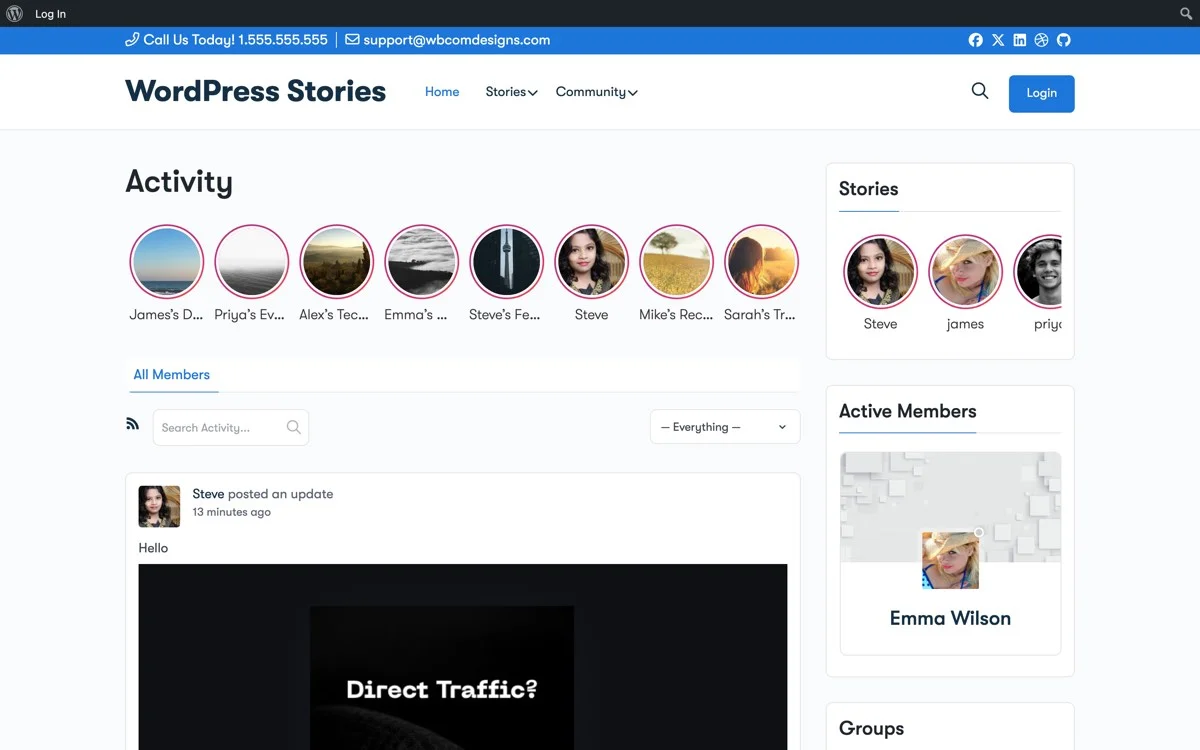
WP Stories gives you the infrastructure to run drip-feed launch campaigns directly on your WordPress site. Instead of relying on Instagram or Facebook stories that disappear from a platform you do not own, you publish story content on your own domain, where your buyers are already browsing and where you keep full control of the data and the audience.
Here is how to set up a micro-content launch sequence with WP Stories:
Step 1: Plan Your Story Timeline
Map out your launch sequence on a calendar. Assign each day a theme: teaser, problem awareness, feature reveal, tutorial, or social proof. Plan three to five stories per day during the launch window, and write the whole outline before you shoot a single frame.
Step 2: Create Visual Story Content
Each story should be a single image or short text overlay. Keep it focused. One idea per story. Use your product screenshots, short screen recordings converted to GIFs, or simple text-on-image graphics.
Step 3: Publish Stories on Schedule
Use WP Stories to publish your story content according to your timeline. Stories appear in the story bar at the top of your site, catching the attention of every visitor during your launch window, whether they arrive from search, email, or a direct link.
Step 4: Link Stories to Your Product Page
Every story in your launch sequence should link back to your product page. WP Stories supports clickable links within stories, so interested viewers can go directly from a story to your checkout page without hunting for it themselves.
Step 5: Monitor Engagement and Adjust
Track which stories get the most views and engagement using the metrics outlined above. If your feature reveal stories are outperforming your teaser stories, adjust your sequence to front-load more feature content next time. The story format makes it easy to iterate quickly between launches.
Practical Tips for Your First Micro-Content Launch
If you have never run a drip-feed launch before, start small. You do not need a 30-story sequence for your first attempt. Here is a minimal viable launch sequence:
- Two days before launch: Post two teaser stories hinting at what is coming
- One day before launch: Post three stories revealing the problem your product solves
- Launch day: Post five stories covering key features, a quick tutorial, and the purchase link
- Day after launch: Post two stories with early buyer feedback and a reminder of any launch pricing deadline
That is 12 stories total. Each one takes 10-15 minutes to create. Your entire launch campaign requires less time than writing a single long-form launch post, and it will reach more people across more touchpoints.
Track your results and compare them to your previous single-blast launches. Most sellers who switch to drip-feed sequences see higher conversion rates, longer engagement windows, and more total sales across the launch period. Keep the sequence that worked as a template, and swap in new screenshots and copy for the next product you ship.
Get Started with WP Stories
Your digital product deserves a launch strategy that matches how your audience actually consumes content. WP Stories brings story-based micro-content to your WordPress site, giving you the tools to build drip-feed launch sequences that convert.
Stop relying on single-blast announcements that peak and fade within hours. Start building launch sequences that accumulate attention, trust, and sales across days and weeks.
Get WP Stories today and turn your next product launch from a one-day event into a sustained marketing campaign.