Add Business Profiles to Your EDD Membership Community


Why Membership Communities Need Professional Profiles
Running a membership community with Easy Digital Downloads means you’ve already built something valuable: a gated space where paying members access exclusive content, tools, and resources. But if your members are professionals, freelancers, agencies, or business owners, a basic username and avatar isn’t enough. They need professional profiles that reflect who they are and what they do.
Consider the difference between a membership site where members are just names on a list versus one where every member has a detailed business profile showing their expertise, services, reviews from other members, and a history of community engagement. The second version doesn’t just look more professional. It creates real networking value that keeps members renewing their subscriptions month after month.
This is where BuddyPress Business Profile transforms your EDD membership community from a content delivery platform into a professional networking hub.
Understanding the Membership-Profile Connection
Easy Digital Downloads handles payments, access control, and content delivery. BuddyPress handles community features like profiles, activity feeds, and messaging. BuddyPress Business Profile bridges these two systems by adding structured business information to member profiles, then letting you control who sees what based on their membership status.
The result is a layered system where free members get basic community access, paid members get enhanced business profiles, and premium members get full directory visibility with priority placement and additional features.
The Value Proposition for Members
When members pay for a subscription on your EDD site, they’re buying more than just access to downloads. With business profiles enabled, they’re buying:
- Professional visibility: A structured profile that showcases their business to other members
- Networking opportunities: The ability to discover and connect with other professionals in their field
- Reputation building: Reviews and activity history that demonstrate their expertise and reliability
- Lead generation: Exposure to potential clients and collaborators within the community
This additional value makes your membership more sticky and justifies higher pricing tiers, since members are now paying for a network, not just a folder of downloads.
Configuring Business Profiles for Paid Members
Setting up BuddyPress Business Profile for a membership community requires thoughtful configuration. You want business profiles to enhance the membership experience while also serving as an incentive for free users to upgrade.
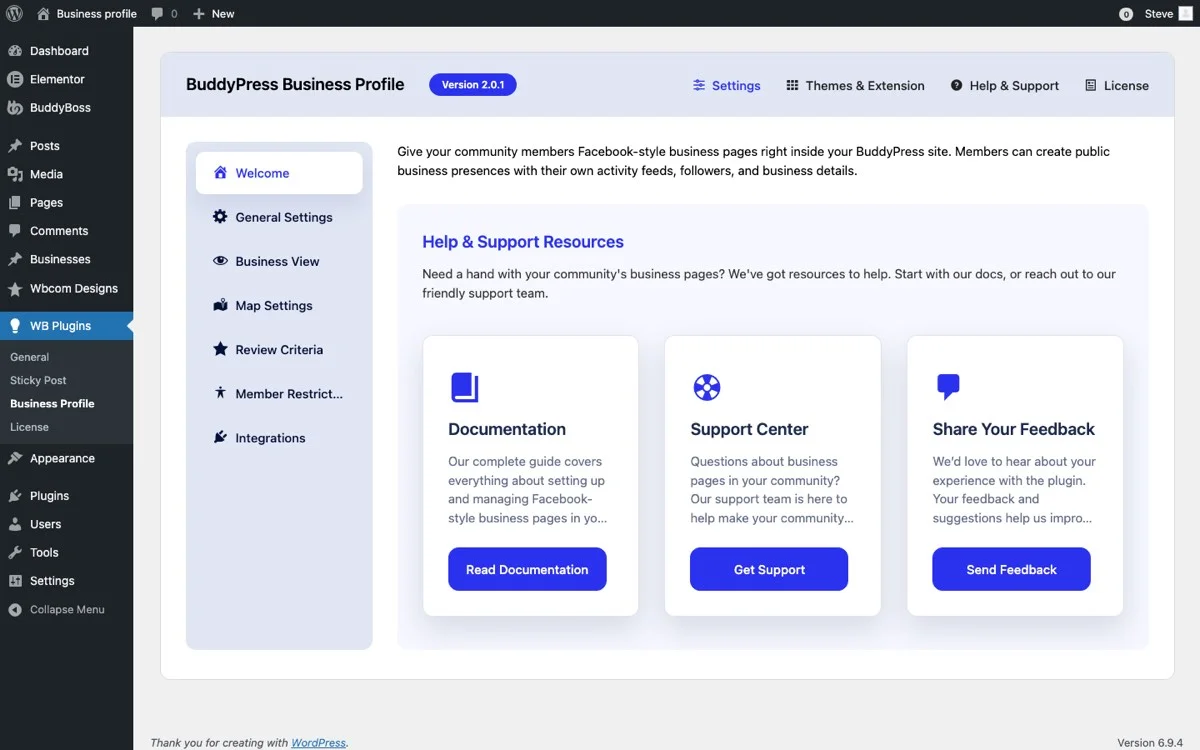
Profile Fields for Professional Members
For a membership community, the profile fields you enable should reflect the professional context of your members. Here’s a recommended field configuration:
- Business Name: The member’s company or practice name
- Professional Title: Their role or specialization
- Business Description: A detailed overview of their services, experience, and expertise
- Industry/Category: The business category they operate in
- Services Offered: Specific services they provide to other members or clients
- Website and Portfolio: Links to their external presence
- Contact Information: Professional email, phone, or booking link
- Location: City, state, country for geographic networking
- Operating Hours: Availability for consultations or meetings
Each of these fields contributes to a comprehensive professional profile that serves double duty: it helps the member market themselves and it helps other members find the right professional for their needs.
Setting Up the Initial Profile Flow
When a new member joins your community, guide them through completing their business profile as part of the onboarding process. A completed profile leads to better engagement, more connections, and higher retention.
Consider sending a welcome email sequence that includes profile completion steps, tips for writing a great business description, and examples of well-crafted profiles from existing members. Members who complete their profiles in the first week are significantly more likely to remain active in the community.
Member Restrictions by Role and Tier
One of the most powerful aspects of combining EDD memberships with BuddyPress Business Profile is the ability to gate features by membership tier. This creates a natural upgrade path that drives revenue.
Tiered Profile Access Model
Here’s a practical tier structure for a professional membership community:
Free Tier (Community Member):
- Basic BuddyPress profile with avatar and bio
- Can browse the member directory
- Can view other members’ business profiles
- Cannot create their own business profile
- Limited activity feed participation
Professional Tier ($19/month):
- Full business profile with all fields
- Listed in the member directory
- Can receive reviews from other members
- Activity feed posting enabled
- Follower/following functionality
- Access to member-only downloads
Premium Tier ($49/month):
- Everything in Professional
- Featured placement in directory (shown first)
- Priority search results
- Enhanced profile with portfolio gallery
- Verified badge on profile
- Access to premium downloads and resources
This structure gives free members enough access to see the value of upgrading while reserving the most powerful networking features for paying members.
Role-Based Profile Controls
BuddyPress Business Profile lets you map features to WordPress user roles. Since EDD membership plugins typically assign roles based on subscription level, you can connect the two systems to automatically enable or disable business profile features based on membership status.
When a member upgrades from free to Professional, their business profile creation capability activates immediately. When a member downgrades or their subscription lapses, their profile remains visible but editing is locked until they resubscribe. This prevents profile data loss while maintaining the paywall incentive.
Business Categories for Member Specializations
In a professional membership community, categories serve a different purpose than in a marketplace. Instead of organizing products, they organize people by expertise and industry.
Designing Your Category Taxonomy
Your category structure should reflect the professional landscape of your membership base. For a WordPress-focused community, categories might include:
- Web Development: Full-stack developers, front-end specialists, back-end engineers
- Design and UX: Graphic designers, UX researchers, UI designers
- Digital Marketing: SEO specialists, PPC managers, content marketers
- Content Creation: Writers, videographers, podcasters
- Consulting: Business consultants, technology advisors, strategy consultants
- Agency Services: Full-service agencies offering multiple capabilities
- E-commerce: WooCommerce specialists, payment integration experts
- Education and Training: Course creators, workshop facilitators, coaches
Allow members to select multiple categories if their business spans several areas. A web development agency that also offers digital marketing should be discoverable in both categories.
Category-Based Networking
Categories don’t just help with search. They enable targeted networking features. You can create category-specific activity feeds, organize virtual meetups by category, send targeted communications to members in specific categories, and create category-based discussion groups.
This kind of targeted networking is what transforms a generic membership site into a professional community where members actually talk to each other, collaborate, and find value beyond the downloadable content.
Reviews Between Members
In a membership community, reviews serve a different purpose than on a public marketplace. Here, reviews are peer endorsements that build professional credibility within a trusted group.
Peer Review Dynamics
When members can review each other’s business profiles, it creates a professional reference system within your community. A web developer who receives glowing reviews from five other members in the community has demonstrable proof of quality that extends beyond self-promotion.
This peer validation has real business value for members. They can reference their community reviews when pitching to clients, which turns your membership platform into a credibility-building tool that pays for itself.
Review Guidelines for Professional Communities
Set clear guidelines for reviews in a professional context:
- Reviews should be based on actual professional interaction (collaboration, hiring, referral)
- Constructive criticism is welcome but personal attacks are not
- Members should disclose any business relationship when leaving a review
- Review bombing or coordinated negative reviews result in account suspension
With proper guidelines, the review system becomes a genuine quality signal rather than a popularity contest, which is what makes it worth citing outside the community in the first place.
Map Integration for Local Meetups and Networking
If your membership community includes members who could benefit from local connections, the map feature in BuddyPress Business Profile adds a powerful geographic dimension to your directory.
How Location-Based Networking Works
When members add their business location to their profile, their position appears on a community map. Other members can browse the map to find professionals in their area, which opens the door to:
- Local meetups: Members in the same city can organize informal meetups or co-working sessions
- Regional collaboration: Agencies and freelancers in the same area can team up on projects
- Conference networking: Members attending the same industry event can connect beforehand
- Client referrals: Members can refer clients to trusted professionals in specific locations
Privacy Considerations
Not every member wants their exact location visible. Make sure your configuration allows members to choose their location granularity: city-level, state-level, or country-level. Some members may prefer to show only their country or region, while others are happy to share their city for local networking purposes.
Giving members control over their location privacy builds trust and increases adoption of the feature, since nobody wants to feel pressured into sharing more than they’re comfortable with just to appear on a map.
Follower Connections for Professional Networking
The follower system in BuddyPress Business Profile takes on special significance in a membership community. Unlike a public marketplace where following is about staying updated on products, in a membership context, following is about building a professional network.
Building Professional Relationships
When members follow each other, they create a network graph that reveals the community’s social structure. This has practical benefits:
- Content relevance: Members see activity updates from professionals they actually care about
- Introduction facilitation: Mutual followers can facilitate introductions between members who should know each other
- Community health metrics: The density of follower connections indicates how engaged and interconnected your community is
- Influencer identification: Members with the most followers are your community’s thought leaders and potential ambassadors
Encouraging Meaningful Connections
To prevent the follower system from becoming superficial, encourage quality connections over quantity. Feature members who have strong engagement with their followers rather than those who simply have the highest follower count. This promotes meaningful professional networking over vanity metrics.
Activity Feeds for Community Engagement
Activity feeds are the heartbeat of any community. In a membership context, they serve as a professional social network where members share updates, insights, and opportunities.
What Members Should Share
Guide your members on what makes good activity feed content in a professional community:
- Project announcements: “Just launched a new client website. Here’s what we built and the tools we used.”
- Industry insights: “Interesting trend I’m seeing in e-commerce conversion rates this quarter.”
- Resource sharing: “Found a great tool for managing WordPress multisite networks. Highly recommend.”
- Collaboration requests: “Looking for a designer to partner on a large e-commerce project. DM me if interested.”
- Milestone celebrations: “Our agency just hit 100 client sites managed. Thanks to this community for the support.”
The activity feed should feel like a professional LinkedIn feed tailored specifically to your community’s niche.
Moderation and Community Standards
Set expectations early about what belongs in the activity feed and what doesn’t. Excessive self-promotion, spam, and off-topic content should be moderated to maintain the professional atmosphere that keeps members engaged and paying.
Integrating with EDD Membership Levels
The technical integration between BuddyPress Business Profile and EDD membership plugins is where everything comes together. Here’s how to connect the systems effectively.
Membership Plugin Compatibility
BuddyPress Business Profile works with EDD’s ecosystem. The key is mapping your membership levels to BuddyPress capabilities and user roles. When a member purchases or renews their subscription through EDD, their WordPress role updates automatically, which in turn enables or disables their business profile features.
Automated Profile Management
With proper configuration, the entire profile lifecycle is automated:
- New member joins: Welcome email includes profile setup instructions, business profile creation is enabled based on their tier
- Member upgrades: Additional profile features unlock immediately
- Member downgrades: Premium features like featured placement are removed, but the profile remains intact
- Membership expires: Profile editing is locked, but the profile stays visible to maintain SEO and social proof value
- Member renews: Full profile editing is re-enabled seamlessly
This automation reduces administrative overhead and creates a smooth experience for members as they move between tiers.
Upsell Opportunities
Use the business profile as an upsell tool. When free members browse the directory and see the enhanced profiles of paid members, they experience the value gap firsthand. Add clear calls to action on restricted features: “Upgrade to Professional to create your business profile and get listed in the directory.”
This natural upsell mechanism can significantly improve conversion rates from free to paid memberships.
Measuring Community Health
Once your membership community has business profiles up and running, track these metrics to measure success:
- Profile completion rate: What percentage of eligible members have completed their business profile?
- Directory engagement: How often do members browse the directory and view other profiles?
- Review activity: How many reviews are being left per month, and what’s the average rating?
- Follower growth: Are members building connections with each other over time?
- Activity feed participation: How active is the community feed, and are members interacting with each other’s posts?
- Upgrade correlation: Do members who engage with business profiles have higher retention rates?
These metrics tell you whether your community features are driving the engagement and retention that justify your membership pricing. Track them monthly rather than weekly, since profile and review activity moves slowly enough that weekly snapshots mostly capture noise rather than a real trend.
Common Pitfalls When Tiering Business Profiles
A few mistakes show up repeatedly when membership sites first layer business profiles onto their tier structure, and catching them early saves a lot of frustrated support tickets later.
The first is setting the free tier too generously. If free members can already see the full directory, browse every business profile, and read every review, there’s little left to justify the jump to Professional. Keep enough behind the paywall (creating a profile, appearing in the directory, receiving reviews) that the free tier functions as a genuine preview rather than the whole product.
The second is letting profile data disappear when a member’s subscription lapses. A member who cancels and later returns should not have to rebuild their business description, categories, and portfolio links from scratch. Lock editing on a lapsed subscription rather than deleting the underlying data, so a lapsed member who resubscribes gets their old profile back immediately rather than starting over and feeling penalized for a temporary gap in payment.
The third is neglecting the directory’s search and filter experience as the member base grows. A directory that worked fine with 50 members becomes unusable at 500 without solid category filtering and search. Revisit your taxonomy every quarter or two as the community grows past its original size, splitting broad categories once they get crowded.
A Sample Onboarding Sequence That Drives Profile Completion
Profile completion rarely happens on its own; it needs a nudge sequence built into your onboarding, especially for members who joined mainly for the downloads and haven’t thought about the networking side yet.
- Day 0 (signup): Welcome email with a direct link to the profile editor and one sentence explaining why a complete profile matters, referencing the directory other members already browse.
- Day 3: A short reminder if the profile is still incomplete, showing exactly which fields are missing rather than a generic nudge.
- Day 7: Highlight two or three well-written example profiles from active members, giving new members a concrete template to model rather than a blank form to stare at.
- Day 14: A final nudge tied to a specific benefit, such as “complete your profile to start receiving reviews” or “complete your profile to appear in category search results.”
Communities that run a sequence like this consistently see higher completion rates than ones that mention profile setup once in a generic welcome email and never follow up. The difference tends to come down to specificity: members respond better to “here’s exactly what’s missing” than to a vague reminder that a profile exists.
Getting Started with Your Membership Community
Adding professional business profiles to your EDD membership community is one of the highest-impact changes you can make to increase member engagement and reduce churn. Members who build a professional presence on your platform have a reason to stay beyond the content alone.
BuddyPress Business Profile gives you everything you need: structured business fields, categories, reviews, maps, follower connections, and activity feeds. Combined with EDD’s membership capabilities, you can build a professional community that members genuinely value and are happy to pay for.
Start by installing the plugin, configuring your membership tiers with appropriate profile access levels, and building out your business categories. Then invite your existing members to create their profiles and watch your community transform from a download platform into a professional network.
Give the rollout time to take hold. Profile completion, reviews, and follower connections all build gradually rather than appearing the day you flip the feature on, and a community that looks half-populated after the first week is not a sign the feature failed; it’s a sign the onboarding sequence needs another few cycles to reach everyone.
Get BuddyPress Business Profile and elevate your EDD membership community with professional business profiles.