User Insights Plugin Review and Tutorial 2020

Most WordPress stores have customer data scattered across three or four places: order history in EDD or WooCommerce, membership status in a separate plugin, forum activity in bbPress, course progress in LearnDash, sometimes even a spreadsheet someone started keeping outside WordPress entirely because none of the plugins talked to each other. Answering a simple question, “who are my highest-value customers and what do they actually do on my site,” means opening four different screens and doing the math by hand. Users Insights exists specifically to collapse that into one dashboard.
This walkthrough covers what the plugin actually does for an EDD-based store and how setup works. Where it fits against the analytics options built into EDD itself gets its own section too.
What Users Insights Actually Does
Users Insights is a paid WordPress plugin that pulls user data from whatever major plugins are running on a site into one searchable table. WooCommerce and Easy Digital Downloads are among the integrations covered, alongside BuddyPress, LearnDash, and a handful of others. Instead of checking EDD’s own reporting screen for purchase history and then switching to BuddyPress for community activity, everything lives in one filterable view. Sales and order status sit alongside purchase counts, page visits, and device data, all in the same place.
The pitch is straightforward. Most of these individual plugins already track this data somewhere. Users Insights doesn’t replace that tracking, it surfaces it in a format built for actually answering questions rather than digging through separate admin screens one at a time.
Key Features
Smart filters let you segment users by almost any tracked attribute rather than scrolling through a flat list. Reports translate raw numbers into charts that are actually readable at a glance rather than a table of digits. Geolocation shows where customers are actually located, useful for deciding whether a regional promotion makes sense. User groups let you build custom segments, VIP customers, dormant accounts, trial users, for targeted follow-up. Custom user fields extend the data you can track beyond what WordPress captures by default, and dedicated user profile pages pull everything about one customer into a single view instead of five separate screens.
Page visit tracking and device detection add basic behavioral data without needing a separate analytics tool bolted on, and user session tracking shows how customers actually move through the site rather than just where they end up. Optimized data loading matters more than it sounds like it should, a user management plugin that grinds to a halt on a store with ten thousand customers isn’t actually useful no matter how good its feature list looks on paper.
Get the Plugin
Setting Up Users Insights
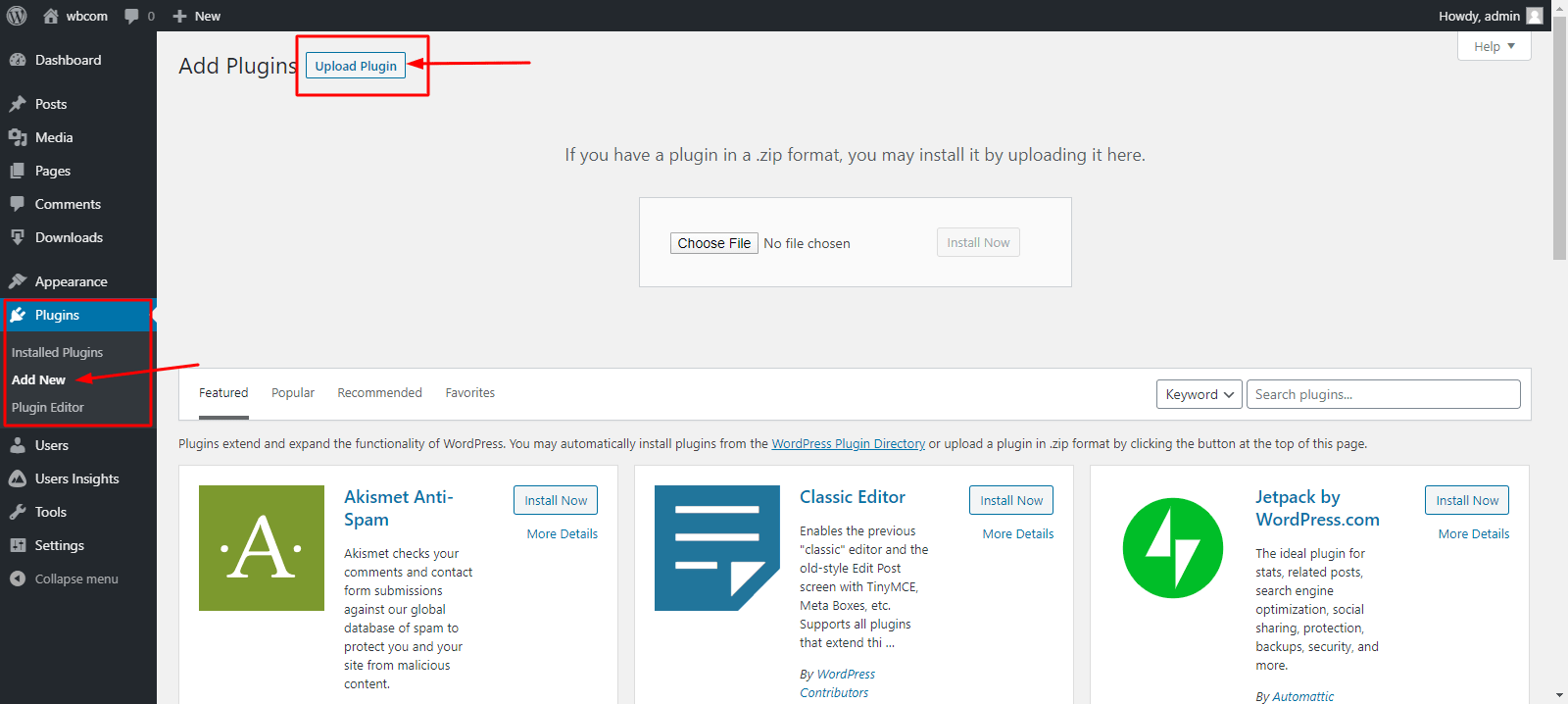
After purchasing and downloading the plugin file, installation follows the standard WordPress pattern. Navigate to wp-admin, then Plugins, then Add New. Click Upload Plugin from there.
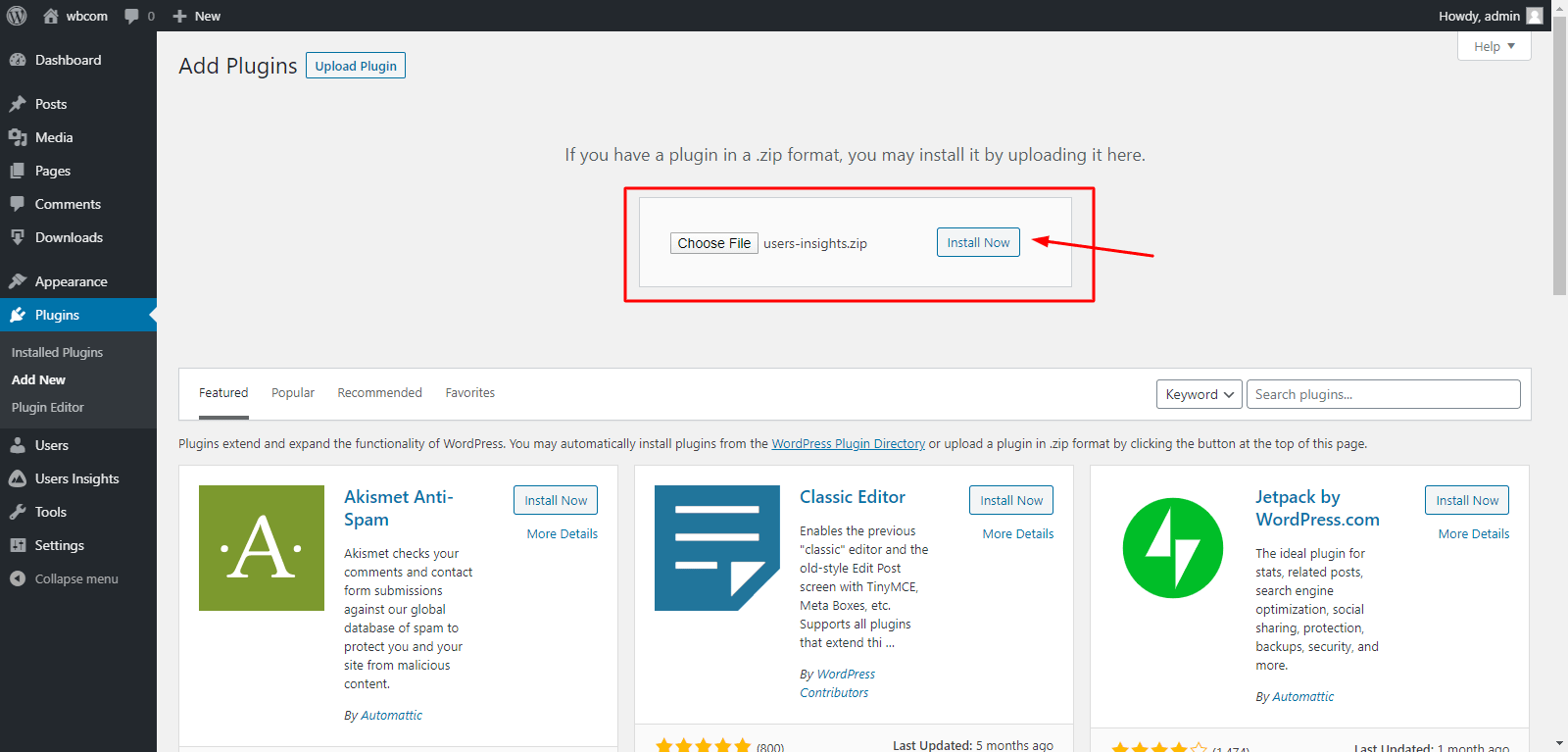
Choose the downloaded ZIP file from your local system, click Install Now, then Activate. The plugin adds a Users Insights menu item to the admin dashboard once it’s active.
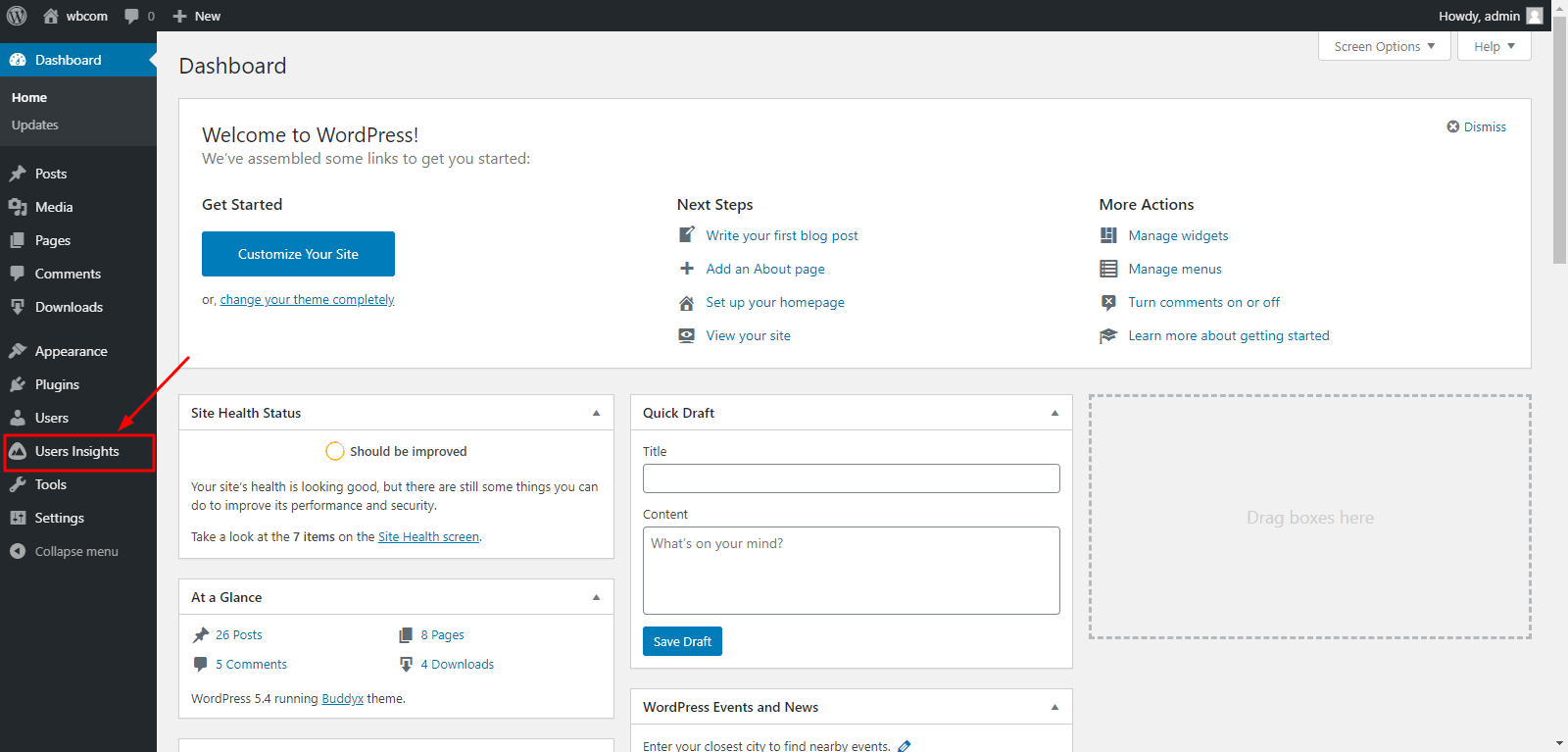
Configuration happens under Users Insights, then Module Options. This is the step that matters most for an EDD store specifically, since the plugin doesn’t pull every plugin’s data automatically. Each integration, WooCommerce, BuddyPress, bbPress, LearnDash, Easy Digital Downloads, Paid Memberships Pro, along with general modules like device detection and page visit tracking, needs to be switched on individually. To get EDD sales data flowing into the dashboard, find Easy Digital Downloads in the module list and click Active Module.
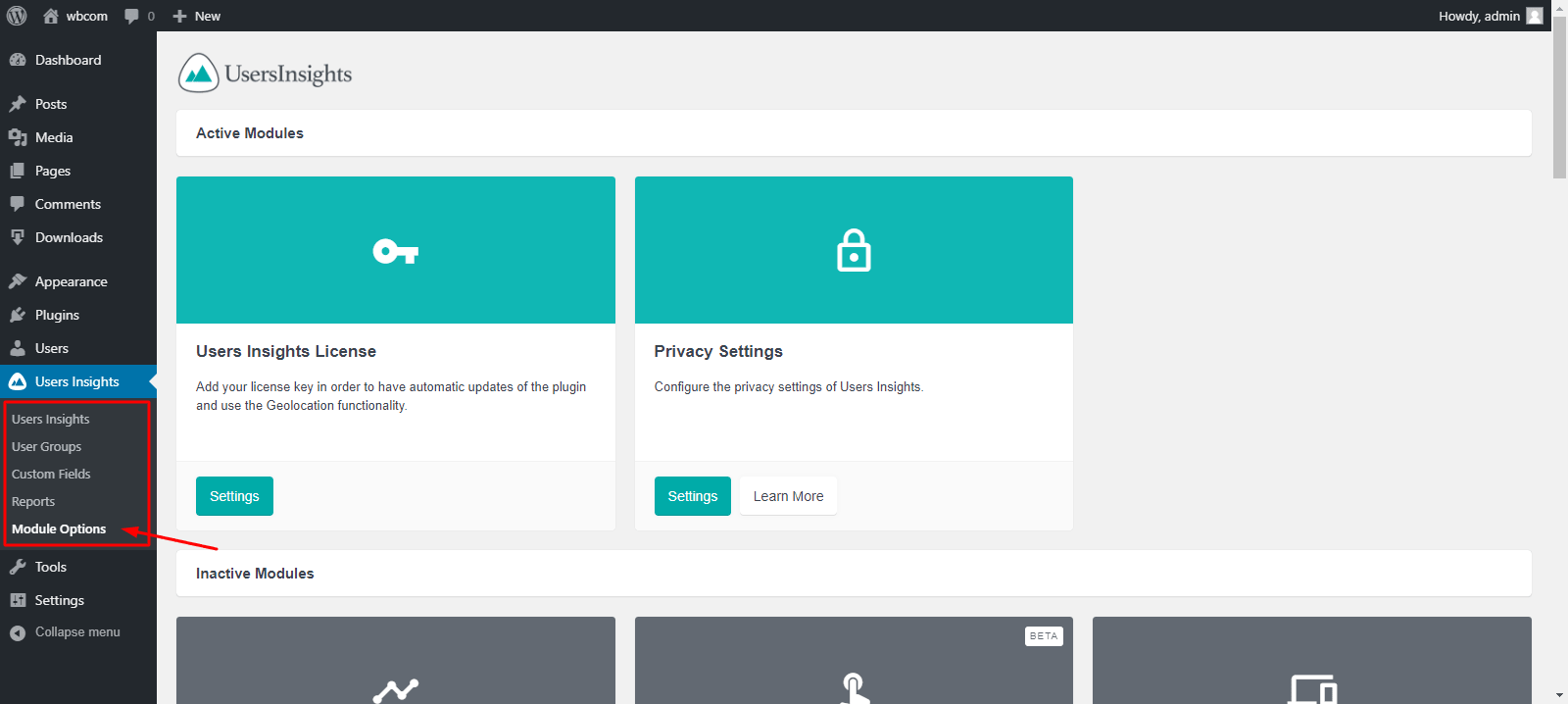
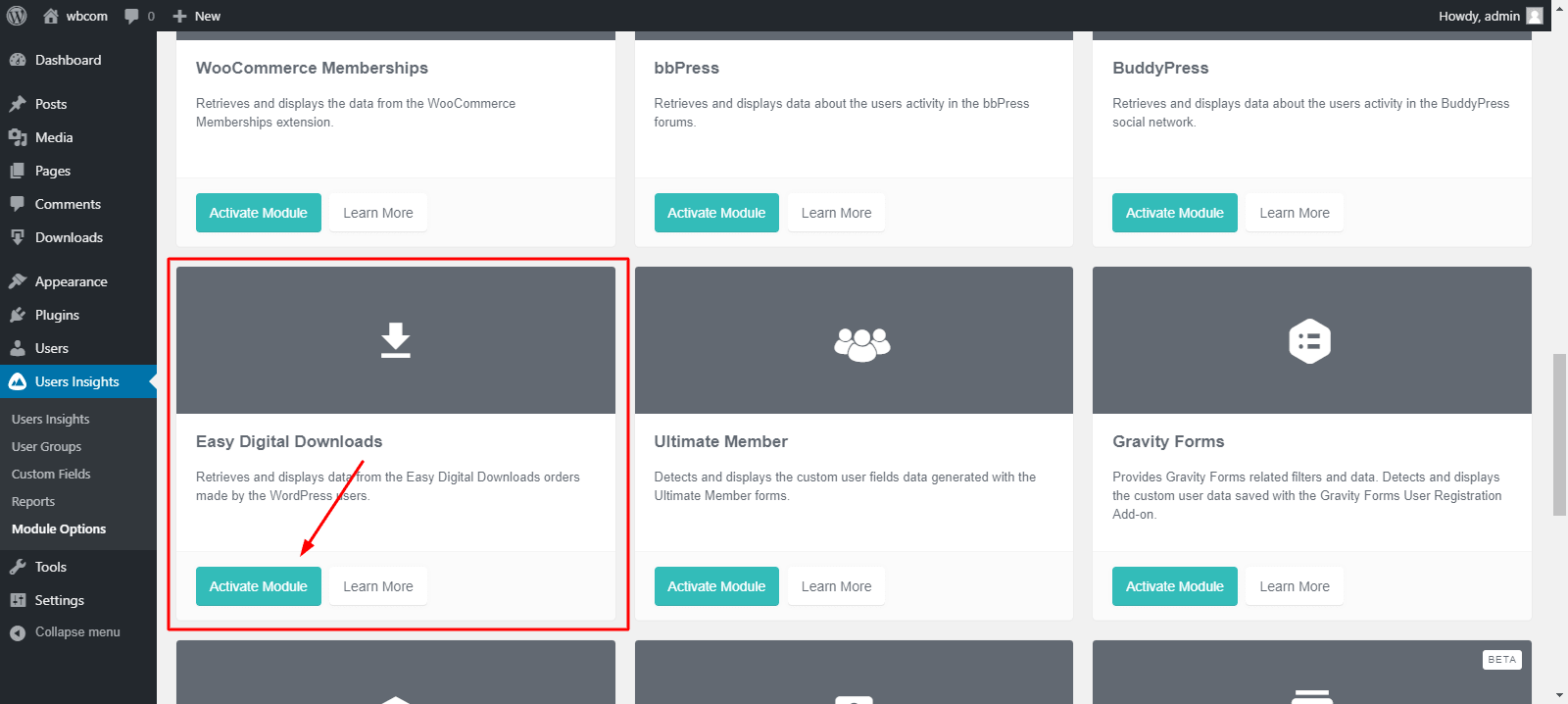
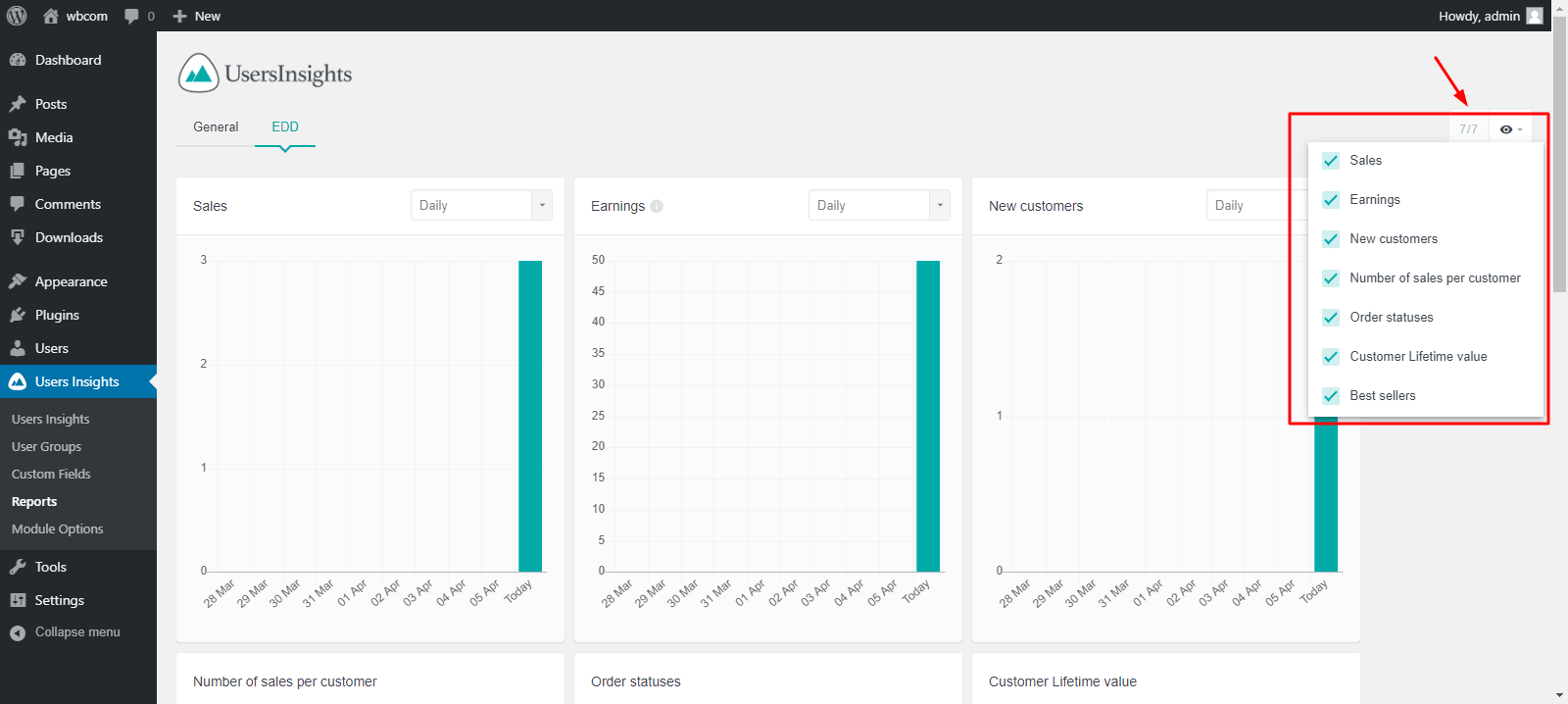
Once a module is active, its data appears immediately in the Reports tab without any additional configuration.
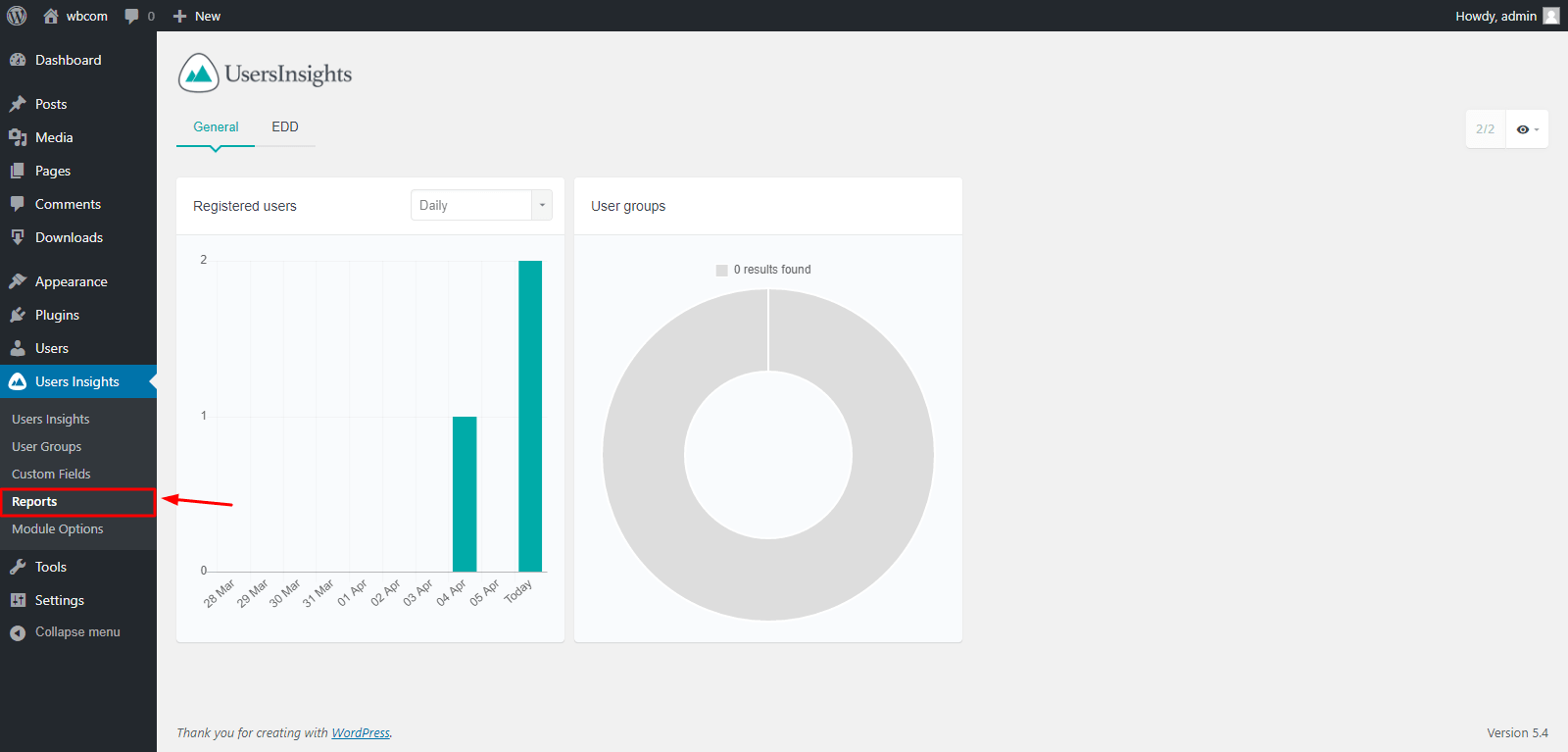
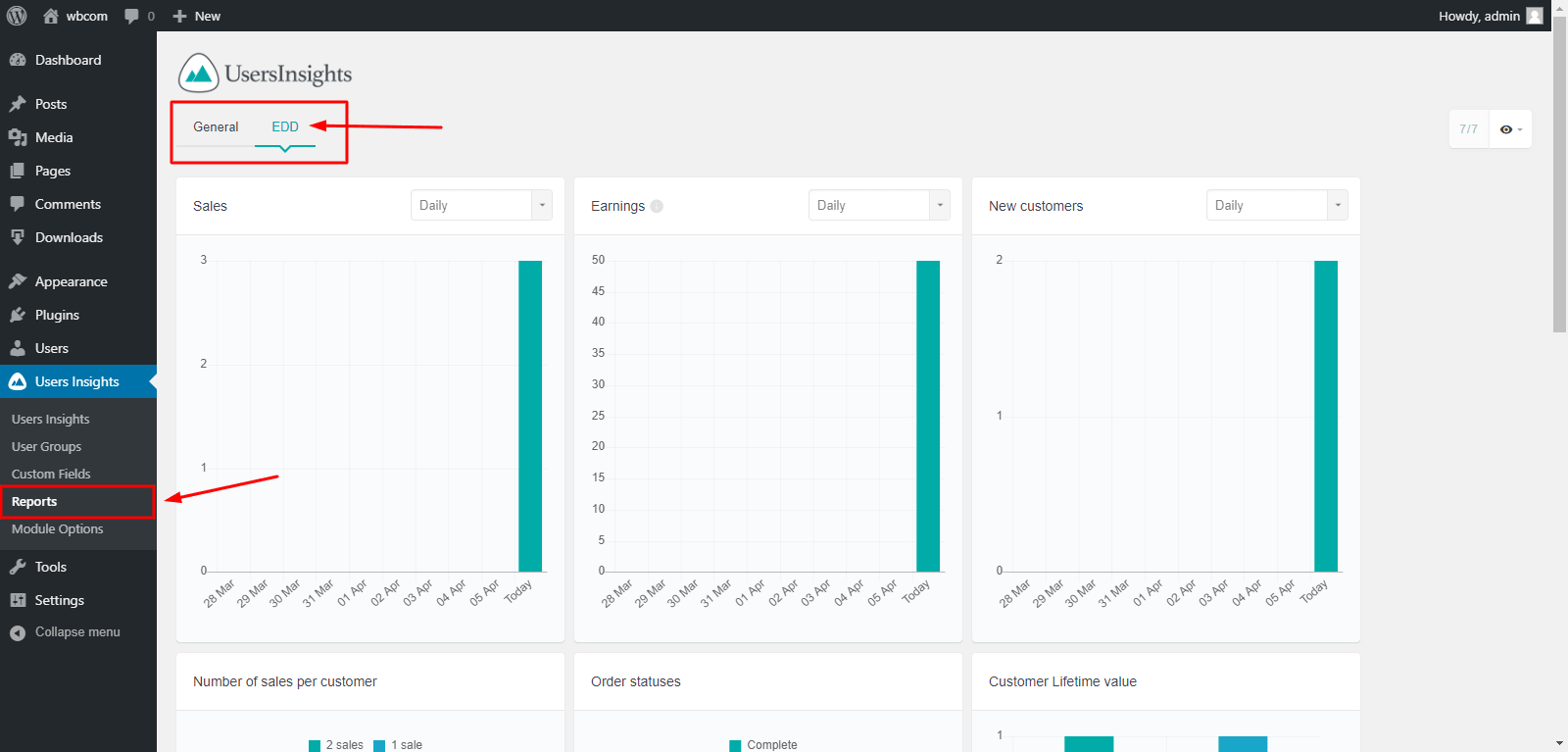
That’s the entire setup. Activate whichever modules match the plugins already running on the store, and reports populate automatically without a separate configuration step for each one. Modules can also be filtered from the top-right option, useful once several are active and a specific report needs isolating.
User Profiles and User Groups
The individual user profile view pulls posts and purchases for one specific customer into a single screen. Email activity shows up in that same view, filterable by username, first name, email, or the group a customer belongs to. This is the view worth checking before responding to a support ticket from a repeat customer, since context that would otherwise take three separate lookups is sitting in one place already.
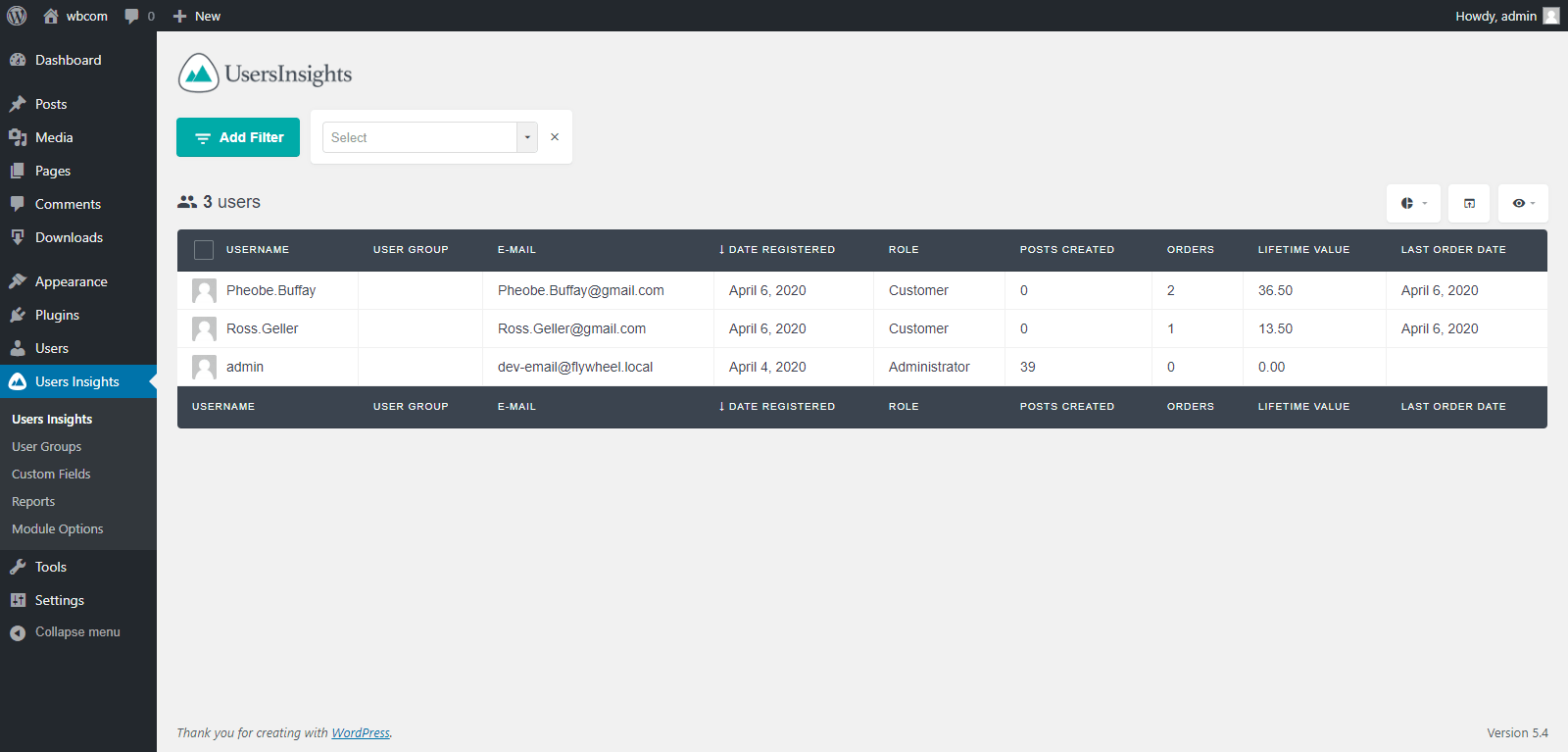
User groups solve a different problem: managing a large customer base as one flat list stops working past a certain size. Creating custom groups, high-value repeat buyers, trial users who never converted, customers flagged for a specific issue, lets an administrator filter and act on a segment instead of scrolling through everyone. This becomes genuinely useful once a store has enough customers that “just look through the list” stops being realistic.
Where This Fits Against EDD’s Built-In Reporting
EDD already ships with its own order and customer reporting, and it’s worth being clear about what a third-party plugin like Users Insights adds on top rather than duplicates. EDD’s native reports are strong on transaction-level detail, revenue by product, order status breakdowns, refund tracking. What they don’t do natively is cross-reference that purchase data against activity in a completely separate plugin, forum participation in bbPress, course progress in LearnDash, community engagement in BuddyPress, in one unified customer view.
For a store that only runs EDD with no other major plugin ecosystem layered on top, native EDD reporting combined with a tool built specifically for deeper analysis may cover everything needed without a separate user management plugin. Our guide on EDD analytics and reporting for tracking digital store performance covers what’s available out of the box before deciding whether a third-party layer is worth adding. For stores running EDD alongside a membership, community, or course component, that’s exactly the situation where a cross-plugin view like Users Insights starts earning its cost.
Privacy and Data Tracking Considerations
Any tool that tracks device information and page visits touches privacy regulation territory depending on where customers are located. Geolocation tracking raises the same concern. GDPR in the EU and similar frameworks elsewhere generally require disclosure of what’s being tracked and, in many cases, a legitimate basis or consent for tracking beyond what’s strictly necessary to fulfill an order. Update the site’s privacy policy to reflect what Users Insights actually collects once it’s active, and confirm the specific tracking modules enabled match what’s disclosed to customers. This isn’t unique to Users Insights, any analytics or user-tracking plugin carries the same obligation, but it’s easy to activate a new module and forget the disclosure needs updating alongside it.
Practical Ways an EDD Seller Actually Uses This Data
The theoretical pitch of unified customer data is easy to grasp. What that looks like in daily use is more specific. A support ticket comes in from a customer asking about a renewal, and instead of guessing at their purchase history, the profile view shows exactly what they bought and when. Whether they’ve had prior support contact shows up in that same view, all before typing a reply. That single lookup replacing three separate ones is the actual time savings, not an abstract efficiency gain.
Segmentation matters more once a store has enough history to look backward, not just forward. A group built around “purchased once, never returned” is a direct target list for a win-back email campaign. A group built around “top 10% by lifetime spend” is worth a different kind of outreach entirely, early access to a new product, a personal thank-you, terms a mass campaign wouldn’t extend to everyone. Neither segment is visible from EDD’s default order list without manually cross-referencing purchase totals, which is exactly the manual work a tool like this removes.
What This Doesn’t Solve
Users Insights is a visibility tool, not an automation tool. It shows who belongs in a “hasn’t purchased in six months” segment, but it doesn’t send that segment a re-engagement email on its own, that still requires a separate email platform connected to the exported or synced list. Treat it as the research layer that informs what an email automation tool, a support workflow, or a manual outreach campaign should target, not as a replacement for those tools.
It also doesn’t replace proper financial reporting for accounting purposes. The sales figures shown inside Users Insights are useful for quick reference and segmentation, not a substitute for EDD’s own transaction records or a real accounting system when it comes time to reconcile books or prepare taxes. Use it for customer intelligence, not bookkeeping.
Comparing This to a Dedicated CRM
For a store with a small, self-contained customer base living entirely inside WordPress plugins, Users Insights covers a lot of what a CRM would otherwise be needed for, at a fraction of the cost and without leaving the WordPress admin. Once a business grows past that, sales pipeline tracking, multi-channel contact history spanning outside WordPress entirely, team-based deal assignment, a dedicated CRM starts covering ground this plugin was never built to reach. Our roundup of the best CRM tools for freelancers and solo digital sellers covers that next tier of tooling for anyone who’s outgrown what a WordPress-native plugin can offer.
The two aren’t mutually exclusive either. A store can reasonably run Users Insights for the WordPress-native customer view while also feeding higher-value leads or larger accounts into a proper CRM for the relationships that need more structured follow-up than a segment filter provides.
Custom Reporting Beyond What Ships Out of the Box
The default reports cover common questions well, but a store with specific reporting needs, tracking a particular product bundle’s performance, comparing customer behavior across two membership tiers, may find the built-in views don’t map exactly to the question being asked. Custom user fields help here, since data captured through a custom field becomes filterable the same way any built-in field is. Our deeper guide on building custom reports and analytics dashboards in Easy Digital Downloads covers the native EDD side of custom reporting, worth reading alongside this plugin’s own custom field capability if the default views genuinely don’t cover a specific business question.
Questions Sellers Ask About User Insights Plugins
Does this replace Google Analytics or a dedicated analytics tool?
No, and it isn’t trying to. Users Insights is built around named, logged-in users and their activity across your own plugins, not anonymous site traffic or acquisition-channel analysis the way Google Analytics is. Run both if traffic-source analysis and customer-level reporting are both priorities, since they answer different questions.
Is this worth it for a store running EDD as the only major plugin?
Possibly not. The core value of Users Insights comes from unifying data across multiple plugin ecosystems. A store running EDD alone gets less differentiated value than one also running BuddyPress, LearnDash, or a membership plugin, since EDD’s own reporting already covers a lot of the single-plugin use case reasonably well.
Does activating more modules slow the site down?
Only activate modules for plugins actually in use. Each active module adds a small amount of ongoing data processing, and leaving unused modules switched on for plugins that aren’t even installed provides no benefit while adding unnecessary overhead. Match active modules to your actual plugin stack.
What happens to this data if I deactivate the plugin later?
The underlying data tracked by WordPress core and your other plugins, EDD orders, BuddyPress activity, and so on, remains fully untouched. Users Insights reads and organizes that data rather than owning it, which is exactly why deactivation doesn’t put the source data itself at any risk. What disappears is the unified view itself and any custom fields or segments built specifically inside the plugin. Export anything genuinely important, saved segments, custom field data, before deactivating if there’s a chance you’ll want that specific configuration again later.
Data Freshness and Sync Timing
Reports inside Users Insights update as underlying plugin data changes, but it’s worth understanding roughly how that timing works before relying on the numbers for a same-day decision. A new EDD order typically reflects quickly since the plugin hooks directly into the relevant events rather than running on a slow batch schedule. Where lag can show up is with data that requires heavier processing, large-scale bulk operations like a plugin import, a mass user migration, or a big historical backfill can take longer to fully reflect across every report. For routine day-to-day operation, this isn’t something most stores notice, but it’s worth being aware of before treating a report as a live, second-by-second feed rather than a near-real-time one.
Exporting Data for Use Outside WordPress
Segments and filtered views built inside Users Insights are genuinely useful for exporting into other tools rather than acting purely as an in-dashboard reference. A filtered list of customers meeting a specific criteria, purchased a specific product, hasn’t logged in for ninety days, can typically be exported as a CSV and imported into an email platform for a targeted campaign, or handed to a support team working from a spreadsheet rather than the WordPress admin directly. This export capability is often what actually justifies the plugin’s cost for a store running regular targeted campaigns, since building that same segment manually from raw EDD order data each time would eat significant hours every month.
Check the specific export format and field mapping against whatever tool receives the data before relying on it for a live campaign, since email platforms and CRMs vary in what CSV structure they expect, and a mismatched field can silently drop data rather than throwing an obvious error.
A Realistic Cost-Benefit Read for a Small Store
For a store just starting out, with a few dozen customers and one plugin ecosystem, the honest answer is that native EDD reporting probably covers what’s needed without an additional paid plugin in the stack. The math changes as the customer base grows and as more plugins enter the picture. A store running EDD alongside a membership tier and a community space is exactly the profile where the unified view starts saving real hours every week. Add a course catalog into that mix and the time saved compounds further, hours that would otherwise go to manually cross-referencing four separate admin screens.
A reasonable rule of thumb: if a week goes by without anyone manually checking more than one plugin’s data to answer a customer question, the unified view probably isn’t earning its subscription cost yet. Once that cross-referencing becomes a routine weekly task, the time saved starts to clearly outweigh what the plugin costs.
Whether the Setup Time Is Worth It
The setup itself takes under ten minutes for most stores: install the plugin, activate it, and switch on whichever modules match the plugins already in use. The bigger time investment is deciding which segments and filters actually matter for the business rather than exploring every option the interface offers. Start narrow: activate the EDD module, build one or two customer segments that map to a real business question, high-value repeat customers, customers who haven’t purchased in six months, and expand from there once those initial segments prove genuinely useful rather than trying to configure everything on day one.