
The Hidden Cost of Unmanaged Affiliate Links
Every digital product seller eventually discovers affiliate marketing. You use hosting services, design tools, email platforms, and development resources to run your business. Recommending those tools to your audience with affiliate links is a natural extension of what you already do.
But here is where most sellers stumble: they treat affiliate links as an afterthought. A raw Amazon link pasted into a blog post here, a ShareASale URL dropped into a sidebar widget there, a CJ referral link embedded in an email that may or may not still work.
Over time, this creates a tangled mess of links scattered across dozens of pages, posts, emails, and widgets. And that mess has real financial consequences.
The True Cost of Link Chaos
Unmanaged affiliate links cost you money in ways that are not immediately obvious:
- Broken links: Affiliate programs change their URL structures, sunset products, or shut down entirely. A link that earned $50/month last year might be returning 404 errors right now without you knowing.
- Inconsistent tracking: When you paste raw affiliate URLs directly into content, you have no centralized way to track which pages, posts, or placements drive the most clicks and conversions.
- Missed opportunities: You mention a tool in 15 different blog posts but only added an affiliate link to 3 of them. The other 12 mentions are sending traffic to the vendor’s site with no attribution to you.
- Trust erosion: Long, ugly affiliate URLs with tracking parameters scream “I am getting paid for this.” While there is nothing wrong with earning commissions, presentation matters.
- Platform dependency: If an affiliate network changes their link format, you need to manually update every instance across your entire site. For a site with 200+ posts, that is days of tedious work.
The aggregate impact is significant. Studies suggest that 10-25% of affiliate links on established sites are broken or suboptimal at any given time. If your affiliate program generates $500/month, that is $50-125/month in lost commissions due to poor link management alone.
Why Raw Affiliate URLs Hurt Your Conversions
Let us look at what a typical raw affiliate URL looks like:
https://www.hostingcompany.com/pricing?ref=abc123&utm_source=partner&utm_medium=affiliate&utm_campaign=wp_plugin_review&click_id=7f8a9b2c3d
Now compare that to a cloaked link:
https://yoursite.com/go/recommended-hosting
The difference is not just cosmetic. Raw affiliate URLs create several conversion problems:
Visitors Hesitate to Click Suspicious URLs
When a link destination is a long string of parameters and tracking codes, visitors instinctively question where it leads. This is especially true for security-conscious audiences, which describes most people shopping for digital products and software tools.
A clean, branded link that stays on your domain feels safe. It communicates professionalism and transparency.
Ad Blockers and Security Extensions Flag Raw Affiliate URLs
Many popular browser extensions and ad blockers maintain lists of known affiliate network domains. When your links point directly to tracking.shareasale.com or commission-junction.com, they may get blocked entirely. Your visitors never even see them.
Cloaked links that route through your own domain bypass these filters because the initial click goes to your site, not to a known tracking domain.
Social Media Platforms Penalize Affiliate Links
If you share content on Facebook, Twitter, or LinkedIn that contains direct affiliate URLs, those platforms may reduce your reach or flag your posts. Social algorithms are designed to detect commercial link patterns, and raw affiliate URLs light up every detection filter.
Branded redirect links from your own domain look like regular website links to social media algorithms, so your reach stays unaffected.
Email Deliverability Suffers
Email spam filters are aggressive about affiliate network domains. Including raw affiliate URLs in your email newsletters can tank your deliverability or route your messages to spam folders. Using your own domain’s redirect links avoids this entirely.
Centralizing All Your Links in One Dashboard
The foundation of effective affiliate link management is centralization. Instead of links scattered across your database in post content, widget text, theme files, and custom fields, you need a single source of truth.
WB Ad Manager Pro provides exactly this. Here is how centralized link management transforms your workflow:
Single Point of Control
When all your affiliate links are managed from one dashboard, updating a link takes seconds instead of hours. If your hosting affiliate partner changes their tracking URL, you update it once in WB Ad Manager Pro, and every instance across your entire site updates automatically.
This is not a minor convenience. It is a fundamental shift in how you manage your monetization. Consider these scenarios:
- Affiliate program shuts down: Replace the link with an alternative program in one click. Every mention across 50 blog posts, 10 pages, and 5 sidebar widgets updates instantly.
- Better commission rate available: Switch to a higher-paying affiliate program without touching any content. Just update the destination URL.
- Seasonal promotion: Temporarily redirect all links for a product to a special landing page during Black Friday, then revert when the sale ends.
- A/B testing: Test two different landing pages to see which converts better, all without modifying any content.
Link Organization and Categorization
With centralized management, you can organize your affiliate links by:
- Affiliate network: Group all ShareASale links, all Impact links, all direct partnerships.
- Product category: Hosting, themes, plugins, tools, courses.
- Commission type: One-time, recurring, tiered.
- Status: Active, paused, expired, testing.
This organizational structure makes it possible to audit your entire affiliate portfolio at a glance. You can immediately see which programs are active, which need attention, and which are underperforming.
Historical Data Preservation
Every click, every redirect, every conversion is tracked against the centralized link record. This means you build a comprehensive history of each affiliate relationship’s performance over time, which is invaluable for:
- Negotiating better commission rates with data to back up your traffic value.
- Identifying seasonal patterns in affiliate revenue.
- Making informed decisions about which partnerships to invest more content in.
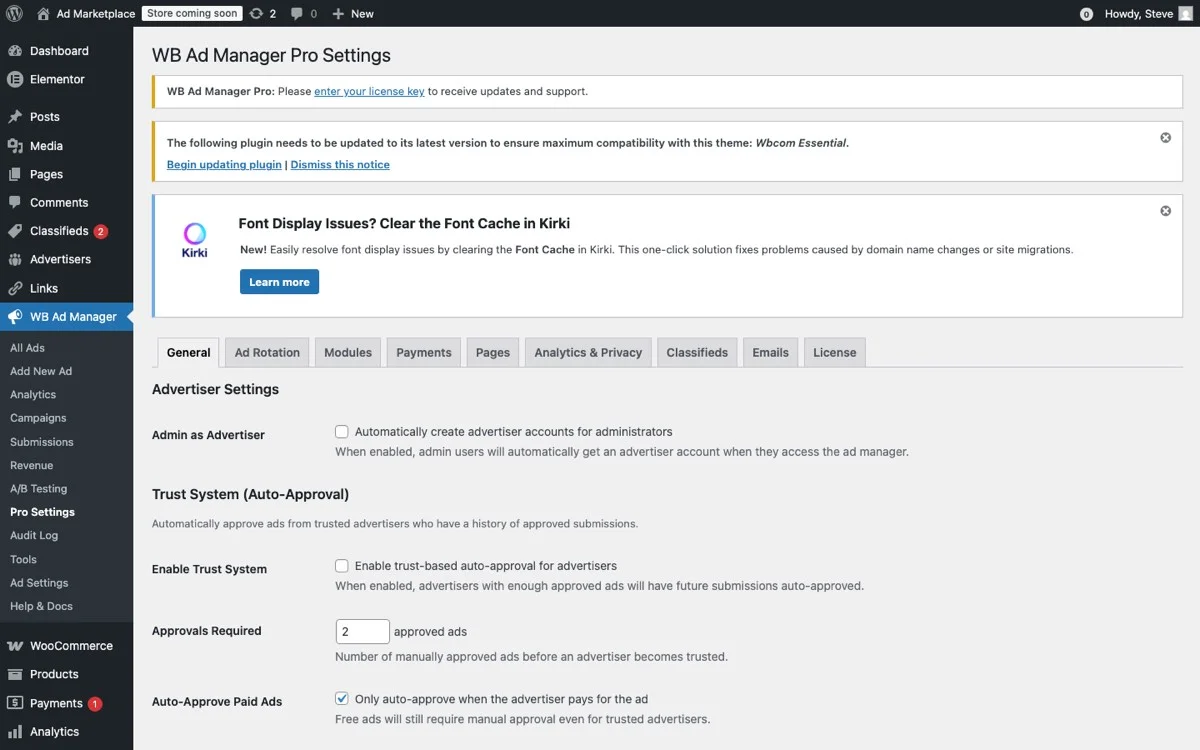
Link management settings, configure cloaking, tracking, keyword auto-linking, and health monitoring
Automatic Keyword Linking Across Your Entire Site
Here is where centralized link management goes from convenient to genuinely powerful. Automatic keyword linking scans your existing content and converts specified keywords into affiliate links without you touching a single post.
How Automatic Keyword Linking Works
You define keyword-to-link mappings in WB Ad Manager Pro. For example:
- “SiteGround” links to your SiteGround affiliate URL
- “Elementor” links to your Elementor affiliate URL
- “ConvertKit” links to your ConvertKit affiliate URL
The plugin then scans your content and automatically converts the first instance (or every instance, based on your settings) of each keyword into an affiliate link. This works across:
- Blog posts and pages
- Product descriptions
- Custom post types
- Widget areas
Why This Is a Revenue Game-Changer
Think about how many times you have mentioned a product or service in your content without linking to it. For a site with 100+ blog posts, the number of missed linking opportunities is enormous.
Automatic keyword linking retroactively monetizes your entire content library. That tutorial you wrote two years ago that still gets 500 visitors a month? It now has affiliate links for every product it mentions, earning commissions on traffic you were already getting.
The math is compelling:
- 100 blog posts averaging 3 product mentions each = 300 potential affiliate links
- You probably manually added links to about 30% of those = 90 active links
- Automatic keyword linking adds the remaining 210 links
- Even at a modest 0.5% click-through rate with $2 average commission = $210/month in previously missed revenue
Smart Linking Controls
Automatic linking is powerful, but it needs guardrails. WB Ad Manager Pro gives you control over:
- Maximum links per page: Prevent over-linking that looks spammy. Set a cap of 3-5 auto-links per page.
- Link frequency per keyword: Only link the first mention of each keyword per post, not every instance.
- Page exclusions: Exclude checkout pages, account pages, and other conversion-critical pages from auto-linking.
- Nofollow and sponsored attributes: Automatically add proper rel attributes for SEO compliance and Google guidelines.
- Open in new tab: Configure whether auto-links open in a new tab to keep visitors on your site.
Link Health Monitoring: Catching Broken Affiliates Before They Cost You
Affiliate links break. Programs end, URLs change, merchants go out of business, and tracking systems get overhauled. Every broken affiliate link is a dead end for your visitors and a lost commission for you.
The Scale of the Problem
If you have been running an affiliate-monetized site for more than a year, you almost certainly have broken links. The causes are numerous:
- Program closures: Approximately 5-10% of affiliate programs shut down or restructure annually.
- URL changes: Merchants redesign their sites and change their URL structures.
- Network migrations: A merchant moves from one affiliate network to another, invalidating all existing links.
- Product discontinuation: The specific product you linked to no longer exists.
- Tracking parameter expiration: Some affiliate platforms expire tracking parameters after a set period.
Automated Link Health Checks
WB Ad Manager Pro includes link health monitoring that regularly checks the status of your affiliate URLs. The system:
- Pings each destination URL to verify it returns a valid response (not a 404, 500, or redirect loop).
- Checks redirect chains to ensure your links are not going through unnecessary hops that slow down the click experience.
- Monitors response times so you know if an affiliate partner’s site is consistently slow (which hurts conversion rates).
- Alerts you to changes when a destination URL starts redirecting to a different page than expected.
What to Do When Links Break
When the health checker flags a broken link, you have several options, all manageable from the centralized dashboard:
- Update the URL: If the affiliate program still exists but changed their link format, update the destination.
- Replace with alternative: Swap the broken link with a competing product’s affiliate program.
- Disable temporarily: Pause the link while you investigate, so visitors do not hit dead ends.
- Remove entirely: Delete the link mapping if the product is no longer relevant to your audience.
Each of these actions propagates instantly across your entire site thanks to the centralized management system.
Tracking Click Performance: Know What Earns and What Does Not
You cannot optimize what you do not measure. Click tracking transforms your affiliate strategy from guesswork into data-driven decision-making.
Essential Metrics to Track
WB Ad Manager Pro tracks comprehensive click data for every affiliate link:
- Total clicks: How many times each link was clicked, period.
- Unique clicks: How many individual visitors clicked, filtering out repeat clicks.
- Click-through rate (CTR): Clicks divided by impressions, showing which placements drive the most engagement.
- Click sources: Which pages and posts generate the most clicks for each link.
- Time-based patterns: When clicks happen (day of week, time of day) to inform your content publishing schedule.
- Device breakdown: Mobile vs. desktop click distribution, which affects which affiliate products to prioritize.
Turning Data into Revenue Decisions
Raw click data is useful, but the real value comes from the decisions it enables:
Identify your top-performing content for affiliate revenue: If 3 out of 100 blog posts generate 60% of your affiliate clicks, those posts deserve attention. Update them regularly, optimize their affiliate placements, and create more content on similar topics.
Discover which products your audience actually wants: You might promote 20 affiliate products, but your audience consistently clicks on only 5 of them. Double down on those 5 with dedicated reviews, comparison posts, and tutorial content.
Optimize placement and context: Track which link positions (in-content, sidebar, end-of-post) generate the most clicks. Use this data to adjust your automatic linking rules for maximum revenue.
Negotiate better rates: When you can show an affiliate partner that you send them 500 qualified clicks per month, you have leverage to negotiate higher commission rates or custom deals.
Building an Affiliate Revenue Dashboard
With all click data centralized in WB Ad Manager Pro, you can build a clear picture of your affiliate revenue performance:
- Monthly click trends: Are your affiliate clicks growing or declining?
- Revenue per click estimates: Based on known commission rates, project your monthly affiliate income.
- Content ROI: Which blog posts generate the most affiliate revenue relative to the effort of creating them?
- Program comparison: Which affiliate networks and programs deliver the best results?
Advanced Strategies for Digital Product Sellers
Digital product sellers have unique advantages when it comes to affiliate marketing. Your audience trusts your technical expertise, and the products you recommend carry extra weight because you are a fellow creator in the same space.
Stack Recommendations
Create “tool stack” content that recommends the complete set of tools needed for a specific outcome. For example, if you sell WordPress themes, create a “Complete WordPress Site Launch Stack” that includes hosting, security, backup, SEO, and performance tools, each with affiliate links managed through WB Ad Manager Pro.
Contextual Product Page Recommendations
On your own product pages, recommend complementary affiliate products that work well with what you sell. If someone buys your WooCommerce extension, they probably also need hosting optimized for WooCommerce, a payment gateway, and shipping tools.
Email Sequence Monetization
Post-purchase email sequences are prime real estate for affiliate recommendations. After someone buys your product, they are in setup mode and actively looking for the tools they need to use it effectively. Time-delayed affiliate recommendations in your onboarding emails convert exceptionally well.
Review and Comparison Content
Leverage your expertise as a digital product creator to write authoritative reviews and comparisons. These posts rank well in search, attract high-intent visitors, and convert affiliate clicks at much higher rates than generic content.
Getting Started: A Practical Roadmap
Here is a step-by-step plan to go from scattered affiliate links to a fully managed, optimized system:
Week 1: Audit and Centralize
- Install WB Ad Manager Pro on your EDD site.
- Inventory all existing affiliate links across your site.
- Create centralized link entries for each affiliate product.
- Set up link cloaking with branded URLs.
- Replace raw URLs in your most-trafficked content with managed links.
Week 2: Automate and Expand
- Configure automatic keyword linking for your top 10 affiliate products.
- Set smart linking rules (max links per page, first-instance-only, page exclusions).
- Enable link health monitoring.
- Review auto-linked content to verify the links look natural and contextually appropriate.
Week 3: Monitor and Optimize
- Review your first week of click tracking data.
- Identify top-performing content and underperforming links.
- Adjust keyword mappings based on actual performance.
- Add new affiliate products based on content gaps you identify.
Month 2 and Beyond: Scale
- Create dedicated affiliate content (reviews, comparisons, tutorials) targeting high-performing products.
- Negotiate custom commission rates with top-performing partners.
- Expand automatic keyword linking as you add new affiliate programs.
- Run monthly link health audits to keep everything current.
The Compounding Effect of Good Link Management
Affiliate link management is not a one-time project. It is an ongoing system that compounds over time. Every new blog post you write gets automatically monetized. Every broken link gets caught before it costs you money. Every click gets tracked so you can make smarter decisions.
The difference between a seller who manages their affiliate links strategically and one who does not grows every month. After a year, the managed approach typically generates 2-3x more affiliate revenue from the same content and traffic.
Your content library is an appreciating asset, but only if the monetization infrastructure is maintained. WB Ad Manager Pro provides the tools to build that infrastructure once and benefit from it indefinitely.
Stop letting unmanaged links silently drain your affiliate earnings. Centralize, automate, monitor, and optimize. Your bottom line will thank you.
Get WB Ad Manager Pro and take control of your affiliate link strategy today.