10 Best Membership Plugins for WordPress


Picking a membership plugin is one of those decisions that is cheap to get wrong on paper and expensive to get wrong in practice. Every option on this list can technically restrict content and take a payment. The differences that actually matter show up later: how the plugin handles a member who lets a subscription lapse mid-course, how much custom development it takes to match your site’s design, and whether the pricing model still makes sense once your list grows past a few hundred paying members.
This guide covers ten plugins and tools worth considering for a WordPress membership site in 2026, what each one is actually built for, and current pricing pulled from each vendor’s own site rather than recycled from an older comparison post. Pricing on membership software changes often, sometimes through promotional discounts and sometimes through full restructuring, so treat every number here as a snapshot and confirm the current figure on the vendor’s site before you commit.
What Makes a Membership Plugin Worth Using
Before ranking anything, it helps to be specific about what a membership plugin actually needs to do well. At minimum, it should let you:
- Create and manage multiple membership levels with different pricing and access rules
- Restrict specific posts, pages, downloads, or entire sections of the site by membership level
- Process recurring payments through a real payment gateway, not just a one-time charge
- Automate what happens when someone signs up, upgrades, downgrades, or cancels
- Give members a self-service account area to manage their own subscription and billing details
A plugin that handles all five of those cleanly saves you from the two most common membership-site failure modes: members who keep access after they should have lost it, and members who lose access after a payment that actually went through. Both are support nightmares, and both are usually the result of a plugin (or a setup) that does not handle subscription status changes reliably.
Key Features to Compare Before You Choose
- Content restriction granularity. Can you gate a single paragraph, or only whole pages? Some plugins only lock entire posts; others let you drip individual content blocks.
- Payment gateway support. Confirm the plugin supports the gateway you actually want to use, Stripe and PayPal cover most cases, and check whether recurring billing is native or requires a separate add-on.
- Membership levels and tiering. Look at how many levels you can create on your plan, and whether upgrading or downgrading between them is handled automatically or requires manual intervention.
- Automation. Renewal reminders, expiration emails, and automatic content delivery all reduce the manual work of running the site.
- Reporting. You need to see churn, active member count, and revenue at a glance, not by exporting a spreadsheet and doing the math yourself.
1. MemberPress
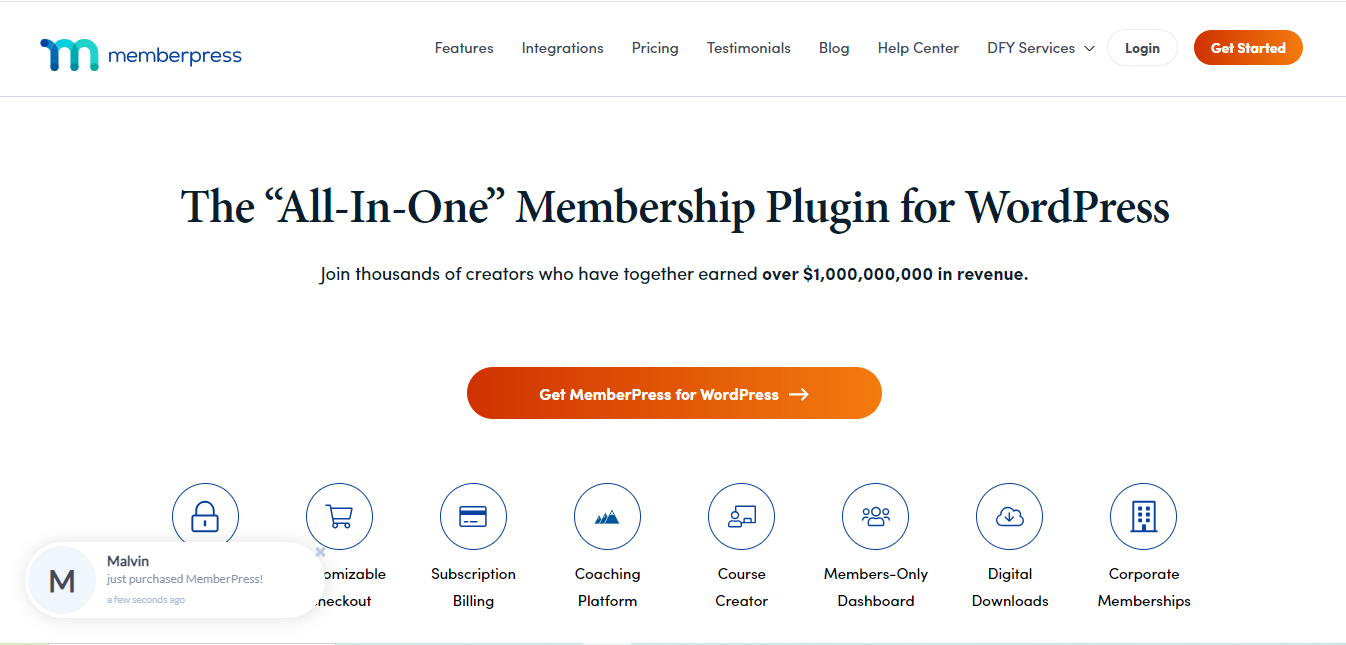
MemberPress remains one of the most complete membership plugins for WordPress, handling membership management, content protection, payments, and member reporting from a single dashboard.
Key Features
- Flexible membership plans with multiple pricing options
- Access control for posts, pages, and custom content types
- Native Stripe and PayPal integration for recurring billing
- Built-in reporting and revenue analytics
- Drip content to release material gradually over time
Pros
- Straightforward setup, even for a first-time membership site owner
- Strong documentation and support
- Works well alongside most WordPress themes and page builders
Cons
- The entry-level plan carries a per-transaction fee; you need the mid tier or higher to remove it
- Deep customization of the checkout and account pages generally needs some CSS or developer help
Pricing: MemberPress currently runs three annual plans, frequently discounted from list price: an entry Launch tier around $199.50/year (list $399) that includes a per-transaction fee, a Growth tier around $349.50/year (list $699) that removes transaction fees, and a Scale tier around $499.50/year (list $999) that adds API access and affiliate tools. All three cover unlimited members and content. Confirm the live promotional price on MemberPress’s own pricing page, since the site runs discounts often enough that a fixed number here would go stale within months.
2. Elementor
Elementor is not a membership plugin on its own, it is WordPress’s most widely used page builder, but it earns a spot on this list because so many membership sites are built visually with Elementor handling the page design while a dedicated plugin (MemberPress, Paid Memberships Pro, and others) handles the actual access control.
Key Features
- Drag-and-drop builder for custom membership landing, pricing, and account pages
- Direct integration with popular membership plugins including MemberPress and WooCommerce Memberships
- A library of pre-built templates for pricing tables and membership-related pages
Pros
- No-code page design, which matters when you want a membership site that does not look like a default plugin template
- Large widget and template library
Cons
- Not a standalone membership solution; you still need a dedicated plugin for access control and payments
- Heavier page designs can slow load times if not optimized
Pricing: Elementor’s free core plugin is enough to page-build with, but membership-relevant features (the Theme Builder, Form Builder used for signup forms, and dynamic content) require Elementor Pro, which currently starts around $49/year for the entry Essential tier covering a single site. Higher tiers cover more sites and add advanced widgets; Elementor also now sells a bundled “Elementor One” plan that combines the page builder with hosting and AI tools for a single subscription.
3. PeepSo
PeepSo is a social networking plugin for WordPress built for community-driven membership sites: private networks, activity feeds, and discussion spaces rather than a simple paywalled blog.
Key Features
- User profiles, activity feeds, and private messaging
- Social login and customizable registration forms
- Integration with WooCommerce and other membership tools for paid access tiers
Pros
- Delivers a genuine social-network feel inside a self-hosted WordPress site
- The core plugin is fully usable for free with no time limit
- Solid group management and moderation tools
Cons
- Advanced features (white-label branding, mobile apps, deeper integrations) require a paid bundle
- Complex, large communities may need custom configuration to run smoothly
Pricing: PeepSo’s core plugin is free and unlimited, no credit card required. The Community Bundle currently runs about $149/year and adds white-label branding, email digests, and social login. The Ultimate Bundle runs about $249/year and adds native mobile apps plus deeper integrations with WooCommerce, LearnDash, and other tools.
4. Paid Memberships Pro
Paid Memberships Pro has shifted its business model since it first became popular: the plugin itself is now a genuinely free, open-source core, with paid tiers built around either buying the full add-on pack for self-hosting or paying for managed hosting on top.
- Key Features
- Customizable membership levels with per-level content restriction
- Native payment gateway integration
- Detailed member and revenue reporting
- Pros
- A genuinely usable free version, not just a trial
- Large, active support community and extensive documentation
- Highly customizable without needing a developer for basic changes
- Cons
- The free version lacks premium add-ons, so a growing site will likely need to upgrade
- The managed-hosting tiers cost meaningfully more than a simple self-hosted license
Pricing: The core plugin is free. A self-hosted Standard plan with the full premium add-on pack runs about $499/year. Paid Memberships Pro also now sells managed-hosting bundles: a Max plan around $999/year for sites handling up to roughly 1,000 orders a month, and a larger Max 2x plan around $2,999/year for higher-volume sites. This is a meaningfully different structure from a few years ago, when the paid tier was a flat, much lower add-on license, so do not rely on an older price quoted elsewhere.
5. LearnDash

LearnDash is the strongest option on this list for anyone combining membership access with structured online courses rather than a simple gated blog. Worth knowing: LearnDash is now part of Liquid Web’s software portfolio following an acquisition, which has not changed how the plugin functions but is worth factoring in if vendor consolidation matters to your buying decision.
- Key Features
- Full course creation tools: quizzes, assignments, certificates
- Membership-level integration with content protection
- Drip content for releasing lessons over a schedule
- Native payment gateway integration plus a documented EDD add-on
- Pros
- Best-in-class for combining paid course access with membership levels
- Mature Groups feature for selling seats to organizations, not just individuals
- Cons
- More setup complexity than a plugin built purely for content gating
- No free tier, unlike some of the newer LMS-focused competitors
Pricing: LearnDash now sells three annual tiers rather than a single flat price: an Essentials tier around $259/year for solo instructors, a Pro tier around $399/year that adds AI-assisted course outlining and advanced reporting, and an Elite tier around $599/year built for institutions running group and multi-instructor training. All tiers include unlimited courses and learners with no per-student fee.
6. MemberMouse
MemberMouse is built for larger, more complex membership sites that need granular content protection, detailed analytics, and flexible trial or upsell logic rather than a simple two-tier paywall.
- Key Features
- Granular content protection and access control
- Native payment gateway integration
- Customizable membership levels and trial offers
- Detailed reporting and cohort analytics
- Pros
- Scales cleanly to large membership rosters
- Strong support and documentation
- Cons
- Steeper learning curve than a basic content-restriction plugin
- Priced higher than several alternatives on this list
Pricing: MemberMouse now bills annually rather than the flat monthly rate it once advertised. Current promotional pricing runs roughly $149.50/year for the Basic tier, $249.50/year for Plus, and $349.50/year for Pro, each discounted from a higher list price, with renewals reverting to the full rate. Confirm the live number before buying, since promotional pricing on this plugin changes.
7. Memberium
Memberium is a specialist plugin built for site owners already running Keap (formerly Infusionsoft), ActiveCampaign, or HighLevel as their CRM, and it deserves an update from how it’s usually described: it is no longer Keap-only. Memberium now sells dedicated versions for all three platforms, so it fits a broader range of marketing-automation stacks than older comparisons suggest.
Key Features
- Deep, native integration with Keap/Infusionsoft, ActiveCampaign, or HighLevel, depending on which version you buy
- Drip content functionality tied directly to CRM tags and automation
- Advanced membership management built around CRM-driven access rules
Pros
- The closest thing to a native membership layer for Keap, ActiveCampaign, or HighLevel users
- Advanced marketing automation tied directly to member status
Cons
- Only worth the price if you are already committed to one of its supported CRMs
- Steeper learning curve for anyone new to CRM-driven membership logic
Pricing: For the Keap/Infusionsoft version, Memberium currently starts at $77/month (around $770/year) for a Standard plan covering one domain and one Keap app, with a Pro plan around $117/month for unlimited domains, and an Advanced plan around $207/month for multi-app agencies. This is a substantially lower entry point than the flat $147/month figure sometimes still quoted in older buying guides, so anyone who dismissed Memberium on price a while back may want to look again.
8. LifterLMS
LifterLMS is primarily a learning management system, but its roots in membership functionality make it a strong pick for anyone combining courses with broader gated content rather than running a pure standalone course catalog.
Key Features
- Full LMS capabilities for course creation and management
- Membership tiers and subscription management
- Content protection with drip scheduling
Pros
- A genuinely usable free core, with unlimited courses, students, and instructors before you spend anything
- Strong fit for course-plus-membership hybrids
Cons
- Some genuinely useful features (ecommerce add-ons, a bundled theme, email marketing integration) are locked behind paid bundles
- Can feel like overkill for a site that only needs simple content gating
Pricing: The core plugin is free. Paid bundles currently start around $199/year for the Earth Bundle (one site, ecommerce add-ons), scale to around $299/year for the Universe Bundle (five sites plus a bundled theme and email integration), and top out around $799/year for the Infinity Bundle (unlimited sites and the full add-on catalog). LifterLMS also sells a one-time lifetime license on its top bundle for site owners who want to avoid renewal billing entirely.
9. myCred
myCred takes a different approach from every other plugin on this list: instead of managing access tiers directly, it manages points, badges, and ranks, which membership sites use to gamify engagement and reward member activity.
Key Features
- Point-based reward system tied to specific user actions
- Badge and rank system to gamify the member experience
- Customizable point exchange rates, so points can convert into discounts or perks
Pros
- Genuinely increases engagement on community-driven membership sites
- Integrates with WooCommerce and several other membership and forum plugins
Cons
- Does not replace a membership plugin; it layers on top of one
- Not a fit for every membership site, gamification works better for community and forum-driven sites than for straightforward content subscriptions
Pricing: The core plugin is free on WordPress.org. Paid add-on packs currently start around $99/year for the Basic tier, scale to around $149/year for Professional, and top out around $299/year for the Business tier, which adds ecommerce marketplace integrations and priority support.
10. Social Snap

Social Snap is not a membership plugin either, it is a social sharing and engagement tool, included here because visibility and social proof matter for membership sites trying to convert visitors into paying members. It adds share buttons, social login for faster registration, and engagement tracking across your content.
Key Features
- Social sharing buttons for major platforms
- Customizable button designs and placement
- Social login for faster member registration
Pros
- Easy to install and configure
- Reduces registration friction through social login
Cons
- Not a membership or content-restriction tool by itself
- Some sharing and analytics features are premium-only
Pricing: Social Snap sells annual licenses with tiers based on site count and feature depth. Check the current pricing directly on Social Snap’s site before buying, since we could not independently confirm a current figure at the time of this update and would rather point you to the source than repeat a number that may already be stale.
Comparison Table
| Name of Tool | Best for | Standout Feature | Starting Price |
|---|---|---|---|
| MemberPress | Comprehensive membership management | All-in-one system with content protection and payment integration | ~$199.50/year (promotional) |
| Elementor | Custom membership page design | Drag-and-drop builder for membership pages | Free core, Pro from ~$49/year |
| PeepSo | Community-driven membership sites | Social networking: profiles, feeds, private messaging | Free core, bundles from ~$149/year |
| Paid Memberships Pro | Complex, customizable membership systems | Free open-source core with optional managed hosting | Free core, self-hosted add-ons ~$499/year |
| LearnDash | Online education combined with membership | Advanced course tools with membership integration | ~$259/year |
| MemberMouse | Large, complex membership sites | Granular access control and cohort analytics | ~$149.50/year (promotional) |
| Memberium | Keap, ActiveCampaign, or HighLevel users | CRM-driven membership automation | From ~$77/month (Keap Standard) |
| LifterLMS | Course-based membership sites | Combines LMS and membership features | Free core, bundles from ~$199/year |
| myCred | Gamifying the membership experience | Points, badges, and rank-based rewards | Free core, add-ons from ~$99/year |
| Social Snap | Social visibility and registration friction | Sharing buttons and social login | Check current site pricing |
How to Actually Choose Between These
If you are running a straightforward gated-content or course-membership site with no unusual requirements, MemberPress or Paid Memberships Pro cover the vast majority of needs, and the choice between them mostly comes down to budget: Paid Memberships Pro’s free core is real, while MemberPress trades a slightly higher price for a more polished out-of-box experience. If courses are the actual product and membership access is secondary, LearnDash or LifterLMS should be your starting point instead of a general membership plugin, since both handle lesson progression and quizzes that a pure content-restriction tool does not.
If your site’s whole value proposition is the community itself, discussion, connection, and interaction between members, PeepSo is worth evaluating before a generic membership plugin, since it is built around social features from the ground up rather than bolting them on. And if you already run your marketing and sales through Keap, ActiveCampaign, or HighLevel, Memberium is worth a serious look precisely because it ties membership access directly to the automation you are already running, instead of forcing you to sync two separate systems by hand.
Common Mistakes When Choosing a Membership Plugin
The most expensive mistake is picking a plugin based on price alone and discovering months later that it cannot do something your business model actually needs, drip content, group licensing, or a specific payment gateway, and migrating a live membership site with paying subscribers to a different plugin is far more painful than doing the comparison properly the first time. Test the free trial or the plugin’s free tier with a real content-restriction scenario before committing to an annual plan, not just a demo checkout.
The second common mistake is underestimating what happens when a payment fails. Ask specifically, for any plugin you are considering, what happens to a member’s access the moment a renewal payment is declined: is there a grace period, does the plugin retry automatically, and does the member get a clear email telling them what to do next. A plugin that just silently cuts off access on the first failed charge creates a support headache and loses members who would have happily updated their card if asked.
Frequently Asked Questions
Do I need a separate page builder if my membership plugin already has templates? Not necessarily. Most membership plugins on this list ship with basic templates good enough to launch on. A page builder like Elementor becomes worth adding once you want a level of custom design the plugin’s own templates cannot deliver.
Can I switch membership plugins later without losing my members? It is possible but rarely painless. Membership plugins generally do not offer a one-click migration path to a competitor, so switching means exporting member and subscription data, reimporting it into the new plugin, and reconnecting payment gateway subscriptions, which sometimes requires members to re-enter payment details. Choosing carefully the first time avoids this entirely.
Is a free membership plugin good enough to launch with? For a small site with simple content gating, yes. Paid Memberships Pro, PeepSo, LifterLMS, and myCred all have genuinely usable free cores. The moment you need automated drip content across many tiers, advanced reporting, or deeper payment gateway support, you will likely outgrow the free tier, but there is no reason not to start there and upgrade once revenue justifies it.
Whichever plugin you land on, the ideal choice depends on your specific site: MemberPress and Paid Memberships Pro cover general-purpose membership management well, Elementor handles the visual design layer, PeepSo fits community-first sites, LearnDash and LifterLMS suit course-driven memberships, MemberMouse and Memberium fit larger or CRM-integrated operations, myCred adds gamification on top of any of the above, and Social Snap helps the whole site convert more visitors into members in the first place. Match the plugin to what your site actually needs to do, not to whichever one ranks first on a list, including this one.
For the payment and subscription side of running a membership business rather than just the WordPress plugin choice, see our guide to setting up recurring payments and subscriptions in Easy Digital Downloads. And if your membership site is built around paid courses specifically, how to sell online courses with EDD and an LMS plugin walks through combining a course platform with proper payment and licensing tools.