Why Every Digital Product Marketplace Needs a Stories Feature in 2026


Digital Products Are Easy to Sell, Hard to Market
If you run a digital product marketplace powered by Easy Digital Downloads, you already know the challenge. Your products are files: plugins, themes, templates, ebooks, courses, graphics. They don’t have the visual appeal of a physical product sitting on a shelf. You can’t hold them, unbox them, or photograph them in a lifestyle setting the way a skincare brand or a furniture store can.
That constraint makes marketing digital products fundamentally harder than marketing physical ones. Product descriptions and static screenshots only carry a listing so far before it starts to blend into every other product grid on the internet. Customers need to see your products in context, hear from real users who actually bought them, and feel some kind of connection to the creator or team behind them before a purchase starts to feel like an easy decision instead of a leap of faith.
That’s exactly the gap stories close. The WP Stories plugin adds Instagram-style stories to any WordPress site, and for a digital product marketplace specifically, it opens up marketing possibilities that a static product grid simply can’t match.
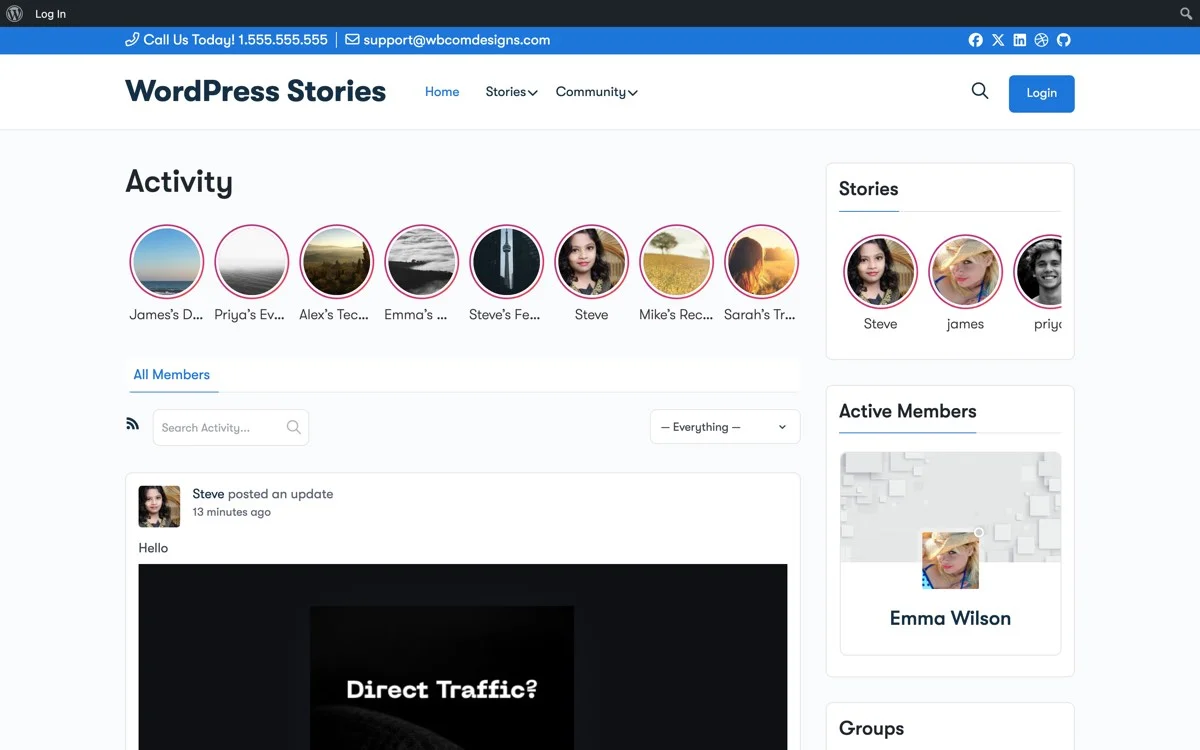
Stories on your digital marketplace, engaging visual content above your product listings
The Engagement Gap in Digital Marketplaces
Most EDD-powered marketplaces end up looking remarkably similar to each other: a grid of product cards, each with a thumbnail, a title, a price, and an Add to Cart button. A customer browses, maybe reads one or two descriptions, and either buys or leaves without much reason to come back.
There’s no emotional connection built into that layout. No sense of urgency pushing a maybe toward a yes. No reason for a visitor who didn’t buy today to think about your marketplace again tomorrow. A product grid is functional, but functional alone rarely creates the kind of return-visit habit that turns a browser into a repeat customer.
Stories bridge exactly this gap. They give a marketplace a reason to be checked daily rather than stumbled onto once, and they let a seller build the kind of familiarity that a static thumbnail never will. Think about how differently you browse a marketplace you’ve visited before versus one you’re seeing for the first time, familiarity changes buying behavior more than any single product description ever could, and stories are one of the fastest ways to build that familiarity without waiting months for repeat organic visits to accumulate naturally.
7 Story Strategies for Digital Product Marketplaces
1. Product Demo Stories
Show your digital products in action through stories rather than leaving them to a single static screenshot. A WordPress theme looks like a flat image on a product page. In a story, you can walk through it being installed, customized, and used on a real live site, all in a few seconds of visual, sequential content that a static page simply can’t replicate. Add a CTA button linking directly to the product page so a viewer who’s convinced mid-story can purchase immediately, without losing momentum hunting for the right link.
2. New Release Announcements
Every time you release a new product or ship a major update, turn it into a story rather than only a blog post or a changelog entry. Stories feel more personal and more urgent than a written announcement buried in a feed, and they show up in a format your audience is already primed to check regularly.
3. Flash Sales and Time-Limited Discounts
Stories are close to the ideal format for flash sales because urgency is already built into the medium. Create a story announcing a limited-time discount, add a CTA button linking straight to the discounted product, and let the story expire naturally when the sale ends, no manual cleanup required, no stale banner left up three weeks after a promotion has already closed.
4. Customer Showcases
When a customer builds something genuinely impressive with your products, whether that’s a site built on your theme or a course completed using your platform, showcase it in a story. Consider building a permanent story collection called Customer Showcases that new visitors can browse on arrival, giving social proof a visual, scrollable home instead of burying it in a testimonials page nobody clicks.
5. Developer and Creator Stories
If your marketplace hosts multiple vendors, let them share their own stories about their products and their process. A creator talking through why they built a particular template, or what problem a plugin was built to solve, builds a kind of trust and personal connection that a bare product listing never generates on its own.
6. Tutorial and Tips Series
Build a permanent story collection with quick, bite-sized tips on using your products. Over time this becomes a genuinely useful visual knowledge base, one that reduces support tickets simply because the answer to a common question is already sitting in a story a customer can find in seconds.
7. Upcoming Product Teasers
Build anticipation for what’s coming next by sharing teaser stories with work-in-progress screenshots and behind-the-scenes sneak peeks. A marketplace that shows its process, not just its finished catalog, gives visitors a reason to check back specifically to see what’s next.
How It Works
The Story Viewer
When a customer taps a story, a full-screen viewer opens with auto-play, progress bars, and CTA buttons linking directly to the relevant product page. There’s no dead end, every story has a clear next step built in.
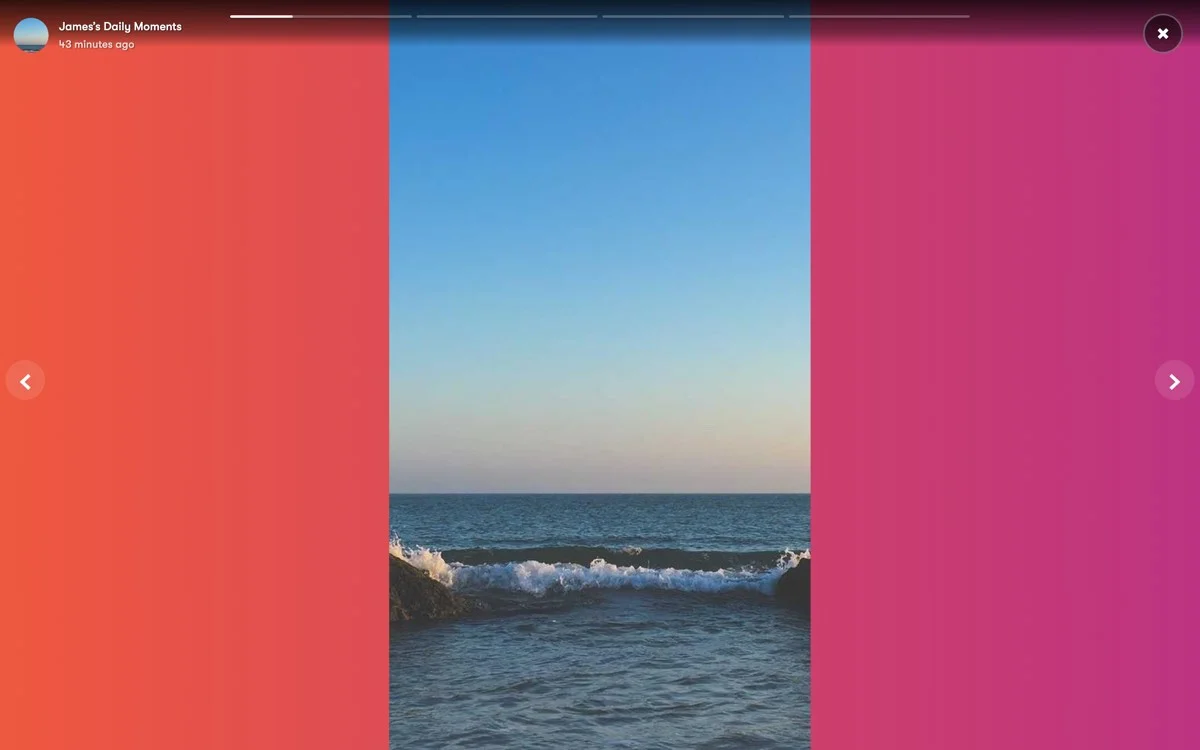
Full-screen story viewer, showcase products with CTA buttons that link directly to checkout
Display Styles for Product Pages
Choose the display style that fits your marketplace layout rather than forcing one format everywhere. Instagram Style shows story circles at the top of a page, which tends to work best on a homepage where you want stories to be the first thing a visitor notices. Square Style renders product story cards, a natural fit for category pages where stories can sit alongside a filtered product grid. List Style compresses stories into a compact list, well suited to a sidebar widget on pages where space is tight.
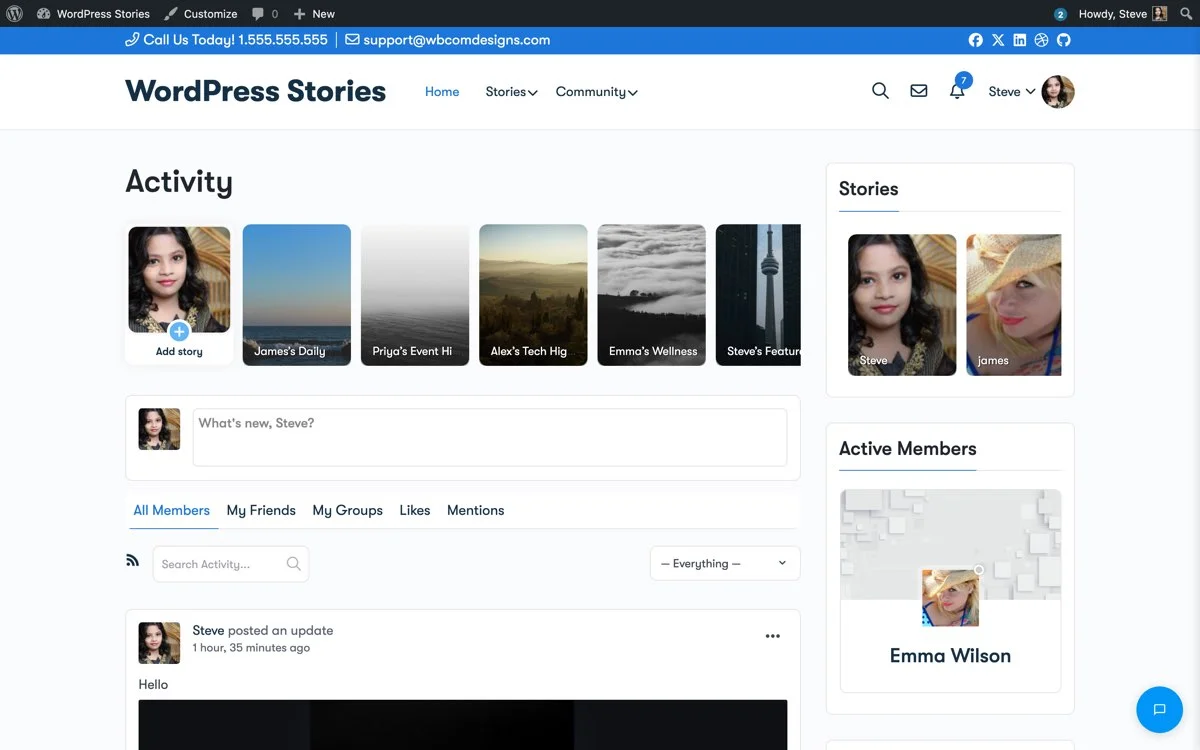
Square Style, card-based story thumbnails ideal for showcasing product collections by category
Creating Stories from Admin
As the marketplace owner, you create stories directly from the WordPress admin panel, no separate app, no third-party dashboard to log into. The story editor lets you add images, titles, CTA buttons, and set a custom duration for each individual story item, giving you the same kind of control over pacing that a professional social media manager would want.
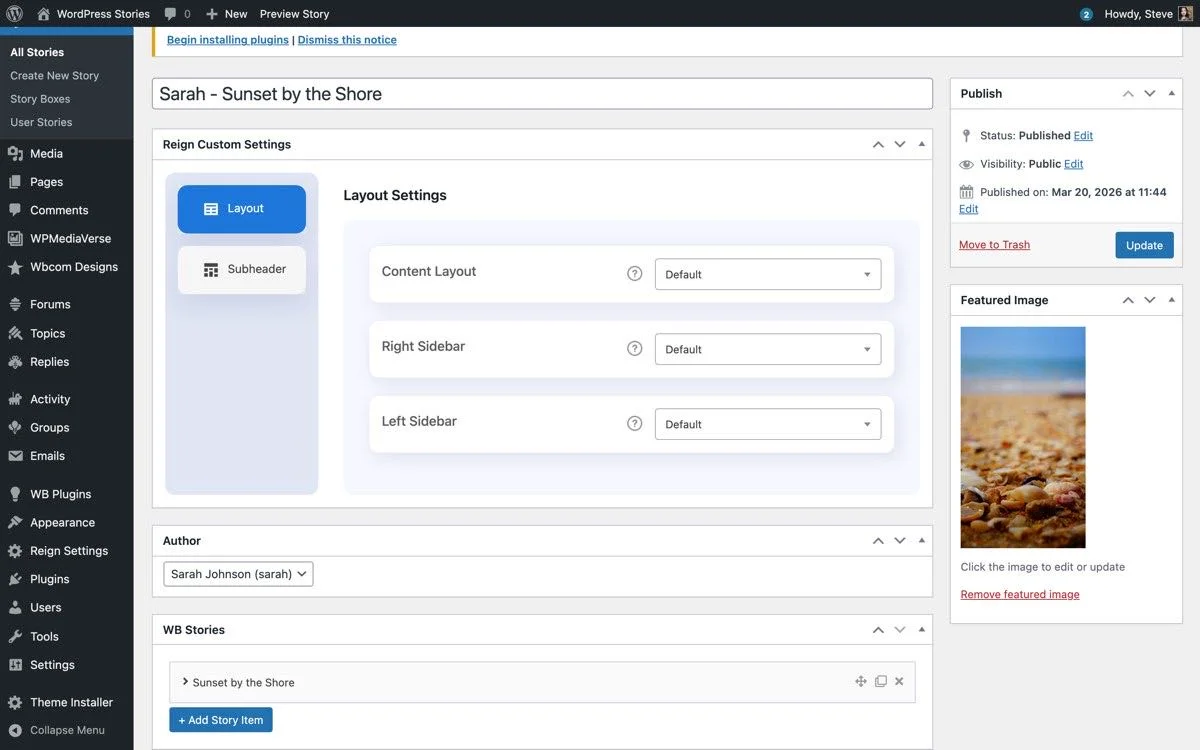
Story Editor, add media, titles, CTA buttons, and durations from the WordPress admin
CTA Buttons Are Your Secret Weapon
Every story in WP Stories can carry a call-to-action button with a custom link, and for a digital marketplace specifically, that turns out to be genuinely powerful. A Shop Now button can link straight to a product page. A Download Free Trial button can point to a demo version. A View Demo button can send a viewer to a live preview instead of a screenshot. A Get 30% Off button can link directly to a discounted checkout URL, and a Read Docs button can send a curious buyer straight to documentation before they’ve even reached the product page.
Unlike Instagram, where a swipe-up link historically required a follower threshold most small sellers never reach, WP Stories lets you add a CTA button to every single story from the very first one you publish, no audience minimum required.
Placing Stories on Your Marketplace
Shortcodes make it straightforward to add stories exactly where they matter most. Use [wb-story-activities] on the homepage, positioned above the product grid so it’s the first thing a visitor sees. Use [wb-story id="X"] on product category pages for category-specific story boxes tied to that particular collection. Add the WP Stories widget to a sidebar to show stories on every page without extra shortcode placement, and consider adding stories to a checkout success page specifically for related-product cross-selling, right when a buyer’s guard is down and they’re already in a purchasing mindset.
Why Stories Beat Banner Ads
Plenty of marketplace owners lean on banner ads and homepage sliders to promote products, and stories consistently outperform that older format for a few concrete reasons. Banner blindness is real and well documented, users have spent years training themselves to ignore anything that looks like an ad, while stories read as native content rather than an interruption. Stories are also sequential by nature, a user who opens one is already committed to viewing what follows, which a banner glanced at for half a second never earns.
Stories run full-screen with no competing distractions, just your content filling the entire viewport, and they update daily rather than going stale the way a banner sitting untouched for months eventually does. They also carry built-in interaction, likes and views, that hand you real engagement data a static banner never could.
Stories and the Rest of Your EDD Store
Stories work best as one layer in a broader marketing and conversion strategy rather than a standalone feature bolted onto a homepage. If you’re already tracking how visitors move through your funnel, our guide to EDD analytics and conversion tracking covers how to measure whether a change like adding stories is actually moving the needle on conversions, not just anecdotally feeling more engaging.
If your marketplace hosts more than one seller, pairing stories with a proper submission workflow matters too, our piece on accepting frontend submissions for a multi-vendor marketplace covers how to let vendors contribute products, and by extension their own stories, without you manually uploading everything yourself. And since stories are only as effective as the store they point back to, it’s worth double-checking the fundamentals covered in our EDD store optimization guide so a story’s CTA button doesn’t lead to a slow-loading product page that undoes the momentum you just built.
Performance
WP Stories automatically optimizes uploaded images, reducing file sizes by up to 80 percent without a visible quality hit. That matters more than it sounds like it should, a marketing feature that tanks your Core Web Vitals is a feature actively working against your SEO and conversion goals at the same time it’s supposed to be helping them. Your marketplace pages stay fast, and the stories themselves load quickly enough that a visitor never has to wait through a loading spinner to see your content.
Stories vs. Email Marketing: Not a Replacement, a Complement
It’s worth being clear about what stories are and aren’t. They’re not a replacement for email marketing, an email list remains the most reliable channel for reaching customers who’ve already opted in and expect to hear from you. What stories add is a lightweight, low-commitment touchpoint for the much larger group of visitors who haven’t subscribed to anything yet, people who land on your homepage from search or a referral link and might browse for thirty seconds before deciding whether you’re worth a second look.
An email requires an address and a decision to opt in before you can reach someone again. A story requires nothing, it’s sitting right there the moment someone lands on your site, doing the work of building familiarity before you’ve earned the right to their inbox. The two channels work well together: a story can build the initial interest, and an email capture form or a discount-gated download can convert that interest into a subscriber for the long-term relationship.
Which Kinds of Digital Products Benefit Most
Stories don’t help every digital product equally, and it’s worth being honest about where the format earns its keep. Visual products, themes, templates, design assets, UI kits, benefit enormously since the format is built for exactly this kind of before-and-after, in-context demonstration. A theme that looks like a flat screenshot on a product page comes alive in a story showing it actually running on a real site with real content.
Courses and educational products benefit almost as much, though the story content shifts toward instructor introductions, student testimonials, and quick teaching-moment previews rather than pure visual demos. Software plugins and tools benefit when the story can show a specific pain point being solved in a few seconds, a slow page becoming fast, a manual task becoming automated, rather than trying to explain every feature at once.
Pure text products, ebooks and written guides specifically, benefit least from a visual-first format, though even here a well-designed quote card or a behind-the-scenes look at the writing process can work as a supporting story type rather than a primary marketing channel.
Frequently Asked Questions
Do stories work on a marketplace with only a handful of products?
Yes. A smaller catalog actually benefits more from stories in some ways, since every product can get dedicated visual attention rather than being buried in a large grid. Start with product demo stories for your best sellers and expand from there as your catalog grows.
How often should I publish new stories?
There’s no fixed rule, but stories work best as a living, regularly refreshed layer rather than a set-and-forget feature. A cadence of two to three new stories a week, mixing product demos, announcements, and customer showcases, keeps the format feeling alive without becoming a daily production burden.
Do stories require video, or do static images work too?
Static images work fine and are often easier for a solo seller to produce consistently. Video adds production value for product demos specifically, but a well-composed static image with clear text and a strong CTA button is enough for most story types, especially announcements and flash sales.
Can vendors on a multi-vendor marketplace create their own stories?
Yes, WP Stories supports this, letting individual creators or vendors share stories about their own products and process, which is particularly useful for a marketplace where trust in the individual seller matters as much as trust in the platform itself.
Will adding stories slow down my marketplace pages?
WP Stories is built with automatic image optimization specifically to avoid this problem, reducing file sizes significantly without a visible quality loss. As with any new feature, it’s still worth spot-checking your Core Web Vitals after rollout to confirm real-world performance on your specific hosting setup.
Setting Up Your First Story Box
The fastest path to seeing whether stories work for your marketplace isn’t a full rollout across every page at once, it’s a single, focused test. Pick your five best-selling products and build one story box specifically around them: a demo story for each, a single announcement story if you’ve got a recent update worth mentioning, and one customer showcase if you have a strong example on hand. Place that box on your homepage using the Instagram Style layout, since that’s the placement most likely to get seen by every visitor regardless of which product page they eventually land on.
Give it two to three weeks before judging results, long enough to see whether returning visitors are actually opening stories on repeat visits, not just the first time out of curiosity. Check the built-in view and interaction data WP Stories provides rather than guessing, and use that early data to decide which story types are worth doubling down on for your specific audience before expanding into category pages, a sidebar widget, or a checkout success page cross-sell.
Get Started
Your digital marketplace doesn’t need to feel like a static catalog. Stories bring it to life with fresh visual content, customer showcases, product demos, and flash sales that create genuine urgency and a sense of connection a plain product grid never will.
Install WP Stories, create your first product story box, and place it on your homepage. Your customers will notice the difference immediately.
Get WP Stories for your digital product marketplace today.