Build a Public Feature Roadmap for Your WordPress Plugin or Digital Product

Someone lands on your Easy Digital Downloads product page and starts reading the description. They’re not just checking what the plugin does today. They’re quietly asking a second question underneath the first: will this still exist and get better in a year, or am I about to buy something the developer abandons the moment a bigger opportunity shows up. A public feature roadmap is one of the cheapest ways to answer that question before it’s even asked out loud.
It’s a small thing on a product page, one link, one board. It does real work on conversion because it directly addresses the specific fear that stops a hesitant buyer from clicking purchase on a plugin from a developer they’ve never bought from before.
This matters more in a crowded category than a niche one. If your plugin is competing against five other options solving roughly the same problem, the roadmap becomes one of the few remaining differentiators once feature lists start looking interchangeable.
Why Buyers Actually Check for This
Digital products carry a specific kind of risk physical products don’t. A buyer isn’t just paying for what a plugin does on day one, they’re implicitly betting on ongoing support, compatibility updates as WordPress core changes, and new features that keep pace with their growing site. A roadmap answers all three at once: what’s actively being worked on, what’s coming, and whether anyone’s paying attention at all.
Reviews and testimonials that mention “actively developed” or “transparent about what’s coming” correlate with meaningfully higher conversion on product pages, particularly for buyers comparing your plugin against three or four competitors with similar feature lists. When the features look equivalent, trust in ongoing development becomes the tiebreaker.
What Actually Belongs on a Public Roadmap
Three Columns, Not Fifteen
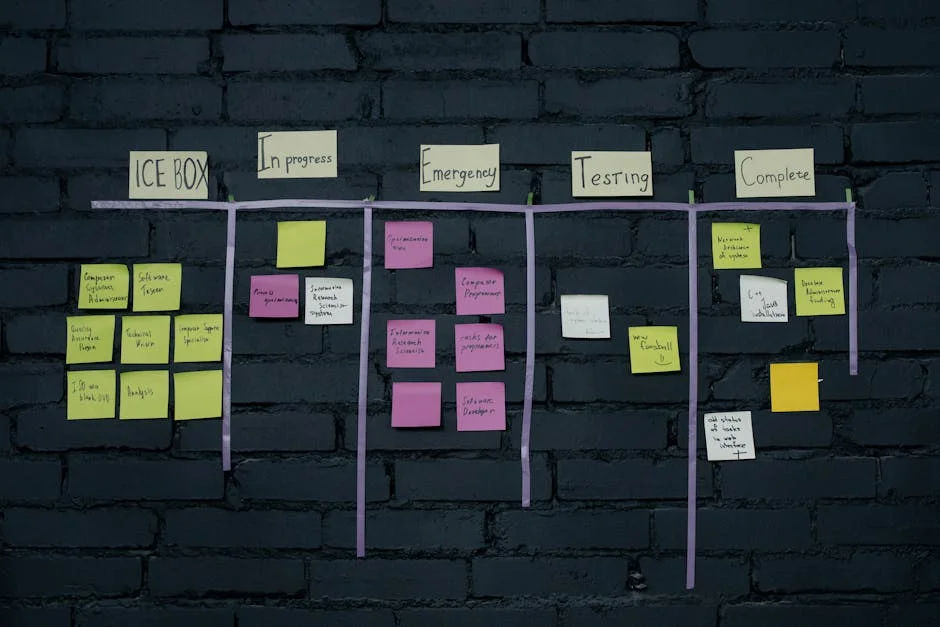
Now, Next, Later. That’s the whole structure most successful public roadmaps need. Now means actively in progress. Next means queued and committed. Later means under consideration but not promised. Anything more granular than this, sprint numbers, percentage-complete bars, detailed sub-tasks, adds noise for a customer audience without adding useful information. Save that granularity for your internal project management tool, not the public view.
Real Requests, Attributed Where You Can
“Requested by a customer running a 50k-product catalog: bulk CSV export, in progress” reads as far more credible than a bare feature name sitting in a queue. Attribution, even anonymized, signals that the roadmap reflects actual demand rather than a wishlist the developer generated alone in a vacuum. It also quietly invites more customers to submit their own requests, which is exactly the engagement loop you want running.
Status That Means Something
Open for voting, in progress, in beta, shipped. Four clear states beat a vague progress bar every time. Letting customers vote on open requests does double duty, it prioritizes your actual backlog around real demand instead of guesswork, and it keeps customers checking back on the page, which is free engagement you didn’t have to buy with an ad.
No Hard Dates, Ever
This is the rule most new maintainers break first, and it costs them the most trust when it breaks. A committed date that slips damages credibility more than never having promised a date in the first place. “Q2 target” or “in progress” or “no committed timeline yet” all preserve trust in a way “shipping March 15th” doesn’t once March 15th passes and the feature isn’t done.
Tools That Turn an Internal Backlog Into a Public View
Several tools handle the internal-to-public translation cleanly: ClickUp’s public dashboard views, Trello’s public boards, Productboard, Canny, Roadmap.space, and a published Notion page for teams that want something lighter. For most EDD plugin sellers specifically, ClickUp tends to be the cleanest balance, it handles the internal project management work, tasks, sprints, GitHub integration, and exposes a sanitized public view from the same underlying data rather than requiring a separate tool synced manually.
You can try ClickUp free here, it’s free forever for solo users, which matters if you’re a single developer maintaining one or two plugins rather than a team.
Build the Internal Process First, Publish Second
The order here matters more than it looks like it should. Publishing a polished public roadmap before you have an actual internal process generating real progress is how a roadmap turns from a trust signal into evidence of the opposite. A “Now” column that hasn’t moved in three months is worse for conversion than no roadmap at all, because it confirms the exact fear the roadmap was supposed to address.
Get your internal workflow running first: a place where feature requests land, a lightweight triage process, sprints or milestones that actually ship on a cadence you can sustain. Once that’s genuinely working, publish the sanitized view. The public roadmap should be a window into a real process, not a marketing page dressed up to look like one.
How This Fits Into the Bigger Trust Picture
A roadmap is one signal among several a careful buyer checks before purchasing a plugin they’ll depend on. Changelog frequency, support forum response times, and how clearly you communicate about licensing all feed the same underlying trust judgment. If you’re navigating what AI-assisted development means for how you represent your own plugin’s code, our piece on AI-written plugin code, ownership, licensing and liability for EDD sellers covers a related trust question that’s increasingly relevant as more of the WordPress plugin ecosystem incorporates AI-assisted development.
The underlying setup work, invoicing structure, licensing tiers, checkout flow, matters here too. Our guide on selling WordPress plugins and themes with Easy Digital Downloads covers that foundation in more depth, worth having solid before a roadmap starts driving more serious buyer traffic to your product page.
When a Roadmap Becomes Part of a Bigger Story
For plugin businesses thinking further ahead, an actively maintained public roadmap with a visible customer voting history becomes a real asset when the business itself is eventually valued, whether for fundraising, partnership conversations, or an acquisition. It’s documented proof of product-market signal that a spreadsheet of internal notes never quite conveys the same way to an outside party. Our piece on what a $6M digital product exit teaches about building sellable service businesses touches on exactly this kind of documented process being part of what makes a business attractive to a buyer, not just its revenue numbers.
Mistakes That Undermine an Otherwise Good Roadmap
Letting the roadmap go stale is the most damaging one, and it’s also the easiest to fall into once initial enthusiasm wears off. A roadmap updated once at launch and never touched again is worse than not having one, because a prospective buyer who checks the last-updated date and sees six months of silence reads that as confirmation the project is winding down, not as a neutral absence of information.
Padding the roadmap with vague, low-effort entries to make it look busier than it is backfires just as often. “Improvements and bug fixes” as a permanent entry in the Now column signals filler, not progress. Specific entries, even small ones, read as more credible than a long list of vague ones.
Publishing every internal idea, including half-formed ones you’re not actually committed to, creates a different problem: customers start treating “Later” column entries as promises rather than possibilities, and get frustrated when an idea quietly disappears because it turned out not to be feasible. Curate what goes public more carefully than what stays in your internal backlog.
And ignoring the roadmap’s voting or comment activity once it exists. A roadmap with visible customer votes and zero response from the maintainer reads as a dead feature, not an active one. If you’re going to enable engagement, budget the time to actually engage with it.
What a Roadmap Looks Like at Different Product Stages
Pre-launch or just-launched: keep the roadmap simple and honest about where you are. A short “here’s what shipped in v1, here’s what’s next” post does more good than an elaborate public dashboard for a product with a handful of customers. Overbuilding the roadmap infrastructure before you have enough activity to fill it looks emptier than having no roadmap at all.
Established with a real customer base: this is where the full Now/Next/Later structure with voting starts paying for itself. You have enough request volume that prioritization genuinely benefits from customer input, and enough traffic that the trust signal on your product page reaches meaningful numbers of prospective buyers.
Mature product with a large install base: the roadmap becomes as much a support and communication tool as a sales one at this stage. Existing customers checking on a specific request they made months ago need to see it move, or see an honest explanation of why it didn’t make the cut. The roadmap’s job shifts from “convince a new buyer” to “retain and reassure an existing one,” and the tone should shift with it.
At this stage, an ignored or abandoned request from a long-time customer costs more trust than the same silence would with a brand-new buyer, because there’s more relationship history for the silence to contradict.
Questions Maintainers Ask Before Publishing One
What if I publish a roadmap and then can’t keep up with it?
Set the update cadence you can actually sustain before you publish anything, monthly is realistic for most solo maintainers, weekly is not. A roadmap updated reliably once a month beats one that promises weekly updates and delivers them for three weeks before going silent. Under-promise on cadence, then exceed it occasionally, rather than the reverse.
Should competitors seeing my roadmap worry me?
Less than it feels like it should. Competitors watching your roadmap are also signaling that you’re worth watching, and most genuinely differentiated features take real development time to copy even once announced. The trust benefit with actual customers almost always outweighs the competitive intelligence you’re giving away, unless you’re working on something genuinely novel and unreleased that a competitor could ship faster than you.
How do I handle a feature request I know I’ll never build?
Say so directly rather than leaving it in permanent limbo. “Not currently planned, here’s why” closes the loop honestly and often redirects the customer toward a workaround or a different tool that fits their need better. Silence on a request customers keep voting for reads worse over time than a clear no.
Does a roadmap make sense for a single-feature, simple plugin?
Less critical than for a complex product with a long feature surface, but still worth a lightweight version. Even a simple plugin benefits from showing “still maintained, still compatible with the latest WordPress version” as an ongoing signal, which a roadmap communicates more concretely than a static changelog buried on a separate page.
Is a changelog the same thing as a roadmap?
No, and conflating them undersells both. A changelog documents what already shipped, proof of past delivery. A roadmap documents what’s coming, proof of future intent. Buyers evaluating a purchase care about both, but they answer different questions, and a product page that only has one is missing half the trust picture.
Starting Small
You don’t need a polished public dashboard on day one. A single pinned post in your support forum with three honest sections, working on now, coming next, considering later, does most of the same trust-building work as a dedicated tool, and it costs nothing to set up this afternoon. Upgrade to a dedicated roadmap tool once the volume of requests and the size of your customer base justify the extra structure, not before.
Where the Requests Actually Come From
A roadmap is only as good as the pipeline feeding it, and most maintainers underinvest in that pipeline while overinvesting in the public presentation. Support tickets are the richest source most people ignore, a customer explaining a workaround they built for a missing feature is a feature request in disguise, and it’s usually more specific and better-reasoned than a generic suggestion box entry.
Reviews, both the good and the critical ones, surface patterns worth tracking even when nobody explicitly requests a feature. Three reviews independently mentioning the same missing capability is a stronger signal than one loud customer who happens to be vocal on your roadmap board. Read reviews with an eye for this pattern specifically, not just for star ratings.
Direct outreach to your highest-value customers, the ones running the plugin on the biggest or most complex sites, tends to surface requests that never make it into a public suggestion box at all, because those customers often don’t think to ask publicly for something they’ve assumed is out of scope. A short email asking “what’s the one thing you wish this did” to your top twenty customers by revenue often produces a better prioritized list than months of open public voting.
The Connection Between Roadmap Trust and Refund Rates
This is a less obvious benefit worth naming directly. Buyers who purchase after seeing evidence of active development and a clear path forward tend to give a product more benefit of the doubt when something doesn’t immediately work as expected. They’re more likely to open a support ticket and wait for a fix than to request a refund out of frustration, because the roadmap has already established that the maintainer is engaged and responsive.
Refund rate isn’t a metric most maintainers connect back to their roadmap page, but the causal chain is real: trust signals reduce impulse refunds by giving a frustrated buyer a reason to believe their issue will actually get resolved rather than ignored. If your refund rate is higher than comparable products in your category, a stale or missing roadmap is worth checking as a contributing factor, not just your support response time.
It’s a cheap diagnostic to run. Pull your last twenty refund requests and check whether any mention feeling like the product was abandoned or unsupported. If that pattern shows up even a few times, the roadmap fix is faster and cheaper than most support-process overhauls.
A Roadmap Doesn’t Replace Communication, It Supplements It
The most common failure mode isn’t a bad roadmap, it’s treating the roadmap as the only communication channel and letting everything else go quiet. A release announcement in your changelog, a short note in your newsletter about what shipped, a mention in support responses when a fix ties back to a roadmap item, all reinforce the same trust signal through different channels that reach different segments of your customer base.
Customers who never visit your roadmap page directly still benefit from the process behind it, provided that process surfaces through the channels they do pay attention to. Treat the public roadmap as one visible artifact of a broader communication habit, not the whole habit itself.
Get that habit right, and the roadmap page becomes almost a formality, evidence of something that was already true rather than the thing creating the trust in the first place.
A Simple Rollout Plan for Your First Roadmap
If none of this exists yet, the path from nothing to a working roadmap doesn’t need to take long. Spend the first week just collecting: pull recent support tickets, skim your last dozen reviews, and note every feature request you can find in one place, even a plain spreadsheet is fine at this stage.
In week two, sort what you collected into the three-column structure and pick two or three items you can genuinely commit to shipping in the next month. Resist the urge to list everything you’ve ever considered; a short, honest list beats a long, aspirational one that you’ll quietly abandon within a month. Publish it somewhere genuinely visible, a pinned support forum post, a page linked from your product description, or a dedicated tool if you’re already ready for one.
From week three onward, the only real job is consistency: update the board on the cadence you committed to, respond to new requests as they come in, and move items across columns as they actually progress rather than letting them sit. The roadmap’s credibility comes entirely from this ongoing maintenance, not from how polished it looked on launch day.
A Roadmap Is a Commitment, Not a Marketing Asset
It’s worth ending on this distinction because it’s easy to lose sight of once a roadmap starts driving measurable conversion gains. The moment a roadmap starts feeling like a marketing tool to optimize rather than an honest record of what you’re actually building, customers tend to notice, even if they can’t quite articulate why the page suddenly feels less trustworthy.
Keep the roadmap accurate first and persuasive second, in that order, and the conversion benefit takes care of itself as a side effect of doing the underlying work well rather than as the goal you set out to optimize for directly from day one.