How to Recover Abandoned Carts in Easy Digital Downloads and Recapture Lost Revenue

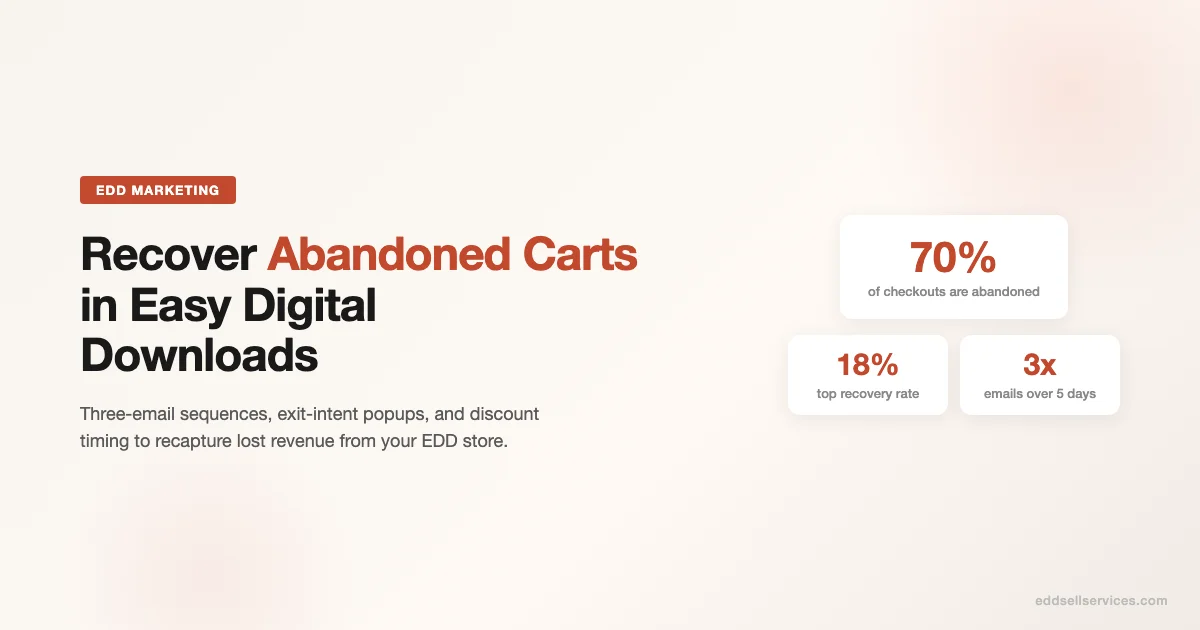
About 70% of shoppers who start a checkout never complete it. For an EDD store doing $5,000 a month in revenue, that means roughly $11,500 more is sitting in abandoned sessions every month. That number is recoverable, or at least a good chunk of it is. This is a playbook for getting it back.
Why Carts Get Abandoned in EDD Stores
EDD buyers are mostly developers, solopreneurs, and small teams. They are not impulse shoppers. The most common reasons for abandonment in digital product stores are different from physical ecommerce:
- They hit an unexpected price at checkout (currency conversion, taxes, fees)
- They need to check with a team member or manager before buying
- They want to compare your plugin with a competitor before committing
- They got distracted and simply forgot to complete the purchase
- The payment form felt unfamiliar or the checkout felt insecure
Understanding the reason shapes the recovery strategy. A buyer who left to compare options responds differently than one who just got pulled into a meeting.
Step 1: Set Up Abandoned Cart Tracking in EDD
EDD core does not track abandoned carts out of the box. You need the Abandoned Cart add-on from Easy Digital Downloads or a third-party solution. Once installed, it captures checkout sessions where a buyer entered their email but did not complete the purchase.
What Gets Tracked
The add-on records the cart contents, the email address, the timestamp, and the checkout URL with a cart recovery token. When a buyer clicks your recovery link, their cart is restored automatically, so they do not have to search for the product again.
What You Need Before Sending Recovery Emails
- An email address (the buyer must have entered it on the checkout form)
- A transactional email provider configured (Postmark, SendGrid, or Amazon SES all work well)
- A recovery link that restores the exact cart
- A privacy policy that discloses recovery email use (GDPR requirement for EU buyers)
Step 2: Write a Three-Email Recovery Sequence
One email is not enough. Three emails over five days is the standard sequence for digital products. Here is the timing and angle that has worked for stores in the EDD ecosystem:
| Timing | Subject Line Angle | Goal | |
|---|---|---|---|
| Email 1 | 1 hour after abandonment | Helpful reminder, no pressure | Catch buyers who just got distracted |
| Email 2 | 24 hours after abandonment | Address objection or answer a question | Handle the comparison shopper |
| Email 3 | Day 5 after abandonment | Final nudge, optional discount | Convert fence-sitters with an incentive |
Email 1: The Gentle Reminder (1 Hour)
Keep this one short. The buyer knows what they left behind. Your job is to make it easy for them to come back, not to write a long pitch. Include the product name, one specific benefit, and the recovery link. A subject line like “Your download is still waiting” works better than anything clever.
Email 2: The Objection Handler (24 Hours)
This email is where you earn the conversion from the consideration-phase buyer. Use it to answer the most common questions your customers ask before purchasing. Link to your documentation, your refund policy, a testimonial from a similar user, or a demo video. The goal is to remove the friction that stopped them.
Email 3: The Final Nudge (Day 5)
At this point, the buyer has had five days. If they have not purchased, they either forgot again or they are genuinely on the fence about price. This is where a time-limited discount makes sense. A 10-15% off code that expires in 48 hours adds urgency without devaluing your product permanently. Make clear this is the last email in the sequence.
Step 3: Exit-Intent Popups Before the Cart Is Abandoned
Exit-intent popups detect when a buyer’s cursor moves toward the browser close button or address bar and trigger a message before they leave. This is a pre-abandonment tactic, not a recovery tactic, but it belongs in the same playbook because the goal is the same: keep the buyer in the funnel.
For EDD stores, exit-intent popups work best when they either capture an email (for buyers who have not yet entered one) or offer a small incentive. An email capture popup lets you send the recovery sequence even to buyers who never started the checkout form.
What to Put in the Popup
- A single clear headline that names the product or benefit
- An email capture field with a reason to give it (“Get the download link even if you leave”)
- An optional lead magnet (a free lite version, a tutorial, a case study)
- No fake urgency or countdown timers on popups – buyers see through it and it damages trust
Tools that integrate well with EDD for exit-intent popups include OptinMonster, ConvertBox, and Sleeknote. Each of these can pass the email to your email marketing platform and trigger a recovery automation.
Step 4: Discount Strategy for Recovery Emails
The right discount amount depends on your product price and your margin. For digital products, margin is effectively 100% minus support costs, so the economics are different from physical goods. Here is a framework:
| Product Price | Recommended Discount | Notes |
|---|---|---|
| Under $30 | Skip the discount | Price resistance is rarely the issue at this level |
| $30 to $100 | 10-15% on final email only | Use a time-limited code to add urgency |
| $100 to $300 | 15-20% on final email | A meaningful dollar amount here justifies the delay in buying |
| Above $300 | Consider a payment plan instead | Spreading cost over 2-3 months often converts better than a flat discount |
One rule: never offer a discount in the first recovery email. Buyers who just forgot do not need an incentive. Discounting too early trains your audience to abandon carts deliberately to get a code.
Step 5: Timing Optimization for Recovery Emails
The hour of day your recovery email lands matters more than most store owners realize. EDD stores sell primarily to developers and technical buyers who tend to check email in the morning and after lunch. Based on data from stores in the WordPress plugin space:
- Best send windows: 8-9 AM and 1-2 PM in the buyer’s timezone
- Worst send windows: Friday afternoon and Saturday (lowest open rates in B2B-adjacent audiences)
- Timezone detection: use the checkout IP to estimate timezone if your ESP supports it
If your ESP does not support timezone-based sending, default to UTC+0 morning sends. Most of your buyers are in North America or Europe, and morning UTC catches the EU awake and the US early bird crowd.
Recovery Rate Benchmarks for EDD Stores
What counts as a good recovery rate? Industry benchmarks vary widely, but for digital product stores in the WordPress and SaaS ecosystem, these are realistic targets:
| Recovery Metric | Average | Top Quartile |
|---|---|---|
| Recovery email open rate | 35-45% | 50-60% |
| Click rate on recovery emails | 8-12% | 15-20% |
| Conversion rate from clicks | 20-30% | 35-50% |
| Overall cart recovery rate | 5-10% | 12-18% |
The overall recovery rate feels low until you do the math. If your store processes $8,000 per month and the standard 70% abandonment rate applies, you are leaving $18,600 on the table monthly. Recovering just 8% of that is $1,488 in additional monthly revenue, which compounds significantly over a year.
Common Mistakes in EDD Cart Recovery
- Sending too many emails too fast. Three emails in 24 hours reads as spam and will damage your sender reputation.
- Generic subject lines. “Complete your purchase” gets ignored. Name the product: “Your license for [Product Name] is waiting.”
- Not testing recovery links before launch. A broken cart recovery URL is a trust killer. Test the full flow end-to-end before going live.
- Forgetting unsubscribe links. Recovery emails are transactional, but a clear opt-out reduces spam complaints significantly.
- Using the same discount code for everyone. Unique per-buyer codes prevent sharing and let you track which buyers actually used the offer.
Tools That Work With EDD for Cart Recovery
Here are the main options, from native to third-party:
- EDD Abandoned Cart (official add-on): The tightest integration, tracks every checkout session, built-in email templates, recovery link generation handled automatically.
- ActiveCampaign + EDD integration: If you are already using ActiveCampaign for your broader email marketing, it can pull cart data via the EDD automations add-on.
- MailerLite with EDD webhooks: Budget-friendly option for smaller stores. Requires a bit more manual setup but works reliably.
- WP Fusion: Sends EDD checkout events to your CRM, which can trigger recovery automations in HubSpot, Drip, or ConvertKit.
Running Your First Recovery Sequence: A Checklist
- Install EDD Abandoned Cart or configure your ESP integration
- Test checkout tracking: start a session, check the abandoned cart log
- Write three emails: reminder, objection-handler, final nudge
- Set up unique discount codes in EDD for the third email
- Configure send timing: 1 hour, 24 hours, 5 days
- Add an exit-intent popup to the checkout page
- Run GDPR compliance check on your recovery email disclosure
- Test the full flow from abandonment to cart restoration
- Let the sequence run for 30 days, then review your recovery rate
- A/B test subject lines on emails 1 and 3
What to Do After You Have Cart Recovery Running
Once your recovery sequence is live and running, the next lever is preventing abandonment in the first place. The biggest abandonment driver that is actually fixable is checkout friction. Review your EDD checkout form and ask: how many fields are required? Can you reduce them? Can you enable guest checkout? Does the payment page load fast on mobile?
The stores that get recovery rates above 15% are usually also the ones that have already cleaned up their checkout flow. The two work together.
Recovery emails are a second chance. A cleaner checkout is your first. Get both right and the revenue difference is measurable within 60 days.
Start Recovering Revenue Today
If your EDD store does not have an abandoned cart sequence running, you are leaving money on the table every single day. The setup takes a few hours. The return compounds every month. Start with the EDD Abandoned Cart add-on, write three honest emails, and launch. Optimize timing and discount strategy after you have 30 days of data.
Cart recovery works best alongside a full post-purchase email system. The guide on integrating email marketing with EDD for automated customer nurture sequences covers welcome flows, win-back campaigns, and renewal automation in detail. If you are still deciding whether EDD fits your business model, the overview of EDD use cases for freelancers, agencies, and SaaS founders breaks down where EDD outperforms alternatives based on real store operator experience.
Advanced Recovery Tactics for Higher-Revenue EDD Stores
Once your basic three-email sequence is running, there are several advanced tactics that high-revenue EDD stores use to push recovery rates above 15%. These require more setup time but pay back significantly in stores doing $10,000 or more per month.
SMS Recovery as a Supplement to Email
A small but growing number of EDD store owners have added SMS recovery messages as a complement to their email sequence. The open rate on SMS is substantially higher than email, often above 90%. The use case is narrow: send a single SMS message 2-4 hours after abandonment to buyers who have given a phone number on checkout. Keep it to one message per abandoned cart session, include the product name and a direct checkout link, and always include an opt-out path. Tools like Klaviyo SMS or Twilio with a custom EDD hook handle this without requiring a separate platform.
Do not replace your email sequence with SMS. Use it as a first touchpoint for buyers who check their phone more than their email. The email sequence then catches the ones who do not respond to SMS.
Personalization Beyond the Product Name
Basic recovery emails mention the product the buyer left behind. Advanced recovery emails go further. If you can segment by customer history, send a different message to first-time visitors versus buyers who have purchased from you before. Returning customers respond better to messages that acknowledge the relationship: “You bought [Previous Product] from us last March – here is the same quality, at the same fair price, with the same no-questions refund policy.” First-time visitors respond better to trust signals: reviews, refund policy link, a sentence about who else uses the product.
EDD stores can implement this segmentation through custom payment note queries in the EDD database. When a buyer abandons, check whether their email address exists in the edd_customers table. If yes, they are a returning buyer. If no, they are a new visitor. Your ESP can receive this as a custom field and branch your recovery automation accordingly.
Cart Recovery Attribution in Your Analytics
Recovered carts should be tagged distinctly in your analytics so you can measure their contribution separately from organic checkouts. When a buyer completes a purchase via a recovery email link, that sale comes from a unique URL token. Most recovery email systems pass a UTM source parameter on the checkout recovery link. Configure your UTM parameters before launch so recovered revenue shows up as a separate line in your GA4 acquisition report.
Standard UTM parameters for recovery emails:
- utm_source: abandoned-cart
- utm_medium: email
- utm_campaign: recovery-sequence
- utm_content: email1 (or email2, email3)
Tracking recovery email UTMs separately lets you calculate the true ROI of your recovery system and justify the time investment in optimizing it.
Seasonal Adjustments to Your Recovery Strategy
Cart abandonment rates change by season, and your recovery strategy should change with them. In the week before major EDD discount periods (like Black Friday/Cyber Monday for software), abandonment rates rise because buyers are waiting for a sale. Your recovery email timing should reflect this.
During pre-sale anticipation windows, shorten your Email 3 timing from day 5 to day 2. The buyer is not on the fence about the product; they are waiting for a better price. Getting them the discount two days earlier than they expected converts better than waiting.
After a product launch, the first 48 hours have lower abandonment rates but higher checkout intent. Focus your recovery energy on the time-sensitive nature of launch pricing in that window rather than on objection handling.
Handling International Buyers in Recovery Emails
EDD stores with international audiences face a currency and timezone challenge in cart recovery. A buyer in Germany who abandons a cart at 9 PM their time should not receive a recovery email at 3 AM. Timezone detection via checkout IP is imperfect but better than defaulting to a fixed UTC send time.
Currency display in recovery emails matters too. Show the price in the buyer’s local currency if your store supports multi-currency. A recovery email showing USD prices to a buyer who saw EUR prices on the product page creates a price discrepancy that kills the conversion.
Legal Compliance for EDD Cart Recovery Emails
Recovery emails occupy a grey area in email law. They are triggered by purchase intent, not an explicit email marketing opt-in. Here is what you need to know to stay compliant:
GDPR Requirements for EU Buyers
Under GDPR, sending a marketing email to someone who has not explicitly opted in is generally prohibited. Cart abandonment recovery emails are often treated as “legitimate interest” communications rather than marketing emails because they are directly connected to a transaction the buyer initiated. However, this is not universally agreed upon by data protection authorities.
The safest approach for EU buyers: include a brief disclosure on your checkout form that reads something like “By providing your email, you agree that we may contact you about your incomplete purchase.” Keep it short, prominent, and distinct from any marketing email opt-in. Add an easy opt-out path in every recovery email, even if it is just a single “do not send me recovery emails” link.
CAN-SPAM Compliance for US Buyers
US-based recovery emails must comply with CAN-SPAM. The core requirements are: a clear sender identity, a truthful subject line, a physical mailing address, and an opt-out mechanism that is honored within 10 business days. Recovery emails that mimic transactional messaging but include promotional content (like a discount offer) should be treated as commercial emails under CAN-SPAM, which means all four requirements apply.
Retention Policy for Abandoned Cart Data
Do not store abandoned cart email addresses indefinitely. Set a retention policy: delete abandoned cart records after 60-90 days if no purchase has been made. This reduces your data liability and keeps your recovery lists clean. Most EDD abandoned cart add-ons have a configurable retention period. Set it and review it annually.
What a Mature Cart Recovery System Looks Like
At the six-month mark, a well-optimized EDD cart recovery system should look like this: three automated emails, a tested exit-intent popup on the checkout page, UTM-tagged recovery links feeding clean attribution data into GA4, a self-updating discount code system generating unique per-buyer codes for Email 3, and a monthly review cadence that compares open rate and conversion rate by email position.
The biggest gains from that monthly review will come from subject line tests on Email 1 (the reminder) and Email 3 (the final nudge). Subject lines are where most of the open rate variance lives. Conversion rate variance is more often about the discount amount and the objection handling in Email 2.
Stores that reach this maturity level typically see a 10-15% cart recovery rate sustained over time, which represents a meaningful and compounding addition to monthly revenue with no incremental advertising spend. If you want the sequencing, tagging, and automation configured for you rather than assembled from scratch, Wbcom Designs provides marketing automation services for EDD and WordPress product stores.
Frequently Asked Questions About EDD Cart Recovery
Does EDD Abandoned Cart work with all payment gateways? Yes. The add-on tracks cart sessions at the PHP level before any payment gateway interaction. Whether you use Stripe, PayPal, or manual invoicing, the abandonment tracking fires at the same point in the checkout flow.
Can buyers opt out of recovery emails? Yes. Every recovery email should include an opt-out link. The EDD Abandoned Cart add-on supports per-buyer opt-out natively. Honor opt-outs permanently and remove opted-out email addresses from recovery automation immediately.
How many recovery emails is too many? Three is the practical maximum for most EDD stores. A fourth email sent beyond day 5 generates more unsubscribes than conversions. If a buyer has not purchased after three recovery emails, the probability of conversion drops below 2%. At that point, move them to a standard marketing list if they have opted in, or remove them from recovery sequences entirely.
What is the best subject line for EDD recovery emails? The highest-converting subject lines for EDD stores are product-specific and carry zero pressure. “Your [Product Name] license is still available” and “Still thinking about [Product Name]?” consistently outperform “Complete your purchase” or urgency-based subject lines for developer and technical audiences.