

Agile Without the Enterprise Overhead
Agile methodology has transformed how software gets built. Sprints, backlogs, standups, retrospectives. The framework works because it breaks overwhelming projects into manageable chunks and forces regular delivery.
But here is the problem: most agile tools are designed for enterprise teams with 50 developers, a dedicated Scrum Master, and a project manager who spends their entire day managing Jira boards. If you are a solo developer or a small team selling WordPress plugins and themes through Easy Digital Downloads, those tools are overkill.
You do not need a $20,000/year project management suite to run effective sprints. You need a lightweight system that maps agile principles to your actual workflow, lives inside the tool you already use (WordPress), and does not require a certification to operate.
That is exactly what the Product Roadmap plugin delivers. It is not marketed as an agile tool, but its feature set maps remarkably well to sprint-based development workflows. And because it runs natively in WordPress, you manage your sprints in the same dashboard where you manage your EDD products.
Why Small Plugin Teams Need Lightweight Sprints
If you are building WordPress plugins or themes as a solo developer or with a team of two to five people, you might think agile is not for you. It is easy to dismiss sprints as corporate overhead designed for teams that have meetings about meetings.
But small teams actually benefit more from sprint discipline than large teams do. Here is why:
Feature Creep is Deadlier at Small Scale
Large teams can absorb scope creep because they have the headcount to redistribute work. A two-person team that keeps adding “just one more thing” to a release will miss deadlines, burn out, or ship buggy code. Sprints with fixed scope prevent this.
Context Switching Kills Productivity
Without sprints, small teams tend to react to whatever seems most urgent. A customer complaint pulls you off the feature you were building. A new idea from a blog post sends you down a rabbit hole. Sprints create protected time where you work on what you committed to, not whatever arrives in your inbox.
Release Predictability Builds Customer Trust
Customers who buy your EDD products want to know when the next update is coming. Sprint-based development creates a predictable release cadence. Instead of vague promises, you can say: “We ship updates every two weeks” and actually mean it.
Burnout Prevention
The most insidious risk for small plugin teams is burnout. When every day feels like an endless to-do list with no milestones, motivation erodes. Sprints create natural checkpoints where you can celebrate what shipped, reflect on what went well, and recharge before the next cycle.
Mapping Agile Concepts to Product Roadmap Features
Product Roadmap was designed as a public-facing roadmap tool, but its underlying architecture maps cleanly to agile sprint concepts. Let us walk through the key mappings.
Timeline = Sprint Buckets
The Timeline feature in Product Roadmap lets you group roadmap items into time-based containers. For agile purposes, each Timeline entry becomes a sprint.
Create Timelines like:
- Sprint 12 (Mar 18 – Mar 31)
- Sprint 13 (Apr 1 – Apr 14)
- Sprint 14 (Apr 15 – Apr 28)
Each roadmap item assigned to a Timeline is effectively a sprint backlog item. When you filter the board by Timeline, you see exactly what is committed for that sprint and nothing else. No noise, no distractions, just the work that needs to get done in the next two weeks.
This mapping works especially well because Timelines are flexible. You are not locked into two-week sprints if that does not fit your workflow. Use one-week sprints for hotfix cycles or three-week sprints for major feature releases. The Timeline feature adapts to your cadence.
Priority = Story Points Proxy
Traditional agile uses story points to estimate effort. Product Roadmap uses Priority levels, which serve as an effective proxy for story points in a small-team context.
Here is a practical mapping:
- Critical Priority = 8+ story points (large, complex items that dominate a sprint).
- High Priority = 5-7 story points (significant items that take multiple days).
- Medium Priority = 3-4 story points (half-day to full-day tasks).
- Low Priority = 1-2 story points (quick wins that can fill gaps in a sprint).
During sprint planning, you select items from your backlog and assign them to the current sprint’s Timeline. Using Priority as a capacity guide, you know that a two-week sprint can realistically handle one Critical item, two High items, and a handful of Medium and Low items. This prevents overcommitment, which is the number one cause of sprint failure for small teams.
Kanban Board = Sprint Board
This is the most natural mapping. Product Roadmap’s Kanban board, with its columns for different statuses, functions exactly like a sprint board.
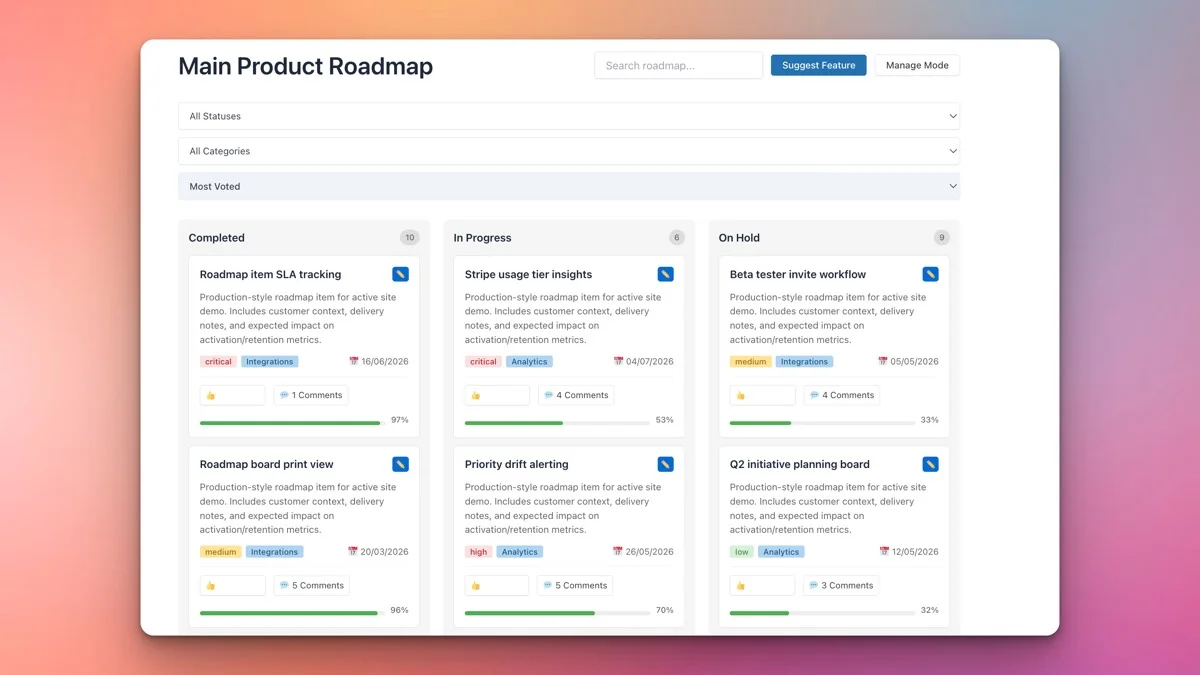
A typical sprint board configuration looks like:
- To Do, Items committed for this sprint but not yet started.
- In Progress, Items currently being worked on.
- In Review, Items in code review or QA testing.
- Completed, Items finished and ready for release.
As you work through the sprint, items move from left to right across the board. The visual progress is motivating for the team and informative for stakeholders. A glance at the board tells you exactly where the sprint stands without needing a status meeting.
For EDD plugin developers, this board also serves a dual purpose. It is your internal sprint tracker and your public-facing roadmap simultaneously. Customers see the same board you use for planning, which means they always have an accurate picture of what is being worked on right now.
Running Sprint Planning with Filters
Sprint planning is the ceremony where you decide what work to commit to for the upcoming sprint. With Product Roadmap, the planning session is straightforward and filter-driven.
Step 1: Review the Backlog
Open your roadmap in the WordPress admin and filter to show items not yet assigned to a Timeline. These are your backlog items. Sort by Priority and vote count to see what is most important and most requested.
Step 2: Assess Capacity
Based on your team size and the sprint duration, estimate how many items you can realistically complete. Use the Priority-as-story-points mapping described above. A two-person team on a two-week sprint might commit to 20-30 story points worth of work.
Step 3: Select Sprint Items
Drag items from the backlog into the current sprint’s Timeline. Mix priorities to balance impact with achievability. Every sprint should include at least one customer-facing improvement (to maintain the public roadmap’s momentum) and room for technical debt or bug fixes.
Step 4: Set Initial Status
All selected items start in the “To Do” column. Do not pre-assign items to “In Progress” unless someone is literally starting work in the next hour. Clean status at sprint start makes progress tracking meaningful throughout the cycle.
Step 5: Communicate the Plan
Because Product Roadmap is public, your sprint plan is automatically communicated to customers the moment you publish it. No separate announcement needed. Customers who follow your roadmap see the new sprint items appear and know exactly what your team is working on.
Tracking Progress with Percentage Completion
Product Roadmap includes percentage-based progress tracking on each item. For sprint management, this is more useful than a simple status change because it shows incremental progress within each stage.
An item sitting in “In Progress” for three days could mean anything. An item sitting in “In Progress” at 75% tells you it is almost done. An item at 20% after three days tells you it is behind schedule and might not make the sprint.
Here is how to use percentage tracking effectively during sprints:
Update Daily
At the end of each workday, update the percentage on every in-progress item. This takes less than two minutes and gives you a real-time dashboard of sprint health. It also replaces the need for formal standup meetings if your team is small enough.
Use Honest Numbers
The temptation is to inflate percentages to make progress look good. Resist this. A sprint that shows honest 40% completion at the midpoint is more useful than one that shows 80% and then stalls for the remaining days. Honest tracking lets you identify problems early and adjust scope before the sprint ends.
Define What 100% Means
Before the sprint starts, agree on what “done” means for each item. Does 100% mean the code is written? Or does it mean the code is written, reviewed, tested, and merged? Being explicit prevents the common trap where an item is “done” for a week while it sits in an untested pull request.
Track Velocity Over Time
After a few sprints, you will have data on how many percentage points your team completes per sprint. This is your velocity, and it makes future sprint planning dramatically more accurate. If you consistently complete 80 points per sprint, you know not to commit to 120.
Sprint Reviews Using the Completed Column
At the end of each sprint, the Completed column on your Kanban board becomes your sprint review artifact. Every item that made it to “Completed” during the sprint is visible in one place, making reviews fast and focused.
Here is how to run an effective sprint review with Product Roadmap:
What Shipped
Walk through every item in the Completed column. For each one, note what was built, any deviations from the original plan, and the impact on customers. For items that are publicly visible on the roadmap, customers can see these completions in real time.
What Did Not Ship
Equally important: review items that were committed but did not make it to Completed. Why? Was the estimate wrong? Did unexpected complexity arise? Did a higher-priority issue interrupt the sprint? These are not blame questions; they are learning opportunities.
Customer Impact
For EDD store owners, connect sprint completions to business metrics. Did shipping that feature reduce support tickets? Did it generate upsell opportunities? Did customers who voted for the feature leave positive reviews? Tying sprint output to business results keeps the team motivated and focused on value delivery.
Carry-Over Items
Items that did not complete move back to the backlog or carry over to the next sprint. In Product Roadmap, this means reassigning their Timeline to the next sprint period. Update their percentage to reflect actual progress so the next sprint starts with accurate data.
Retrospectives: What Product Roadmap Data Tells You
Sprint retrospectives are where the team reflects on how the sprint went, not what was built but how it was built. Product Roadmap provides several data points that feed directly into retrospective discussions.
Completion Rate
How many items moved to Completed versus how many were committed? A healthy sprint completes 80-90% of committed items. Consistently below that suggests overcommitment. Consistently at 100% might mean you are undercommitting and could push harder.
Progress Trajectory
Look at how percentages progressed throughout the sprint. Did items move steadily, or did everything jump from 20% to 100% on the last day? Steady progress indicates good estimation and disciplined work. Last-day rushes indicate hidden problems that surface too late.
Customer Vote Alignment
How many completed items had high vote counts? If you are consistently shipping low-vote items while high-vote items sit in the backlog, there is a disconnect between your sprint priorities and customer demand. The voting data helps you recalibrate.
Priority Distribution
Review the priority mix of completed items. An all-Low sprint means you shipped many small things but no meaningful improvements. An all-Critical sprint means you tackled one big thing and neglected smaller wins. The ideal mix includes a range of priorities.
Managing Your Product Backlog
Between sprints, your Product Roadmap board serves as your product backlog. All items not assigned to a specific sprint Timeline live here, organized by priority, category, and vote count.
Effective backlog management practices:
- Groom weekly. Spend 30 minutes each week reviewing backlog items. Update priorities based on new customer feedback, close items that are no longer relevant, and refine descriptions so items are ready for sprint selection.
- Use votes as a health check. Items with zero votes after 90 days on the board should be archived or deprioritized. They represent ideas that seemed good in theory but did not resonate with customers.
- Separate bugs from features. Use categories or tags to distinguish bug fixes from feature requests. This ensures your sprint mix always includes both types of work.
- Keep the backlog visible. Because Product Roadmap is public, your backlog is visible to customers. This is a feature, not a bug. Customers can see everything you are considering, vote on what matters, and trust that their input will be seen.
- Limit backlog size. A backlog with 500 items is not a backlog; it is a graveyard. Archive items older than six months with low votes. A lean backlog of 30-50 active items is easier to manage and more honest about what you will realistically build.
Upgrading to Pro for Multi-Sprint Boards
The free version of Product Roadmap handles single-board sprint management well. But if you are running sprints across multiple products, or if you need separate boards for your public roadmap and internal sprint tracking, the Pro version unlocks multi-board capabilities.
With Pro, you can create separate boards for different purposes:
- Public Roadmap Board: Customer-facing, showing planned features and accepting votes. This is your marketing and transparency tool.
- Sprint Board: Internal or semi-public, showing the current sprint’s items with detailed status tracking. This is your team’s daily work tracker.
- Product-Specific Boards: If you sell multiple EDD products, each product can have its own board with its own sprint cadence and backlog.
Pro also adds email notifications, which are valuable for sprint workflows. Team members can subscribe to board changes and get notified when items move between columns. Customers can subscribe to specific items and get notified when their requested features ship.
For teams managing more than one EDD product, Pro’s multi-board support transforms Product Roadmap from a simple roadmap tool into a lightweight but complete sprint management system.
Making Agile Work Without the Complexity
The goal of agile is not to follow a process. It is to ship better software faster while staying responsive to customer needs. For WordPress plugin and theme developers selling through EDD, Product Roadmap provides the structure to do that without the overhead of enterprise project management tools.
You get sprint buckets through Timelines, effort estimation through Priority levels, visual progress through the Kanban board, and customer input through voting. That is everything a small team needs to run productive sprints.
The best part: because Product Roadmap is public-facing, your agile workflow doubles as a customer communication tool. Your sprint board is your roadmap. Your completed column is your changelog. Your backlog is your feature request board. One tool, multiple purposes, zero complexity tax.
If you have been thinking about adding structure to your development process but dreading the complexity of traditional agile tools, start here. Install Product Roadmap, set up your first sprint, and see how much more focused your next two weeks become.