10 Best Google Reviews Plugins for WordPress


If you’re running a WordPress website, having authentic customer reviews is crucial to gaining credibility. Among the many review platforms, Google Reviews hold a unique authority and weight, making them essential for any business looking to establish trust with potential customers. Using a good Google reviews plugin doesn’t just help you display Google reviews directly on your website; it also streamlines the process of collecting and showcasing feedback so you aren’t copy-pasting testimonials by hand.

This guide covers ten of the strongest Google reviews plugins for WordPress in 2026, focusing on options that are reliable, actively maintained, and offer real customization rather than a locked-down free tier. Whether you want to showcase recent reviews or curate a specific set of positive feedback, one of these will fit your site. Let’s get into the list and why you need one of these plugins in the first place.
What Do Google Reviews Plugins Actually Do?
A Google reviews plugin pulls star ratings and written feedback from your Google Business Profile and renders them somewhere on your WordPress site, whether that’s a dedicated page, a homepage widget, or a floating badge. The better ones integrate directly with the Google Places API, syncing new reviews automatically instead of requiring you to copy them over by hand. Displaying reviews this way increases trust, can support SEO through structured data, and tends to improve conversion rates on product and service pages. Some plugins add customization options to match your site’s look, while others focus on advanced features like rich snippets that make star ratings show up directly in Google search results.
Why Add a Google Reviews Plugin to Your Site?
A handful of concrete benefits show up consistently once a business adds Google reviews to its WordPress site:
- Build trust fast: Google reviews carry more weight with most shoppers than a testimonial slider you wrote the copy for yourself, because visitors know they came from a third-party platform.
- Support SEO: Plugins that add review schema markup can make your star rating appear directly in search results, which tends to lift click-through rate even before ranking position changes.
- Improve conversion rates: Positive reviews sitting next to a call-to-action nudge undecided visitors toward booking a service or completing a purchase, an effect covered in more depth in our piece on ecommerce trends that actually drive conversions.
- Stay current automatically: Most of the plugins below sync new reviews on a schedule, so your site never shows stale feedback from two years ago.
- Cut down manual work: Pulling reviews automatically saves the time of screenshotting and manually formatting testimonials every time a new one comes in.
Key Features Worth Comparing
Before picking one, it helps to know which features actually separate a good plugin from a mediocre one:
- Real-time syncing: The plugin should pull new Google reviews automatically rather than requiring a manual refresh.
- Customizable display: Look for plugins that let you adjust the review widget’s look to match your site’s design instead of forcing a fixed template.
- Multiple review platforms: Some plugins pull in Yelp and Facebook alongside Google, which gives visitors a broader picture of your reputation.
- SEO support: Rich snippet markup helps your rating show up in search results, not just on your own site.
- Straightforward setup: The plugin should connect to your Google Business Profile without requiring you to hand-edit an API key in most cases.
- Flexible placement: Widgets, shortcodes, and blocks give you more control over exactly where reviews appear.
1. WP Business Reviews

WP Business Reviews aggregates reviews from Google, Yelp, Facebook, Yellow Pages, and Zomato, which makes it a strong fit for businesses that want their whole reputation shown in one place rather than just their Google rating.
Key Features
- Aggregates Google reviews alongside Yelp, Facebook, Yellow Pages, and Zomato
- Automatically fetches new reviews as they come in
- Filtering to exclude reviews below a chosen star rating
- Multiple display formats: gallery, carousel, and list
Pros
- Supports more review platforms than most competitors
- No coding required for setup
- Genuinely customizable display options
Cons
- Paid plans start at $49/year for a single site; there is no permanent free tier
Why It Stands Out
WP Business Reviews doesn’t limit you to Google alone; you can pull in feedback from several platforms at once, which makes it a strong pick if you want to show a wide range of social proof rather than a single source.
Also read: 10 Best SEO Plugins for WordPress
2. Rich Showcase for Google Reviews
Rich Showcase for Google Reviews (formerly listed as Google Reviews Widget) is a free WordPress.org plugin with over 100,000 active installs, making it one of the most widely used options on this list. Its straightforward interface and generous free tier make it a solid pick for beginners and experienced site owners alike.
Key Features
- Real-time Google review updates
- Multiple display formats (slider, grid, list)
- Mobile-responsive design out of the box
Pros
- Lightweight and fast-loading
- Free version covers the core review-display features most sites need
- 4.9-star average rating across more than 1,600 reviews on WordPress.org
Cons
- Deeper customization and multi-location support sit behind the premium version
Why It Stands Out
This is the plugin to reach for if you want a no-fuss solution for displaying Google reviews with minimal setup and a track record of six-figure install numbers backing it up.
3. Starfish Reviews
Starfish Reviews goes a step beyond passive display: it automates review requests by email and text, then aggregates the results from Google, Facebook, and Yelp. This plugin fits businesses that want to actively grow their review count, not just show off the reviews they already have.
Key Features
- Automated review request campaigns via email and text
- Aggregates reviews from Google, Facebook, and Yelp
- Customizable review display layout
Pros
- Actively grows your review count instead of only displaying existing ones
- Freemium model with a free trial to test before paying
- Clean, professional widget design
Cons
- More setup steps than a pure display plugin, since it also handles outreach
- Full review-request automation requires a paid plan
Why It Stands Out
Starfish Reviews suits businesses that want to go beyond just displaying Google reviews and actively manage the process of collecting more of them from multiple platforms at once.
4. Reviews Feed
Reviews Feed is a free WordPress.org plugin with over 100,000 active installs that displays Google and Yelp reviews either in a single combined feed or as separate feeds per platform.
Key Features
- Combined or separate feeds for Google and Yelp reviews
- Support for multiple business accounts on the same site
- Regularly updated, with new releases shipping frequently
Pros
- Free with a genuinely useful feature set, not just a crippled trial
- Actively maintained, with updates shipping on a tight cadence
- Simple setup through the WordPress Customizer
Cons
- Design customization is more limited than paid, design-first alternatives
Why It Stands Out
Reviews Feed is a practical pick for businesses that want Google and Yelp reviews together without paying for a premium plugin, and its update frequency is a good signal that it won’t quietly go stale.
5. Google Places Reviews Pro
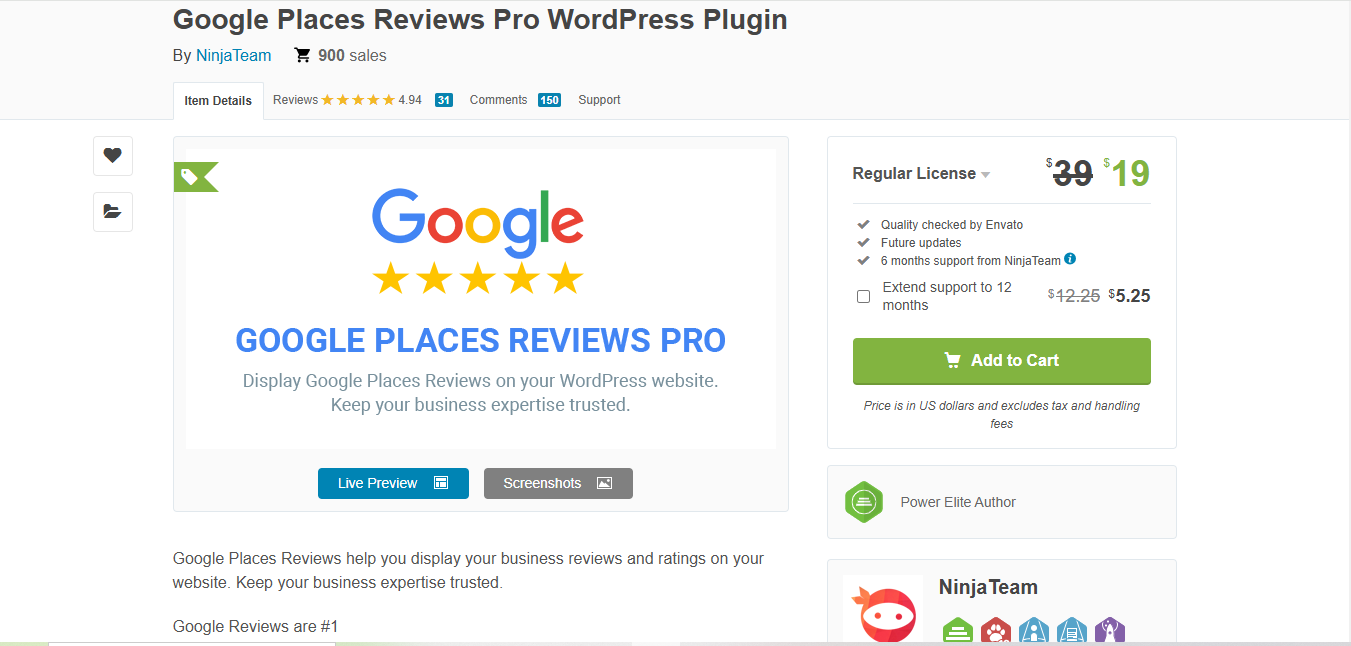
Google Places Reviews Pro is a CodeCanyon plugin built for businesses with multiple locations, with custom review filtering and a strong track record of nearly a thousand sales and a 4.9-star average.
Key Features
- Multi-location support for businesses with several branches
- Custom review filtering by rating or keyword
- Full integration with the Google Places API
Pros
- Well suited to businesses with multiple locations
- Highly customizable display options
- Strong sales history and rating on CodeCanyon
Cons
- One-time purchase rather than a WordPress.org free listing, so support runs through CodeCanyon’s system
- Initial setup takes longer than the simpler plugins on this list
Why It Stands Out
Google Places Reviews Pro is the strongest option here for businesses managing reviews across several locations rather than a single storefront.
Also read: Local SEO for Multiple Locations
6. Reviews and Rating – Google Reviews
Reviews and Rating – Google Reviews makes displaying Google reviews straightforward, with over 20,000 active installs and more than 250 design templates to choose from.
Key Features
- Direct integration with the Google Places API
- 250+ customizable design templates
- Shortcode, widget, and Gutenberg block support
Pros
- Completely free, with no premium upsell required for core functionality
- Simple to install and configure
- GDPR-compliant by design
Cons
- The sheer number of templates can feel overwhelming when you’re picking one for the first time
Why It Stands Out
For users seeking a genuinely free, actively maintained solution to display Google reviews, this plugin’s install count and template library are hard to beat.
7. Widget for Google Reviews
Widget for Google Reviews is a highly rated plugin that displays your Google reviews in a variety of formats, built for simple integration and fast performance.
Key Features
- Customizable review widget
- Automatic real-time updates
- Free and premium versions available
Pros
- Lightweight and fast
- Easy to install and configure
- Free version provides essential display features
Cons
- Advanced customization sits behind the premium version
Why It Stands Out
For businesses that want a simple, fast solution to display Google reviews, Widget for Google Reviews delivers with minimal setup and a seamless connection to your Google Business Profile.
8. WP Google Review Slider
WP Google Review Slider is a free plugin with over 30,000 active installs that displays reviews in a slider or grid layout, with reviews cached locally on your own server for faster page loads.
Key Features
- Slider and grid display layouts
- Reviews cached locally rather than fetched live on every page load
- Simple shortcode-based placement
Pros
- Local caching keeps page load times fast even with many reviews
- Free to use with a clean, no-frills setup
- Good fit for sites already worried about third-party script bloat
Cons
- Fewer design themes than some of the premium alternatives on this list
Why It Stands Out
Because reviews are stored locally instead of pulled live from Google on every page view, WP Google Review Slider tends to load noticeably faster than plugins that hit the API on each visit.
9. Rich Snippets for Google Reviews
Rich Snippets for Google Reviews is a premium plugin built specifically to help businesses use Google reviews for SEO. If getting your star rating to appear directly in search results is the priority, this is the plugin to look at first.
Key Features
- Rich snippet schema markup for Google reviews
- Real-time Google review syncing
- Customizable review display
Pros
- Directly targets the SEO benefit of review schema, rather than treating it as an afterthought
- Straightforward setup
- Displays star ratings in search engine results, not just on-site
Cons
- Requires the premium version for full functionality
Why It Stands Out
Rich Snippets for Google Reviews is built around the SEO angle specifically, which makes it the right pick if display alone isn’t the goal and you want the rating to show up in the search results page itself.
10. Easy Reviews
Easy Reviews is a review management platform rather than a simple display plugin. Its Testimonial Publisher tool shows selected Google reviews on your website, and its Testimonial Generator lets visitors leave reviews directly on your site, including people without a Google account.
Key Features
- Testimonial Publisher displays curated Google reviews on your site
- Testimonial Generator collects new reviews and testimonials directly, no Google account required
- Competitor tracking and Google Business Profile setup assistance
Pros
- Combines review display with active review collection in one subscription
- No coding required for installation
- Useful for businesses without an existing Google review volume to display
Cons
- Subscription-based, starting at $19/month per tool; there is no free tier
- Costs more over time than a one-time-purchase or free WordPress.org plugin
Why It Stands Out
Easy Reviews is worth considering specifically for businesses that need help generating reviews in the first place, not just displaying the ones they already have.
Comparison Table
| Name of Tool | Best For / Standout | Key Feature | Pricing |
|---|---|---|---|
| WP Business Reviews | Aggregating reviews from multiple platforms like Google, Yelp, and Facebook | Customizable review display with widgets and shortcodes | From $49/year, no permanent free tier |
| Rich Showcase for Google Reviews | Simple, high-install-count integration for Google reviews | Multiple display formats (slider, grid, list) | Free, with a premium tier for advanced options |
| Starfish Reviews | Actively generating new reviews, not just displaying existing ones | Automated review request campaigns plus multi-platform display | Freemium with a free trial |
| Reviews Feed | Free, actively updated Google and Yelp display | Combined or separate feeds per platform | Free |
| Google Places Reviews Pro | Managing reviews for businesses with multiple locations | Custom review filtering and multi-location support | One-time purchase via CodeCanyon |
| Reviews and Rating – Google Reviews | Displaying Google reviews with a huge template library | 250+ design templates, GDPR compliant | Free |
| Widget for Google Reviews | Fast, simple Google reviews integration with real-time updates | Customizable review widget with real-time updates | Free, with premium features for advanced options |
| WP Google Review Slider | Fast page loads via locally cached reviews | Slider and grid layouts, reviews cached on your own server | Free |
| Rich Snippets for Google Reviews | Leveraging Google reviews for SEO with rich snippets | Schema markup so ratings show in search results | Premium version required for full functionality |
| Easy Reviews | Generating new reviews, not just displaying them | Testimonial Generator and Testimonial Publisher tools | From $19/month per tool |

How Free and Paid Options Actually Differ
Most of the free plugins on this list, particularly Reviews Feed, Reviews and Rating – Google Reviews, and WP Google Review Slider, cover the core job well: pulling reviews from your Google Business Profile and displaying them somewhere on your site. What you give up by staying free is usually design flexibility and multi-platform aggregation, not reliability. None of the free options here are abandoned or poorly rated; they’re simply narrower in scope than the paid tools.
Paid tools earn their price in one of two ways. WP Business Reviews and Google Places Reviews Pro charge for breadth: more platforms, more locations, more filtering. Starfish Reviews and Easy Reviews charge for an active function beyond display, namely generating new reviews through email and text outreach. If your Google Business Profile already has a healthy number of reviews, a free display plugin is usually enough. If you’re starting from near zero, a review-generation tool pays for itself faster than a display-only plugin ever will.
Watch for This Before You Install Any Review Plugin
Review plugins are a moving target. Two products that were commonly recommended in this category as recently as mid-2026 have since shut down or been renamed, which is a reminder to check a plugin’s WordPress.org listing for its last-updated date before installing anything, review roundup included. A plugin with no updates in over a year is a bigger risk than a slightly less polished one that ships changes regularly. It’s also worth reading a platform’s terms before displaying reviews from it: some review platforms restrict how their reviews can be embedded outside their own site, so confirm the plugin you choose stays within the rules of the platform it’s pulling from.
Frequently Asked Questions
Do I need a Google Business Profile before I can use these plugins?
Yes. Every plugin on this list pulls reviews from an existing Google Business Profile, so you need one set up and verified first. If you haven’t claimed your profile yet, do that before installing any of these tools, since none of them can generate a profile for you.
Will a Google reviews plugin slow down my site?
It depends on how the plugin fetches reviews. Plugins that cache reviews locally, like WP Google Review Slider, avoid hitting the Google API on every page load, which keeps things fast. Plugins that fetch reviews live on each visit can add a small delay, so check whether a plugin caches results before installing it on a page where speed really matters.
Can I display reviews from more than one location?
Yes, but not every plugin supports it. Google Places Reviews Pro and WP Business Reviews both handle multi-location setups directly. Several of the simpler free plugins are built around a single Google Business Profile and would need one instance per location, which gets unwieldy past two or three sites.
Is it against Google’s rules to display reviews this way?
Displaying reviews pulled through the official Google Places API, with proper attribution, is within Google’s terms. What crosses the line is manually copying and editing review text, or fabricating reviews outright, which is why every plugin on this list connects through the API rather than asking you to paste text in by hand.
Choosing the Right Google Reviews Plugin for Your Site
When picking a Google reviews plugin, weigh how many reviews you already have, whether you want other platforms folded in, and how much of the SEO angle matters to your goals. From simple display plugins to full review-generation platforms, the list above covers real, currently maintained options for showcasing your Google reviews and building trust with visitors. Install one, connect it to your Google Business Profile, and give it a week to start pulling in fresh reviews before judging the result.
Interesting Reads
How to Have 2 Lines of Text in WordPress Header