15 EDD Enhancement Plugins for Your Site

Why a Fresh EDD Store Needs More Than the Core Plugin
Easy Digital Downloads handles the essentials of selling files, software, and digital products out of the box, but a store that only runs core EDD tends to hit the same ceiling within a few months: no way to add products in bulk, plain unstyled receipt emails, no visibility into which items actually convert, and a checkout flow that feels a step behind stores running WooCommerce with a full plugin ecosystem behind them.
The plugins below fill in those gaps. Every one has been checked against the WordPress.org plugin directory for current status as of this update, since a few well-known names from earlier versions of lists like this one have since been discontinued or, in one case, pulled for a security issue. Where that happened, it’s called out directly rather than quietly swapped, along with what to use instead.
The Plugins Covered Here:
- WP Sell Services
- Bulk Edit Easy Digital Downloads
- WP Menu Cart
- WP HTML Mail – Email Designer
- Recapture for Easy Digital Downloads
- SEOPress
- EDD – Mollie Gateway
- Advanced Discount Options (a note on EDD Advanced Discounts)
- ExactMetrics (Google Analytics Dashboard for WP)
- EDD Free Link
- Schema
- EDD Product Slider
- Calculated Fields Form
- myCred (a note on BadgeOS)
- Simple Download Monitor
1. WP Sell Services
If your store sells anything beyond a static digital file, phone consultations, video editing, custom design work, software installation, WP Sell Services turns that into a proper service marketplace built on top of Easy Digital Downloads. Vendors can list tiered packages, and every order comes with a built-in conversation thread so the customer can submit requirements and go back and forth with the vendor without either side needing a separate messaging tool.
Features that are offered by this plugin:
- Service as a product, with tiered packages
- Customer requirement submission after checkout
- Order email notifications
- Vendor-customer chat section
- Order management dashboard
- Service reviews and ratings
Product page: WP Sell Services2. Bulk Edit Easy Digital Downloads
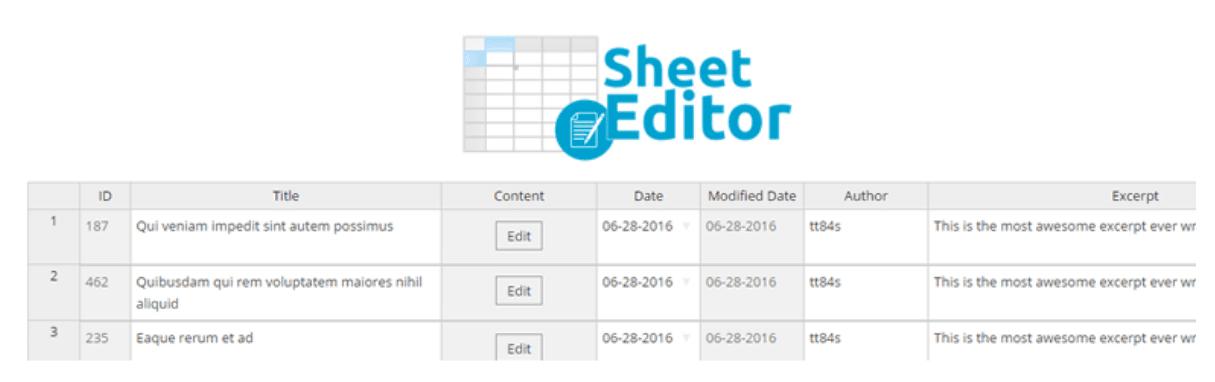
Editing products one at a time through the standard WordPress editor gets tedious fast once a catalog grows past a handful of items. This plugin puts every EDD product into a spreadsheet-style table right inside WordPress, so you can edit prices, titles, or details across dozens of products at once and save the whole batch without any export/import step.
Features that are offered by this plugin:
- All EDD products shown in a single editable table
- Bulk edit pricing, titles, and download details
- No export/import round-trip required
- Bulk-create new downloads directly from the table
- Changes apply live once saved
Download: Bulk Edit Easy Digital Downloads3. WP Menu Cart

Earlier versions of lists like this one pointed to “WooCommerce Menu Cart,” but that plugin, as its name states plainly, is built specifically for WooCommerce and won’t read an EDD cart. The plugin that actually works with Easy Digital Downloads, from the same developer, is WP Menu Cart, and its own listing confirms compatibility with both WooCommerce and EDD. It drops a cart icon into your navigation menu showing live item count or price, so a visitor never has to click through to a separate cart page just to check what’s in it.
Features that are offered by this plugin:
- Cart icon, item count, price, or a combination in the menu bar
- Show always, or only when the cart has items
- Float left, float right, or follow your menu’s default placement
- Custom CSS support
- Setup takes under a minute
Download: WP Menu Cart4. WP HTML Mail – Email Designer

Default WordPress and EDD emails are plain text with no branding, which looks unfinished next to a checkout page you’ve spent real effort designing. WP HTML Mail replaces that with a visual, no-code editor for building responsive receipt and notification emails, so a customer’s purchase confirmation actually looks like it came from a real business.
Features that are offered by this plugin:
- Responsive, device-independent templates
- Text or image header options
- Customizable colors and fonts
- Legal information footer
- Inline CSS for consistent rendering across email clients
- Test mode and live preview
Download: WP HTML Mail5. Recapture for Easy Digital Downloads

Worth flagging directly: Jilt for Easy Digital Downloads, the plugin that used to sit in this spot, was closed on the WordPress.org repository in May 2022 at the author’s request and is permanently unavailable. If an older guide or a cached version of this article still points you toward it, don’t try to chase down an install file from a third-party source. It’s gone, and there’s no supported path back.
For the same job, recovering abandoned checkouts with automated follow-up emails, Recapture for Easy Digital Downloads is an actively maintained plugin built specifically for EDD stores rather than adapted from a WooCommerce tool. It captures email addresses at checkout before the sale completes, then sends a scheduled sequence to bring the customer back if they don’t finish.
Download: Recapture for Easy Digital Downloads6. SEOPress

Digital product pages need the same SEO fundamentals as any other content: clean sitemaps, structured data, sensible meta descriptions, and a way to manage redirects when a product URL changes. SEOPress handles all of that without the white-label restrictions or upsell nagging some competing plugins are known for, and it works cleanly alongside EDD product pages without any special configuration.
Download: SEOPress7. Easy Digital Downloads – Mollie Gateway

For stores selling into European markets where Mollie is a common processor, this extension connects your Mollie account directly to EDD checkout. Whatever payment methods you’ve enabled in Mollie become available at checkout automatically, and you can also run it in webhook-only mode to keep receiving payment confirmations even if you’ve turned off Mollie as an active checkout option.
Download: EDD Mollie Gateway8. A Note on Advanced Discount Options

EDD Advanced Discounts, the plugin previously listed here for setting a maximum cart amount alongside the standard minimum, was closed on the WordPress.org repository in July 2025 at the author’s request and is no longer available for download. Rather than point you toward an unverified replacement, it’s worth knowing that Easy Digital Downloads’ own core discount system already covers percentage and flat-amount codes with a minimum cart requirement, which handles the large majority of discount strategies most stores actually run.
If you specifically need a maximum-cart-limit condition or more advanced discount stacking rules, check the official extensions catalog at easydigitaldownloads.com before searching WordPress.org, since first-party extensions there tend to stay better maintained against core EDD updates than third-party add-ons.
9. ExactMetrics (Google Analytics Dashboard for WP)
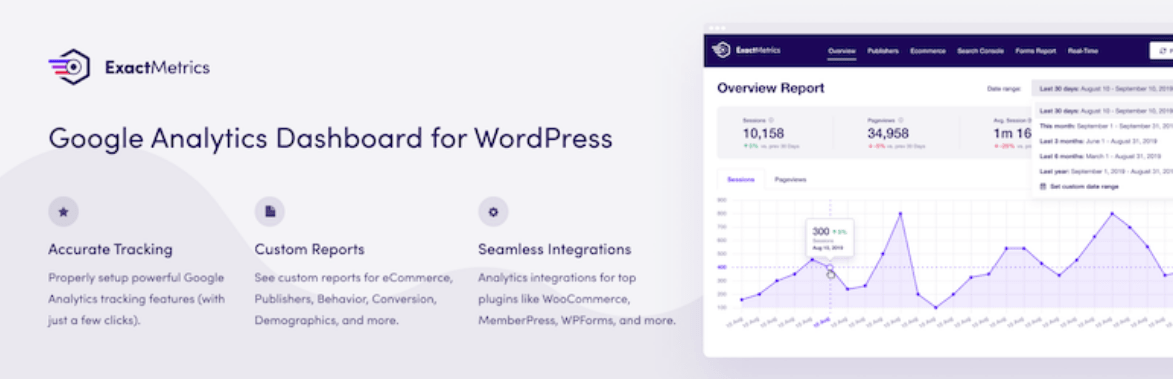
ExactMetrics (the plugin most people still search for under its older name, Google Analytics Dashboard for WP) sets up Google Analytics tracking without touching a line of code, and surfaces the numbers that matter directly inside the WordPress dashboard instead of making you log into a separate Analytics account. Its enhanced eCommerce tracking add-on works with EDD specifically, so you can see which products actually drive revenue rather than just which pages get traffic. The plugin currently sits at roughly 300,000 active installs, a healthy, actively maintained user base even if older marketing claims of “over a million” don’t reflect its current numbers.
Download: ExactMetrics10. Easy Digital Downloads Free Link
For products you’re giving away rather than selling, forcing a visitor through the full add-to-cart and checkout flow just to grab a free file is unnecessary friction. This plugin swaps the add-to-cart button for a direct download link whenever a product is free and has a single, externally hosted file, cutting the process down to one click.
Download: EDD Free Link11. Schema

A lightweight, focused plugin that adds schema.org structured data in the recommended JSON-LD format automatically, without the bloat some all-in-one SEO suites carry. Well-formed structured data can help Google display richer search results for your product pages, star ratings, price, and availability shown directly in the listing, rather than just a plain blue link and a snippet of text.
Download: Schema12. EDD Product Slider
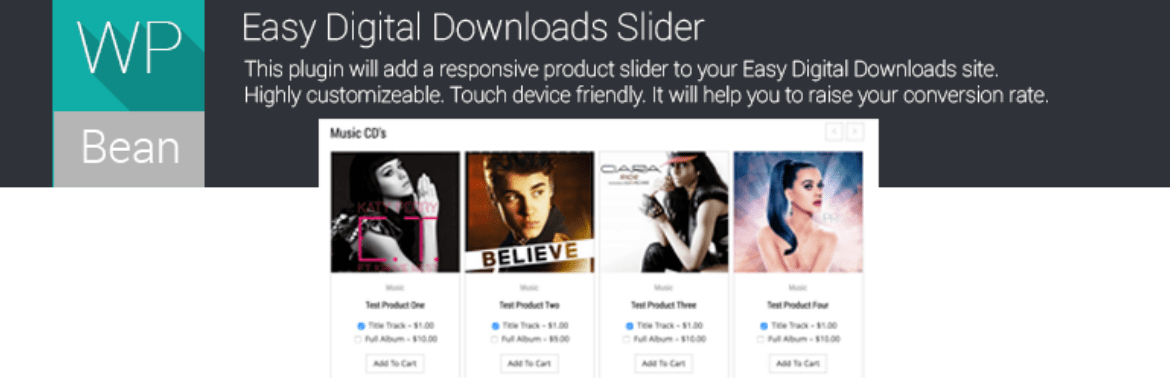
Adds a touch-friendly, responsive product carousel anywhere you drop a shortcode, useful for a homepage featured-products section or a “customers also bought” strip on a product page. Highly customizable without requiring any settings changes to get a clean result out of the box.
Features that are offered by this plugin:
- Responsive product carousel
- Image, price, and cart button shown in each slide
- Flat, modern default styling
- Simple shortcode with multiple configurable attributes
- Touch-device friendly
Download: EDD Product Slider13. Calculated Fields Form

Not EDD-specific, but genuinely useful for a service-based digital store: this form builder handles both simple and complex calculations, quote estimators, loan calculators, date-based pricing, and similar tools, which suits any store selling variable-priced services rather than flat-rate downloads.
Features that are offered by this plugin:
- Visual form builder with multiple field types
- Unlimited calculated fields per form
- Supports advanced operations including ternary logic and common math functions
- Drop-downs, checkboxes, radio buttons, dates, and number fields
Download: Calculated Fields Form14. myCred (a note on BadgeOS)

This one needs a direct warning rather than a quiet swap: BadgeOS, the plugin previously recommended here for achievements and badges, was closed on the WordPress.org repository in June 2023 specifically for a security issue, and it has not been reopened since. Don’t install it from any source still hosting the old package.
For the same points-badges-ranks functionality, myCred is the long-standing, actively maintained alternative and is currently updated on a regular cycle. If you’d rather run something lighter and free with no premium upsell path, WB Gamification is a genuinely free points-and-badges plugin worth a look, though myCred has the deeper feature set if your store needs more advanced reward logic.
Download: myCred15. Simple Download Monitor

Useful for tracking exactly how many times a file gets downloaded, independent of your sales data, which matters if you’re distributing free resources or lead magnets alongside paid products. Password-protect any downloadable file so visitors need a code before grabbing it, and optionally enable an AJAX file-tree browser so visitors can explore your full file library rather than hunting for one specific download link.
Download: Simple Download MonitorWhat to Check Before Installing Any Plugin on This List
Every entry above was confirmed active on the WordPress.org repository at the time of this update, but plugin status changes, and a list like this one is a snapshot, not a permanent guarantee. Before installing anything, check the plugin’s “Tested up to” version against your current WordPress version, look at when it was last updated (anything untouched for over a year deserves a second look before you rely on it for a live store), and read the most recent handful of reviews for reports of conflicts with your specific theme or other plugins.
It’s also worth testing any new plugin on a staging copy of your store before activating it on the live site, particularly payment gateway extensions and anything touching checkout, since a broken checkout flow costs real revenue every hour it’s live.
Avoiding Plugin Bloat While Still Covering the Gaps
Fifteen plugins is a lot for one store to run simultaneously, and installing all of them at once isn’t the goal here. Most stores get real value from four or five: a bulk editor if the catalog is large enough to need it, an SEO plugin, an analytics dashboard, a menu cart, and whichever payment gateway matches the audience’s region. Add the rest only as a specific need comes up, a discount campaign, a gamification push, a free lead magnet, rather than installing everything up front and letting unused plugins slow the site down or create update conflicts nobody’s tracking.
Why Plugins Get Closed, and What It Means for You
Three plugins on the original version of this list, Jilt for EDD, EDD Advanced Discounts, and BadgeOS, are no longer available, and the reasons behind each closure are worth understanding rather than treating as random bad luck. A plugin closes at the author’s request for all kinds of ordinary reasons: the business behind it shut down, the developer moved on to a different project, or a company acquisition changed priorities. That covers the Jilt and Advanced Discounts closures here. BadgeOS is a different case entirely, closed specifically because the WordPress Plugin Review Team identified a security vulnerability and the issue wasn’t resolved before the closure took effect.
The practical lesson isn’t to avoid third-party plugins altogether, a store running only core EDD with no extensions is missing a lot of functionality. It’s to build a habit of periodically checking your installed plugins against the WordPress.org repository, since a plugin that was safe and actively maintained when you installed it two years ago isn’t guaranteed to still be either today. A closed plugin still installed on your site keeps running unless you remove it, but it stops receiving security patches the moment it closes, which is a quiet but real risk on a store handling customer payment data.
Frequently Asked Questions
Is it safe to keep using a plugin after it’s been closed on WordPress.org?
It depends heavily on why it closed. A closure for “author request” with no security flag usually just means updates have stopped, which is a growing risk over time as WordPress core moves forward, but not an immediate emergency. A closure specifically for a security issue, like BadgeOS, is a different situation entirely and that plugin should be deactivated and removed, not left running, regardless of how well it’s worked for you historically.
How often should I audit the plugins running on my EDD store?
A quarterly check is reasonable for most small to mid-sized stores, looking at each plugin’s last update date, its “tested up to” WordPress version, and whether it’s still listed as active on WordPress.org at all. Stores processing a high volume of transactions or storing sensitive customer data should check more frequently, since the cost of an exploited vulnerability scales with how much is riding on the store staying secure.
Do all of these plugins work together without conflicts?
Generally yes, since they cover distinct, non-overlapping functions, payments, email design, analytics, SEO, that rarely fight over the same hooks or resources. The most common conflict point on any WordPress site is between plugins that both try to modify checkout behavior or both load their own version of a JavaScript library, so pay closer attention when combining multiple payment gateway extensions or more than one popup/optin tool on the same store.
Should I install a plugin’s premium version if a free tier exists?
Only once the free tier’s limitations actually block something you need. Several plugins on this list, SEOPress and Calculated Fields Form among them, offer capable free tiers that cover most small-store needs without any paid upgrade. Start free, and upgrade only when a specific missing feature is costing you real time or sales, rather than paying upfront for capacity you’re not using yet.
Conclusion
Core Easy Digital Downloads gets a store selling, but these additions are what take it from functional to genuinely competitive: better emails, real analytics, cleaner SEO, and recovery tools for the checkouts that don’t complete on the first try. Install what your store actually needs, verify each plugin’s current status before you rely on it, and revisit this list periodically since the plugin landscape shifts more than most store owners expect.
If you haven’t installed EDD yet: Get Easy Digital Downloads
Want more ecommerce tools to upscale your store? Read this next.