Receipt Links Not Opening After an Easy Digital Downloads Update: What to Do
Old receipt and invoice links in emails stopped opening after EDD 3.7.1. What is happening, what to tell customers, and how to test updates first.

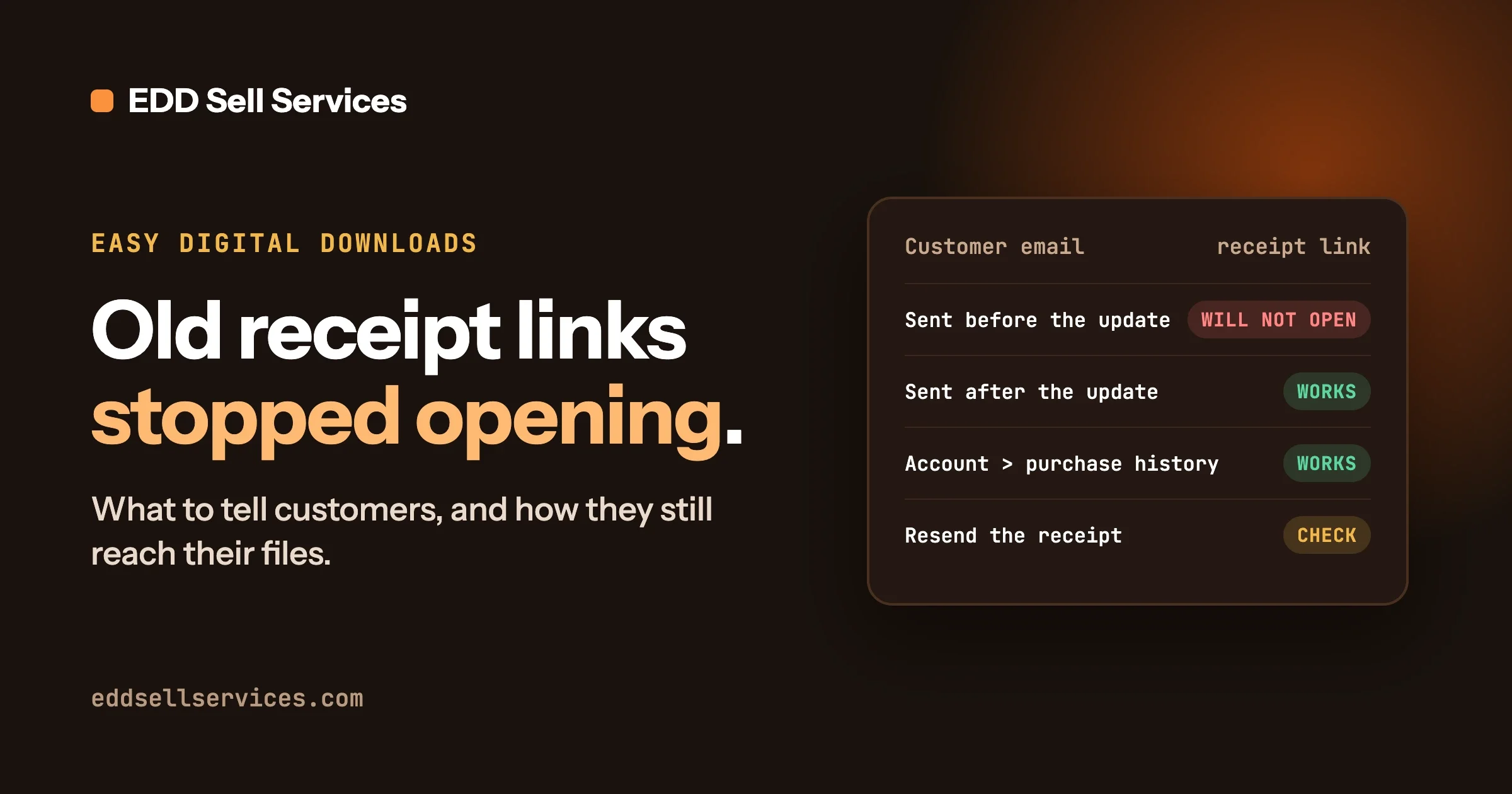
Since Easy Digital Downloads (EDD) version 3.7.1, the receipt and invoice links inside emails that were sent before you updated no longer open. As of 8 October 2026 the problem is reported on EDD’s public issue tracker, it has not been answered or fixed by the EDD team, and the newest release (3.7.1.1) still behaves the same way in its code. Emails sent after the update are fine, and customers can still reach their receipts and files by other routes, which this guide lists.
Everything below is written for the person who runs the store, not for a developer. Where a step needs a developer, we say so.
In this guide
- What is happening, and whether a fix exists today
- What your customers will see, in their words
- How to check whether your store is affected
- What to tell customers right now, with a reply you can copy
- The ways a customer can still reach a receipt and their files
- The workaround, and what a real fix would look like
- How to test an EDD update on a copy of your store next time
- Questions people ask
What is happening, and is there a fix?
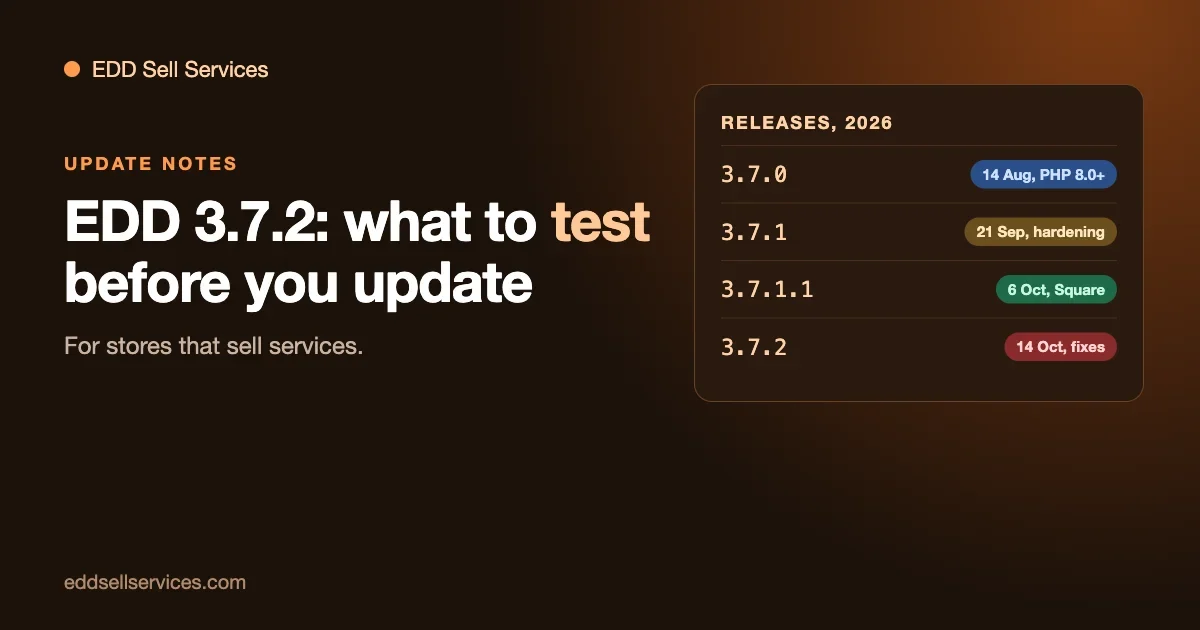
There is no fix yet. The problem was reported on EDD’s GitHub issue tracker (the public place where people report bugs in the plugin) on 28 September 2026, under the title “3.7.1: receipt and invoice links in emails sent before the update no longer open”. On 8 October 2026, when we read it, the report was still open, carried no labels, had no replies from anyone, and had no linked fix.
The release history matters here, so here is where things stand on that date:
- EDD 3.7.1 was published on GitHub on 21 September 2026. This is the version that changed how receipt links are built.
- EDD 3.7.1.1 was published on 6 October 2026 and is the current release on WordPress.org. Its changelog lists one item, about Square payments. It does not mention receipts.
- We also read the code of 3.7.1.1 on GitHub. The check that rejects old links is still there, unchanged.
So the honest answer today is: updating to the latest version does not repair old links. If EDD releases a fix, the simple instruction will be to update to that version, and we will say which one. Until then, this guide gives you the steps that keep your customers able to reach what they paid for.
One note on the issue numbers you may see mentioned online. The idea for this guide started from two reports, numbers 9849 and 9847. Only 9849 describes this problem. Number 9847 is about something unrelated (how the plugin information screen reports “tested up to” versions for licensed downloads), so ignore it for receipts.
What do customers actually see?
The reports we have seen come from customers, so here is the pattern in their words. Someone buys a product, receives the receipt email, and keeps it. Weeks later they click “View Receipt” or “View Invoice” in that email, usually because they need the invoice for their accounts or want to download the file again. The page does not show their receipt.
What they might write to you:
- “The link in my receipt email doesn’t work.”
- “It says I don’t have permission to see this order.”
- “It asks me to log in, but I never made an account.”
- “I can’t find my invoice.”
The issue report says the visitor gets a permission error or a login form, and that the buyer is blocked too, not just strangers. When we read the receipt code in 3.7.1.1 on GitHub, an old link that fails the new check ends with the page message “Sorry, trouble retrieving order receipt.” We read this in the code and have not reproduced it on a test store, so your customers may see a slightly different message depending on your theme and settings. The point is the same: the link goes nowhere useful.
Why does it happen? A short, plain explanation
A receipt link in an EDD email is not a plain address. It carries a long code at the end, built from the order. When the customer clicks, the store rebuilds that code and checks it matches. The code protects receipts, because without it anyone could guess order numbers and read other people’s orders.
Before 3.7.1, the store built that code with one method (an MD5 hash, a standard way of turning data into a fixed-length code). In 3.7.1, EDD switched to a different, signed method. The new check accepts only codes made the new way. Every email already sitting in a customer’s inbox carries a code made the old way, so after the update the store no longer recognises it. The issue report also lists the exact places this affects: the receipt link in purchase receipt emails, and the “View Invoice” link added by EDD Pro’s invoices feature.
The 3.7.1 changelog has a line that may be connected: “Orders: Increased the verification required for a guest to view an order receipt.” EDD has not said whether the effect on old emails is intended, so we will not guess at their reasons. What matters for you is the result: old links fail, new links work.
How can you check whether your store is affected?
Your store is affected if both of these are true:
- It now runs EDD 3.7.1 or later (including 3.7.1.1).
- It sent receipt or invoice emails while it was still on 3.7.0 or earlier.
If your store never sent a receipt before updating, there is nothing to repair. If it is a busy store, assume you are affected.
Step 1: find your EDD version
- In your WordPress admin, open Plugins.
- Find Easy Digital Downloads in the list. The version number is shown under its name.
- Write down the number, and write down roughly the date you updated. Your hosting dashboard or your update emails can help you find that date.
Step 2: find an old receipt email
Look in your own inbox for a receipt email from a purchase you made, or that a friendly customer or colleague made, before the update date. The admin copy of the sale notification does not count, because it goes to you and does not carry the customer’s receipt link. If you have no old email of your own, ask one trusted customer to try theirs, or check your email log if your email plugin keeps one.
Step 3: click the link
Open the old email and click the receipt link, and the invoice link if you use EDD Pro invoices. If you see the receipt, that email is fine. If you see an error, a login form that does not lead to the receipt, or a “trouble retrieving” message, you have found the problem.
Step 4: compare with a new email
Open Downloads, Orders, open any recent order and use the resend receipt option described in the next section, sending it to yourself. Click the link in that fresh email. It should open. If the new link opens and the old one does not, you have confirmed the exact pattern in the issue report.
If your new links fail as well, that is a different problem, possibly a page setting or a security plugin, and this guide does not cover it.
What should you tell customers right now?
Tell them the truth in two sentences: the old link in their email stopped working after a store update, and here is how to get their receipt or file another way. Do not promise a date for a fix, because the fix is not in your hands and EDD has not announced one.
Here is a reply you can paste and adjust. It uses no technical words.
Hi [name],
Thanks for letting us know. After a recent update to our store software, the receipt and invoice links in older emails stopped opening. Your order is safe and nothing is wrong with your payment.
The quickest way to get what you need is to log in to your account on our site at [your account page link] and open your purchase history, where you will find your receipt and your files. If you did not create an account, reply with the email address you used at checkout and we will send you a fresh receipt with a working link within [your usual reply time].
Sorry for the extra step. [your name]
Two small notes on that reply. First, only say “we will send a fresh receipt” if someone on your team will really do it, because the next section shows how and it takes a minute per order. Second, if you use invoices for tax records, say you can send the invoice by email as an attachment or in a new email, only if that is true in your setup.
If you get many of these messages, consider putting a short notice on your support page or in your store’s help text. Something like: “If a receipt link from an older email does not open, log in to your account to see your orders, or contact us.”
How can a customer still reach their receipt and files?
There are four routes. They come from EDD’s own documentation and from reading the receipt code. We have not clicked through them on a test store, and we say so in the notes, so check each one on your own site before you rely on it.
Route 1: the store owner resends the receipt
EDD documents this for admins: go to Downloads, Orders, open the order, find the Email section and click Resend Receipt. A receipt sent this way is built by the store at that moment. When we read the code, the function that builds the receipt page address in 3.7.1.1 uses the new signed code, so the resent email should carry a link that works. Please confirm that on your own store with one order of your own before you tell customers to expect it.
The same option appears when you hover over an order in the orders list, according to EDD’s FAQ page.
Route 2: the customer logs in and uses their purchase history
If your customers have accounts, EDD’s FAQ says a page with the [purchase_history] shortcode lets a logged in customer see their purchases and download them, as long as your settings allow access. Newer EDD documentation also lists blocks for this: an Order History block (“intended to be used on a customer account page”) and a User Downloads block that lists the files available to the customer. If your store already has an account page with one of these, point customers at it. If it does not, adding one is a good habit anyway, because it gives people a way to find receipts that does not depend on an old email.
Route 3: the receipt page itself, for people with and without accounts
EDD’s blocks documentation describes what a visitor who is not logged in sees on the receipt page. For a guest purchase (no account), they can enter the purchaser’s email address to confirm the order and view the details. For an order tied to an account, they get a login form. This route only works if the visitor has a valid link, so on its own it does not repair old emails. It does explain why some customers see a login form and some see an email box.
Route 4: let customers resend their own receipt
EDD also offers a separate extension called Resend Receipt. Its documentation says customers can request a receipt by entering a payment ID, purchase key or licence key, for both guest and registered purchases, and that it can also send a new download link if the old one expired. You add the form to a page with the [edd_resend_form] shortcode. We have not checked whether the emails it sends carry links in the new format, so test it before you rely on it. If it works, it takes a lot of support work off your hands.
What about the download links?
The issue report is about receipt and invoice links. It does not say that download links stopped working, and we found no report saying so. The 3.7.1 changelog does contain a line saying EDD “improved the validation performed when generating file download links”, which is a reason to test downloads yourself rather than assume. In your own checks, click the download button on a fresh test order and on an old one if you can.
How can you fix it or work around it?
Here we stay strictly with what the issue report and the changelog say. We have not tested any fix, and you should not read anything here as “tested”.
The simple path: wait for an official fix
The issue report asks EDD for one of two changes. The first is to keep accepting the old kind of link for orders created before the store updated to 3.7.1, while new orders use only the new kind. The second is to add a hook (a small connection point developers use to change plugin behaviour) so a store can allow its own old links. As of 8 October 2026, EDD has done neither. When an official release does, you will be able to update, and old links should start working again without anything else on your side. Check the changelog tab on the Easy Digital Downloads page at WordPress.org for a line about receipt links, or follow the issue on GitHub.
The interim path: tell customers and use the routes above
For most small stores this is the right choice. Use the reply from earlier, resend receipts on request, and make sure your account page works. It costs a little support time and no risk to your store.
The developer path: accept the old links yourself
The person who opened the report says they solved it in their own theme by accepting the old kind of code for orders created before their 3.7.1 upgrade date. That tells us a fix is possible without changing EDD itself. We have not seen their code, so we cannot give you code, and we will not make up a snippet. If you want this done, it needs a developer who can write it as a small companion plugin (not by editing EDD’s files, which are overwritten on every update) and who can test it with an old email and a new one. It also loosens a check that EDD tightened on purpose, so it should be done carefully. Our custom development page explains how we work on this kind of request.
Should you go back to EDD 3.7.0?
We would not do this just for the receipt problem. The 3.7.1 changelog contains a long list of changes to access checks, validation and permissions, across checkout, downloads, customers, orders and the API. Going back means giving those up. If your store has a serious problem that only a rollback solves, take a full backup first, test on a copy, and talk to a developer. For a link problem that you can work around, staying on the current release is the safer choice. This is general advice, not a guarantee, and not a substitute for advice about your own store.
How should you test an EDD update before applying it next time?
This problem is a good example of why updates should be tried on a copy of your store first. Nothing looked broken on the surface after the update, because the damage was in emails that had already been sent. The only way to see it is to test an old email against the new version. Here is a routine you can repeat for every update.
Step 1: make a copy of your store (a staging site)
A staging site is a private copy of your website where you can try changes without affecting real customers. Most good WordPress hosts have a one click “create staging site” button in their dashboard. If yours does not, ask your host or a developer. Make sure the copy cannot send real customer emails or take real payments. If you are unsure how your host handles this, ask before you test.
Step 2: take a full backup of the live store
Do this even though you are testing on a copy. A backup is your way back if something goes wrong when you update the live site later.
Step 3: place a test purchase on the copy, before updating
This is the step most people skip, and it is the one that would have caught this problem. On the copy, turn on EDD’s test mode (Downloads, Settings, Payments, General, Enable Test Mode), place an order the way a customer would, and keep the receipt email. EDD’s own “Testing Your Store Before Launch” guide walks through test orders and says that if you use Stripe in test mode you can pay with the test card number 4242 4242 4242 4242, any future expiry date, any security code and any postcode. Use a real inbox you can open so you can check the email arrives.
Step 4: update EDD on the copy
Update the plugin on the staging site only. Leave the live site alone.
Step 5: run the checklist
Click through each of these and tick it off:
- Old receipt link: open the receipt email you saved in step 3, which was sent before the update, and click “View Receipt”. It must open the receipt. This is the check that fails in the problem described here.
- Old invoice link: if you use invoices, click “View Invoice” in the same old email.
- New test purchase: place a second test order after the update. Confirm you land on the confirmation page, the receipt email arrives and its link opens.
- Download link: click the download link in the new email and in the old email. Check the right file arrives.
- Account login: log in as a customer with an account, open the purchase history page and check the order and file are listed.
- Resend receipt: as admin, resend a receipt from an order and open the new email’s link.
- Your own emails: check the admin sale notification arrived, and that any custom text in your receipt template looks right.
Step 6: only then update the live store
If every item passes, update the live site at a quiet time of day, and run the old receipt link check again once it is done. If an item fails, you now have a problem you found privately, with time to tell customers or wait for a fix, instead of finding out from an angry email.
Test purchases made on the copy should be deleted afterwards so they do not clutter your reports. On a staging copy this does not matter, because you will throw the copy away.
A small habit that helps: keep a “known bad” email
Whenever you update EDD, keep one receipt email from before the update in an inbox you control. It becomes your test email for the next round. It is a cheap way to check that links in already sent email still work.
Questions people ask
Is your customers’ data or payment at risk because of this?
The issue report describes links that refuse to open, not a leak. Nothing in the report says orders or payments are exposed. The failure is a refusal. A broken link is an annoyance, not a data breach. If you are in a regulated business or have concerns about your own setup, speak to a professional. This guide is not legal advice.
Will new orders have the same problem?
According to the code we read, links created after the update use the new method and are accepted by the new check, so new emails should work. Confirm it with a fresh test order, as in the checklist above.
Do you need to update to the latest EDD version to fix it?
Not for this problem. As of 8 October 2026, the newest release (3.7.1.1) does not change how old links are handled. Update for the other fixes in the changelog if your testing passes, but do not expect it to restore old receipt links. If a later release addresses it, the changelog will say so and you can update then.
How many customers does this affect?
Everyone who is holding a receipt or invoice email from before your update and clicks the link. That is why it tends to show up as a small stream of support messages rather than one big failure. Many people never click an old email again, so you may hear from only a few.
Can customers get their files even if the receipt link fails?
Yes, through the routes above: a resent receipt, the account purchase history, or a download page for logged in customers. Test them on your store, because what is available depends on which pages and blocks you have set up.
Is EDD going to fix this?
We do not know. As of 8 October 2026 the EDD team had not replied on the issue. We would rather say that plainly than guess. Check the issue and the changelog before you plan around a fix.
Where this leaves you
If you run a store that sells services as well as downloads, the receipt and the account page are even more important, because they are where a buyer comes back to get the finished work. If you want to see how a service order works from payment to delivery on EDD, start with our guide How to Sell Services With Easy Digital Downloads, Start to Finish, and if you are still deciding on a platform, read Easy Digital Downloads vs WooCommerce for Selling Services: Which One Fits Your Store?. The EDD Sell Services features page lists what the add-on puts on each order, and if you would like a developer to look at your store’s receipts, account page or update process, the custom development page is the place to start.
Related Posts
Gumroad and Lemon Squeezy Alternatives for Selling Services From WordPress: EDD, SureCart and WooCommerce
Delivering Custom Work in Easy Digital Downloads: Custom Deliverables, Upload File or a Full Service Workflow