How to Sell Digital Products With Easy Digital Downloads: Ebooks, Templates and Software
How to sell ebooks, templates and software with Easy Digital Downloads: which extensions you need, how to set up each product, license keys, file protection and a test-mode launch, from EDD's own docs.

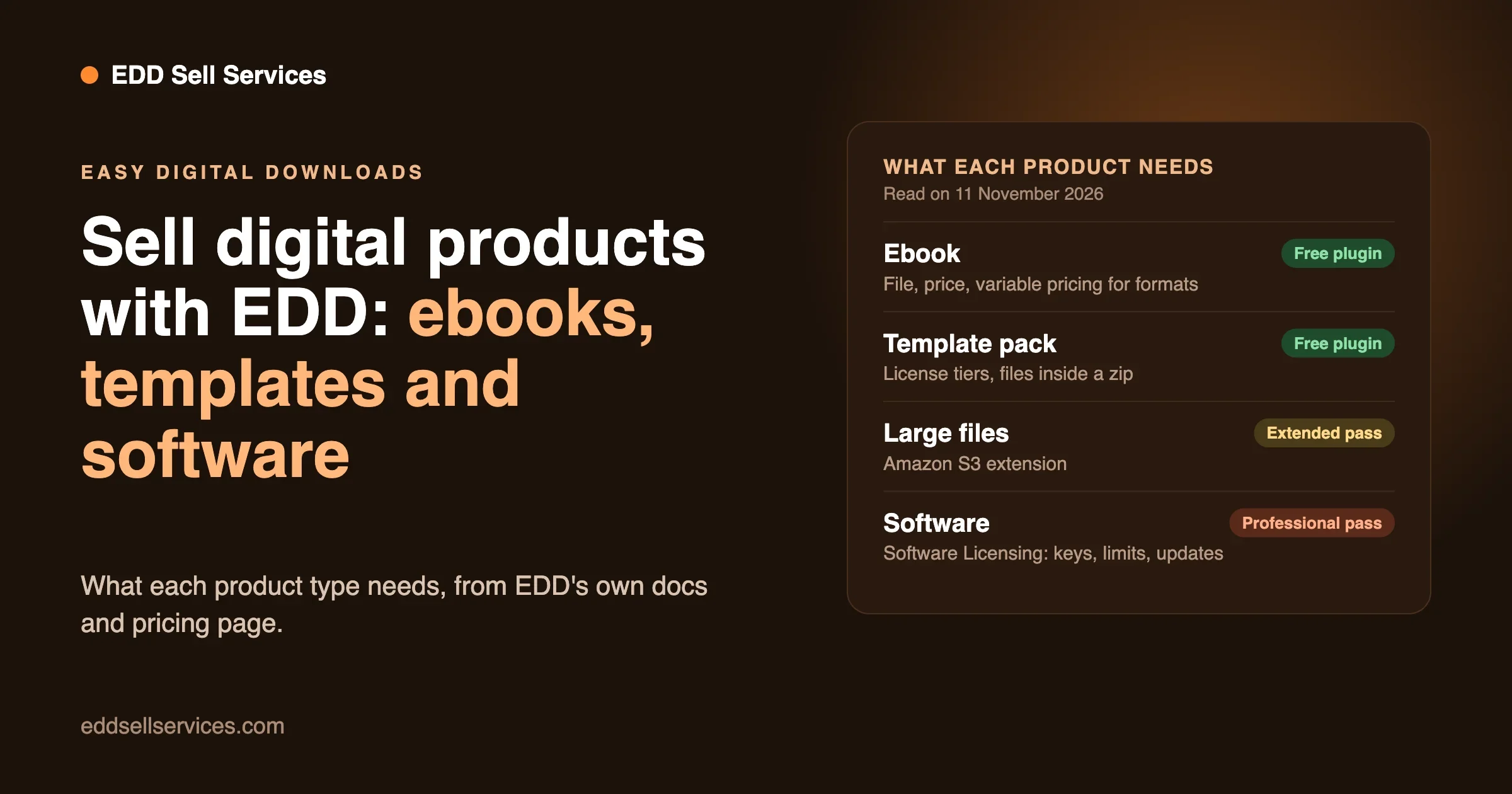
You can sell digital products with Easy Digital Downloads by installing the free plugin on a WordPress site, adding each file as a “Download” product, connecting a payment gateway and testing one order. The plugin protects your files, sends the receipt and gives the buyer a download link. Ebooks and templates need nothing beyond the free plugin and a payment connection. Software that needs license keys and automatic updates needs a paid pass. This guide walks through all three product types, step by step, using Easy Digital Downloads’ own documentation and pricing pages, which we read on 11 November 2026.
- Ebooks: a Download with the file on its Files tab. Use variable pricing for formats or editions and a Bundle for a series.
- Templates: variable pricing for license tiers such as Personal, Business and Developer. Put images inside a zip file, because EDD leaves loose .jpg.png and .gif files unprotected.
- Software: the Software Licensing extension, which EDD’s docs say needs a Professional pass or higher. It adds license keys, activation limits and update checks.
- Large files: the Amazon S3 extension stores files in your own S3 account and needs at least an Extended pass, according to its doc.
- Test first: EDD’s test mode and Stripe’s test card let you run a full order before you take real money.
- One thing to check: the pricing page and the WordPress.org listing disagree on which pass includes subscriptions. We explain below.
What do you need before you start with Easy Digital Downloads?
Three things. A WordPress site, the plugin, and a way to take payment.
The plugin’s WordPress.org listing showed version 3.7.3 on 11 November 2026, last modified on 2 November, with more than 40,000 active installs. It lists WordPress 6.7 and PHP 8.0 as the minimum. Ask your host which PHP version you run before you install.
The free plugin includes a cart and checkout, product variations and bundles, secure file downloads with unique links, expiry times and download limits, discount codes, refunds, reports, and payments through Stripe, PayPal and Square, plus Apple Pay and Google Pay. That is the listing’s own list, and it is enough for a first ebook or template shop.
EDD’s guide on installing and activating the plugin covers the first step. Its payment gateways doc names Stripe, PayPal and Square, and a built-in Store Gateway for free orders and test transactions.
Which extensions do you need for ebooks, templates and software?
Here is how we map each product type to what EDD’s pages say. We read the pricing page, the WordPress.org listing and each extension’s page or doc. Where those sources do not agree, the table says so.
You sell | What you need | What EDD’s pages say |
|---|---|---|
A single ebook, template or preset pack | The free plugin and a payment connection | Cart, checkout, protected files, variations, discount codes and refunds are listed as free features. |
A bundle of products at one price | The Bundle product type | The product-creation doc describes Bundle as a product type. The WordPress.org listing lists bundles as free, but the pricing page lists “Product Bundles” in the Extended pass. Check which applies to your install. |
Large files such as video or big zips | Amazon S3 extension | The doc says it requires at least an Extended pass. |
Content only buyers can read online | Content Restriction | The extension page restricts posts and pages to customers who bought a product, and buyers must have an account. Its page points to the Extended pass. |
Software with license keys and updates | Software Licensing | The usage doc says it requires a Professional pass or higher. |
Subscriptions, memberships or yearly license renewals | Recurring Payments | The pricing page lists “Subscriptions & Free Trials” under the Personal pass. The WordPress.org FAQ says subscriptions require an Extended pass. Ask EDD before you buy. |
Customer reviews on product pages | Reviews extension | The extension page points to the Extended pass. |
EU VAT handling | EDD Pro with an active licence | The EU VAT doc says VAT number checks need the Pro licence. |
The pass prices were these on 11 November 2026, all introductory, with renewals at full price: Personal $99.50 (normally $199, one site), Extended $199.50 (normally $399, one site), Professional $299.50 (normally $599, two sites) and All Access $499.50 (normally $999, three sites). Our guide Is Easy Digital Downloads Free? explains what each costs and when a pass pays for itself.
How do you add a digital product in Easy Digital Downloads?
Every product type starts the same way. EDD’s guide to creating products calls a product a Download, and the steps below follow it.
- Add a new Download. In the WordPress admin, go to Downloads, then Add Download. The editor works like a normal post.
- Write the name and description. The description can be one sentence or a full sales page with images.
- Pick the Product Type. In the Download Details box, choose Single Product for most files. Bundle combines several products at one price. Service removes file uploads and download links, and we cover it in our guide on selling services with Easy Digital Downloads.
- Set the price. Enter a Price. For several choices, such as formats or license tiers, use variable pricing instead.
- Add the files. On the Files tab, upload the file to the File URL field and edit the File Name. The File Name is what the customer sees on the receipt. Click Add File to add more, and drag to reorder.
- Add a product image. It becomes the featured image.
- Publish. You can publish now or schedule a date.
One rule matters more than the rest. Upload files through the product, not through the WordPress media library. The guide says files added through the product go to a protected EDD folder, which blocks direct links.
What do the Settings tab options do?
Four settings on the product’s Settings tab are worth knowing, all from the same guide:
- File Download Limit overrides the store-wide limit for this one product. The page does not state the default limit.
- Refund Status keeps the product refundable or marks it non-refundable. Refund Window limits how many days after purchase a refund is possible. Admins and Shop Managers can refund regardless of the window.
- Hide default purchase button lets you place the EDD Buy Button block or shortcode wherever you like.
- Notes holds download instructions. They appear on the customer’s receipt only, never on the public page.
There are two button types. Add to Cart follows the normal checkout. Buy Now opens a pop-up purchase that skips the checkout page, and the guide says it is available only when a single supported gateway is active and taxes are not used.
How do you sell ebooks with Easy Digital Downloads?
An ebook is the simplest product. One file, one price, one download link.
Add the PDF or EPUB on the Files tab as above. If you sell both formats, you have two choices. You can add both files to one product, so every buyer gets both. Or you can turn on variable pricing and give each format its own price option. EDD’s variable pricing doc says the Price Assignment column on each file links it to one price option. The default, All, delivers the file with any purchase. A file assigned to one option goes out only when that option is bought.
That gives you a clean setup: “PDF only” for $12, “PDF and EPUB” for $15, with the EPUB file assigned to the second option only.
The same doc describes two more settings. The Default radio button sets which option is preselected on the page. And “Enable multi-option purchase mode” shows the options as checkboxes, so a buyer can pick several at once.
How do you offer a sample chapter?
Put the sample in the product description as text, or as a separate free product. EDD’s docs on selling images make the same point for pictures: show customers a separate preview and keep the full file behind the purchase. The free-products route has a catch. The WordPress.org listing lists “free downloads” among the paid features, so check what your pass covers, or keep the sample on the page as plain text.
How do you sell a series of ebooks?
Use a Bundle. The creating-products guide says a Bundle combines multiple products into one package with one price, and a Downloads tab replaces the Files tab so you can pick the included products. As the table above shows, EDD’s pages disagree on whether bundles need a paid pass, so test it on your own install first.
What about big files?
A short ebook is a few megabytes. A video course or a large pack is not. EDD’s Amazon S3 doc describes an extension that stores your download files in your own S3 account instead of on your web host. It needs at least an Extended pass. When a customer clicks, EDD creates a temporary S3 link, and the doc says links last five minutes unless you change the Link Validity Time setting. The endpoint field also works with S3-compatible services such as Cloudflare R2.
How do you sell templates with Easy Digital Downloads?
Templates, themes, spreadsheets, Notion pages, Figma files and design packs follow the same pattern as ebooks, with two extra decisions: license tiers and file protection.
How do license tiers work?
The creating-products guide gives the example directly: for options such as Personal, Business or Developer licenses, use variable pricing. You might sell one template at $29 for personal use, $79 for client work and $149 for unlimited projects. The file can be the same for all three, or you can assign extra files, such as source files, to the higher tiers using Price Assignment.
The tier is a label and a price. EDD does not police how the buyer uses the template. Put the terms in your product description and in a license text file inside the download, and ask a lawyer to draft the wording if the money at stake is large. We are not lawyers.
Why zip your images?
EDD’s doc on selling images says zip files are protected by default, while .jpg.png and .gif files are left unprotected. If you upload a loose image as the download, the original could be exposed. Compress your files into a zip first and upload that through the product. Make smaller preview images for the product page. If you want to stop anyone using a preview, the doc names a Download Image Watermark extension for that.
How do you keep the files safe?
Test a direct link before you launch. EDD keeps download files in wp-content/uploads/edd/ and guards the folder with an .htaccess file. The doc on NGINX says this works only on Apache. On NGINX, anyone with the direct URL can download the files unless your host adds a rule. Ask your host which server you use. Then buy your own product, copy the download URL, open it in a private window after the link expires, and confirm it does not work.
How do you sell software with license keys?
Software needs three things a template does not. A key the customer can use to unlock it, a limit on how many sites or devices can use that key, and a way to push updates only to people who paid.
That is the job of the Software Licensing extension. EDD’s usage doc says it requires a Professional pass or higher. The extension page says it generates, activates and checks license keys, mainly for WordPress plugins and themes, and has an updater that lets licensed customers update with one click.
How do you set up a licensed product?
The usage doc and EDD’s blog post How to License Software in WordPress (and Sell It), last updated 2 September 2026, give these steps:
- Install Software Licensing from Downloads, then Extensions, and enter your Pro licence key.
- Create a Download. Turn on variable pricing if you want tiers such as single site and multi-site.
- Upload your plugin or theme as a .zip file on the Files tab.
- Turn on “Create licenses for this product” in the Download Details box. A Licensing Settings box appears.
- Set the Activation Limit, which is the number of sites each key can be used on. Leave it empty or enter 0 for unlimited.
- Set the License Length in days, weeks, months or years, or turn on “Licenses never expire.”
- In the Versions section, fill in the Version Number, choose the Update File from the product’s files, and write the Changelog.
- Test the whole purchase in test mode.
Keys are made at purchase, so you do not create them by hand.
What does the buyer see?
The usage doc says the license key appears on the purchase confirmation page automatically. The receipt email does not include keys by default. You add the {license_keys} tag to it. The [edd_license_keys] shortcode shows keys to logged-in customers on an account page.
How do updates reach customers?
The blog post says to copy the Software Licensing SDK from the samples folder into your plugin or theme, and register your product with your store URL, the product’s item ID, the current version and the main plugin file path. The version in your code must match the Version Number in the Licensing Settings. When you release a new version, customers with a valid licence see the normal WordPress update notice, with your changelog in it.
The post adds one detail every software seller should know. Expired or invalid licenses stop receiving update notifications, but the software keeps working. That is the policy you are choosing for your customers, so say it plainly on your product page.
What about renewals?
The blog post says renewals go with Recurring Payments, and that you set a renewal discount and reminder emails under Downloads, Settings, Extensions, Software Licensing. The usage doc says an expired key cannot be activated again until it is renewed. The Recurring Payments page says billing can run daily, weekly, monthly, quarterly, semi-annually or yearly, with free trials of any length and a customer dashboard where buyers update cards and cancel.
If you sell a plugin or theme, pair this with a clear refund and support policy before you launch. A key that unlocks updates is also a promise about what the buyer gets after the first year.
How do you take payment, handle tax and refund an order?
Payment setup is the same for every product type. Under Downloads, Settings, Payments, connect Stripe, PayPal or Square. The gateways doc advises weighing the fees each gateway charges, and so do we. On top of the gateway’s own fee, our earlier check of the plugin’s code (version 3.7.1.1, on 12 October 2026) found a 3% fee on card payments when no valid licence is active. That is our finding and not a line in EDD’s docs, and we did not re-run it today. The WordPress.org page shows two user reviews that raise the same fee, and the page itself says only that EDD has zero listing fees and no marketplace commissions. Read our guide to EDD payments, fees and refunds before you choose.
For tax, EDD’s tax settings doc says tax is off by default. You turn it on under Downloads, Settings, Taxes, set a rate for each country or state, and say whether you enter prices with or without tax. The doc does not say that EDD files or pays tax to any authority, so that stays your job. The EU VAT doc says VAT number checks need the Pro licence. Talk to an accountant who knows the countries you sell to.
For refunds, the refunds doc says you refund from the order screen. With Stripe, a checkbox makes EDD refund the money at the gateway too. Without it, the refund is recorded in EDD only. Set each product’s Refund Status and Refund Window, as described above, so your policy and your store agree.
How do you test the store before you go live?
Follow EDD’s test and launch doc. It takes about twenty minutes.
- Go to Downloads, Settings, Payments, General, tick Enable Test Mode and save.
- Connect your gateway in test mode. For Stripe, click Connect with Stripe. For PayPal and others, use that gateway’s sandbox.
- Buy your own product. With Stripe test mode, use card number 4242 4242 4242 4242, any future date, any CVC and any ZIP code.
- Check that the confirmation page shows a download link, the receipt email arrives and its link works, the right file downloads, the order appears under Downloads, Orders marked as a test, and you get the owner notification email.
- Turn test mode off. If you connected Stripe only in test mode, connect it again in live mode before you take real orders.
Run the test once for each product type you sell. A software product with a license key needs its own run, including the key on the confirmation page and the receipt tag.
What should you watch after launch?
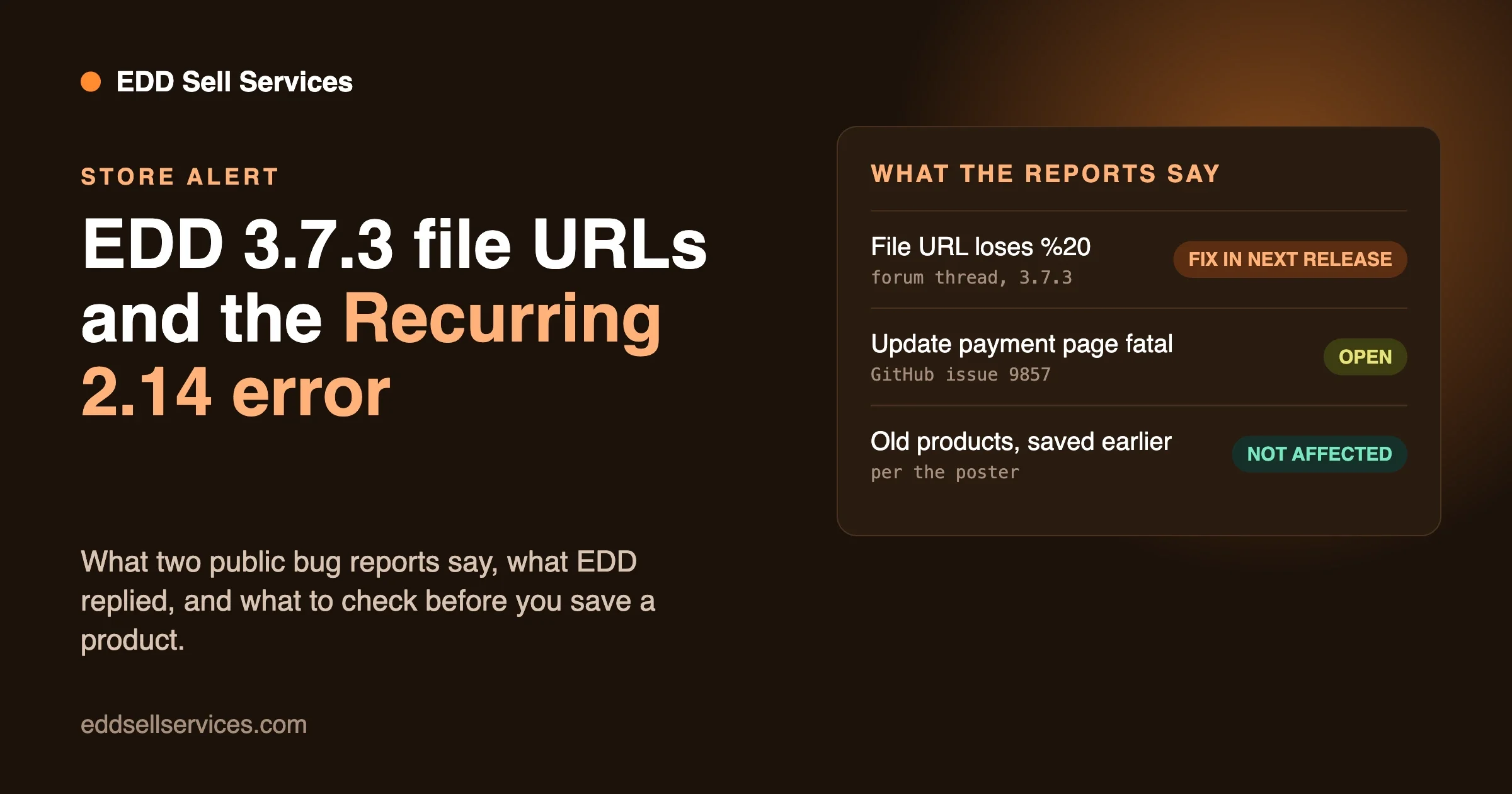
Keep a short routine. Update on a staging copy first. Buy one product of each type after every plugin update. Read the plugin’s support forum before you update on the live store. We learned why when we wrote up two public reports on EDD 3.7.3, one about file URLs and one about Recurring Payments, in our note on the EDD 3.7.3 file URL and Recurring Payments reports. A download link that fails is the failure your customers feel first, so test it every time.
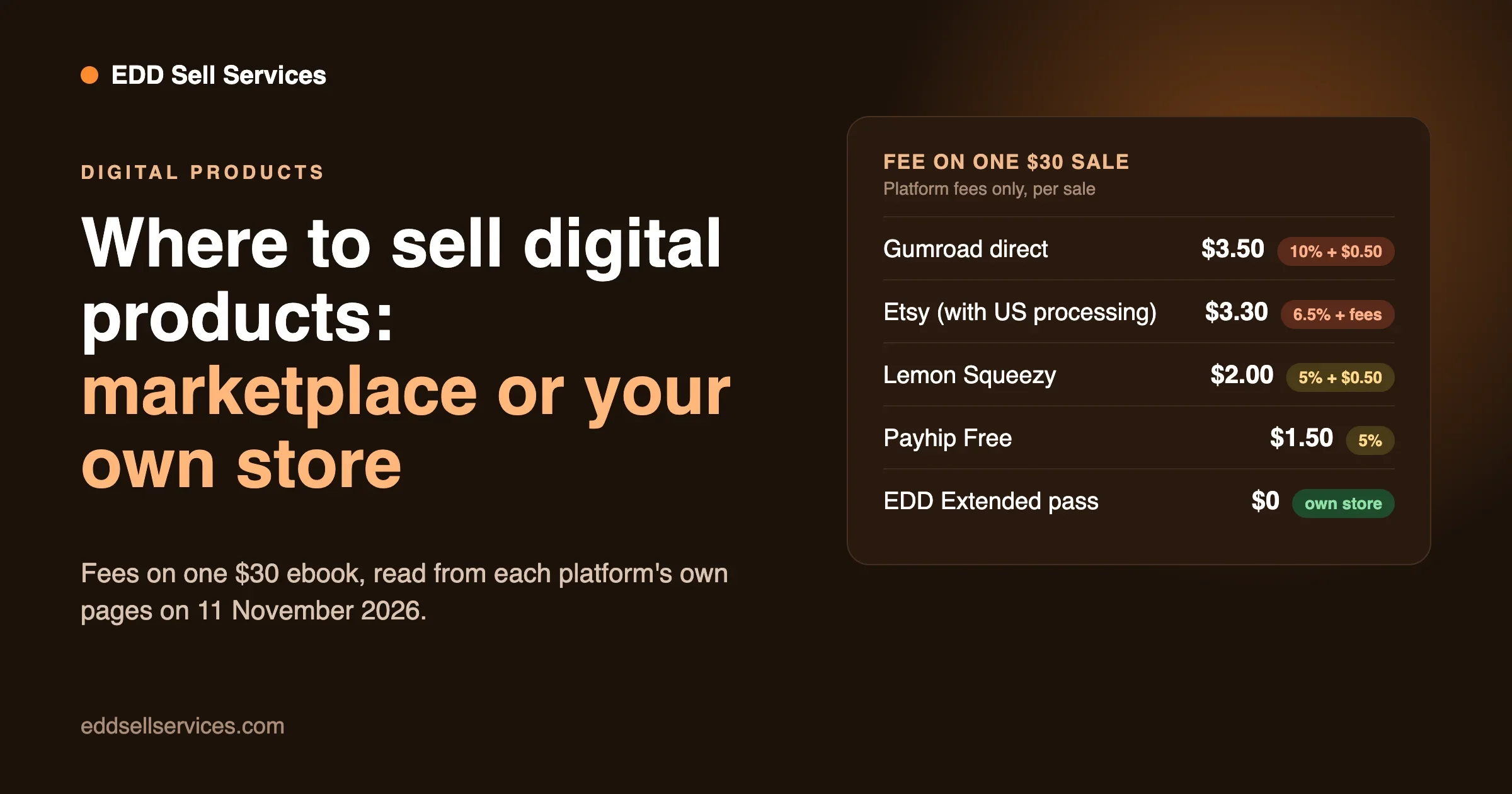
If you are still deciding between a marketplace and your own store, our post on where to sell digital products online compares the fees of Gumroad, Etsy, Payhip, Lemon Squeezy and EDD on one $30 ebook.
Questions people ask
Is Easy Digital Downloads free for digital products?
The plugin is free on WordPress.org, and the listing says it has zero listing fees and no marketplace commissions. You still pay for hosting and your payment gateway’s fees. Our own check found a 3% fee on card payments without a licence, so read the pricing page and test it.
Can I sell ebooks without a paid pass?
Yes. A single ebook with one price, protected files and a payment connection needs only the free plugin, according to its WordPress.org listing. Bundles, subscriptions and content restriction are where passes come in.
How do I stop people sharing my files?
You cannot stop a determined buyer from sharing a file they have downloaded. EDD helps by keeping files in a protected folder and giving each buyer a unique, expiring link with a download limit. On NGINX you need a host rule, as the doc above explains. For software, license keys and activation limits add a second layer.
Do I need Software Licensing for a template?
No. Software Licensing is for products that check a key and update themselves, such as plugins and themes. A template or ebook uses variable pricing and a download link.
Can I move my products from Gumroad?
EDD’s guide on migrating from Gumroad maps Gumroad features to EDD ones. It does not name an import tool, so plan to rebuild products by hand.
Can I sell services and downloads in the same store?
Yes. EDD has a Service product type, and add-ons give a service a brief, a chat and a delivery step. Our start-to-finish guide covers it.
If you want help setting up licensing, file delivery or a move from another platform, our team can talk it through on the custom development page. If you sell services as well as downloads, the EDD Sell Services page has the live demo, and our pricing page lists the plans.
Related Posts
Where to Sell Digital Products Online: Marketplaces vs Your Own Store With Easy Digital Downloads
EDD 3.7.3: The File-URL Space Bug and the Recurring 2.14 Fatal Error, and What Store Owners Should Do