Freelance Add-On Services for EDD Store Owners: A Practical Setup Guide


The setup question always comes at the same moment: a store owner has decided, finally, that custom services deserve a real system instead of an inbox full of half-answered requests. Then they open a new tab, search for how to actually do it, and find either a wall of generic “how to freelance” advice that assumes there’s no existing store, or marketplace-plugin documentation written for someone building a Fiverr clone from scratch. Neither matches the actual situation: an EDD store that already sells digital products and now wants a second, smaller lane for paid custom work.
This is a practical setup guide for exactly that: adding freelance add-on services to an EDD store without turning it into a full marketplace rebuild. It walks through what to decide before installing anything, what the install and first-listing process actually looks like, and what to check before the first real order comes through.
Setting up freelance add-on services for an EDD store: three decisions worth making on paper first
Rushing into a plugin install without answering a few basic questions is how services catalogs end up half-configured and abandoned after week one. These three take fifteen minutes and save a redo later.
Decide which requests are actually services versus which are just support
Not every “can you help me with this” email is a paid service opportunity. A buyer asking how to install a plugin they already purchased is a support request, it should stay free, because charging for it damages trust in the product itself. A buyer asking for a custom-built variant of that plugin, tailored to their specific site, is a service, it’s new work, it takes real time, and it deserves a price tag. Drawing this line before setup prevents two failure modes: charging for things buyers reasonably expect to be free, and quietly doing paid-tier work for free because it arrived disguised as a support ticket.
Decide payout timing before the first sale, not after
Whether funds settle immediately, after a holding period, or on a scheduled cadence changes how a seller plans cash flow. This matters more for services than for downloads, because a services order often spans days or weeks, the payment and the actual work-completion event aren’t the same moment, unlike an instant download delivery. Knowing the payout timing up front avoids the awkward surprise of promising fast delivery on money the seller hasn’t technically received yet, the same cash-flow planning problem covered from the payout-tool side in our roundup of Payoneer alternatives for freelancers.
Decide how much customization actually belongs in a “service” versus a variant of the existing download
Some requests are close enough to the existing product that a new pricing tier on the download itself would solve it better than a full custom service listing. If 80% of custom requests are “give me the same template but in blue,” that’s arguably a new EDD variation, not a service. Services are for genuinely bespoke, one-to-one work, not a proxy for a product feature that should just ship.
Setting up the plugin: what actually happens during install
WP Sell Services installs like a standard WordPress plugin and runs standalone, no WooCommerce, BuddyPress, or EDD dependency required to activate it, which matters directly here since the goal is adding it next to an existing EDD store rather than replacing anything. After activation, the setup path runs through becoming a vendor (even a solo seller runs through the vendor flow, since the vendor system is what tracks order history and seller level), then into the service creation wizard itself.
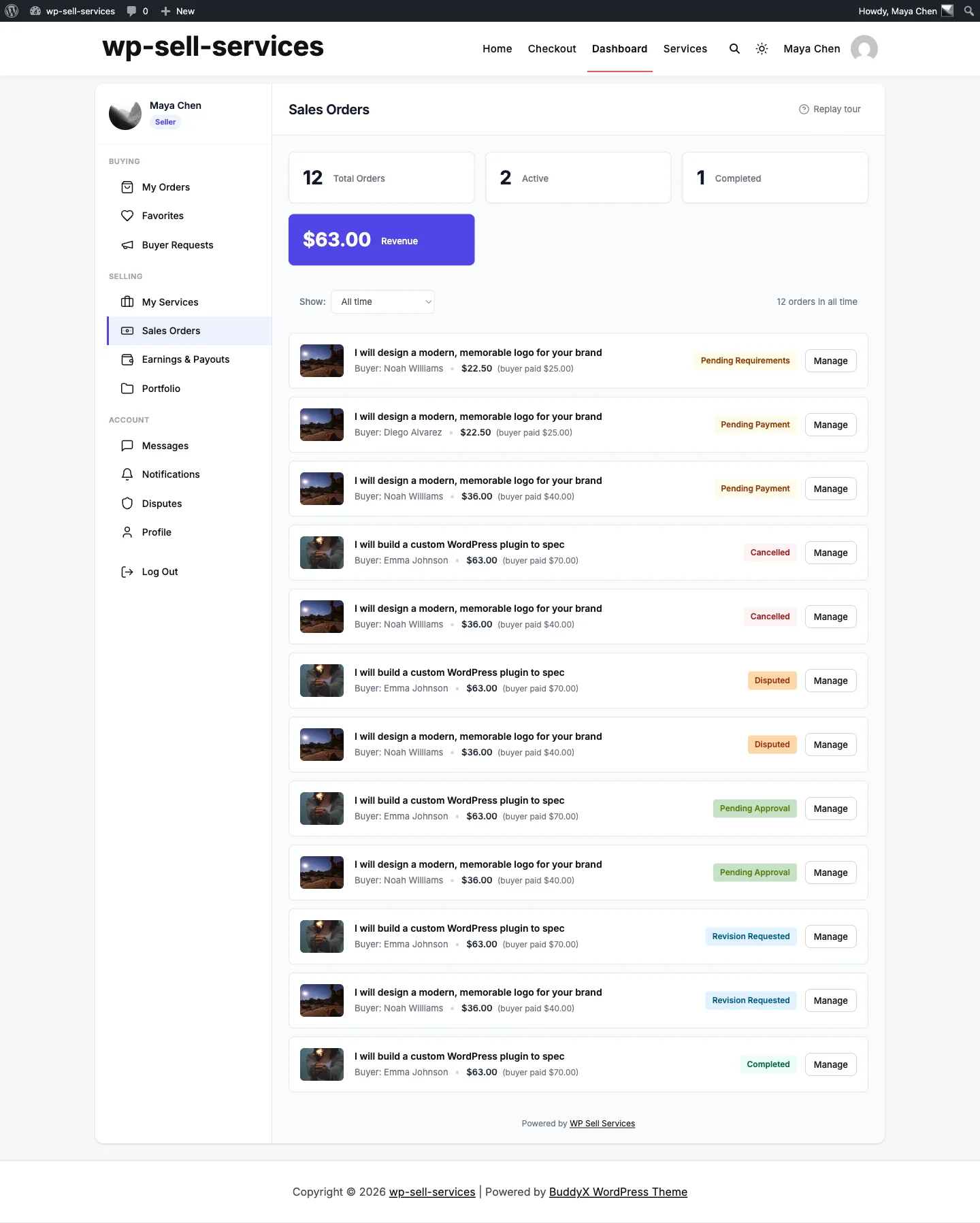
The vendor dashboard is the home base once a service listing goes live, orders, messages, and earnings all surface here.
Vendor profile setup
The vendor profile is the trust layer buyers see before committing to a custom order. Unlike a downloads product page, where the file itself does most of the persuading, a services listing sells the seller as much as the deliverable. A thin profile, no bio, no portfolio examples, no clear turnaround expectations, reads as risky to a buyer who’s about to pay for work that doesn’t exist yet. Filling this out properly before the first listing goes live is worth the extra twenty minutes, the same relationship-tracking discipline worth applying once orders start piling up, which our CRM tools roundup for freelancers and solo digital sellers covers in more depth.
The service creation wizard
This is the core of the setup. The wizard walks through a multi-step flow: service title and category, description, and, the part that matters most for pricing consistency, three-tier pricing setup (commonly Basic, Standard, Premium). Each tier gets its own price, deliverables list, and turnaround estimate. This is where the earlier “what counts as a service” decision pays off directly: a seller who’s already drawn that line walks into the wizard knowing exactly what to type instead of improvising tier descriptions on the spot.
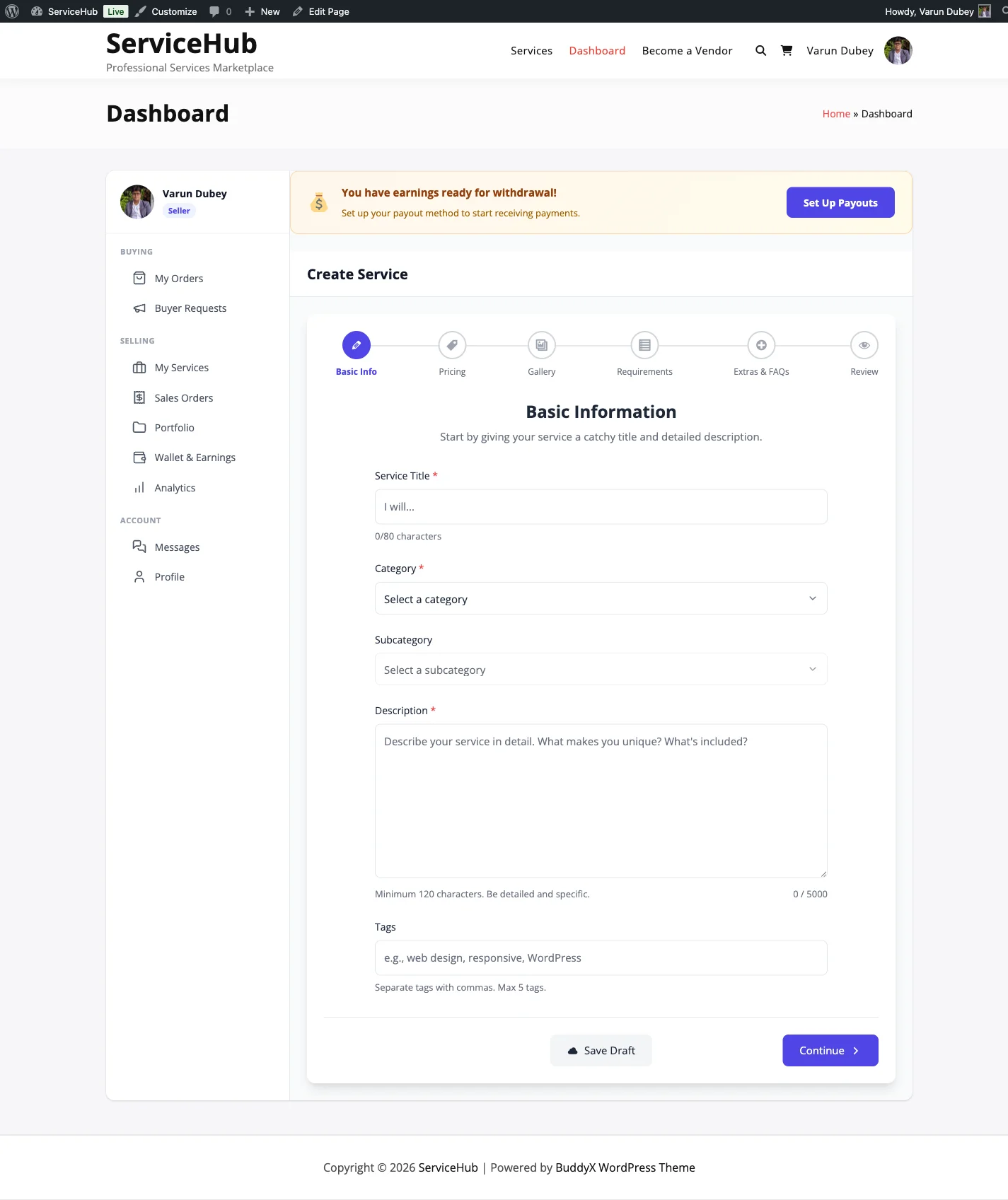
The service creation wizard, title, description, and three pricing tiers get defined in one guided flow.
Checkout configuration
Stripe and PayPal are built into the free version, so this step is connecting existing accounts rather than integrating a new payment processor from scratch. Sellers who already run Stripe for EDD purchases will find the setup familiar, it’s the same account, a separate connection point for the services checkout.
Writing the first listing: what separates a listing that converts from one that sits empty
A common mistake in a first service listing is describing the process instead of the outcome. “I’ll work closely with you to understand your needs and deliver a custom solution” tells a buyer nothing they can act on. Compare that to “Custom color and font rebrand of the [Template Name] pack, delivered as source files within 5 business days, one revision round included”, the second version answers what, how long, and what’s included, which are the three questions every buyer is silently asking before they click purchase.
Tier differentiation should be real, not cosmetic. A Basic tier that’s nearly identical to Standard except for a slightly higher price makes buyers suspicious that the higher tiers exist purely to upsell rather than to deliver more. The gap between tiers should map to something concrete: fewer or more revision rounds, faster or slower turnaround, source files included or not, a discovery call included or not.
Pricing anchored too low creates a different problem than pricing anchored too high. A $15 Basic tier for genuinely custom work signals either that the work isn’t actually custom, or that the seller doesn’t value their own time, both read poorly to buyers who are used to paying real freelance rates elsewhere. It’s worth pricing at least in line with what the same work would cost on Upwork or Fiverr, since buyers comparing options will notice if a listing is priced dramatically below market with no explanation.
Order management once the first order lands
The order moves through an 11-status lifecycle from the moment a buyer checks out. The early statuses cover request and requirements collection, this is where the seller gathers the specifics a generic listing description couldn’t capture (brand colors, source files, deadline constraints). Skipping a thorough requirements-collection step is the single most common cause of scope disputes later in the order, because assumptions made at this stage are the ones both sides argue about at delivery.
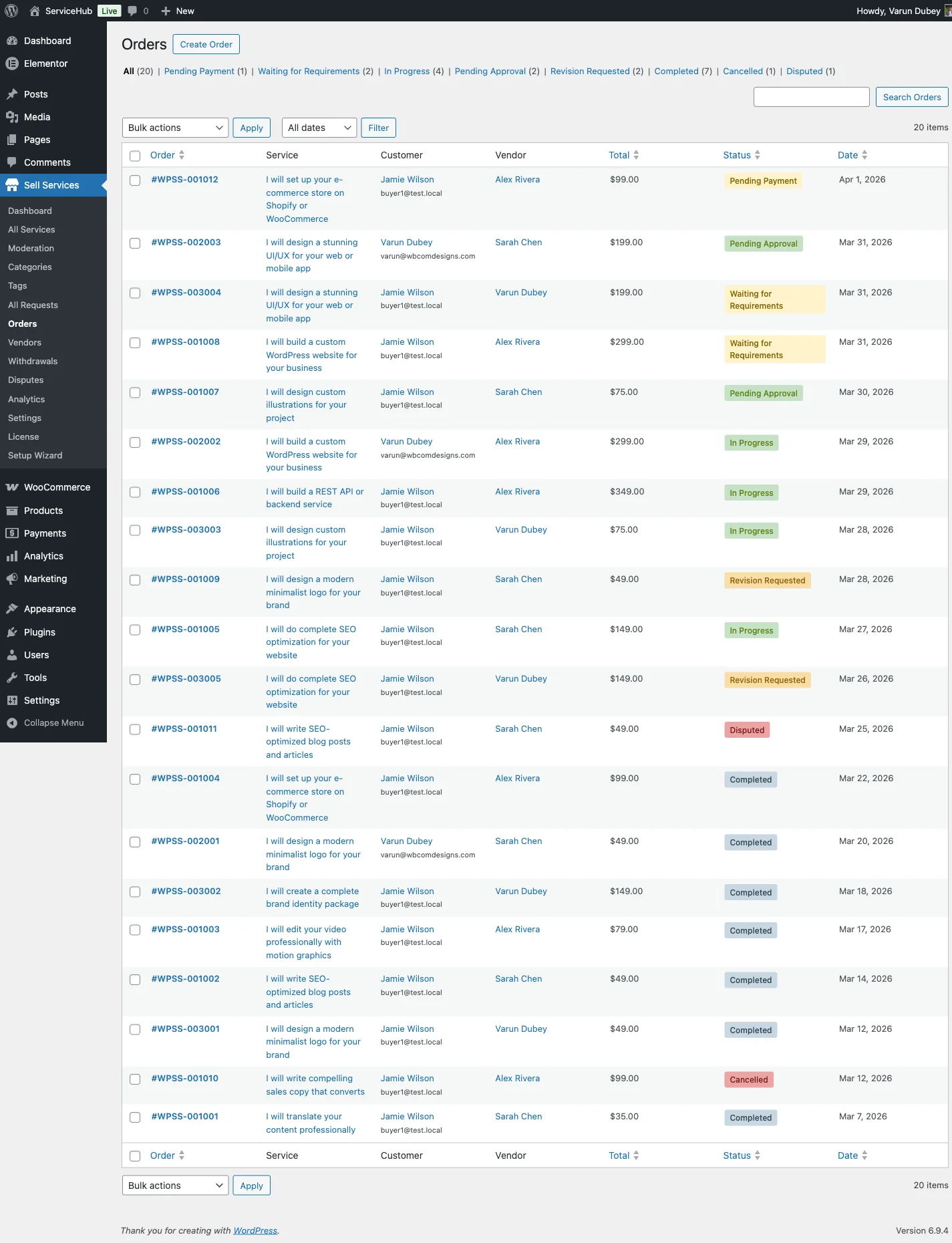
Every order sits in the lifecycle at a visible status, no more digging through email threads to figure out where things stand.
Order messaging with file attachments handles everything from requirement gathering through delivery and revision rounds. Every exchange lives on the order record itself, which becomes genuinely useful the first time a dispute or a “wait, what did we agree on” moment happens weeks after the original conversation. The order’s message history is the record, nobody has to reconstruct anything from memory or a scattered inbox.
Calibrating price against real freelance rates
Sellers new to pricing custom services tend to anchor on the price of their existing download instead of the price of comparable freelance work, which produces numbers that are far too low. A $39 template and a $150 custom rebuild of that template aren’t the same category of transaction, even though one grew out of the other. The rebuild took real hours, involved back-and-forth communication, and carries the kind of accountability a static download never does, if it’s wrong, there’s a revision expectation and a reputation on the line.
A useful exercise before publishing a first listing: search the same service category on a general freelance marketplace and note the price range that similar-scope work commands there. That range is a starting anchor, not a ceiling, a seller with direct product knowledge and an existing relationship with the buyer base can often price above the generic-freelancer range, because the buyer isn’t hiring a stranger who needs to be briefed from zero. The seller already built the product; a generic freelancer has to learn it first.
It’s also worth pricing the Basic tier high enough that it isn’t a loss leader once time is actually tracked. A common mistake is setting Basic at a token price meant to look approachable, then discovering after a few orders that the actual hours spent make it barely profitable. Better to price Basic at a number that holds up under real time-tracking from the start than to discount it deliberately and quietly resent every Basic-tier order that comes in.
How deep the requirements-collection step should actually go
The gap between a smooth order and a frustrating one usually traces back to how much information got collected before work started, not to anything that happened during delivery. A requirements step that only asks “what do you need” invites a one-line answer that leaves half the actual specifics undiscovered until the first draft is already wrong.
Stronger requirements collection asks specific, closed-ended questions tied to the service itself: exact brand colors (hex codes, not “blue”), source file formats needed, any existing brand guidelines to follow, a hard deadline if one exists, and how many people on the buyer’s side need to approve the final deliverable. Vague open-ended prompts get vague open-ended answers; specific questions get specific, usable answers. A seller who templates this requirements form once, tailored to their exact service, saves themselves from re-asking the same clarifying questions in the messaging thread on every single order.
A realistic first-week timeline
Day one: install the plugin, complete the vendor profile, and don’t publish yet. Day two: build exactly one service listing using the guidance above, three real tiers, concrete deliverables, honest turnaround times. Day three: connect Stripe and PayPal, then run a test order end to end (many sellers skip this and regret it the first time a real buyer hits a checkout error). Day four: publish the listing and place it somewhere existing buyers will see it, the product page of the most closely related download is the highest-converting spot, not a standalone “services” menu item nobody clicks. Day five through seven: watch for the first inquiries, respond fast (response speed matters disproportionately for a brand-new listing with no track record yet), and resist the urge to add a second service until the first one has run through a complete order cycle.
This pacing matters more than it looks. A seller who publishes five services on day one, with none of them battle-tested, ends up debugging pricing and process issues across five listings simultaneously instead of one. One listing, run to completion once, teaches more about what actually needs fixing than five listings launched in parallel.
Where the vendor system pays off beyond the first sale
Auto-calculated seller levels reward consistent delivery over time, a factor that becomes genuinely useful once a seller has more than a handful of completed orders. A rising seller level is a visible signal to new buyers evaluating whether to trust a services listing with real money, functioning the same way a star rating or “Top Rated” badge does on any marketplace a buyer has used before. It’s a compounding asset that a plain product page can’t replicate, because a product page looks the same on day one as it does after two hundred sales, a vendor profile with a growing order history doesn’t.
For sellers weighing whether the custom-work pattern justifies building this out at all, our companion piece on selling custom services alongside digital downloads covers the underlying case in more depth, this guide assumes that decision is already made and focuses purely on the setup mechanics.
Deciding who on the team handles fulfillment
Solo sellers skip this question entirely, but anyone running an EDD store with even one contractor or part-time hire needs to decide, before the first listing publishes, who actually does the custom work when an order comes in. A vendor account tied to a single person creates a bottleneck the moment that person is unavailable, a sick day or a vacation week turns into a missed delivery deadline and a damaged seller-level history.
The fix isn’t complicated, but it needs deciding in advance rather than improvised mid-order: either the store owner stays the sole fulfiller and builds turnaround times generous enough to absorb the occasional bad week, or a second trusted person gets access to the order queue and messaging thread so orders don’t stall waiting on one specific human. Sellers who wait until the first missed deadline to have this conversation usually have it with an already-frustrated buyer watching.
Common setup mistakes worth avoiding
Publishing a listing with vague scope is the most frequent one, “custom work available, contact for details” defeats the entire purpose of a structured services system, because it just reintroduces the email-negotiation problem inside a nicer-looking page. A close second is skipping the vendor profile entirely and going straight to publishing a service; buyers evaluating a first-time, zero-history seller lean heavily on whatever profile information exists, so an empty one costs conversions that no amount of pricing optimization will recover.
A third mistake is setting turnaround times optimistically rather than realistically. Promising 48-hour delivery on work that reliably takes five days creates a pattern of missed deadlines that damages the seller level and buyer trust simultaneously, far worse than quoting five days honestly from the start and occasionally delivering early.
Frequently asked questions
Do I need WooCommerce or BuddyPress installed to use WP Sell Services with my EDD store?
No. The free version runs standalone and doesn’t require WooCommerce, BuddyPress, or EDD to function. It installs and operates independently alongside an existing EDD store.
How long does the actual setup take for a first listing?
Realistically, a solo seller who has already decided on pricing and scope can complete vendor profile setup, a first service listing, and checkout configuration in an afternoon. The multi-step service creation wizard is guided, not a blank form, most of the time goes into deciding what to write, not fighting the interface.
Can I offer more than three pricing tiers?
The core structure supports three-tier pricing (Basic, Standard, Premium) per listing, which covers the vast majority of custom-service use cases without overcomplicating the buyer’s decision. A seller needing more granular differentiation can create separate listings for meaningfully different service categories rather than adding tiers within one.
What happens if a buyer wants something outside the defined scope mid-order?
Order messaging handles the conversation, and the seller can adjust or renegotiate scope directly in that thread with a clear record of what was agreed. This is precisely the scenario a structured order system is built for, compared to an email thread, there’s a persistent, referenceable record instead of a memory-dependent negotiation.
Is there a cost to get started?
The core plugin is free with no license key required and no dependency on WooCommerce, BuddyPress, or EDD. A paid Pro Personal tier ($69/yr for one site) adds WooCommerce integration, vendor analytics with CSV/PDF export, and scheduled automated payouts, useful once volume grows, but not required to launch a first service.
How is this different from just using a scheduling or invoicing tool alongside my EDD store?
A scheduling or invoicing tool (see our HoneyBook alternatives comparison for what that category typically covers) handles one piece of the puzzle, either the calendar or the payment, but neither manages the full order lifecycle, requirements collection, threaded messaging with file attachments, or a public listing buyers can discover and purchase from directly. Our companion post on whether digital product sellers need a marketplace plugin or just a contact form goes deeper into exactly this comparison.
What to watch in the first month of orders
Once a handful of orders have cleared the full lifecycle, patterns start showing up that a single order can’t reveal. Turnaround time is the first thing worth auditing honestly, if the quoted five days is consistently becoming seven in practice, that’s a signal to either adjust the listed turnaround or fix whatever is causing the slippage, rather than letting every order run a day or two over and quietly eroding trust. Revision requests are the second pattern worth tracking: if nearly every order uses its full allotment of revision rounds, the original requirements-collection step probably isn’t capturing enough detail up front, and tightening that form will do more for profitability than raising prices will.
Tier distribution matters too. A listing where nearly everyone buys the cheapest tier suggests either the higher tiers aren’t differentiated enough to justify their price, or the Basic tier is underpriced relative to what buyers are actually willing to pay. Both are fixable with a pricing and description pass once there’s enough order data to see the pattern clearly, guessing at this before any real orders exist is far less reliable than adjusting based on what buyers actually chose.
Setup is the easy part
None of the mechanical steps above are difficult, the wizard is guided, the checkout integrations are standard, and the whole install-to-first-listing path fits inside a single afternoon for someone who’s already decided what they’re selling. The part that actually determines whether this works is the fifteen minutes of upfront thinking most sellers skip: what counts as a service, what the tiers actually mean, and what a realistic turnaround time looks like. Get that right on paper first, and the setup itself is close to mechanical, and the first-month adjustments become a matter of small tuning rather than starting over.