Should Your Online Course Have a Community Attached to It?


Most course creators ask whether their course needs an online course community after they already know the answer. They noticed the completion rate on their dashboard, did some quiet math on refund requests, and started wondering whether a community tab would fix what the video lessons alone can’t.
The honest answer is: sometimes yes, sometimes no, and the difference usually has nothing to do with how good your course content is.
The question underneath the question
“Should my course have a community” is really three separate questions wearing one costume. Do your students need each other to finish the course? Do you need a lower-cost way to answer repeat questions? And can you actually keep a space active once you build it? Skip straight to building without answering those three and you end up with a Facebook group that seven people posted in during launch week and nobody has opened since.
A course is a sequence of information. A community is a place where people show up more than once. Those are different products, built for different reasons, and conflating them is why so many “bonus communities” attached to courses go quiet by week three.
What a course is missing without one
Video lessons, PDFs, and quizzes can teach a skill. What they can’t do on their own is create any of the social pressure that gets a person to actually open the course again on a Tuesday night when Netflix is right there too.
No peer pressure to keep going
Self-paced courses fail mostly at the “self-paced” part. Without a cohort, a check-in thread, or even a visible list of who else is working through module four this week, there’s no social cost to quitting. Nobody notices. That’s convenient in the moment and fatal for completion rates over a full quarter.
Compare that to a course where students post their progress in a shared space, even loosely. The moment another person’s win shows up in a feed, sitting on module two for six weeks starts to feel like falling behind rather than just being busy. That’s not manipulation. It’s just how humans respond to visible groups, which is precisely why gym classes outperform solo workout apps for adherence, and why the same principle transfers to course completion.
No place to ask the question that isn’t quite a support ticket
Some student questions are genuine bugs: a broken download link, a payment that didn’t go through. Those belong in a support inbox. But most of what students actually want to ask is softer: “is this normal,” “did anyone else get stuck here,” “what did you end up doing for step six.” None of that fits a support ticket, and none of it gets answered by a help doc, because the answer depends on what the student is actually trying to build.
Without somewhere to ask that kind of question, students either stay stuck silently, and eventually request a refund because the course “didn’t work for them,” or they email you directly, which doesn’t scale past a couple dozen customers.
No visible proof that other people finished
Testimonials on a sales page are curated. A live space where dozens of people are visibly a few weeks ahead of you, posting real screenshots of real progress, does something a testimonial can’t: it makes the outcome feel achievable right now, by someone like you, not by a hand-picked case study from eighteen months ago.
What an online course community actually looks like
This is where most advice gets vague, so let’s be specific. Attaching a community to a course does not mean opening a public Discord and hoping. It means giving your paying students a dedicated, gated space that sits next to the course content, not buried inside a Facebook algorithm that decides who sees what.
A few things separate a working setup from a dead one:
It’s tied to purchase, not to a separate opt-in. If joining the community is a second step students have to remember to take after checkout, most of them won’t take it. The strongest setups add the student automatically the moment they buy, so the community is just part of what they paid for, not an extra chore.
It has real structure, not just one giant chat. A single stream where beginner questions, advanced discussion, and course announcements all mix together becomes noise fast. Splitting the space by topic, cohort, or module keeps a newcomer’s question from getting buried under an unrelated thread from someone three courses ahead of them.
Someone is actually present in it. Not necessarily you, every day, for years. But somebody, whether that’s an assistant, a top student turned moderator, or a rotating schedule, needs to reply inside the first day or two, or the space trains people to expect silence, and then it becomes exactly what makes launch-week Facebook groups go quiet.
Where a standalone community layer fits
This is where a tool like BuddyNext becomes relevant to course creators specifically, as opposed to general “add a forum” advice. BuddyNext is a standalone WordPress community plugin, not something bolted onto BuddyPress or dependent on any particular LMS. That matters here because most course businesses already run on a specific stack (Easy Digital Downloads for checkout, maybe LearnDash or a similar plugin for lesson delivery), and the last thing that stack needs is a community tool that demands you rebuild everything around it.
The free version gives you an activity feed with four tabs (For You, Following, Spaces, and Network), so a student’s first visit isn’t a wall of unrelated noise. They land on activity relevant to them, not a raw firehose.
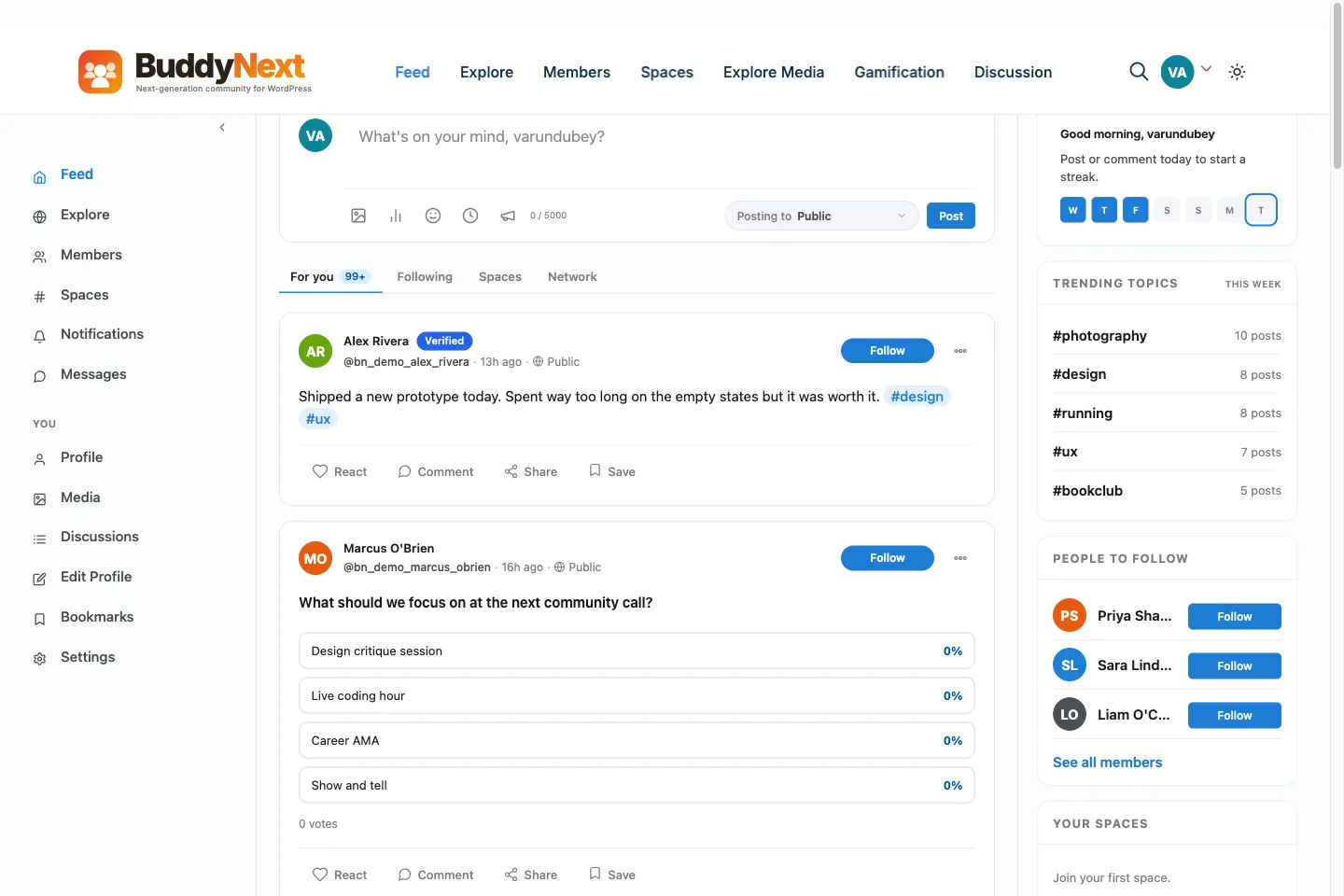
BuddyNext’s activity feed: the default landing view students see when they log in to check on their course community.
The part that maps most directly onto “attach a community to my course” is Spaces. You can spin up an open space for general course discussion, a private space scoped to a specific cohort or module, or a secret space for something like a mastermind tier that isn’t publicly listed at all. Each space carries its own roles, join flow, and notification settings, so a beginner track and an advanced track don’t have to share one undifferentiated feed.
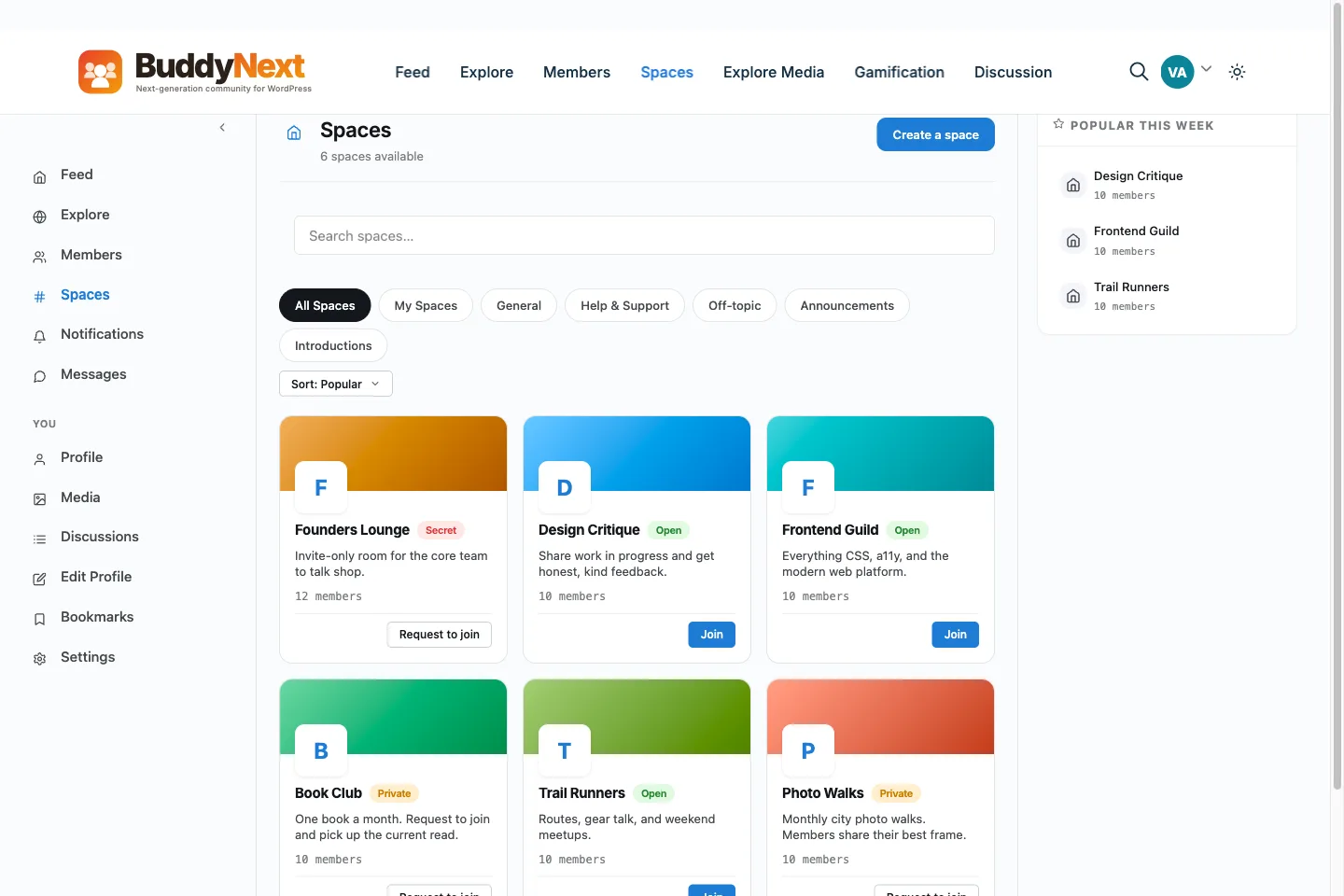
Spaces can be open, private, or secret, which is what lets a single course support a general discussion area and a gated cohort-only space at the same time.
None of this requires students to leave the site where they bought the course. Profiles, member directories, following and connections, threaded comments, reactions, bookmarks: the free tier (31 capabilities in total) covers the pieces that make a course community feel alive without asking you to pay before you know if the community even sticks. If you later want gated tiers tied to a specific purchase, say, a “cohort” tier that only unlocks once someone buys the advanced version of the course, that’s a Pro feature (native Stripe membership tiers, monthly, yearly, or one-time, with trials and gated spaces), not something the free tier tries to fake with workarounds.
What actually changes for students
Assume you’ve set this up reasonably well. What’s different for the person who just bought the course, day one versus a course with no community at all?
The first difference shows up before they’ve watched a single lesson. If your checkout flow drops them into a space where recent cohort activity is already visible (other people introducing themselves, someone’s win from last week, a pinned welcome thread), the course stops feeling like a purchase they made alone. It starts to feel like they joined something already in motion. That framing matters more than it sounds like it should; a lot of “I never got around to it” cancellations are really a story about a purchase that never felt like it had momentum behind it.
The second difference is slower but bigger. Around week two or three, most self-paced students hit a stretch that’s harder or more boring than the intro modules. This is the classic drop-off point for every course platform, regardless of subject. In a course with an active space, that’s also the point where a student can post “is anyone else finding module four rough” and get three replies within a day, one of which is probably from someone who felt exactly the same way and pushed through. That reply is worth more, in terms of retention, than almost any amount of extra video content you could add to smooth over the same module.
What actually changes for you
From the creator’s side, the shift is less about vibes and more about workload distribution, though it takes a few weeks before that becomes visible.
Support load moves from your inbox into the space, at least for the questions that don’t require you personally. A student stuck on a specific exercise, once there are a few dozen active members, usually gets an answer from someone else before you even see the post. That’s not a minor convenience once your course has more than fifty or so active students; it’s the difference between support being sustainable and support eating your week.
Refund conversations change shape too. This deserves its own deep dive, which we’ve covered separately in reducing course refunds with a peer community layer, but the short version is that a lot of refund requests are really “I got stuck and gave up quietly” requests, and a space where getting stuck is visible and answerable heads a chunk of those off before they turn into a refund email.
And if you sell any kind of renewal, upsell, or next-tier course, an active space becomes your best marketing channel for it, better than an email sequence, because the people in it have already shown, by being active, that they’re the segment most likely to buy again.
When adding a community is the wrong move
It would be dishonest to write this piece and pretend a community layer is right for every course. It isn’t, and pushing one onto a business that doesn’t fit the shape wastes real time.
If your course is a single low-priced product, a $19 template pack framed as a “course,” or a one-hour workshop recording, a community adds overhead without adding value proportional to the price. Students bought something quick; they don’t want a membership relationship for it, and you don’t have the margin to justify moderating one.
If you genuinely cannot commit to any presence in the space for the first month, don’t build it yet. An empty space is worse than no space, because it’s now visible proof that nobody’s home, sitting right there on your sales page next to the “join our community” bullet point. Wait until you have either the bandwidth yourself or a plan for who covers it, even if that’s just a top student you compensate to check in three times a week.
And if your students are explicitly buying your course because they want to work alone, a niche that’s more common than people assume, particularly in technical or creative fields where students actively avoid group learning, a community can actively hurt conversion. Read your audience before you build for a generic best practice.
How to actually set this up without overbuilding
Assuming the fit is right, the build itself doesn’t need to be complicated on day one.
Start with one space, not five. A single open space for the whole course, with a pinned welcome post and maybe two or three topic threads to keep things from turning into one long scroll, is enough for the first cohort of any size under a few hundred people. Splitting into cohort-specific or module-specific private spaces makes sense once you’ve got enough volume that one feed feels crowded, not before, because empty subdivided spaces look worse than one active general one.
Automate the join step. Whatever checkout tool you’re running (Easy Digital Downloads is the obvious one if that’s your stack already, and we’ve written about using EDD as your LMS platform in more depth), the community access should be part of the purchase, not a separate email students have to act on. Every extra step between “bought” and “in the space” loses a meaningful percentage of people.
Decide who answers questions in week one before week one starts. This is the single most skipped step. A space with no reply for four days after someone posts a real question trains everyone watching to expect nothing, and that impression is hard to undo later even once you do get more active.
If you eventually want to gate access by tier, free community for everyone who bought the intro course, a private space unlocked only for the advanced tier, that’s where Stripe-based membership tiers on the Pro side come in, letting you lock specific spaces to a specific purchase without hand-managing access lists in a spreadsheet.
A realistic timeline
Setting up the space itself, if you’re using something built for this, is an afternoon of work: creating the space, writing a welcome post, deciding on the first couple of discussion threads. The part that actually takes time is the first month of showing up in it consistently enough that it doesn’t die the way most bolted-on communities do. Budget for that explicitly. If you can’t commit fifteen minutes a day to checking in for the first thirty days, push the launch back rather than shipping a space you can’t tend.
After that first month, the amount of effort required from you personally should be dropping, not staying flat. If it isn’t, that’s usually a sign the space needs better structure (topic threads, a pinned FAQ, a couple of designated helpers) rather than more of your direct time.
Signs it’s working, and signs it isn’t
Thirty days in, most creators want to know if the thing they built is actually earning its place. A few signals are more useful than others.
Watch how many posts come from someone other than you. In a healthy space, by week three or four, the majority of new threads and replies should be student-to-student, not you answering every single question yourself. If you’re still writing most of the replies a month in, the space hasn’t found its own gravity yet, and it’s worth asking directly, right in the space itself, what would make it more useful, rather than guessing from the outside.
Look at return visits, not just join numbers. A space where two hundred people joined but only eight ever came back is not a working community, no matter how good the join count looks on a slide. The number that matters is how many people show up a second and third time without being prompted.
Pay attention to what happens right before someone goes quiet. If you can, look at the last thing a student posted before they stopped showing up. A pattern of “got stuck, posted about it, got no reply, disappeared” is a moderation gap you can fix directly. It means questions are landing but not getting answered fast enough, which is a staffing problem, not a product problem.
And don’t confuse a quiet space with a dead one too early. Some genuinely valuable course communities are lower-volume and high-signal: a handful of serious practitioners exchanging real feedback, rather than a constant stream of chatter. If the students who are there are getting real value and coming back, don’t manufacture activity just to make the feed look busier than it needs to be.
Frequently asked questions
Do I need a big audience before adding a community to my course?
No, but you need enough students that a question posted on a Tuesday gets a reply before the following Tuesday. That threshold is closer to a few dozen active students than a few hundred. Below that, focus on direct support and revisit the community question once volume picks up.
Should the community be free for everyone or gated to paying students?
Gated, in almost every case. An open community around a paid course tends to fill with people who never bought anything, which dilutes the value for the students who did pay and makes moderation harder. Tie access to purchase.
What’s the difference between a Facebook group and a dedicated community space for this?
Ownership and visibility, mainly. A Facebook group lives inside an algorithm you don’t control, competes with everything else in a student’s feed, and gives you no real data on who’s actually engaged. A dedicated space tied to your own site keeps that data yours, keeps students focused on your course specifically, and doesn’t depend on Meta’s policies staying the same next year. If you’re weighing this against a general-purpose membership plugin instead of a dedicated community layer, our roundup of the best membership plugins for WordPress covers where that category is strong and where it falls short for community specifically.
Will a community increase my refund rate because people compare notes and decide to ask for money back together?
In practice it moves the other direction. Most of what pushes refund rates up is silent confusion: a student gets stuck, doesn’t ask anyone, and eventually decides the course “didn’t work.” A space where getting stuck is visible and gets answered heads off more refunds than it causes. We go deeper on this in our piece on reducing refunds with a peer community layer.
Can I add a community later instead of at launch?
Yes, and for a first course it’s often the smarter order. Launch the course, watch where students actually get stuck or drop off over the first cohort or two, then build the community around those specific gaps rather than guessing in advance what students will need.
Does this require switching my checkout or course platform?
No. A standalone community layer like BuddyNext runs alongside your existing checkout and lesson delivery rather than replacing either. It doesn’t require BuddyPress, and it isn’t tied to a specific LMS plugin, so it sits next to what you already have instead of asking you to migrate anything. Whether you’re running Easy Digital Downloads directly or pairing EDD with an LMS plugin, as covered in our guide to selling online courses with EDD and an LMS plugin, the community sits on top of that setup rather than replacing it.
The actual decision
Strip away the trend-chasing angle and the question gets simpler. If your course is priced and structured in a way where students benefit from seeing each other work through it, and you have even a small amount of bandwidth to keep a space from going dead, attaching a community is very likely worth the afternoon it takes to set up. If neither of those things is true yet, it’s fine to wait. The worst version of this isn’t “no community.” It’s a community nobody tends, sitting on your sales page as a bullet point that used to be true.