Building a Members-Only Space for Your Digital Product Customers


Selling a digital product and building a members-only community for the people who bought it are two different projects that get lumped together constantly. One is a transaction. The other is an ongoing relationship. Plenty of digital product businesses do the first well and never touch the second, and for a single ebook or a one-time template pack, that’s often fine.
But once you’re selling anything with repeat value, whether that’s a plugin with regular updates, a template library that grows, or a toolkit customers come back to reference, the gap between “customer who bought once” and “customer who keeps buying” usually gets filled by whether there’s somewhere for that customer to keep showing up.
What counts as a digital product customer, for this purpose
Not every digital product buyer needs a members-only space. Someone who bought a single $12 icon pack and never thinks about your brand again is a fine outcome. The customers worth building a space for are the ones whose relationship with your product doesn’t end at download: plugin and theme buyers who need updates and support, template or asset library subscribers who come back monthly, toolkit or swipe-file buyers who reference the material repeatedly, and anyone on a subscription or membership pricing model where ongoing engagement is the entire point.
If your catalog is mostly one-and-done purchases, skip ahead to the section on when this isn’t worth building. If a meaningful slice of your revenue comes from renewals, updates, or repeat purchases, keep reading, because this is exactly the audience a members-only space is built for.
Why a members-only community beats an open one here
Open communities and members-only spaces solve different problems. An open community is about reach: get as many people talking as possible, let the algorithm or the size of the crowd do the work. A members-only space is about signal: fewer people, but every one of them actually bought something, which changes the entire tone of what gets posted.
For digital product sellers specifically, gating matters for a reason that goes beyond exclusivity marketing. Product support questions, license key issues, and “how do I use this specific feature” threads are useless to anyone who hasn’t bought the product. Mixing that discussion into a public space means burying real customer questions under noise from people browsing for free advice, and it means non-customers can see your support load in public, which rarely does the brand any favors.
A gated space also changes what customers are willing to post. People are more candid about what’s not working, more willing to ask a “probably obvious” question, and more likely to actually show real work when they know the room is limited to people who paid for the same thing they did. That candor is worth more to you than a bigger, noisier audience.
What actually needs to exist in the space
A members-only space for digital product customers has a different shape than one built around a course or a coaching program, because the underlying need is different. Course communities exist to keep people moving through content. Product communities exist to support ongoing use of something the customer already owns.
A place for support that doubles as a knowledge base
Every product generates the same handful of questions repeatedly. A gated space where those questions get asked and answered in public, inside the customer group, turns your support load into a searchable archive instead of a series of one-off emails that vanish after they’re answered. The tenth customer who hits the same snag finds the answer already there instead of opening a new ticket.
A changelog and release channel customers actually see
Email open rates for “we shipped an update” announcements are rarely great, and most customers don’t check a changelog page unless something breaks. A pinned space for updates, tied to the same place customers already go for support, gets seen simply because they’re already there for something else.
Somewhere customers show what they built with it
For template libraries, design assets, plugins, and toolkits, the single strongest social proof isn’t your sales page, it’s a customer showing what they actually built. A dedicated showcase thread or space does two things at once: it gives customers a reason to keep coming back after the initial purchase, and it gives you an ongoing stream of real examples for marketing, with permission built in because they posted it themselves.
Where a standalone community layer fits into this
BuddyNext is worth looking at specifically for this use case because it’s built to be a standalone WordPress community layer rather than something that requires BuddyPress underneath it or a specific ecommerce stack tying it together. For a digital product business already running Easy Digital Downloads for checkout, that separation matters: the community doesn’t need to become the center of your tech stack just because you added it.
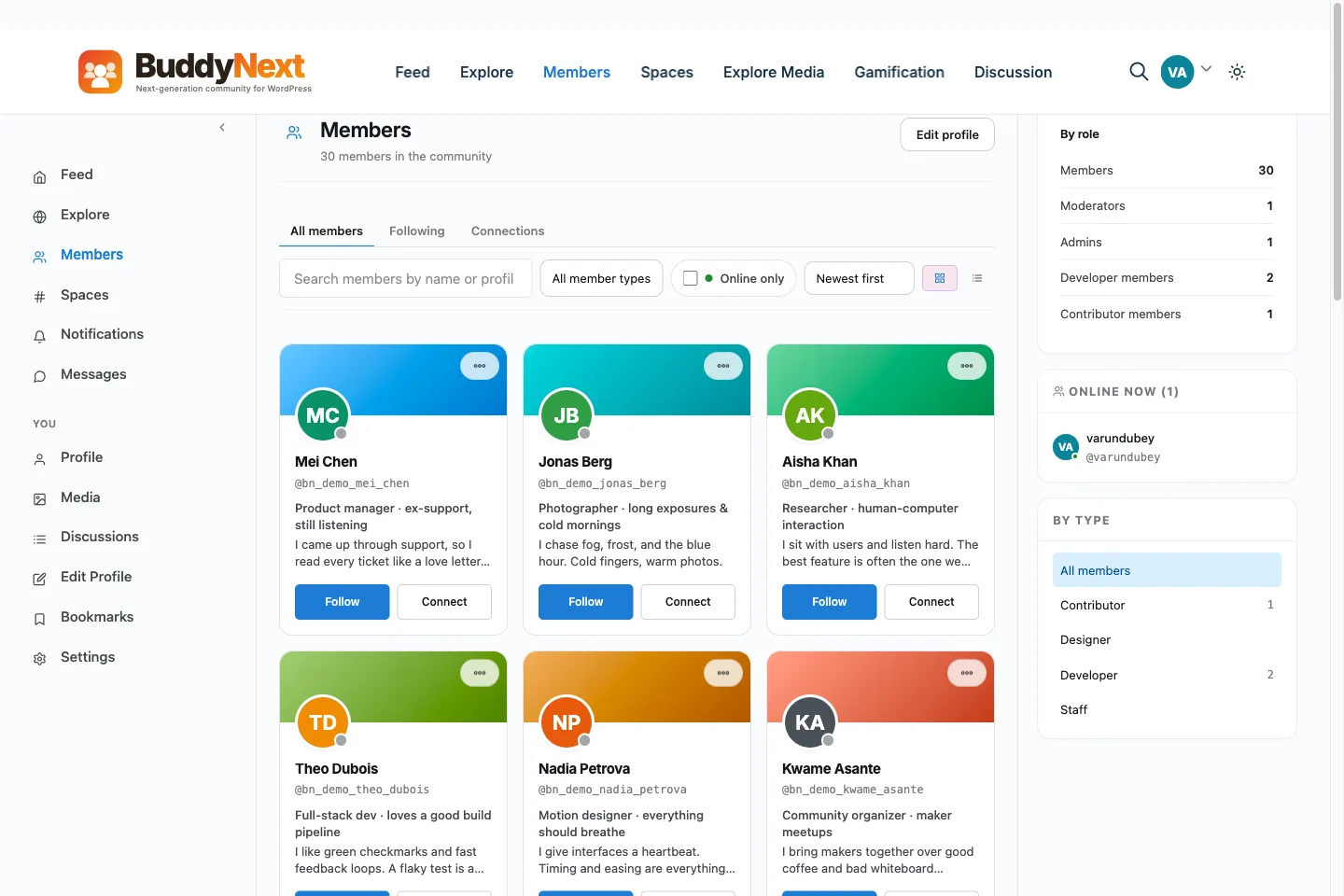
The member directory gives customers a sense of who else is in the space, which matters more for a gated product community than it might seem.
Spaces are the relevant piece again here, same as with course communities, but used differently. A private space scoped to buyers of a specific product keeps the support and showcase content relevant to that exact product, rather than mixing template-pack customers in with plugin customers who have nothing in common except that they bought something from you once. If you sell multiple products, this is the difference between a members-only space that feels built for each customer and one that feels like an overflow bin.
Free-tier BuddyNext covers the mechanics that actually matter for this: member profiles with privacy controls per field, a directory so customers can see who else bought the same thing, threaded comments for support-style back-and-forth, reactions and bookmarks so useful answers stay easy to find later, and deep moderation tooling (reports, banned words, space-scoped moderation) so a support space doesn’t turn into a mess once it has any real volume. None of that requires the Pro tier or a Stripe integration to work.
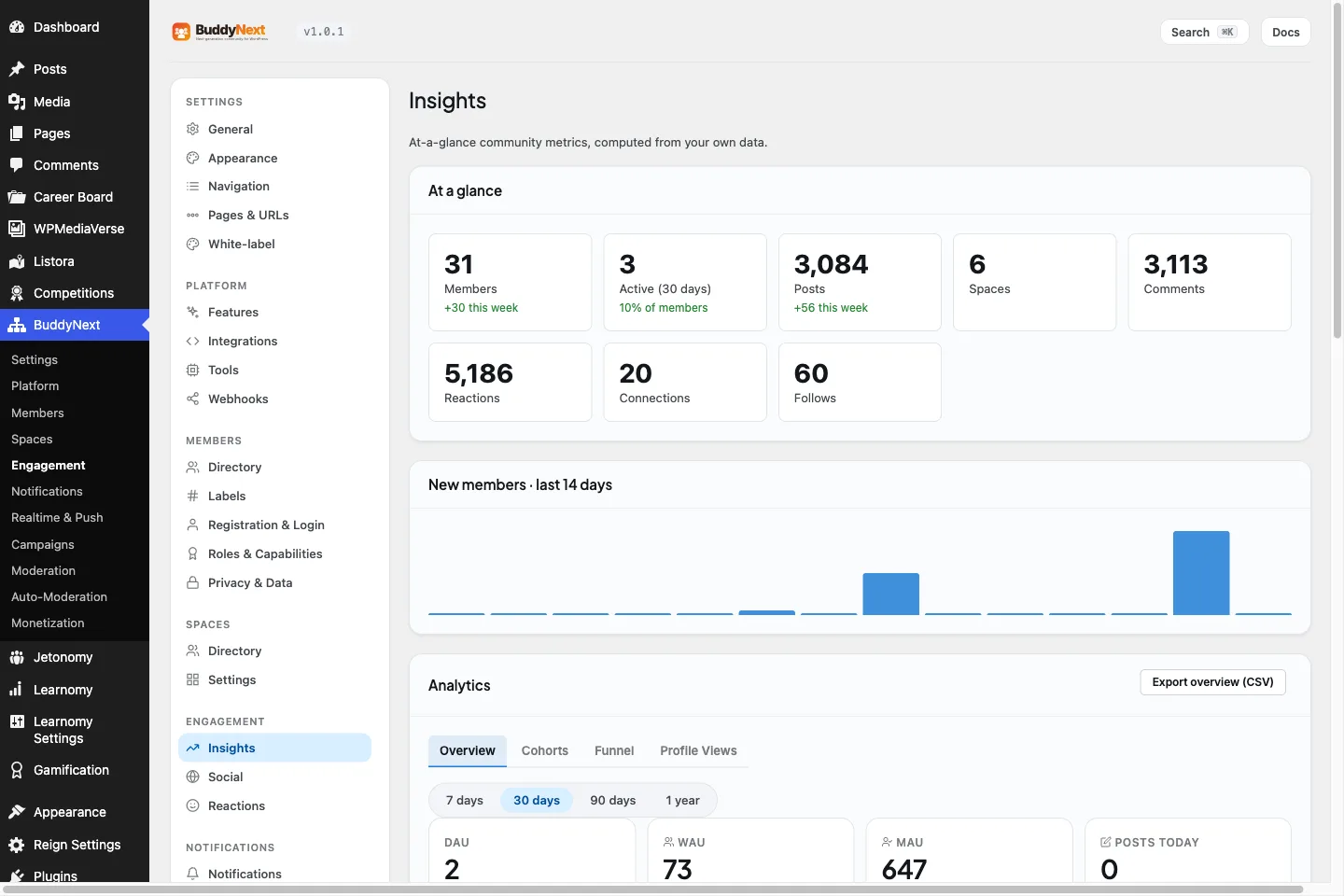
The admin side gives you an overview of activity across spaces, useful once you’re running more than one gated product community.
Where Pro becomes relevant is gating by purchase automatically. If you’re selling through Easy Digital Downloads and want a customer dropped into the right private space the moment they buy a specific license, without you manually approving each join request, that’s where native Stripe membership tiers and gated spaces on the Pro side come in. Free tier can still get you most of the way there with manual or invite-based access; Pro removes the manual step once volume makes that step painful.
Setting up access without creating a support nightmare
The single biggest mistake in building a members-only space for product customers is treating access as an afterthought. If getting into the space requires a customer to notice a mention in a footer, click through to a separate signup, and wait for manual approval, most customers who would have used it never will, and the ones who do will show up annoyed that it took three steps.
Tie access to purchase as directly as your checkout flow allows. If a customer bought a lifetime license to your plugin, they should land in the plugin’s private space automatically or within one click of checkout, not after hunting through a welcome email three days later. Every extra step between “bought” and “in the space” is a customer who never joins, and a customer who never joins is one you’ll be answering the same support question over email instead of once in public where the answer helps everyone after them.
Decide upfront whether access should be permanent or tied to an active license. For subscription products this matters more than it seems: a lapsed subscriber sitting in your private support space forever, still asking questions about a product they’ve stopped paying for, is a different problem than a lifetime buyer who should have access as long as the product exists. Neither answer is wrong, but pick one before launch rather than discovering the gap when your first cancellation happens.
Moderation load is different from a course community
Product support spaces attract a different tone of post than course communities do. Course spaces mostly see encouragement and progress updates. Product support spaces see frustration, because people usually show up when something isn’t working. That’s not a sign the space is failing; it’s the actual job of the space. But it does mean you need a faster response loop than a course community can get away with.
A support question that sits unanswered for three days in a gated product space reads very differently than the same delay in a course community. In a course, a slow reply is annoying. In a product support space, a slow reply on something like a broken license key or a plugin conflict starts to look like the company doesn’t care, and that’s the kind of impression that shows up in a review before it shows up as a support ticket. Staff the first week or two more heavily than you think you need to, then adjust once you see the real volume and pattern of questions.
When a members-only space is overkill
Not every digital product business needs this, and building one before there’s a reason for it wastes effort that would be better spent elsewhere.
If your product is a single-purchase item with no ongoing relationship (a one-time template, a static ebook, a font pack), a gated community adds infrastructure without a matching need. Customers who buy something finished and complete don’t need a place to keep coming back, because there’s nothing new for them to come back to.
If your support volume is low enough that email or a help desk handles it comfortably, don’t build a space just because it seems like the modern thing to do. A quiet gated community that nobody posts in looks worse on a sales page than no community mention at all, because it advertises something that isn’t actually delivering.
And if you’re selling to a highly technical, low-touch audience that explicitly prefers documentation over discussion (some developer tools fit this exactly), a well-maintained knowledge base might outperform a community space entirely. Read what your specific customers actually do, not what the general advice says every product should have.
What this does for renewals and upsells
Beyond support, a members-only space becomes the highest-intent audience you have for anything else you sell. These are people who already paid, already showed up more than once, and are already primed to trust your next product more than a cold email list would be. When you launch a companion product, a template pack extension, or a tier upgrade, announcing it inside the space where these customers already are outperforms almost any other channel, because you’re not trying to earn attention, you already have it.
This also changes the economics of the space itself. A members-only community built purely for support is a cost center. The same space, once it’s also where renewals and upsells get announced first, starts paying for the time it takes to run.
How this is different from a generic membership area
It’s worth being precise about a distinction that gets blurred a lot in product marketing. A membership area, in the sense most WordPress plugins use the term, is a content gate: certain pages, downloads, or videos become visible only to people who paid. That’s valuable, and if all you need is to restrict access to files or premium documentation, a membership plugin does that job well on its own. We’ve covered the landscape of options in our look at the best membership plugins for WordPress, and for pure content-gating, that category is the right tool.
A members-only community is a different thing layered on top of that gate. It’s not just “can this customer see this page.” It’s “can this customer talk to other customers who bought the same thing, ask a question in public, and see that someone already solved the exact problem they’re stuck on.” A content gate answers a permissions question. A community answers a “does anyone else out there use this the way I do” question, and that second question is the one that actually drives renewals and repeat purchases, because it’s the one that makes a customer feel like they made a good decision buying from you rather than a competitor.
Plenty of digital product businesses have the first piece already, gated downloads, license-based access, protected changelogs, and simply never add the second. That’s often the actual gap when a product with decent initial sales sees weak renewal numbers: customers got the file, never talked to another customer, and had no reason to think about the product again until the renewal email showed up asking for money.
Measuring whether it’s actually reducing support load
The clearest way to know if a members-only space is earning its keep is to track one specific number before and after: how many support tickets repeat the same question that’s already been answered in the space. If that number drops noticeably within the first two or three months, the space is doing its job, because it means customers are finding answers before they open a ticket, or your team is answering once in the space instead of once per customer over email.
A softer but still useful signal is whether customers start answering each other’s questions before your team gets to them. This tends to happen later than the support-ticket drop, usually once a space has a critical mass of maybe fifty to a hundred active members, but it’s the point where the space starts actively saving you time rather than just organizing the time you were already spending.
Resist the urge to measure success purely by member count or post volume. A gated space with three hundred silent members and a support space with sixty active ones are not equally valuable; the second one is doing the actual job. Count return visits and answered questions before you count total signups.
A realistic build order
Start with one private space per product line, not one space per individual product, unless your catalog is small enough that per-product spaces make sense from day one. A single “plugin customers” space that covers three related plugins is easier to keep active than three near-empty spaces split too thin.
Seed it before opening it to customers. A completely empty space, even a gated one, reads as abandoned the moment the first customer arrives. Post the first few likely questions and answers yourself, add a pinned welcome with what the space is for, and only then start routing customers into it.
Route new purchases in automatically from day one if your checkout tooling supports it, and manually if it doesn’t yet, rather than waiting for the “right” automation before launching. A manually-added first twenty customers beats a technically perfect pipeline that delays launch by two months.
Frequently asked questions
Do I need a members-only space if I already have a help desk?
A help desk and a members-only space solve different problems. A help desk resolves individual tickets privately. A space builds a searchable, public-to-members archive where the same answer helps every future customer who hits the same issue, and gives customers a reason to return between support needs. Many product businesses run both, with the space absorbing repeat questions and the help desk handling account-specific issues.
Should I open the space to trial users or only paying customers?
Paying customers only, in most cases. Trial users in a support space tend to ask pre-purchase questions that belong in sales conversations, not customer support, and mixing the two dilutes the space for people who already bought. If you want trial-stage engagement, a separate, smaller pre-sale space works better than merging the two.
How much does it cost to set this up?
The community layer itself can start at zero. BuddyNext’s free tier covers spaces, profiles, moderation, and the directory features that a members-only support space actually needs. The paid tier becomes relevant mainly for automatic purchase-based gating through Stripe membership tiers, which matters more once manual access management becomes a real time cost.
What happens to access when a subscription lapses?
Decide this before launch rather than after your first cancellation. Some businesses keep lifetime access for anyone who’s ever purchased, treating the space as a permanent customer benefit. Others tie access to an active subscription, removing it on cancellation. Both are defensible; the mistake is not deciding and ending up with an inconsistent, ad hoc policy that customers notice and complain about.
Will this replace my documentation?
No, and it shouldn’t try to. Documentation covers the stable, known-answer questions. A members-only space covers the messier, situational questions that don’t fit a doc page: “this worked for me but not for my specific setup,” edge cases, and customer-to-customer workarounds nobody wrote down officially. The two work best together, with the space occasionally surfacing questions worth turning into new documentation.
Can I run this alongside my existing EDD-based checkout without switching platforms?
Yes. A standalone community layer runs alongside Easy Digital Downloads rather than replacing any part of your checkout or license management. It doesn’t require migrating your store or adopting a different ecommerce plugin; it sits next to what you already have and connects at the point where a purchase should grant access to a space.
What if I sell several unrelated digital products?
Split by product line rather than forcing everyone into one undifferentiated space. A customer who bought your icon set has nothing useful to say to a customer troubleshooting your form plugin, and mixing them dilutes both conversations. If two products are closely related, a shared space with clearly labeled topic threads works; if they’re genuinely unrelated, separate private spaces per line keep each one relevant enough that customers actually want to be there.
The actual test
Before building this, ask one honest question: does a customer who bought from you six months ago have any real reason to come back to your site today? If the answer is yes, updates, new templates, ongoing use, a members-only space gives that reason a home and turns scattered support emails into something that compounds in value over time. If the answer is genuinely no, a well-organized help page will serve your customers better than a space nobody has a reason to open twice.