Selling Custom Services Alongside Your Digital Downloads


A designer sells a $39 icon pack on her EDD store. Every month, three or four buyers email her asking whether she can “just tweak these for our brand.” She says yes because turning down paid work feels wrong, then spends the next hour hunting through old invoices trying to remember what she charged the last person for a similar favor. There’s no order record, no defined scope, no way to attach a revised file that isn’t just a reply-all email thread. The download itself is fully automated. The custom work bolted onto it is running on memory and goodwill.
That gap between “sell a file” and “sell a favor” is where a lot of digital product revenue quietly leaks out. This post is about closing it: why selling custom services alongside digital downloads works better than either handling requests by email or turning them away, what actually breaks in an email-only setup, and how a dedicated services layer changes the economics without forcing a rebuild of the existing store.
Why custom services and digital downloads end up living in the same shop anyway
Nobody plans to become a hybrid seller. It happens because customers ask for things a static file can’t provide. A course creator sells a “Build Your Course Outline” template, and a buyer wants someone to actually build theirs. A stock photo seller gets asked for a custom shoot. A developer running a WordPress plugin and theme shop writes a changelog that says “extensible via hooks,” and half the support tickets are really requests to write the hook for them.
The pattern holds across categories because digital products solve a repeatable problem, and repeatable problems always have edge cases that need a human. Templates need customization. Plugins need configuration. Icon packs need brand-matching. Courses need coaching. The download is the 80% case; the service is the 20% that a template genuinely can’t cover, and it’s usually the 20% that pays the most per hour, because the buyer already trusts you enough to hand you money twice.
Sellers who resist this pattern for too long tend to lose the revenue to someone else. The buyer who wanted a custom icon set didn’t stop wanting it after being told “sorry, I only sell the templates”, they went to Fiverr, or Upwork, or a competitor who happened to reply “sure, send me details.” The service request was never optional. The only choice was whether it stayed in-house or walked out the door.
What breaks when custom work runs on email
Email feels like the path of least resistance for a first custom order. No new tools, no new dashboard, no learning curve. It works exactly once. By the third or fourth request, cracks show up in predictable places.
Scope drifts because nothing was written down as a commitment
A buyer asks for “a few tweaks to the logo pack.” Two rounds of email later, “a few tweaks” has turned into a full redesign, and there’s no document either party can point back to that says what was actually agreed. Verbal (or email-thread) scope is soft scope. It expands under its own weight because every follow-up message feels like a small addition rather than a new request.
Payment and delivery are two separate, unlinked events
The buyer pays through PayPal.me or a Stripe payment link with no connection to what they’re actually owed. The seller delivers a Dropbox link three days later, in a different thread, with no record tying the payment to the delivery. If the buyer disputes the charge, there’s no order history to point to, just a scattered email trail that a bank or a lawyer would need a highlighter to follow.
Pricing becomes improvised, which means it becomes inconsistent
Without a rate card, every custom quote gets invented from scratch. The seller either underquotes because they’re anxious about scaring the buyer off, or overquotes because they’re annoyed at how much time this is eating into product-development hours. Two buyers asking for near-identical work can end up paying wildly different amounts, and if they ever compare notes, which happens more than sellers expect, especially in tight-knit creator communities, that inconsistency reads as unprofessional at best and unfair at worst.
There’s no file version control
Revision requests come back as replies with attachments named final, final_v2, and final_ACTUALLY_FINAL. Nobody, including the seller, is entirely sure which file is live six weeks later when the buyer emails asking for “the version we agreed on.”
None of this means email is a bad tool. It means email was never built to be an order system, and stretching it into one is what makes custom work feel exhausting compared to the passive, automated feeling of a download sale.
The alternative: services live in the same store, with their own structure
The fix isn’t to hire a project manager or bolt on a generic help-desk plugin. It’s to give custom work the same structural treatment the downloads already have: a defined product, a checkout, an order record, and a delivery mechanism. That’s what a plugin like WP Sell Services is built to do, and it’s worth understanding the shape of it before deciding whether it’s overkill for a small catalog.
The free version is standalone, it doesn’t require WooCommerce, BuddyPress, or EDD to function, so a seller running a pure EDD store isn’t forced to install a second commerce framework just to take custom orders. Setup runs through a multi-step service creation flow where a seller defines what they’re actually offering, including three-tier pricing (a Basic/Standard/Premium structure similar to what buyers already expect from marketplace platforms). That tiering alone solves the “every quote is improvised” problem, the price list exists before the first buyer ever asks.
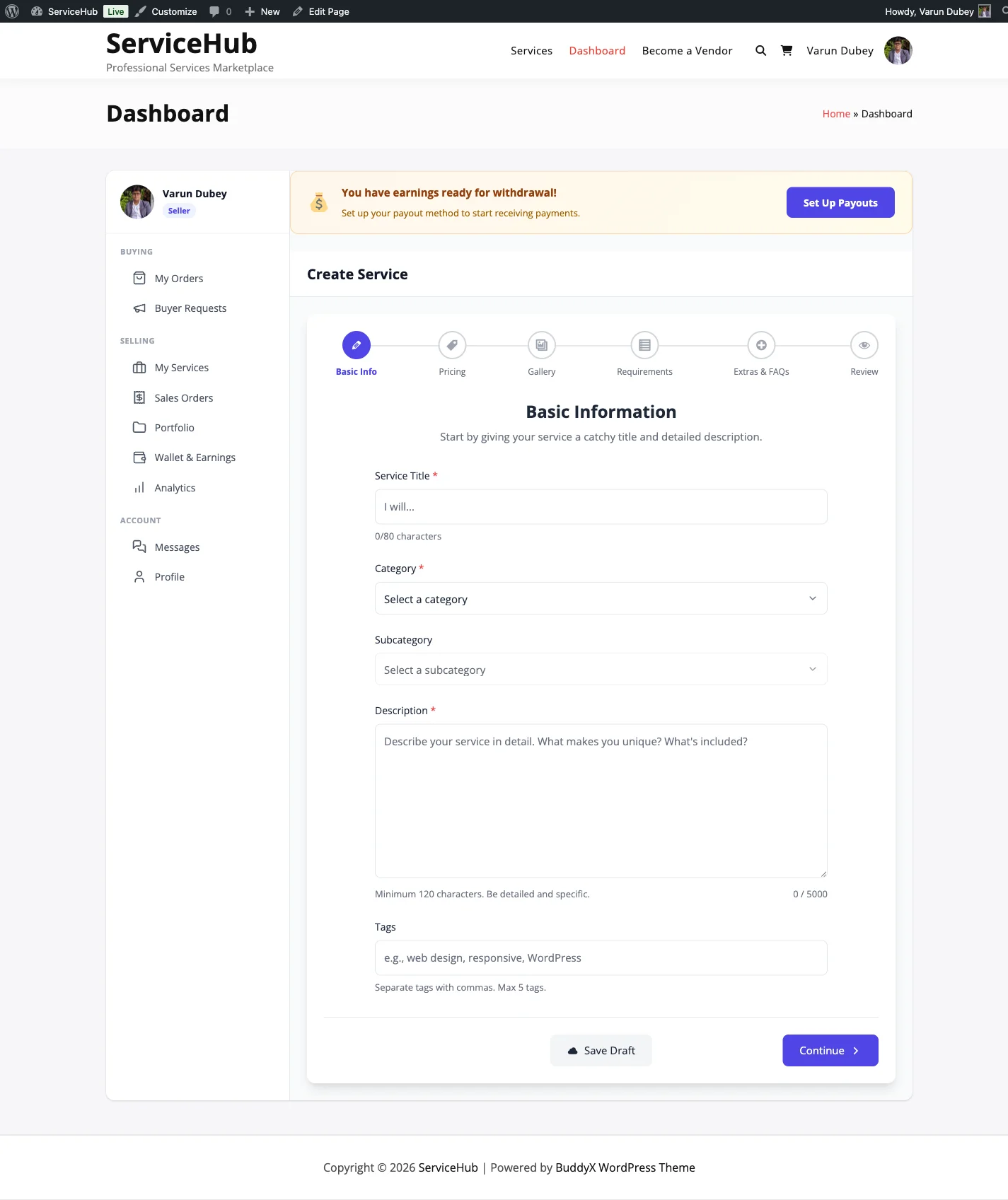
The multi-step service creation flow in WP Sell Services, pricing tiers get defined once, before the first buyer asks for a custom quote.
Checkout runs through built-in Stripe and PayPal integration, so the payment step is no longer a disconnected PayPal.me link, it’s tied directly to the order record. Every order then moves through an 11-status lifecycle (from initial request through delivery and completion), which is the part that actually replaces the email thread. Instead of hunting for the message where scope was agreed, there’s a single order page showing what was requested, what was paid, what was delivered, and what stage it’s currently sitting in.
Where the tiered pricing pattern actually helps a downloads seller
Three-tier pricing looks like a small feature until it’s compared against the improvised-quote problem described earlier. A seller who already sells a $39 template can offer a Basic tier (“we customize the colors and fonts for your brand, $75”), a Standard tier (“full customization plus one round of layout changes, $150”), and a Premium tier (“fully custom build from the template as a starting point, two revision rounds, $300”). The buyer picks a tier the way they’d pick a plan on a SaaS pricing page, and the seller never has to invent a number under time pressure while a customer is waiting on a reply.
This also does something subtler: it normalizes the idea that custom work has a menu, not a mood. Buyers who see fixed tiers trust the process more than buyers who get a “let me think about pricing and get back to you” reply. And sellers stop feeling the low-grade dread of quoting, because the quoting already happened, once, during setup.
Order messaging closes the file-version-control gap
Every order in the system carries its own messaging thread with file attachments built in. That single change removes the final_v2_ACTUALLY_FINAL.zip problem entirely, because every file exchanged for that specific order lives on that specific order’s page, not scattered across a personal email inbox that also contains newsletter subscriptions and spam. When a buyer comes back eight weeks later asking “which file did we land on,” the answer is one click away instead of a search through old threads.
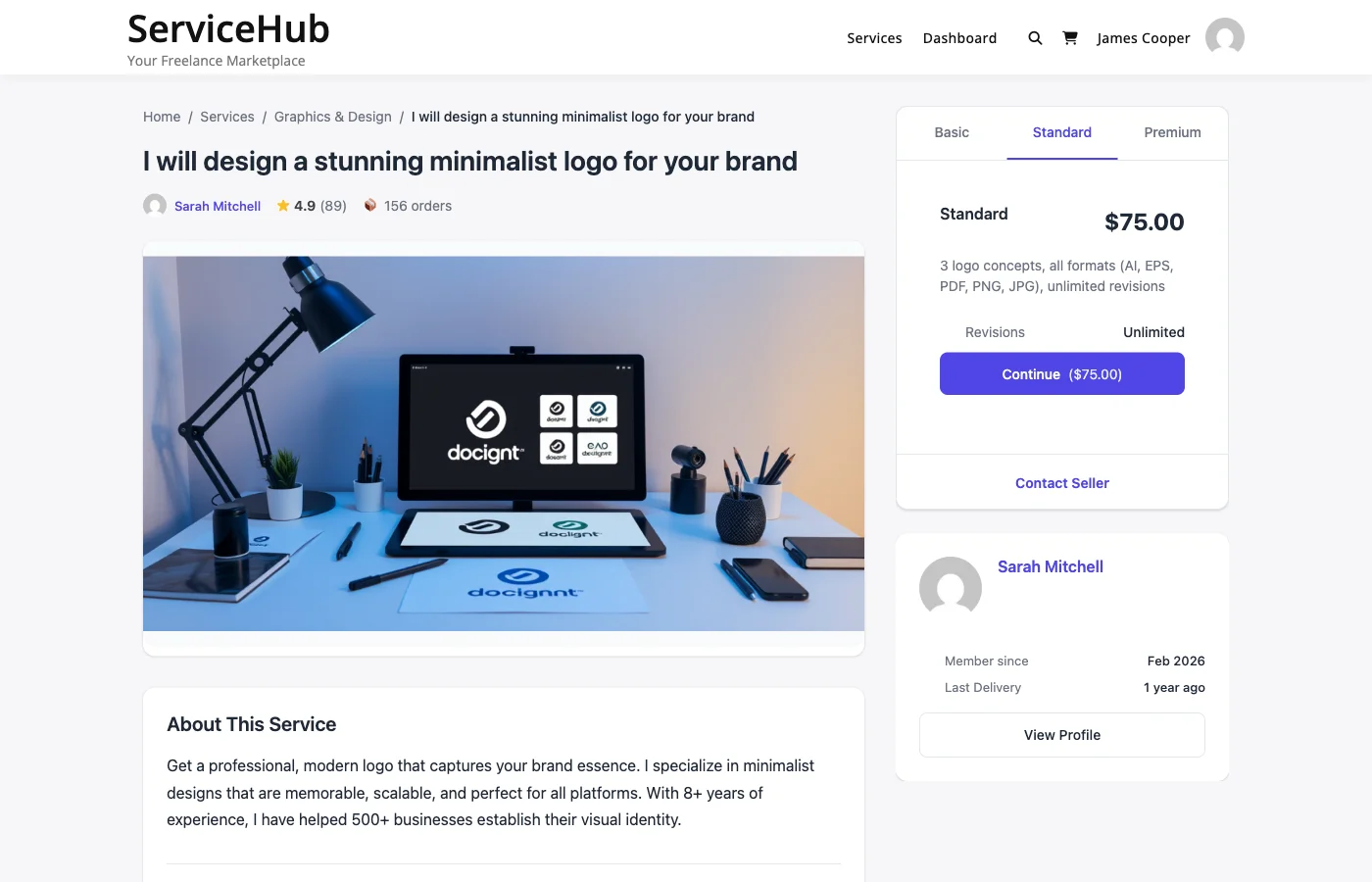
Package cards on the frontend, buyers choose a tier the same way they’d choose a plan, instead of waiting on a custom quote.
The vendor system matters even for a one-person shop
It’s tempting to assume “vendor system” only matters if you’re running an actual multi-seller marketplace. But the vendor layer, including auto-calculated seller levels, is what turns a services offering into something that compounds instead of resetting to zero with every new buyer. A seller level built from completed-order history is a trust signal that a raw product listing can’t provide on its own. A buyer deciding whether to hand over $300 for custom work looks for exactly this kind of evidence before they commit, the same way they’d look at seller ratings before bidding on an item.
For a solo seller, this isn’t about competing with other vendors on the same platform, it’s about having a visible, growing track record attached to the services offering instead of a services page that looks the same on day one as it does after two hundred completed orders.
Whether a services catalog even makes sense depends partly on which flavor of EDD store this is in the first place, a solo freelancer’s storefront looks different from an agency’s or a SaaS founder’s, a distinction covered in more depth in our guide to matching EDD use cases to different types of sellers.
A realistic setup path for someone already running EDD
The practical question for most sellers reading this isn’t “is this a good idea in theory”, it’s “what does Tuesday afternoon actually look like if I try this.” Here’s the shape of it.
Start with one service, not five. Pick the custom-work request that already comes in most often, the brand customization, the setup call, the configuration service, and build a three-tier listing for exactly that. Resist the urge to list every possible service on day one; a thin, well-defined offering converts better than a page of ten vague ones, because buyers can actually picture what they’re purchasing.
Write the tier descriptions the way you’d write a product description, not a scope-of-work legal document. Buyers respond to concrete deliverables (“3 revision rounds, 5-day turnaround, source files included”) more than they respond to hedged language (“we’ll work with you to figure out what you need”).
Connect the checkout to Stripe or PayPal, both are built in, so this isn’t a separate integration project. Publish the listing somewhere existing download buyers will actually see it: a line in the product description, a mention in the post-purchase email, a small callout on the account dashboard. The buyers most likely to want a custom service are the ones who already bought the related download, so the highest-converting placement is right next to what they already paid for once.
Let the first few orders run through the full lifecycle before adding a second service. It’s worth learning where the 11-status flow actually maps to your own delivery process before scaling the catalog, some sellers find they want a custom status name, others find the default flow fits without changes.
Why not just send buyers to Fiverr or Upwork instead
Some sellers solve the custom-work question by outsourcing it entirely, pointing buyers to a freelance marketplace and stepping out of the transaction. It’s a defensible choice for someone who genuinely doesn’t want to do bespoke work, but it quietly gives away three things that are worth naming before defaulting to it.
The first is the relationship. A buyer who gets routed off-site to hire a stranger stops thinking of the original seller as the person who solves their problem. The next time they need something adjacent, a different template, a related plugin, a follow-up tweak, they don’t come back, because the connection was never reinforced. The second is the margin. Fiverr and Upwork both take a cut of freelancer earnings, and routing a buyer there for work the original seller could have done themselves means paying a platform fee for zero added value. The third is quality control. A generic marketplace freelancer has no context on the original product, the buyer’s use case, or the brand conventions already established, the seller who built the template in the first place is almost always faster and more accurate at extending it than a stranger starting from zero.
None of this means outsourcing is always wrong. A seller buried in downloads-catalog work who genuinely can’t take on custom orders is better off referring buyers elsewhere than ignoring the requests. But that’s a capacity decision, not a structural one, and it’s worth making deliberately rather than by default, because the default of silence (not responding to service requests at all) is worse than either option.
Taxes, invoicing, and the paperwork nobody wants to think about
One reason sellers avoid formalizing custom services is the fear of extra bookkeeping. In practice, an order-based system reduces the paperwork burden rather than adding to it, because every transaction generates its own record automatically, what was charged, when, and for what. Compare that to the PayPal.me approach, where a seller often has to reconstruct, months later at tax time, which of forty incoming payments were product sales and which were custom work, based on nothing but a memory of who emailed what.
A per-order record with a defined service name and price tier is exactly the kind of audit trail an accountant asks for, and having it native to the sales system (rather than manually assembled from a spreadsheet) is one of those unglamorous benefits that only becomes obvious the first time a seller has to answer a tax question about six months of scattered custom-work income.
What this doesn’t require
None of the above requires abandoning EDD, migrating the downloads catalog, or learning a second store platform end to end. The services layer sits alongside the existing shop rather than replacing it, a seller keeps selling templates and files exactly as before, and simply adds a second, structured lane for the requests that a static file was never going to satisfy. Readers weighing broader setup questions, payment routing, vendor permissions, what a first week of listings should look like, will find a deeper walkthrough in our companion piece on freelance add-on services for EDD store owners.
How buyers actually discover a services offering they didn’t know existed
Adding a services catalog does nothing if nobody sees it. The highest-converting placement, by a wide margin, is inside the purchase experience for the related download itself, a line on the product page, a mention in the post-purchase automated email sequence, or a note in the license-key delivery message. A buyer who just paid for a template is, for the next few minutes, in an active buying mindset; that window closes fast, and a generic “check out our services” banner three months later in a newsletter converts at a fraction of the rate.
Support tickets are the second-best channel. Anyone asking “can you customize this for me” in a support thread has already told the seller exactly what they want, the reply just needs to include a direct link to the relevant service tier instead of an improvised quote typed into the ticket reply box. That single habit change, replying with a link to a structured listing instead of a hand-typed price, is often what separates a seller who scales custom work from one who burns out answering the same pricing question fifty different ways over a year.
When it’s genuinely not worth doing yet
Fairness requires saying this plainly: if custom-work requests show up once a quarter, building out a services catalog is solving a problem that barely exists yet. Below a certain volume, an invoice tool and a calendar link cover the need fine. The threshold worth watching for is frequency and repetition, once the same three or four flavors of custom request start showing up monthly, that’s the signal the informal system is starting to cost more time than a structured one would.
Frequently asked questions
Do I need to remove or replace my EDD store to add custom services?
No. WP Sell Services runs standalone and doesn’t require EDD, WooCommerce, or BuddyPress to function, so it sits next to an existing EDD catalog rather than replacing any part of it. The downloads keep selling through EDD exactly as they do now; the services catalog is a separate, additional surface.
How is this different from just adding a “custom work” product to my existing store?
A static product listing can take a payment, but it can’t manage an order lifecycle, collect requirements, hold a threaded conversation with file attachments, or track delivery status. A single custom-work SKU is really just a payment button with no order management behind it, the exact gap this post describes.
Can I charge different prices for different levels of customization?
Yes, the service creation flow supports three-tier pricing (commonly Basic, Standard, Premium) per listing, so a seller can offer a light-touch tier and a fully custom tier from the same service page without building separate listings for each.
What happens if a buyer and I disagree about what was delivered?
Order messaging keeps every request, file, and reply attached to that specific order, which gives both sides a single reference point instead of a scattered email history. Escalation and dispute handling get referenced further in our companion post on marketplace plugins versus contact forms, which covers where a structured order system earns its keep over an ad hoc process.
Is there a cost to try this?
The core plugin is free, with no WooCommerce, BuddyPress, or EDD dependency required to use it. A paid Pro Personal tier exists for sellers who want WooCommerce integration, vendor analytics with CSV/PDF export, and scheduled automated payouts, but none of that is required to list a first service and take a first order.
Will this slow down my existing checkout flow for downloads?
No, the services checkout and the EDD downloads checkout are separate flows. Adding a services catalog doesn’t touch how existing digital-product purchases are processed.
The real cost of staying informal
The designer from the opening paragraph isn’t losing money on the custom work itself, she’s charging for it, and buyers are paying. What she’s losing is the compounding value that a structured system builds automatically: a seller history, a reusable pricing menu, a searchable order record, a professional-looking process that turns a one-time custom buyer into a repeat one. Email can process a transaction. It can’t build a track record. That difference is small on order one and enormous by order fifty, and it’s the entire argument for giving custom services the same product treatment the downloads already get.