10 Best LearnDash Alternatives and Competitors for Digital Product Sellers in 2026

LearnDash has been the default answer to “which WordPress LMS should I buy” for over a decade, and for a long stretch it earned that position. But if you sell digital products, courses alongside eBooks, templates, plugins, or memberships, the calculus in 2026 looks different than it did when LearnDash first took the crown. The license is only the entry point: real payment processing typically means bolting on WooCommerce plus a gateway extension, meaningful analytics means another paid add-on on top, and by the time your stack actually sells courses the way your store sells downloads, you have assembled three or four moving parts across separate vendors, each renewing annually and each updating on its own schedule.
This comparison looks at the ten best LearnDash alternatives and competitors specifically through the lens of a digital product seller: someone who already thinks in terms of checkout conversion, average order value, and owning the customer relationship, not an enterprise training department with an IT team. Every platform below is judged on three things: what the deal actually looks like once you assemble a real selling stack, whether payments are native or bolted on, and whether you keep ownership of your catalog, your students, and your revenue.
Table of Contents
- Quick comparison
- 1. Learnomy, own the platform, keep every dollar
- 2. Tutor LMS, the strongest frontend builder
- 3. LifterLMS, deep, WooCommerce-native, priced accordingly
- 4. Sensei LMS, lean, if you live in WooCommerce
- 5. LearnPress, open core, add-on economics
- 6. MasterStudy LMS, a polished theme-ecosystem option
- 7. WP Courseware, simple drag-and-drop, strong reporting
- 8. MemberPress Courses, when membership is the business model
- 9. Thinkific, hosted, hands-off, rented
- 10. Teachable, easy to start, a cut of every sale
- Why digital product sellers outgrow LearnDash
- How we evaluated these ten platforms
- The stack math nobody puts on a pricing page
- FAQ
- Final verdict
Quick comparison
| Platform | Type | Checkout | The deal |
|---|---|---|---|
| Learnomy | Complete learning platform for WordPress | Stripe + PayPal built in, works standalone | No platform fees, what students pay is yours |
| LearnDash | WordPress plugin | Basic native; WooCommerce for real checkout | Annual license, add-ons and analytics sold separately |
| Tutor LMS | WordPress plugin | Via WooCommerce/EDD | Open core, launch features gated to premium tiers |
| LifterLMS | WordPress plugin | Via add-ons/WooCommerce | Per-add-on licensing that pushes toward the full bundle |
| Sensei LMS | WordPress plugin | Via WooCommerce | Open core, paid tier for quizzes and drip |
| LearnPress | WordPress plugin | Via add-ons | Open core, selling essentials sold as add-ons |
| MasterStudy LMS | WordPress plugin | Some native + WooCommerce | Open core, annual premium tier |
| WP Courseware | WordPress plugin | Via WooCommerce/integrations | Annual license, commerce handled elsewhere |
| MemberPress Courses | WordPress plugin | Native | Annual license, membership engine included |
| Thinkific | Hosted SaaS | Native (hosted) | A monthly subscription forever |
| Teachable | Hosted SaaS | Native (hosted) | A monthly subscription forever plus a cut of sales on entry plans |
1. Learnomy, own the platform, keep every dollar
If the reason you are searching for LearnDash alternatives is stack sprawl, a core license here, WooCommerce there, an analytics add-on on top, Learnomy is the most direct answer on this list. It is not another plugin to bolt into a pile: it is a complete learning platform for WordPress, the online school you own. Courses with video, audio, PDF, and reading lessons come together in a drag-and-drop builder; quizzes span six question types with partial credit, question banks, timed, proctored attempts, and an essay-grading inbox; and completion certificates are QR-verifiable, with a public verification page and LinkedIn-shareable design students actually show off.
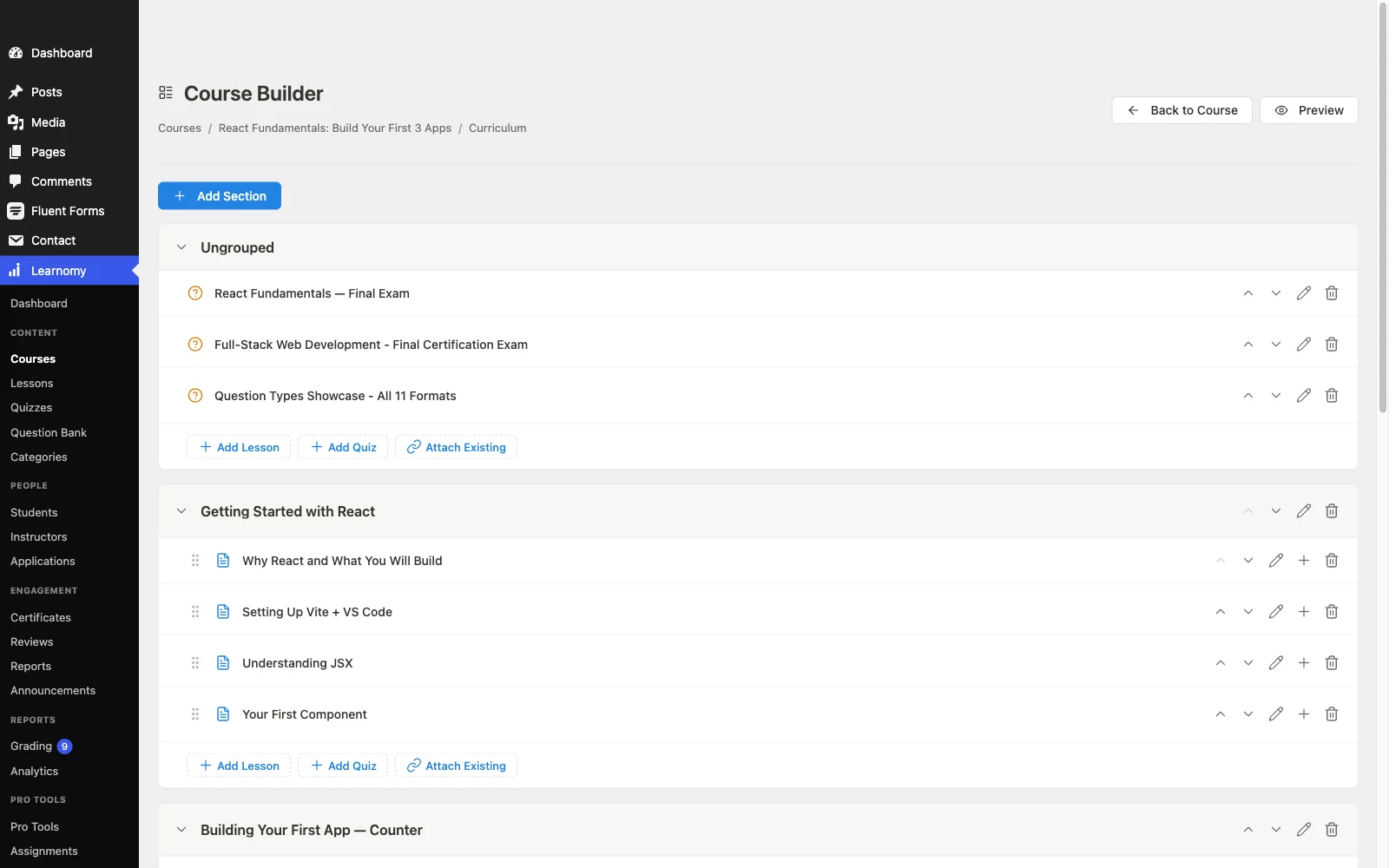
For a digital product seller, the checkout story is the headline. Stripe and PayPal checkout is built in and works standalone, you do not need to bolt on a cart just to sell a course, and a WooCommerce adapter is there if your store already runs on Woo. There are no platform fees: what students pay is yours, minus only your payment processor’s cut, on a site you control, with student data in your own database. No hosted middleman can raise prices, change terms, or hold your catalog hostage. If you have read our breakdown of what platform fees actually cost creators over a year, you already know why this compounds.
The rest of the platform covers what LearnDash sells piecemeal: memberships with trials and an automatic pricing page, instructor revenue sharing with Udemy-style splits and instructor applications and dashboards, coupons, reviews, announcements, email templates, full-text course search, Course structured data for rich search results, and PWA offline progress for students learning on phones. Teams and B2B training, company seats, learning paths, cohorts, drip, are part of the platform rather than an enterprise upsell. Course videos stay protected, and the whole thing is yours to brand, down to dark mode and layouts; community, discussion boards, gamification, and a job board are available by pairing companion Wbcom products rather than shipping natively. And if you are already on LearnDash, Learnomy’s migration wizard moves your courses over directly.
Pros:
- Complete platform, courses, quizzes, certificates, memberships, checkout, and analytics in one system instead of a plugin pile
- Built-in Stripe and PayPal checkout; no commerce plugin required
- No platform fees and full data ownership with standard WordPress portability
- Core plugin is agent-callable via the WordPress Abilities API; prompt-to-draft AI generation is available on the upgraded tier
- Instructor revenue sharing built in for marketplace-style growth
- Direct migration wizard from LearnDash
Cons:
- Younger third-party ecosystem than LearnDash’s decade of niche add-ons
- Self-hosted, so hosting and backups remain your responsibility (true of every WordPress option here)
Get it: wbcomdesigns.com/downloads/learnomy.
2. Tutor LMS, the strongest frontend builder
Tutor LMS is the LearnDash alternative most people evaluate first, and its frontend course builder is genuinely the best building experience in the WordPress LMS space, you construct and preview courses without bouncing into wp-admin. Its open core is usable for a simple course, and the premium tiers add drip content, certificates, gamification, and multi-instructor tools.
The catch for a seller: the features that make a course sellable, certificates, content drip, advanced quiz options, sit in those premium tiers, and real checkout still runs through WooCommerce or Easy Digital Downloads. If you already run an EDD store that is less of a problem (see our guide to selling courses with EDD and an LMS plugin), but it is still an integration you maintain rather than a native flow.
Pros: excellent frontend builder; usable open core; strong multi-instructor features; large user community.
Cons: launch-critical features gated to premium tiers; payments depend on a separate commerce plugin; settings sprawl grows with add-ons.
The deal: open core with annual premium tiers; checkout via a separate commerce plugin.
3. LifterLMS, deep, WooCommerce-native, priced accordingly
LifterLMS is the closest philosophical match to LearnDash: a mature, deeply featured course engine with engagement automations (email triggers, achievements) that most competitors lack. Its builder is solid and its documentation is among the best in the category.
The economics are the sticking point. Add-ons are licensed individually, and any realistic selling stack pushes you toward the everything bundle, with payment processing leaning on its own gateway add-ons or WooCommerce. For a seller comparing this against a platform with checkout built in, LifterLMS has to win on its engagement automations specifically, which, for some funnels, it legitimately does.
Pros: engagement automations and achievements; mature and stable; excellent docs.
Cons: per-add-on licensing adds up; payments not native to the core; assembly required.
The deal: annual per-add-on licensing that funnels toward the full bundle.
4. Sensei LMS, lean, if you live in WooCommerce
Sensei, from Automattic, is the minimalist’s LearnDash alternative. It builds courses in the block editor, integrates tightly with WooCommerce for selling, and its open core genuinely supports a simple launch. The paid tier adds quizzes with advanced grading, content drip, and paid course blocks.
The WooCommerce coupling cuts both ways: if your store already runs on Woo, Sensei is a natural extension; if you sell through EDD or want a standalone course checkout, Sensei’s dependency becomes a second commerce stack to maintain. Compare that honestly against what WooCommerce adds in overhead for digital-only stores before committing.
Pros: genuinely usable open core; block-editor native; Automattic backing.
Cons: thin feature set versus this list; WooCommerce all but required for selling; limited reporting.
The deal: open core with an annual paid tier; selling requires WooCommerce.
5. LearnPress, open core, add-on economics
LearnPress has one of the largest install bases of any WordPress LMS, and its core genuinely costs nothing to start with: courses, lessons, quizzes, basic ordering. It earns its place on marketplace theme demos for a reason, it is easy to stand up and looks fine out of the box.
The trade is that almost everything a seller needs, certificates, drip, assignments, most payment gateways, is a paid add-on, and assembling them piecemeal leaves you maintaining a patchwork of separately updated extensions. Support responsiveness at the open-core level is community-grade. It is a fine validation platform and a frustrating scale platform; our roundup of open-source LMS options covers where it fits best.
Pros: open core; huge theme compatibility; low barrier to entry.
Cons: add-on sprawl; selling essentials all cost extra; support is thin at the core level.
The deal: open core with selling essentials sold as separate add-ons.
6. MasterStudy LMS, a polished theme-ecosystem option
MasterStudy, from StylemixThemes, pairs a capable open-core LMS plugin with a polished ecosystem of education themes. Its lesson types are varied (video, streams, slides), its student dashboard looks modern without custom CSS work, and the premium tier adds drip, certificates, assignments, and gradebooks.
It is at its best when adopted alongside a StylemixThemes theme, outside that ecosystem you will do more integration work, and its commerce story (some native gateways plus WooCommerce for the rest) is middle-of-the-pack. A solid choice for education-site builders; a less obvious one for an existing digital storefront adding courses.
Pros: modern UI out of the box; varied lesson formats; coherent theme pairing.
Cons: strongest inside its own theme ecosystem; smaller community; commerce split between native and Woo.
The deal: open core with an annual premium tier.
7. WP Courseware, simple drag-and-drop, strong reporting
WP Courseware is the veteran nobody talks about: a straightforward drag-and-drop course designer with detailed student progress reporting and instructor gradebooks. Teams that want to build training quickly without learning a complex builder consistently like it, it is also a quiet favorite for internal training portals that skip enterprise LMS pricing.
Payments run through WooCommerce or third-party integrations rather than a native checkout, and its marketing surface (sales pages, funnels) is minimal, it assumes you handle selling elsewhere.
Pros: fast to learn; strong progress reporting; certificates included.
Cons: no native checkout; dated UI in places; small ecosystem.
The deal: annual license; commerce handled by whatever store you already run.
8. MemberPress Courses, when membership is the business model
MemberPress approaches courses from the opposite direction: it is a membership and billing engine first, with a genuinely decent course builder attached. Payments are native, subscription handling is best-in-class for WordPress, and access rules are more flexible than most LMS platforms manage.
If your actual product is a paid membership where courses are one benefit among several, MemberPress is arguably the right architecture, the same logic we walk through in our membership-site recurring revenue guide. If courses are the standalone product, you are paying for a billing engine you barely use, and the course tooling alone would not justify the commitment.
Pros: native payments and subscriptions; excellent access rules; courses included in all tiers.
Cons: course features shallower than dedicated course platforms; membership framing may not fit; no open core to trial.
The deal: annual license with the membership engine as the center of gravity.
9. Thinkific, hosted, hands-off, rented
Thinkific is the strongest hosted LearnDash alternative for someone who wants zero server responsibility: no WordPress, no updates, no backups, with native checkout and a no-code builder. On its paid plans it takes no cut of individual sales, which puts it ahead of Teachable on seller economics.
The structural trade is rent versus ownership: a monthly subscription forever compounds past any self-hosted stack, your catalog lives on their infrastructure, and migration out gets harder as your student base grows. Our Thinkific alternatives comparison covers the exit paths if you are already there.
Pros: zero maintenance; polished builder; no per-sale cut on paid plans.
Cons: subscription compounds forever; platform lock-in; limited deep customization.
The deal: a monthly subscription forever, with your school on rented land.
10. Teachable, easy to start, a cut of every sale
Teachable remains the easiest on-ramp in course selling, signup to sellable course in an afternoon, payments, EU VAT, and affiliates handled for you. For validating a first course with zero technical investment, it still works.
For an established seller, the math sours: a monthly subscription plus a transaction cut on entry plans means the platform takes a growing share of your success, and you build your catalog on rented land. We ran the structural math in platform fees vs. Teachable’s cut, and the case for selling from your own site gets stronger every year you grow. See also our full Teachable alternatives roundup.
Pros: fastest launch; handles tax/VAT and affiliates; no technical skills needed.
Cons: a cut of sales on entry plans; full platform dependency; weak customization.
The deal: a monthly subscription forever, plus a share of every sale on entry plans.
Why digital product sellers outgrow LearnDash
To be fair to LearnDash: it is stable, its add-on ecosystem is unmatched, and nearly any niche requirement has an existing extension. The reasons sellers leave are consistent, though. First, stack assembly, a core license plus WooCommerce plus a gateway plus a reporting add-on is a four-vendor stack doing what a complete platform does natively. Second, checkout friction, LearnDash’s built-in payment options are basic enough that WooCommerce is the de facto requirement, and every plugin between a buyer and a purchase is conversion risk. Third, reporting, enrollment counts are easy to find; honest completion-rate reporting requires buying more or bolting on more. None of these are fatal for an enterprise; all of them tax a lean seller every single month.
How we evaluated these ten platforms
Rankings weigh what a realistic launch stack looks like (the license plus the add-ons a real selling flow requires), payment nativeness, ownership and portability of the catalog and student data, reporting honesty, and how much of the platform’s promise survives contact with an actual store. Learnomy’s capabilities are checked against its own documentation and public changelog as of September 2026; competitor feature boundaries reflect each vendor’s published materials at the time of writing, always reconfirm current terms on the vendor’s own site, because tiers shift. Where a hosted platform’s convenience is a genuine advantage, we say so rather than pretending self-hosting is free of responsibility.
The stack math nobody puts on a pricing page
Compare the models structurally rather than by sticker. A hosted platform is a monthly subscription forever, and on entry plans, a percentage of every sale on top, so its cost scales with time and with your success. An assembled plugin stack is a set of annual license renewals across separate vendors, LMS core, commerce plugin, gateway, analytics, each of which can raise prices or lapse independently, plus the integration hours when one update breaks another. A complete platform you own collapses that to your hosting bill and your payment processor: no platform fees, no per-sale cut, no renewal treadmill across four vendors. Over a multi-year course business, the difference is not a rounding error, it is the marketing budget.
FAQ
What is the best LearnDash alternative overall in 2026? For digital product sellers, Learnomy, a complete learning platform for WordPress with built-in Stripe/PayPal checkout, signed QR-verifiable certificates, six quiz types, and no platform fees. Tutor LMS is the strongest plugin alternative if a frontend building experience is your top priority.
What is the easiest LearnDash alternative to start with? Learnomy, checkout, certificates, quizzes, and memberships work out of the box with nothing else to assemble, and its migration wizard imports LearnDash courses directly. LearnPress and Sensei are easy to install, but selling features cost extra or require WooCommerce.
Can I migrate my courses off LearnDash? Yes. Learnomy includes a migration wizard for LearnDash specifically, which moves course structures over directly. On any LMS-to-LMS move, student progress history is the hard part, migrate at a term boundary if you run cohorts, and keep the old system read-only during transition.
Do LearnDash competitors work with Easy Digital Downloads? Tutor LMS integrates with EDD directly, and any WordPress LMS can sit beside an EDD storefront with enrollment automation, our EDD + LMS guide covers the wiring. Learnomy needs no commerce plugin at all, its checkout is built in, which is the simpler architecture when courses are the product.
Are hosted platforms like Teachable or Thinkific ever the right call? Yes, when you are validating a first course and genuinely never want to touch hosting, the subscription buys real convenience. The moment courses become a durable revenue line, ownership economics favor a platform you own, and the migration is easier the earlier you make it.
Is LearnDash still worth it for anyone? If you need a specific niche add-on that only exists in LearnDash’s ecosystem, or you are deep in an agency workflow built around it, staying can be rational. Nobody on this list is worth a painful migration without a concrete gap driving it.
Final verdict
If you sell digital products and want courses to behave like the rest of your catalog, owned, fee-free, with checkout built in, Learnomy is the strongest LearnDash alternative in 2026: a complete learning platform for WordPress, with a LearnDash migration wizard that makes trying it a low-risk exercise. Get it here. Tutor LMS earns second for its builder, LifterLMS for automation depth, and Sensei for WooCommerce-first stores. Go hosted only if you are consciously paying for zero maintenance and accept the rent. For the wider landscape beyond LearnDash’s orbit, our self-hosted WordPress LMS roundup and LearnWorlds alternatives comparison are the natural next reads.