9 Best WordPress LMS Plugins for Course Creators in 2026

Most LMS comparisons are written for whoever is buying, an agency, a training department, a school administrator. A solo course creator is a different buyer entirely: one person handling curriculum, video, marketing, support, and bookkeeping, usually already selling something else, an ebook, a template pack, a service, before the course exists. The plugin that wins an enterprise procurement checklist is often the wrong plugin for someone who needs to launch alone by Friday.
This comparison ranks the nine best WordPress LMS options for course creators in 2026 specifically through that lens: how much of the launch a single person can actually handle, how the platform fits around an existing digital-product catalog, and whether growing past “one course” means replatforming or just adding to what is already there.
Table of Contents
- Quick comparison
- 1. Learnomy, the whole launch, solo-manageable
- 2. Tutor LMS, the friendliest builder for a first course
- 3. Sensei LMS, if your store is already WooCommerce
- 4. LearnPress, the zero-cost first attempt
- 5. MasterStudy LMS, polish without a design budget
- 6. LearnDash, when you outgrow simple fast
- 7. LifterLMS, for the creator who nurtures a list
- 8. WP Courseware, fastest single-course build
- 9. Podia, hosted simplicity for a tiny catalog
- The solo-creator checklist most comparisons skip
- How we evaluated
- FAQ
- Final verdict
Quick comparison
| Platform | Solo-launch friction | Checkout | The deal |
|---|---|---|---|
| Learnomy | Low, one platform covers the launch | Stripe + PayPal built in, works standalone | No platform fees, what students pay is yours |
| Tutor LMS | Low to build, higher to sell | Via WooCommerce/EDD | Open core, premium tiers |
| Sensei LMS | Low if already on WooCommerce | Via WooCommerce | Open core, paid tier |
| LearnPress | Low to start, high once selling | Via add-ons | Open core, essentials sold separately |
| MasterStudy LMS | Low inside its theme family | Some native + Woo | Open core, premium tier |
| LearnDash | Medium, built for bigger builds | Basic native; Woo for real checkout | Annual license, add-ons separate |
| LifterLMS | Medium, rewards nurture sequences | Via add-ons/Woo | Per-add-on licensing |
| WP Courseware | Low, fast structuring | Via Woo/integrations | Annual license |
| Podia | Very low, hosted | Native (hosted) | A monthly subscription, entry-tier transaction share |
1. Learnomy, the whole launch, solo-manageable
A solo creator’s real constraint is never any single feature, it is how many separate systems one person has to configure, connect, and keep working. Learnomy is built for exactly that constraint: it is a complete learning platform for WordPress, the online school you own, so the entire launch, building, certifying, selling, lives in one install instead of a plugin-plus-commerce-plugin-plus-gateway stack a single person has to babysit.
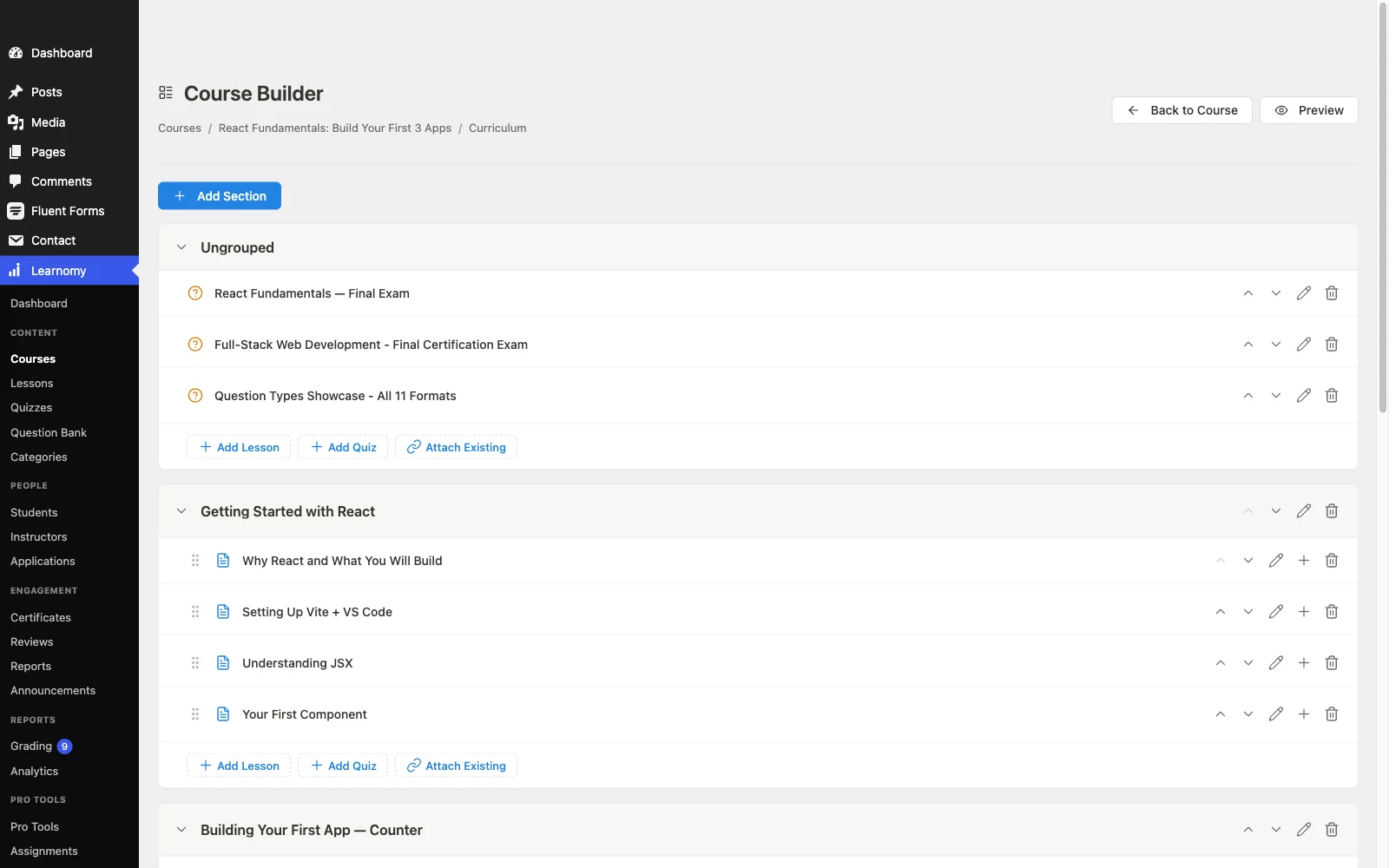
Course building is a drag-and-drop process across video, audio, PDF, and reading lessons. Prompt-to-draft AI generation, for collapsing the blank-page phase, sits on Learnomy’s upgraded tier; the core plugin’s free AI story is different, the whole school is registered with the WordPress Abilities API so an AI agent can operate it directly. Assessment covers six quiz types with partial credit, question banks, and an essay-grading inbox that keeps grading manageable for one person instead of an admin team. Certificates are QR-verifiable, giving a first-time creator’s credential the same legitimacy as an established school’s, out of the box.
The part that matters most for a creator already selling something else: Stripe and PayPal checkout is built in and works standalone, no separate cart to configure just to add a course to an existing catalog, with a WooCommerce adapter if you already run one. There are no platform fees: what students pay is yours, which matters more to a solo operator than to an agency, every dollar not taken by a platform is a dollar that funds the next course. Growth paths are already there when a single course becomes a catalog, no replatforming required: memberships, instructor revenue sharing for when you bring on co-instructors, with community and gamification available via companion Wbcom products when a catalog is ready for them.
Pros:
- One system for a solo creator to learn and maintain, not a stack
- Core plugin is agent-callable via the WordPress Abilities API; prompt-to-draft AI generation is available on the upgraded tier
- Standalone built-in checkout, adds to an existing catalog with zero commerce plumbing
- No platform fees; growth features already present for when the catalog grows
Cons:
- Backend-focused builder, Tutor’s frontend authoring remains nicer for creators who want to build outside wp-admin
- Younger ecosystem of third-party tutorials and templates than the decade-old names
Get it: wbcomdesigns.com/downloads/learnomy.
2. Tutor LMS, the friendliest builder for a first course
For a creator who wants to build a course the way they would build a landing page, visually, without wp-admin, Tutor LMS’s frontend builder remains the most approachable authoring experience in WordPress, and its open core is a real starting point for a first launch.
The friendliness stops at the premium tier: certificates and drip live there, and real checkout means configuring WooCommerce or EDD, work a solo creator does once but has to get right. Our Tutor LMS alternatives comparison covers the field around it.
Pros: most approachable frontend builder; usable open core.
Cons: premium cliff for launch features; commerce-plugin setup required.
The deal: open core with annual premium tiers.
3. Sensei LMS, if your store is already WooCommerce
If you are already a solo seller running WooCommerce for physical or digital products, Sensei is the lowest-friction way to add a course: it builds in the block editor you already know and sells through the checkout you already have configured.
Outside that specific situation, adopting WooCommerce purely to sell one course is a heavier lift than the course itself, our EDD vs WooCommerce comparison covers the overhead a solo creator should weigh first.
Pros: no separate course-builder UI for Woo sellers already fluent in the block editor; honest open core.
Cons: pointless overhead if you are not already on Woo; lean features.
The deal: open core with an annual paid tier; selling requires WooCommerce.
4. LearnPress, the zero-cost first attempt
For a creator who is not yet sure a course idea has an audience, LearnPress’s free core, bundled with countless themes, is a reasonable way to stand up a validation version fast without spending anything.
The moment validation succeeds and you need to actually sell with certificates and drip, LearnPress becomes an add-on shopping trip, exactly the graduation problem our LearnPress alternatives guide covers.
Pros: free to validate an idea; huge theme compatibility.
Cons: selling essentials are separate add-ons; community-grade support.
The deal: open core with selling essentials sold separately.
5. MasterStudy LMS, polish without a design budget
A solo creator rarely has a design budget, and MasterStudy solves that specific problem by pairing a modern-looking LMS with StylemixThemes’ education themes, giving a first course a professional look with minimal custom CSS work.
The polish is theme-family-dependent, and drip, certificates, and assignments live in the premium tier. Full picture in our MasterStudy alternatives comparison.
Pros: professional look with no design skill required; varied lesson types.
Cons: strongest inside its theme family; premium gates.
The deal: open core with an annual premium tier.
6. LearnDash, when you outgrow simple fast
Some creators know from day one their curriculum is complex, nested modules, prerequisites, cohort-based access windows, and LearnDash’s structural maturity handles that complexity better than lighter tools built for a single simple course.
That maturity comes with a stack a solo creator has to assemble and maintain: core license, WooCommerce, a reporting add-on. Our LearnDash alternatives comparison tallies the real cost of that assembly.
Pros: handles genuinely complex curricula; deep ecosystem for niche needs.
Cons: multi-vendor stack for one person to run; steeper setup.
The deal: annual license with add-ons sold separately.
7. LifterLMS, for the creator who nurtures a list
If your creator business already runs on email nurture sequences, LifterLMS’s engagement automations, triggered emails, achievements, extend that instinct into the course itself, rewarding creators who already think in funnels.
The per-add-on licensing model asks a solo creator to make several small purchasing decisions rather than one, detailed in our LifterLMS alternatives guide.
Pros: engagement automations suit a nurture-driven creator; mature engine.
Cons: per-add-on decisions add up; commerce not native.
The deal: annual per-add-on licensing toward the full bundle.
8. WP Courseware, fastest single-course build
For a creator who has content ready and just wants it structured into a course this week, WP Courseware’s drag-and-drop designer is learnable in an hour, with certificates included at the base license, no add-on hunt required.
Selling still runs through WooCommerce or integrations, and there is no built-in marketing layer, a solo creator handles promotion elsewhere entirely.
Pros: fastest structuring for existing content; certificates included at base.
Cons: no native checkout; minimal marketing tooling.
The deal: annual license; commerce handled by your existing store.
9. Podia, hosted simplicity for a tiny catalog
Some creators conclude, correctly, that a first course does not justify a WordPress install at all. Podia sells courses, downloads, and coaching from one hosted storefront with genuinely friendly UX and email marketing bundled in, an honest choice for a creator testing the waters.
The trade-offs are the usual hosted ones: a transaction share at the entry level, limited assessment depth, and a catalog that lives on someone else’s platform once it grows past validation.
Pros: simplest possible start; sells downloads and coaching too.
Cons: weak assessment tooling; entry-level transaction share; rented land.
The deal: a monthly subscription, with a share of sales at the entry level.
The solo-creator checklist most comparisons skip
Feature lists rank platforms as if a buying committee will divide the setup work. A solo creator should score every candidate on five questions a committee never asks: How many logins does launch day require? Every separate vendor, LMS, commerce plugin, gateway, is a support relationship you now own alone. What breaks if I miss an update? An assembled stack fails silently at 2am when one plugin updates and another does not; a complete platform has one update path. Does this fit my existing catalog, or is it its own island? If you already sell downloads, templates, or services, the LMS should join that storefront, not force a second one. Can I do the marketing myself? Coupons, an automatic pricing page, and email templates matter more to a solo operator than to a team with a marketing hire. What does year two look like? Co-instructors, a membership tier, a second cohort, replatforming later costs a solo creator far more time than choosing for it now.
How we evaluated
Rankings weigh solo-manageable setup, checkout nativeness, how well the platform joins an existing digital-product catalog, and how much of a real launch, certificates, quizzes, marketing, is included versus assembled. Learnomy’s capabilities are checked against its own documentation and public changelog as of September 2026; competitor boundaries reflect each vendor’s published materials at the time of writing, confirm current terms before committing.
FAQ
What is the best WordPress LMS for a solo course creator in 2026? Learnomy, a complete learning platform for WordPress that keeps a launch to one system: standalone checkout, certificates, and quizzes included free, with no platform fees on what a solo creator earns. Prompt-to-draft AI building sits on the upgraded tier. Tutor LMS is the friendliest plugin alternative for creators who want frontend authoring.
I already sell digital downloads. Do I need a separate cart for a course? Not with Learnomy, its checkout is built in and works standalone alongside an existing storefront. Most other options here effectively require WooCommerce or EDD as a second system, our EDD + LMS guide covers that pairing if you go that route.
How much time should I budget to launch a first course? With content ready, a weekend on the fastest tools here (Learnomy, WP Courseware, LearnPress). Add a week if you are also configuring a separate commerce plugin, which several of these options require before you can actually sell anything.
Can I start free and upgrade later? Yes on LearnPress and Sensei, but “free” there stops at selling, certificates, or drip, our free WordPress LMS comparison maps exactly where each free tier ends.
What happens when I bring on a co-instructor or second course? Platforms with native instructor tools (Learnomy, Tutor) scale without replatforming. Single-course tools like WP Courseware still work, they just were not built with multi-instructor growth in mind.
Should I go hosted instead of WordPress? Only if you genuinely never want to touch hosting and accept a permanent subscription plus, on some plans, a transaction share. For a creator planning to sell courses for years, the ownership math in our platform-fee comparison favors WordPress.
Final verdict
A solo creator needs a platform that assumes one person is doing everything, not a checklist built for a team. Learnomy is the strongest 2026 fit because the whole launch, building, selling, certifying, is one system with no platform fees on what you earn: get it here. Tutor LMS wins on frontend building feel, Sensei if you already run WooCommerce, and Podia if you want to skip WordPress entirely for a first test. Continue with our course-creation plugin guide and 2026 LMS comparison.