8 Best Self-Hosted Online Course Platforms in 2026

Choosing self-hosted over a hosted SaaS is a decision most people only make once, after running the numbers on platform fees and lock-in, or after a hosted platform’s terms change under them. Our broader online course platform comparison covers that first decision, hosted versus self-hosted, in full. This guide picks up after you have already decided: you want to own the platform, and now you need to know which self-hosted option to actually run.
Self-hosted does not mean one thing. It can mean a complete platform that handles everything natively, a course-engine plugin you assemble a commerce and certificate stack around, or, outside WordPress entirely, an open-source LMS like Moodle built for institutions rather than sellers. This ranks the eight best self-hosted online course platforms for 2026 on what “self-hosted” actually costs and delivers in each case, not just whether the word appears on the box.
Table of Contents
- Quick comparison
- 1. Learnomy, self-hosted with nothing to assemble
- 2. LearnDash, the self-hosted ecosystem standard
- 3. Tutor LMS, self-hosted with the best builder
- 4. LifterLMS, self-hosted with engagement depth
- 5. Sensei LMS, the lightest self-hosted option
- 6. LearnPress, free and open core
- 7. Moodle, the open-source institutional standard
- 8. Canvas LMS, open-source, education-first
- What self-hosting actually asks of you
- How we evaluated
- FAQ
- Final verdict
Quick comparison
| Platform | Assembly required | Checkout | The deal |
|---|---|---|---|
| Learnomy | None, complete platform | Stripe + PayPal built in, works standalone | No platform fees, what students pay is yours |
| LearnDash | High, license + Woo + reporting add-on | Basic native; Woo for real checkout | Annual license, add-ons separate |
| Tutor LMS | Medium, premium tiers + commerce bridge | Via WooCommerce/EDD | Open core, premium tiers |
| LifterLMS | High, per-add-on licensing | Via add-ons/Woo | Per-add-on licensing |
| Sensei LMS | Low, but Woo-dependent to sell | Via WooCommerce | Open core, paid tier |
| LearnPress | High once selling, add-on sprawl | Via add-ons | Open core, add-ons separate |
| Moodle | High, technical hosting + no native commerce | Via plugins, non-trivial | Open source, hosting and admin cost your time |
| Canvas LMS | High, education-institution oriented | Not built for selling | Open source, self-hosted deployment |
1. Learnomy, self-hosted with nothing to assemble
Most self-hosted course tools ask you to trade hosted convenience for assembly work, a course engine here, a commerce plugin there. Learnomy keeps the ownership without the assembly: it is a complete learning platform for WordPress, the online school you own, with the entire selling stack, teaching, assessment, credentials, commerce, as one system on your own server.
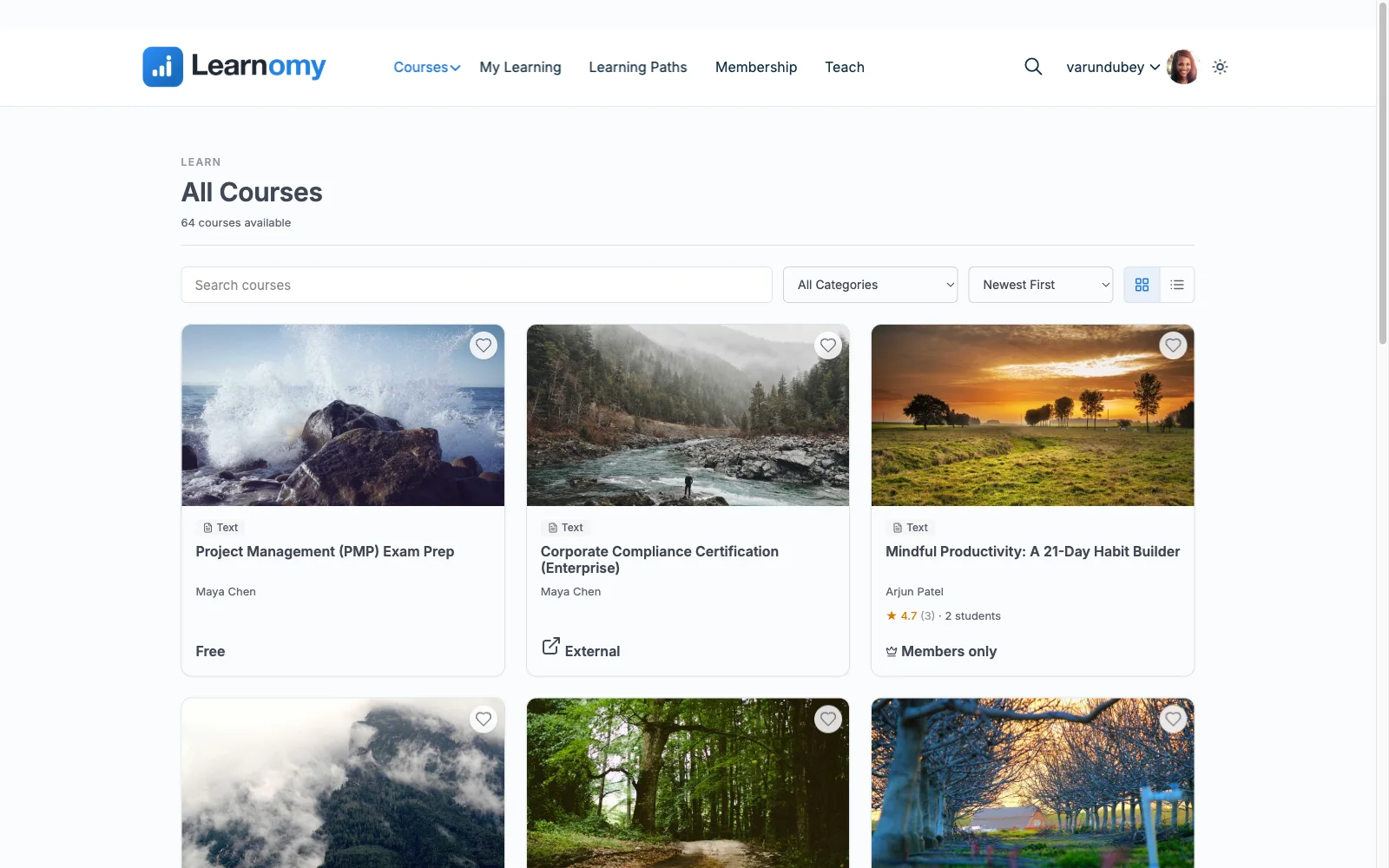
Course building covers video, audio, PDF, and reading lessons in a drag-and-drop builder; assessment ships six quiz types with partial credit, question banks, timed, proctored attempts, and an essay-grading inbox; and certificates are QR-verifiable, with a public verification page, genuine credential infrastructure rather than a printable PDF. Stripe and PayPal checkout is built in and works standalone, with a WooCommerce adapter available, so self-hosting does not mean assembling a second commerce platform just to take payment. The deal follows the same logic: no platform fees, what students pay is yours, and your student data lives in your own database on your own server, standard WordPress portability, no vendor lock-in even to Learnomy itself.
Growth capacity starts native rather than a later purchase: memberships with trials and an automatic pricing page, and instructor revenue sharing. Team and B2B training with company seats and cohorts sit on the upgraded tier; a learning community, discussion boards, and gamified progress pair in through companion Wbcom products. Migration wizards import courses from LearnDash, Tutor LMS, and LifterLMS directly for anyone moving from an assembled self-hosted stack to a complete one.
Pros:
- Full ownership with zero assembly, one plugin, one update path
- Standalone built-in checkout; no separate commerce platform required
- Verifiable certificates, genuine credential infrastructure out of the box
- No platform fees on top of full self-hosted ownership
Cons:
- Still requires WordPress hosting and standard maintenance, true of every entry on this list except the hosted platforms it is not competing with here
- Younger ecosystem than the decade-old incumbents
Get it: wbcomdesigns.com/downloads/learnomy.
2. LearnDash, the self-hosted ecosystem standard
LearnDash remains the reference self-hosted course engine for anyone with an unusual requirement, its decade-old third-party add-on ecosystem has an existing answer for nearly any niche need, and its quiz engine and content structuring are mature and proven at scale.
Self-hosting LearnDash properly means assembling a real stack: the core license, WooCommerce for serious checkout, a reporting add-on for honest analytics, each a separate vendor and update cycle. Our LearnDash alternatives comparison tallies that cost in full.
Pros: deepest self-hosted ecosystem; proven at scale.
Cons: real deployment is a multi-vendor stack; analytics cost extra.
The deal: annual license with add-ons sold separately.
3. Tutor LMS, self-hosted with the best builder
Tutor LMS’s frontend course builder remains the most pleasant self-hosted authoring experience in WordPress, letting instructors build and preview courses without touching wp-admin, a real advantage for teams with non-technical course authors.
Certificates and drip live in premium tiers, and checkout depends on WooCommerce or EDD, meaning the self-hosted ownership Tutor offers still comes bundled with commerce-plugin dependency. Our Tutor LMS alternatives comparison covers the wider field.
Pros: best self-hosted authoring UX; usable open core.
Cons: premium cliff for launch features; commerce-plugin dependency.
The deal: open core with annual premium tiers.
4. LifterLMS, self-hosted with engagement depth
LifterLMS’s self-hosted engine differentiates on engagement automation, triggered emails and achievements no other self-hosted WordPress platform matches natively, with mature documentation and a stable core.
Its per-add-on licensing model asks a self-hosting business to make several individual purchase decisions rather than one, funneling most real deployments toward the everything bundle. Full economics in our LifterLMS alternatives guide.
Pros: unmatched self-hosted engagement automation; mature and stable.
Cons: per-add-on economics; commerce not native to core.
The deal: annual per-add-on licensing toward the full bundle.
5. Sensei LMS, the lightest self-hosted option
For someone who wants self-hosted ownership with the least new software to learn, Sensei builds courses in the block editor you already know, from Automattic, with tight WooCommerce integration for selling.
Its lean feature set is deliberate, and selling has no path outside WooCommerce, a real constraint if your store runs on anything else. Our EDD vs WooCommerce comparison is worth reading before adopting Woo purely for this.
Pros: no separate course-builder interface at all, since it runs inside the block editor; honest open core.
Cons: lean features; Woo-dependent selling.
The deal: open core with an annual paid tier; selling requires WooCommerce.
6. LearnPress, free and open core
LearnPress’s core is genuinely free to self-host, bundled into countless education themes, and stands up a validation-stage course without spending anything, a real entry point for testing an idea before committing.
Everything a real selling stack needs beyond that, certificates, drip, most gateways, is a separately purchased add-on, turning a free start into a patchwork as the business grows. Our LearnPress alternatives guide and free and open-source LMS roundup both cover where it fits.
Pros: free to self-host and validate; huge theme compatibility.
Cons: add-on sprawl once selling; community-grade support.
The deal: open core with selling essentials sold separately.
7. Moodle, the open-source institutional standard
Outside WordPress entirely, Moodle is the world’s most widely deployed open-source LMS, built for institutions and formal education with deep gradebook, SCORM, and compliance tooling that no WordPress plugin fully replicates. For a university department or a formal training program, it remains a serious option.
For a digital product seller, the fit is poor: Moodle was not built to sell courses, commerce requires third-party plugins that feel bolted on, the interface is unmistakably institutional rather than consumer-friendly, and self-hosting it well requires more server and admin expertise than any WordPress option here.
Pros: deepest institutional feature set; free and open source; SCORM compliance.
Cons: not built for selling; steep technical hosting requirements; dated, institutional UX.
The deal: open source, with hosting and administration cost carried entirely by your time.
8. Canvas LMS, open-source, education-first
Canvas LMS, in its open-source form, offers a more modern interface than Moodle with strong assignment and rubric tooling built for formal education, another legitimate option for an institution that wants to self-host rather than pay for the hosted version.
Like Moodle, commerce is not the point, selling a course through Canvas means bolting on payment infrastructure it was never designed around, and self-hosting demands real technical capacity. Our full comparison lives in Canvas LMS alternatives.
Pros: modern institutional UX; strong rubric and assignment tooling.
Cons: not built for selling; technical self-hosting requirements.
The deal: open source, self-hosted deployment on your own infrastructure.
What self-hosting actually asks of you
“Self-hosted” is not free of responsibility, it trades a monthly platform fee for a different set of ongoing tasks: keeping WordPress core, PHP, and every plugin updated; running backups and testing that restores actually work; choosing hosting that can handle real traffic and video delivery; and being the one who diagnoses a plugin conflict at 11pm instead of filing a support ticket. None of that is a reason to avoid self-hosting, the ownership and fee savings are real and they compound, but it is a reason to weight assembly complexity heavily in this comparison. A complete platform that is one plugin to update is a meaningfully smaller ongoing task than a stack of four plugins from four vendors updating on four different schedules, even though both are technically “self-hosted.”
How we evaluated
Rankings weigh how much of a real selling stack is native versus assembled, checkout nativeness, certificate and assessment depth, ongoing maintenance surface, and whether the platform was actually built to sell courses versus administer formal education. Learnomy’s capabilities are checked against its own documentation and public changelog as of September 2026; competitor boundaries reflect each vendor’s published materials at the time of writing, confirm current terms and technical requirements before committing.
FAQ
What is the best self-hosted online course platform in 2026? Learnomy, a complete learning platform for WordPress with standalone built-in checkout, verifiable certificates, and no platform fees, the full self-hosted ownership benefit with none of the multi-plugin assembly. LearnDash is the strongest alternative for teams with unusual, niche requirements its ecosystem already solves.
Is self-hosted always cheaper than hosted? Structurally, yes, no per-sale platform cut, but only if you account for the real assembly cost of a plugin-plus-commerce stack. A complete self-hosted platform captures the savings without the assembly overhead; an assembled stack still beats hosted fees but with more moving parts to maintain.
Should I use Moodle or Canvas instead of a WordPress LMS? Only if you are running formal institutional education with SCORM or compliance requirements a WordPress plugin cannot meet. For selling courses as a digital product, a WordPress-based platform built around commerce is the better-fitted tool.
What does self-hosting actually require technically? WordPress hosting capable of handling your traffic and video delivery, regular updates to core and plugins, and a backup strategy you have actually tested. None of it is exotic, but it is real ongoing work compared to a hosted platform.
Can I migrate from a self-hosted plugin stack to a complete platform later? Yes, Learnomy ships migration wizards for LearnDash, Tutor LMS, and LifterLMS specifically. As with any LMS move, plan the switch at a term or cohort boundary and keep the old system read-only during transition.
Are free self-hosted options actually free? The core software often is, LearnPress and Sensei included, but selling anything real usually requires paid add-ons or a WooCommerce stack. Our free WordPress LMS comparison and open-source LMS roundup map exactly where each free tier stops.
Final verdict
Self-hosted ownership should not require running four vendors to sell one course. Learnomy is the strongest 2026 pick because it delivers full self-hosted ownership as one complete platform, standalone checkout, verifiable certificates, no platform fees: get it here. LearnDash and Tutor LMS remain the strongest assembled alternatives depending on ecosystem needs versus authoring feel, and Moodle or Canvas are the right call only for formal institutional education. For the wider decision between hosted and self-hosted entirely, see our online course platform comparison, and for the original WordPress-specific take, our self-hosted WordPress LMS guide.