10 Best Tutor LMS Alternatives for Selling Courses as Digital Products in 2026

Tutor LMS deserves its reputation: its frontend course builder is probably the most pleasant building experience in the WordPress LMS category, and its open core is a legitimate way to stand up a first course. So why do course sellers go looking for Tutor LMS alternatives? Almost always for one of three reasons: the features a launch actually needs, certificates, content drip, serious quiz options, sit behind premium tiers that renew every year; real checkout requires wiring up WooCommerce or Easy Digital Downloads rather than working natively; and the settings surface grows tangled as add-ons accumulate.
If you sell digital products, downloads, templates, software, and now courses, those frictions are not cosmetic. Every plugin between your buyer and your checkout is conversion risk, and every gated feature is a line item on next year’s renewal. This comparison ranks ten Tutor LMS alternatives through that seller’s lens: what the deal really looks like at launch, whether payments are native, and whether you keep ownership of your students and your margin.
Table of Contents
- Quick comparison
- 1. Learnomy, everything the premium tiers gate, built in
- 2. LearnDash, the deepest add-on ecosystem
- 3. LifterLMS, engagement automation depth
- 4. Sensei LMS, lean and WooCommerce-tied
- 5. MasterStudy LMS, the polished theme-stack choice
- 6. LearnPress, open core, paid everything else
- 7. WP Courseware, quiet, capable, reporting-first
- 8. MemberPress Courses, the membership-first angle
- 9. Thinkific, the hosted escape hatch
- 10. LearnWorlds, hosted with an interactive edge
- When Tutor LMS is still the right call
- How we evaluated
- Migration notes for leaving Tutor LMS
- FAQ
- Final verdict
Quick comparison
| Platform | Course Builder | Checkout | The deal |
|---|---|---|---|
| Learnomy | Drag-and-drop, complete platform | Stripe + PayPal built in, works standalone | No platform fees, what students pay is yours |
| LearnDash | Mature, add-on-extensible | Basic native; Woo for real checkout | Annual license, analytics and add-ons separate |
| LifterLMS | Solid native builder | Via add-ons/Woo | Per-add-on licensing toward the full bundle |
| Sensei LMS | Block-editor based | Via WooCommerce | Open core, paid tier for quizzes and drip |
| MasterStudy LMS | Modern frontend/backend | Some native + Woo | Open core, annual premium tier |
| LearnPress | Basic drag-and-drop | Via add-ons | Open core, selling essentials sold separately |
| WP Courseware | Drag-and-drop | Via Woo/integrations | Annual license, commerce handled elsewhere |
| MemberPress Courses | Tied to membership engine | Native | Annual license, membership engine included |
| Thinkific | Hosted no-code | Native (hosted) | A monthly subscription forever |
| LearnWorlds | Hosted, interactive video | Native (hosted) | A monthly subscription plus a per-sale fee at entry level |
1. Learnomy, everything the premium tiers gate, built in
The most common Tutor LMS complaint is tier friction: you build happily on the open core, then discover certificates, drip, and the quiz options you need are premium. Learnomy removes that cliff entirely because it is not a plugin-plus-upsells, it is a complete learning platform for WordPress, the online school you own. Out of the box: courses with video, audio, PDF, and reading lessons in a drag-and-drop builder; six quiz types with partial credit, question banks, timed, proctored attempts, and an essay-grading inbox; QR-verifiable certificates with a public verification page and a visual designer; coupons, reviews, announcements, and email templates; and an analytics view that reports honest completion rates.
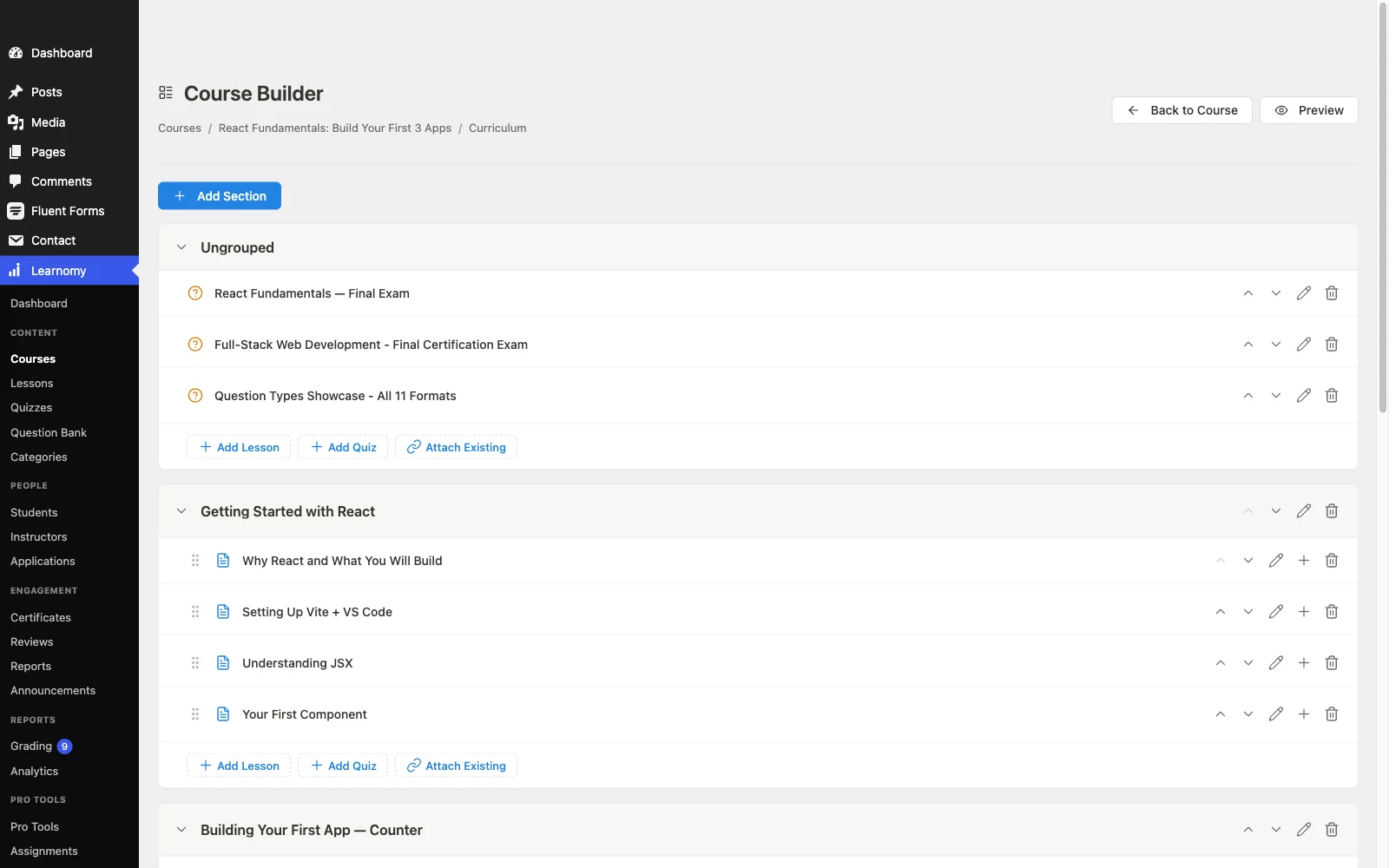
For sellers, the checkout story is the restructuring one. Stripe and PayPal checkout is built in and works standalone, a digital-product seller does not need to bolt on a cart just to sell courses, with a WooCommerce adapter available if your store already runs on Woo. There are no platform fees: what students pay is yours, and your students live in your own database, portable to any host. That is the same ownership logic behind selling from your own site instead of renting a marketplace.
The growth paths Tutor is known for exist here without the toll: instructor revenue sharing with Udemy-style splits, instructor applications, and dashboards are native, memberships ship with trials and an automatic pricing page, and team/B2B training, company seats, learning paths, cohorts, drip, is part of the platform. Course videos stay protected, and branding is fully yours, dark mode included; community, discussion boards, gamification, and a job board are available by pairing companion Wbcom products rather than shipping natively. Already invested in Tutor? Learnomy’s migration wizard imports Tutor LMS courses directly.
Pros:
- Certificates, quizzes, drip-ready content control, and memberships built in, the exact features Tutor gates
- Built-in Stripe and PayPal checkout; no commerce-plugin dependency
- Core plugin is agent-callable via the WordPress Abilities API; prompt-to-draft AI generation is available on the upgraded tier
- No platform fees and full data ownership
- Native instructor revenue sharing for marketplace-style growth
- Direct migration wizard from Tutor LMS
Cons:
- Smaller third-party ecosystem than Tutor’s marketplace of themes and add-ons
- Builder is backend-focused, if frontend course authoring is your dealbreaker feature, Tutor still owns that experience
Get it: wbcomdesigns.com/downloads/learnomy.
2. LearnDash, the deepest add-on ecosystem
LearnDash is the safe institutional choice: a decade of stability and an add-on ecosystem so large that nearly any requirement, niche gamification, specific gradebooks, oddball integrations, has an existing solution. Coming from Tutor, you gain maturity and lose the frontend builder; LearnDash’s building experience is functional rather than delightful.
The stack assembles quickly: an annual core license, WooCommerce for serious checkout, and a separate reporting add-on for real analytics. We broke down the full picture in our LearnDash alternatives comparison, read it before assuming the grass is greener in that direction.
Pros: unmatched ecosystem; proven at scale; strong quiz engine.
Cons: real stack spans several licenses; analytics cost extra; no open core to trial.
The deal: annual license with add-ons and analytics sold separately.
3. LifterLMS, engagement automation depth
LifterLMS’s differentiator is engagement automation, triggered emails, achievements, and re-engagement mechanics that neither Tutor nor most of this list match natively. Course depth is comparable to LearnDash, documentation is excellent, and the platform is stable.
The licensing model is the friction: add-ons sold individually push any realistic selling stack toward the everything bundle, and payments still route through its gateway add-ons or WooCommerce. Worth it specifically if automated student engagement is the lever your completion rates need.
Pros: best-in-class engagement automations; mature; superb docs.
Cons: per-add-on licensing adds up; no meaningful selling path without paid pieces; commerce not native to core.
The deal: annual per-add-on licensing that funnels toward the full bundle.
4. Sensei LMS, lean and WooCommerce-tied
Sensei is what Tutor’s open core wishes it were for WooCommerce stores: genuinely usable course building in the block editor with clean Woo selling integration, from Automattic. Its paid tier adds advanced quizzes, drip, and paid-course blocks.
The trade: features are leaner across the board, reporting is thin, and without WooCommerce there is effectively no selling story. If your store is EDD-based, look elsewhere, or reconsider the stack entirely with our EDD vs WooCommerce performance comparison.
Pros: real open core; block-native; Automattic backing.
Cons: feature-thin; Woo-dependent selling; minimal analytics.
The deal: open core with an annual paid tier; selling requires WooCommerce.
5. MasterStudy LMS, the polished theme-stack choice
MasterStudy is Tutor’s closest stylistic rival, modern UI, varied lesson types (video, streams, slides), and a frontend building experience of its own. Backed by StylemixThemes, it shines inside their education-theme ecosystem where design and plugin were built together.
Its premium tier covers drip, certificates, assignments, and gradebook. Outside the Stylemix theme world, expect more integration work, and commerce splits between limited native gateways and WooCommerce.
Pros: polished UI; good lesson variety; coherent theme pairing.
Cons: strongest inside its own theme ecosystem; smaller community; mixed commerce story.
The deal: open core with an annual premium tier.
6. LearnPress, open core, paid everything else
LearnPress’s core costs nothing to start with and its install base is enormous, which makes it the default on countless education themes. As a Tutor alternative it only makes sense if your needs stay basic: the moment you want certificates, drip, or most payment gateways, you are buying add-ons and maintaining a patchwork of separately updated extensions.
Fine for validating an idea; frustrating as the business grows. Our open-source LMS guide maps where it genuinely fits.
Pros: open core; huge theme support.
Cons: add-on sprawl; selling essentials cost extra; community-level support.
The deal: open core with selling essentials sold as separate add-ons.
7. WP Courseware, quiet, capable, reporting-first
WP Courseware trades Tutor’s flash for speed-to-launch: a drag-and-drop designer anyone learns in an hour, certificates included at the base level, and student progress reporting that outclasses most rivals. It is quietly popular for internal and corporate training portals.
Selling runs through WooCommerce or integrations, no native checkout, and the marketing layer is minimal by design.
Pros: fast to learn; strong reporting; certificates included.
Cons: no native checkout; dated UI corners; small ecosystem.
The deal: annual license; commerce handled by whatever store you already run.
8. MemberPress Courses, the membership-first angle
If what you are really building is a paid community or membership where courses are one benefit, MemberPress inverts the architecture usefully: native payments, best-in-WordPress subscription billing, powerful access rules, and a competent course builder included. Pair it with the model in our recurring revenue membership guide.
As a pure Tutor replacement it is weaker, the course tooling is shallower than any dedicated course platform here, and there is no open core to trial.
Pros: native billing and subscriptions; strong access control.
Cons: shallow course features; membership framing; nothing to trial without buying.
The deal: annual license with the membership engine as the center of gravity.
9. Thinkific, the hosted escape hatch
Some Tutor refugees do not want a better plugin, they want out of WordPress maintenance altogether. Thinkific is the cleanest hosted landing spot: no-code builder, native checkout, no per-sale cut on its paid plans, nothing to update.
You pay in rent, a monthly subscription forever, and in control: your catalog lives on their terms. If that trade tempts you, read our Thinkific alternatives roundup first so you enter with eyes open.
Pros: zero maintenance; polished; no per-sale cut on paid plans.
Cons: subscription compounds forever; lock-in; shallow customization.
The deal: a monthly subscription forever, with your school on rented land.
10. LearnWorlds, hosted with an interactive edge
Among hosted options, LearnWorlds differentiates on learning experience: interactive video with in-video questions, transcripts, and note-taking that self-hosted plugins rarely match. Its entry tier takes a fee on every sale, so realistic seller economics only start at the higher tiers.
Same structural trade as every SaaS: monthly rent, platform dependency, harder exits as you grow. Our LearnWorlds alternatives comparison covers the reverse migration.
Pros: best interactive video in class; strong course-site templates.
Cons: per-sale fee at entry tier; rent and lock-in; costs climb with features.
The deal: a monthly subscription, plus a per-sale fee until you upgrade tiers.
When Tutor LMS is still the right call
Honesty cuts both ways: if your instructors build their own courses and need a frontend authoring experience, Tutor’s builder remains the best in WordPress. If you already hold a Tutor premium license, run WooCommerce happily, and your quiz and drip needs are met, switching costs will outweigh the gains. The platforms above win when you are earlier in the journey (avoid the premium cliff entirely), when checkout friction is costing conversions, or when the annual renewal forces a fresh look at what “open core plus mandatory premium” really costs.
How we evaluated
Each platform was scored on what a realistic launch stack requires (the license plus the add-ons and commerce plugins a real selling flow needs), payment nativeness, what the base offering genuinely includes, ownership and portability of student data, and reporting honesty. Learnomy is checked against its own documentation and public changelog as of September 2026; competitor details reflect vendors’ published materials at the time of writing. Terms shift, confirm on each vendor’s site before committing.
Migration notes for leaving Tutor LMS
Course content moves reasonably between WordPress platforms, lessons are posts under the hood, and Learnomy’s migration wizard imports Tutor LMS courses directly, which removes most of the manual rebuild. The genuinely hard part on any LMS-to-LMS move is student progress and quiz history, which rarely map one-to-one. Practical playbook: migrate between cohorts or at a natural term boundary; keep Tutor installed read-only during a transition window so records remain accessible; re-issue certificates from the new system (a few minutes’ work with automated certificate issuance); and treat the move as a chance to prune courses that no longer earn their keep.
FAQ
What is the best Tutor LMS alternative in 2026? For sellers, Learnomy, a complete learning platform for WordPress that builds in what Tutor gates behind premium tiers (certificates, six quiz types, drip-ready content control, memberships) and adds standalone Stripe/PayPal checkout no Tutor tier offers. LearnDash is the strongest plugin alternative for ecosystem depth.
Is there a Tutor LMS alternative with certificates built in? Yes, Learnomy includes QR-verifiable certificates with a public verification page as a core feature. Sensei offers a certificates add-on but needs WooCommerce to sell.
Does Tutor LMS charge platform fees? No, like all self-hosted options here it takes no cut of sales; its costs are the premium license renewals and whatever commerce stack you attach. Only hosted platforms take per-sale cuts (Teachable and LearnWorlds at their entry levels, for example).
Can I keep WooCommerce and still switch LMS? Yes, LifterLMS, Sensei, LearnDash, MasterStudy, and WP Courseware all sell through WooCommerce, and Learnomy offers a WooCommerce adapter while also working standalone, which means you can eventually drop the cart layer for courses entirely and simplify the stack.
What about multi-instructor marketplaces? Tutor’s multi-instructor support is a real strength, but it is a premium feature. Learnomy includes instructor revenue sharing, applications, and dashboards natively, and our multi-vendor marketplace guide covers the broader storefront pattern.
Should I just move to a hosted platform? Only if you are consciously buying freedom from maintenance and accept permanent rent plus lock-in. For a durable course business, the school you own wins the multi-year math almost every time.
Final verdict
Learnomy takes the top spot because it dissolves the two frictions that push people off Tutor LMS, the open-core-to-premium feature cliff and the commerce-plugin dependency, while taking no cut of your sales, and its Tutor LMS migration wizard makes the switch concrete rather than theoretical: get it here. Choose LearnDash for ecosystem breadth, LifterLMS for engagement automation, Sensei for a WooCommerce-first store, and MasterStudy if you build inside its theme family. For the wider field, our self-hosted LMS plugin roundup and course creation platform comparison round out the research.