8 Best WordPress LMS Plugins That Work with WooCommerce in 2026

If your store already runs WooCommerce, adding courses raises a deceptively simple question: which LMS plays best with the cart you have? The standard answer is a list of integrations. The honest answer starts one step earlier, because “works with WooCommerce” describes three different architectures, and for a meaningful share of course sellers, the best WooCommerce integration turns out to be not needing one.
This guide ranks the eight best WordPress LMS options for WooCommerce stores in 2026, scores each integration for what it actually is, and closes with the comparison most roundups dodge: WooCommerce versus Easy Digital Downloads versus standalone checkout for selling courses specifically. Consider it the commerce-side companion to our payment integration comparison and 2026 LMS guide.
Table of Contents
- Quick comparison
- 1. Learnomy, the adapter, and the escape hatch
- 2. Sensei LMS, the Woo-native choice
- 3. Tutor LMS, flexible bridging, Woo or EDD
- 4. LearnDash, the proven Woo pairing
- 5. LifterLMS, Woo integration plus automation
- 6. MasterStudy LMS, Woo as the gateway fallback
- 7. WP Courseware, straightforward Woo selling
- 8. LearnPress, Woo via add-on
- WooCommerce vs EDD vs standalone for courses, the honest comparison
- How we evaluated
- FAQ
- Final verdict
Quick comparison
| Platform | WooCommerce relationship | Works without Woo? | The deal |
|---|---|---|---|
| Learnomy | Optional adapter, Woo if you want it | Yes, checkout built in, standalone | No platform fees, what students pay is yours |
| Sensei LMS | Built by Automattic for Woo, deepest pairing | Builds courses, cannot sell | Open core, paid tier |
| Tutor LMS | First-class bridge (also bridges EDD) | Builds, but selling needs a bridge | Open core, premium tiers |
| LearnDash | De facto standard pairing via integration | Basic native selling only | Annual license, add-ons separate |
| LifterLMS | Solid integration add-on | Via its own gateway add-ons | Per-add-on licensing |
| MasterStudy LMS | Woo covers what native gateways miss | Partially | Open core, premium tier |
| WP Courseware | Clean, simple integration | Via other integrations | Annual license |
| LearnPress | Via paid add-on | Basic PayPal only | Open core, add-ons separate |
1. Learnomy, the adapter, and the escape hatch
Learnomy takes the top spot with an unusual double answer. For Woo stores, it offers a WooCommerce adapter: course products in your existing catalog, sold through the checkout your customers already trust. But unlike every bridge-dependent engine on this list, the adapter is a convenience, not a dependency, Learnomy is a complete learning platform for WordPress with Stripe and PayPal checkout built in, working standalone. That gives a Woo store something rare: a migration-free exit. If you ever slim the store down, split courses onto their own domain, or conclude (as our comparison below argues some should) that Woo is heavy machinery for digital-only sales, your school keeps selling without replatforming, and either way, no platform fees: what students pay is yours.
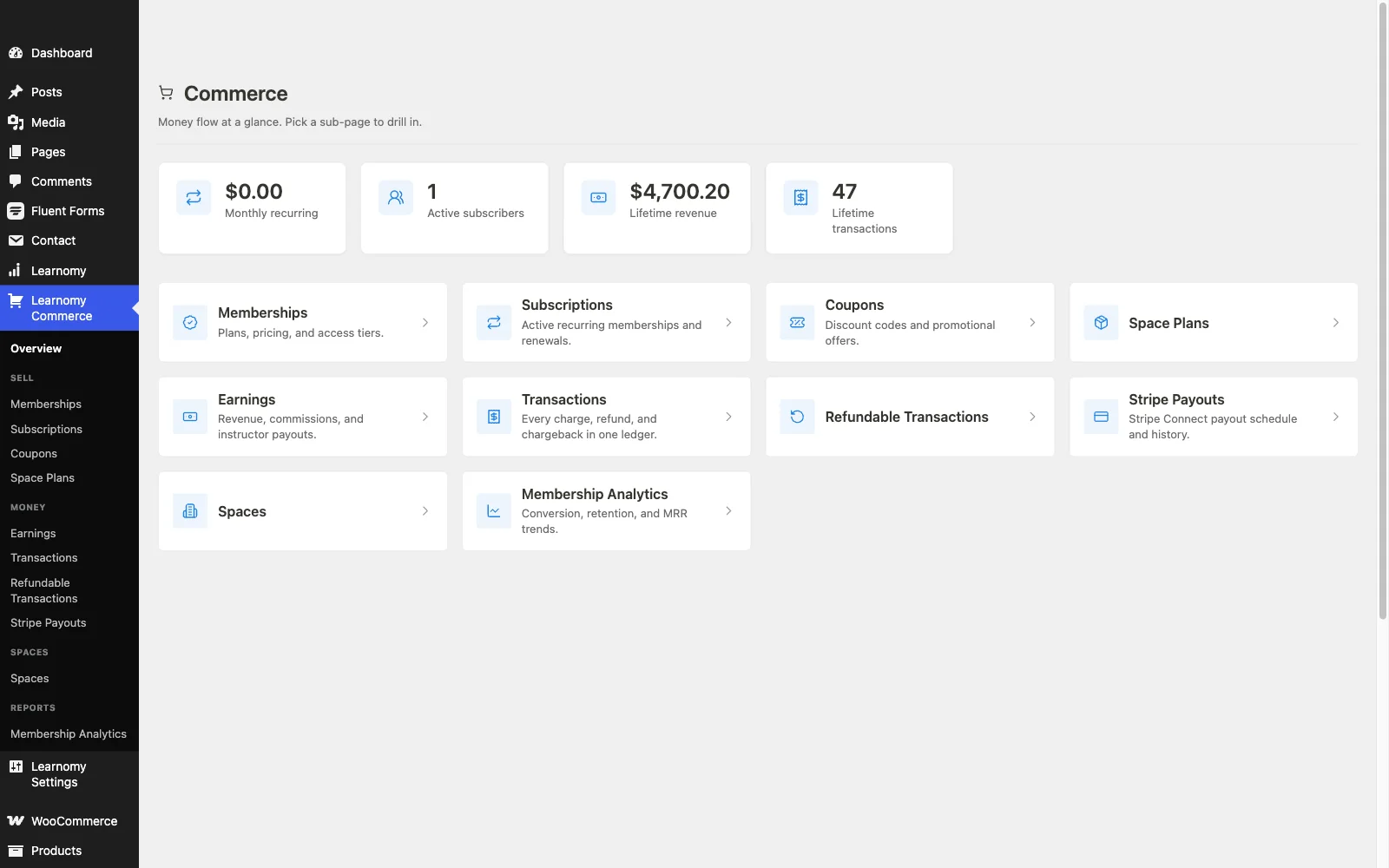
The platform behind the adapter is the full school: drag-and-drop courses with video, audio, PDF, and reading lessons; six quiz types with partial credit, question banks, timed, proctored attempts, and an essay-grading inbox; QR-verifiable certificates with a public verification page; memberships with trials and an automatic pricing page; instructor revenue sharing; coupons, reviews, announcements, email templates; honest completion analytics; protected course videos; and full branding control, dark mode included, with community, discussion boards, and gamification available by pairing companion Wbcom products rather than shipping natively. Migration wizards import from LearnDash, Tutor LMS, and LifterLMS.
Pros:
- Woo adapter when you want catalog unity; standalone checkout when you don’t, no other entry offers both
- No platform fees; the deepest feature set on this list behind the commerce layer
- Future-proof: dropping Woo later costs nothing on the course side
Cons:
- Not Automattic-family, Sensei remains the choice if maximal Woo intimacy is the whole requirement
- Younger ecosystem
Get it: wbcomdesigns.com/downloads/learnomy.
2. Sensei LMS, the Woo-native choice
If the premise is “my store is WooCommerce and courses must live inside it,” Sensei is the purest answer available: built by Automattic, WooCommerce’s own maker, so course products, checkout, subscriptions (via Woo extensions), and customer records all behave like first-family citizens. No mapping quirks, no integration lag after updates, the pairing is the product.
The LMS itself is deliberately lean: block-editor authoring, basic quizzes with a paid tier for depth, free basic certificates, thin reporting. For straightforward courses inside a Woo store, that leanness is a feature; for credential, assessment, or marketplace ambitions, it runs out.
Pros: deepest possible Woo alignment; honest open core; low maintenance.
Cons: lean LMS depth; literally cannot sell without Woo.
The deal: open core with an annual paid tier.
3. Tutor LMS, flexible bridging, Woo or EDD
Tutor’s commerce bridging is the most flexible among dedicated engines: WooCommerce or Easy Digital Downloads, your pick, with courses mapped to products and monetization settings connecting the two. For stores weighing Woo against EDD (or running both), that optionality is real value, and the authoring experience remains the best in WordPress.
The usual gates apply, certificates, drip, and advanced quizzes are premium, and the bridge is yours to maintain through every update cycle. Field map in our Tutor alternatives roundup.
Pros: bridges both Woo and EDD; best authoring UX.
Cons: premium gates; bridge maintenance.
The deal: open core with annual premium tiers.
4. LearnDash, the proven Woo pairing
LearnDash-plus-WooCommerce is the most battle-tested combination in WordPress course selling: the official integration is mature, agencies know its edge cases, and the ecosystem extends it in every direction, subscriptions, group licensing, complex enrollment automations. For institutional builds on a Woo backbone, it remains the default.
It is also the canonical assembled stack: core license, Woo, gateway, reporting add-on, the economics our LearnDash alternatives comparison itemizes.
Pros: most proven pairing; ecosystem depth for complex cases.
Cons: full assembled-stack economics and maintenance.
The deal: annual license with add-ons sold separately.
5. LifterLMS, Woo integration plus automation
LifterLMS’s WooCommerce integration add-on maps products to courses and memberships cleanly, and the platform’s engagement automations then act on purchase events, buy-triggered onboarding sequences are genuinely slick. The per-add-on economics apply as ever, with Woo integration one more licensed piece; details in our LifterLMS alternatives guide.
Pros: purchase-triggered automations; mature engine.
Cons: integration is another licensed add-on; bundle gravity.
The deal: annual per-add-on licensing toward the full bundle.
6. MasterStudy LMS, Woo as the gateway fallback
MasterStudy’s split commerce, some native gateways, WooCommerce for the rest, means Woo functions as its reach-extender rather than its foundation. Workable, especially inside the StylemixThemes theme family, but the dual-path checkout is the platform’s least resolved seam, as our MasterStudy alternatives comparison notes.
Pros: Woo fills gateway gaps; polished student UX.
Cons: two checkout paths to support; premium gates.
The deal: open core with an annual premium tier.
7. WP Courseware, straightforward Woo selling
WP Courseware’s Woo integration does exactly one thing without drama: sell course access as products. Combined with its fast course structuring and best-in-class progress reporting, it suits training businesses that want commerce handled by the store and measurement handled well, the corporate portal pattern again.
Pros: simple, reliable integration; strong reporting.
Cons: no ambitions beyond that; dated corners.
The deal: annual license; commerce via your store.
8. LearnPress, Woo via add-on
True to form, LearnPress connects to WooCommerce through a separately purchased add-on, joining the certificates, drip, and gateway add-ons in the patchwork. It works; it is one more separately updated piece in the stack that our LearnPress alternatives guide suggests graduating from.
Pros: costs little until assembled; ubiquitous theme support.
Cons: integration itself is a purchase; patchwork maintenance.
The deal: open core with essentials sold separately.
WooCommerce vs EDD vs standalone for courses, the honest comparison
Now the question under the question. WooCommerce is built for every kind of commerce, physical shipping, inventory, variations, and carries that generality as weight: more queries, more extensions, more configuration surface than digital-only selling needs, as our EDD vs WooCommerce performance breakdown quantifies. Choose it for courses when the store already runs on it and catalog unity matters more than leanness. Easy Digital Downloads is purpose-built for digital products, lighter, cleaner for downloads-plus-courses catalogs, and pairs naturally with Tutor’s EDD bridge, per our EDD + LMS guide. Standalone checkout, Learnomy’s architecture, removes the cart platform entirely: the school sells itself, no bridge, no second system, no platform fees on what students pay. The honest ranking for course selling specifically: standalone for the fewest moving parts, EDD for digital-catalog unity, WooCommerce when its generality is already paid for. The good news is you no longer have to guess right forever, an adapter-plus-standalone platform makes the choice reversible.
How we evaluated
Rankings weigh integration depth and reliability, what happens without WooCommerce, LMS capability behind the commerce layer, maintenance surface, and architectural flexibility over a multi-year horizon. Learnomy’s behavior is checked against its own documentation and public changelog as of September 2026; competitor boundaries reflect vendors’ published materials at the time of writing, verify integration specifics against your Woo extension stack before committing.
FAQ
What is the best WordPress LMS for WooCommerce in 2026? Learnomy, for the strongest platform that also speaks Woo, while retaining a standalone, fee-free checkout of its own. For maximal Woo-native intimacy on a leaner course, Sensei. For complex institutional Woo builds, LearnDash.
Do I need WooCommerce to sell courses at all? No, that assumption is the biggest unforced error in this category. Learnomy sells standalone through built-in Stripe and PayPal; MemberPress bills natively. Woo is one architecture, not the architecture.
Can WooCommerce handle course subscriptions? Yes, via Woo’s subscription extensions bridged to your LMS, a proven, multi-piece stack. Platforms with native memberships (see our membership features comparison) reach the same outcome with fewer parts.
Is EDD better than WooCommerce for selling courses? For digital-only catalogs, EDD is lighter and more purpose-fit; Woo wins when you also sell physical goods or already run it. For courses alone, standalone checkout beats both on simplicity, the full argument is in our performance comparison.
What happens to my courses if I ever drop WooCommerce? On bridge-dependent engines: a commerce migration project. On Learnomy: you switch to its built-in checkout and keep selling, the adapter was optional all along. Architectural reversibility is worth pricing into the decision.
Do Woo-integrated LMS setups charge platform fees? No per-sale platform cut on any WordPress option, costs are licenses, extensions, and processing. Learnomy’s framing is the cleanest of all: no platform fees, no mandatory license stack, what students pay is yours.
Final verdict
For WooCommerce stores adding courses, the 2026 pick is Learnomy, the deepest school behind the sale, verifiable certificates, real assessment, memberships, revenue sharing, with a Woo adapter today and a standalone, no-platform-fee checkout whenever you want it: get it here. Sensei remains the answer if maximal Woo-native intimacy on a lean course is the whole brief. LearnDash and Tutor remain the proven bridges, with Tutor doubling as the EDD path. Continue with our payment architecture comparison and 2026 LMS guide.