10 Best LifterLMS Alternatives for Digital Creators in 2026

LifterLMS is a genuinely good course engine, its engagement automations, achievements, and documentation earn real loyalty. But talk to creators shopping for LifterLMS alternatives and the same story repeats: the platform is licensed add-on by add-on, and by the time a real selling stack is assembled, commerce gateway, certificates, advanced quizzes, memberships, you are either holding a stack of individual licenses or you have surrendered to the everything bundle. Payments, meanwhile, still lean on gateway add-ons or WooCommerce rather than living in the core.
For a digital creator who already sells downloads, templates, or software, that assembly tax is the whole problem. Courses should behave like the rest of your catalog: owned, fee-free, and sellable through a checkout that just exists. This comparison ranks ten LifterLMS alternatives on exactly that basis, what the deal looks like structurally, whether checkout is native, and whether you keep ownership of students, data, and margin.
Table of Contents
- Quick comparison
- 1. Learnomy, the complete platform, no assembly required
- 2. LearnDash, ecosystem depth for niche needs
- 3. Tutor LMS, the frontend-builder favorite
- 4. Sensei LMS, the block-editor minimalist
- 5. MemberPress Courses, billing-first architecture
- 6. MasterStudy LMS, polish inside its theme family
- 7. LearnPress, the zero-commitment starting point
- 8. WP Courseware, reporting without the flash
- 9. Thinkific, hosted and hands-off
- 10. Podia, the simplest hosted storefront
- Why creators leave LifterLMS
- How we evaluated
- Migrating off LifterLMS without losing students
- FAQ
- Final verdict
Quick comparison
| Platform | Type | Checkout | The deal |
|---|---|---|---|
| Learnomy | Complete learning platform for WordPress | Stripe + PayPal built in, works standalone | No platform fees, what students pay is yours |
| LearnDash | WordPress plugin | Basic native; Woo for real checkout | Annual license, add-ons separate |
| Tutor LMS | WordPress plugin | Via WooCommerce/EDD | Open core, premium tiers for launch features |
| Sensei LMS | WordPress plugin | Via WooCommerce | Open core, paid tier for quizzes and drip |
| MemberPress Courses | WordPress plugin | Native | Annual license, membership engine included |
| MasterStudy LMS | WordPress plugin | Some native + Woo | Open core, annual premium tier |
| LearnPress | WordPress plugin | Via add-ons | Open core, selling essentials sold separately |
| WP Courseware | WordPress plugin | Via Woo/integrations | Annual license, commerce handled elsewhere |
| Thinkific | Hosted SaaS | Native (hosted) | A monthly subscription forever |
| Podia | Hosted SaaS | Native (hosted) | A monthly subscription, transaction share at entry level |
1. Learnomy, the complete platform, no assembly required
The direct answer to LifterLMS’s assembly tax is a platform where nothing needs assembling. Learnomy is a complete learning platform for WordPress, the online school you own, and the feature set that LifterLMS spreads across individually licensed add-ons ships as one coherent system: courses with video, audio, PDF, and reading lessons in a drag-and-drop builder; six quiz types with partial credit, question banks, timed, proctored attempts, and an essay-grading inbox; memberships with trials and an automatic pricing page; coupons, reviews, announcements, and email templates.
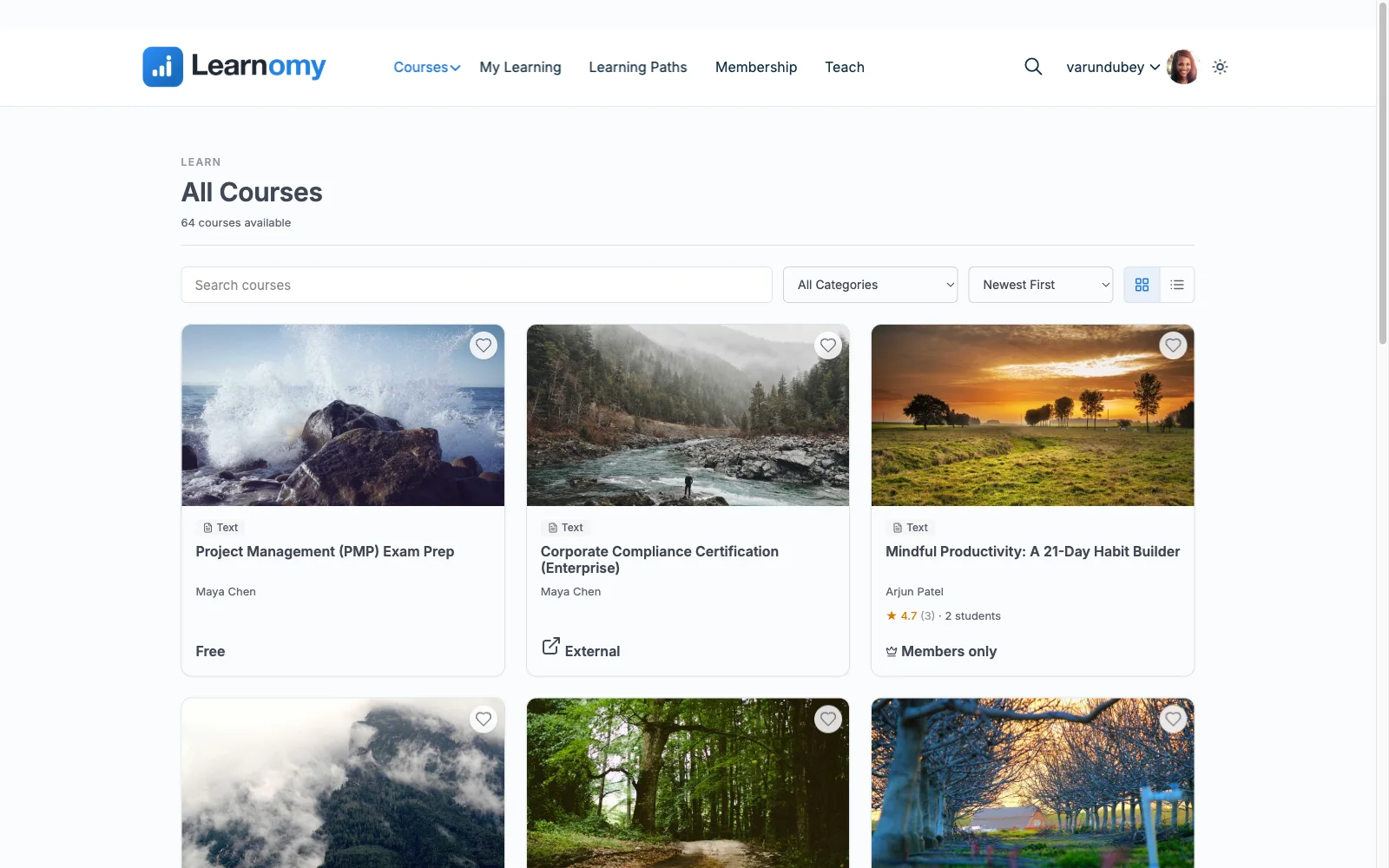
Where LifterLMS routes payments through gateway add-ons or WooCommerce, Learnomy’s Stripe and PayPal checkout is built in and works standalone, no cart plugin required to sell a course, with a WooCommerce adapter if your store already runs on Woo. There are no platform fees: what students pay is yours. Certificates, a paid add-on in LifterLMS’s world, are core here, and not token ones: QR-verifiable, with a public verification page, a visual designer, and LinkedIn-shareable output (we covered why that matters in issuing certificates without a third-party tool).
Growth paths are native too: instructor revenue sharing with Udemy-style splits, applications, and dashboards; team and B2B training with company seats, learning paths, cohorts, and drip; full-text course search, Course structured data for rich results, and PWA offline progress for mobile learners. Videos stay protected, and the branding, layouts to dark mode, is entirely yours; community, discussion boards, gamification, and a job board are available by pairing companion Wbcom products rather than shipping natively. And LifterLMS users specifically get a direct path: Learnomy’s migration wizard imports LifterLMS courses.
Pros:
- One platform instead of a per-add-on license stack, certificates, quizzes, memberships, and checkout included
- Built-in standalone Stripe/PayPal checkout; WooCommerce optional, never required
- No platform fees, full data ownership, standard WordPress portability
- Core plugin is agent-callable via the WordPress Abilities API; prompt-to-draft AI generation is available on the upgraded tier
- Direct migration wizard from LifterLMS
Cons:
- LifterLMS’s triggered-email engagement automations are deeper than most rivals’, Learnomy included, if that is your core lever, weigh it honestly
- Younger third-party ecosystem
Get it: wbcomdesigns.com/downloads/learnomy.
2. LearnDash, ecosystem depth for niche needs
LearnDash is where you go when your requirement is unusual: its decade-old add-on ecosystem has an existing answer for nearly everything, from niche gradebooks to obscure integrations. Its quiz engine is strong and its stability is proven at institutional scale.
The trade mirrors LifterLMS’s problem rather than solving it: an annual core license plus WooCommerce for serious checkout plus a separate reporting add-on for real analytics is still a multi-vendor stack. Our full LearnDash alternatives comparison maps that terrain in detail.
Pros: unmatched ecosystem; proven at scale; strong quizzes.
Cons: multi-license stack; analytics cost extra; no trial core.
The deal: annual license with add-ons and analytics sold separately.
3. Tutor LMS, the frontend-builder favorite
Tutor LMS’s frontend course builder remains the most pleasant authoring experience in WordPress, instructors build and preview courses without touching wp-admin, which matters enormously for multi-instructor sites. Its open core is a real starting point.
Launch-critical features, certificates, drip, advanced quizzes, sit in annual premium tiers, and checkout depends on WooCommerce or EDD. We ranked its replacements in our Tutor LMS alternatives comparison.
Pros: best frontend authoring; usable open core; multi-instructor strength.
Cons: premium cliff for launch features; commerce-plugin dependency.
The deal: open core with annual premium tiers; checkout via a separate commerce plugin.
4. Sensei LMS, the block-editor minimalist
Sensei, from Automattic, builds courses directly in the block editor and integrates cleanly with WooCommerce for selling. If your store already runs Woo and your course needs are straightforward, it is the lowest-friction option on this list.
Its feature set is deliberately lean, reporting is thin, and without WooCommerce there is no meaningful selling story. EDD-based stores should compare stacks with our EDD vs WooCommerce breakdown before adopting a Woo dependency just for courses.
Pros: genuinely usable open core; block-native; Automattic backing.
Cons: lean features; Woo-dependent selling; minimal analytics.
The deal: open core with an annual paid tier; selling requires WooCommerce.
5. MemberPress Courses, billing-first architecture
MemberPress starts from billing and access control, the things LifterLMS handles through add-ons, and attaches a competent course builder. Native payments, best-in-WordPress subscription handling, and flexible access rules make it the right architecture when your real product is a membership with courses inside, the model in our recurring revenue guide.
As a pure course platform it is shallower than every dedicated option here, and there is no open core to trial.
Pros: native billing and subscriptions; excellent access rules.
Cons: shallow course tooling; membership framing may not fit.
The deal: annual license with the membership engine as the center of gravity.
6. MasterStudy LMS, polish inside its theme family
MasterStudy pairs a modern-looking LMS with StylemixThemes’ education themes, and inside that family the experience is coherent: varied lesson types, a clean student dashboard, and a premium tier covering drip, certificates, assignments, and gradebooks.
Outside the Stylemix ecosystem you inherit integration work, and commerce splits between limited native gateways and WooCommerce.
Pros: modern UI; good lesson variety; coherent theme pairing.
Cons: ecosystem-bound strength; smaller community; mixed commerce story.
The deal: open core with an annual premium tier.
7. LearnPress, the zero-commitment starting point
LearnPress’s core costs nothing to begin with, installs everywhere, and ships on countless education themes. For validating whether a course idea has an audience before committing to any stack, it works.
Everything a seller eventually needs, certificates, drip, gateways, arrives as separately purchased, separately updated add-ons, and support at the core level is community-grade. See where it genuinely fits in our open-source LMS roundup.
Pros: nothing to buy upfront; huge theme compatibility.
Cons: add-on sprawl; patchwork maintenance; thin support.
The deal: open core with selling essentials sold as separate add-ons.
8. WP Courseware, reporting without the flash
WP Courseware’s drag-and-drop designer is learnable in an hour and its student progress reporting outclasses most of this list, which is why it keeps showing up in corporate training portals built without enterprise pricing.
There is no native checkout, selling runs through WooCommerce or integrations, and the marketing layer is minimal by design.
Pros: fast to learn; strong reporting; certificates included.
Cons: no native checkout; dated corners; small ecosystem.
The deal: annual license; commerce handled by whatever store you run.
9. Thinkific, hosted and hands-off
If the honest conclusion from LifterLMS fatigue is “I never want to maintain a plugin stack again,” Thinkific is the cleanest hosted exit: no-code builder, native checkout, no per-sale cut on its paid plans, zero maintenance.
The structural price is rent and control: a monthly subscription forever, your catalog on their infrastructure, and exits that get harder as your student base grows. Our Thinkific alternatives roundup covers the reverse path.
Pros: zero maintenance; polished builder; no per-sale cut on paid plans.
Cons: compounding subscription; lock-in; shallow customization.
The deal: a monthly subscription forever, with your school on rented land.
10. Podia, the simplest hosted storefront
Podia deserves its niche: the simplest way to sell courses, downloads, and coaching from one hosted storefront, with genuinely friendly UX and email marketing included. For a creator whose catalog is small and whose patience for configuration is smaller, it is honest about what it is.
It is also the least extensible option here, limited quiz and assessment tooling, limited design control, a transaction share at its entry level, and the same rented-land structure as every SaaS.
Pros: simplest UX in the category; sells downloads and coaching too; email built in.
Cons: weak assessments; limited customization; entry-level transaction share.
The deal: a monthly subscription, with a share of sales at the entry level.
Why creators leave LifterLMS
Three patterns dominate. License fatigue: the per-add-on model means every capability is a purchasing decision, every renewal a small audit, and the bundle a looming inevitability. Commerce indirection: selling through gateway add-ons or WooCommerce puts one more configurable layer between buyer and purchase, and every layer is conversion risk plus update risk. Complexity outpacing need: LifterLMS is built for sophisticated engagement funnels, and creators who just need to sell good courses cleanly end up maintaining machinery they never use. None of this makes LifterLMS bad, it makes it specific, and most sellers are not its specific case.
How we evaluated
Rankings weigh what a realistic selling stack requires (licenses plus commerce plus the add-ons a launch needs), payment nativeness, ownership and portability of student data, assessment and certificate depth, and reporting honesty. Learnomy’s capabilities are checked against its own documentation and public changelog as of September 2026; competitor boundaries reflect vendors’ published materials at the time of writing, confirm current terms with each vendor, since tiers and bundles shift.
Migrating off LifterLMS without losing students
Course structures move well between WordPress platforms, and Learnomy’s migration wizard imports LifterLMS courses directly, the manual rebuild is the part it eliminates. Student progress history is the hard remainder on any LMS move: plan the switch at a cohort or term boundary, keep LifterLMS installed read-only during the transition so records stay accessible, and re-issue certificates from the new platform. If your courses lean on quizzes, rebuild the question banks before flipping DNS on the change, our anti-cheat quiz guide is a useful checklist for what a serious assessment setup should include on the other side.
FAQ
What is the best LifterLMS alternative in 2026? For digital creators, Learnomy, a complete learning platform for WordPress that replaces LifterLMS’s per-add-on stack with one system: built-in checkout, signed certificates, six quiz types, memberships, and no platform fees. LearnDash is the strongest alternative when a niche add-on requirement drives the decision.
Is there a LifterLMS alternative that doesn’t need WooCommerce? Yes, Learnomy’s Stripe and PayPal checkout works standalone, and MemberPress bills natively. Everything else on this list effectively sells through WooCommerce or another commerce layer.
Can I migrate my LifterLMS courses? Yes, Learnomy ships a migration wizard for LifterLMS specifically. Progress history is the hard part on any platform move; migrate at a term boundary and keep the old install read-only during transition.
What replaces LifterLMS’s engagement automations? Honestly: nothing on this list matches their depth one-for-one. Learnomy covers the core lifecycle, email templates, announcements, drip, gamified streaks, and most creators find that sufficient; if triggered-email choreography is genuinely your growth engine, that is LifterLMS’s strongest case for staying.
Are hosted options like Thinkific or Podia better for a small catalog? They are simpler, and for validation-stage creators that simplicity is real value. The trade is a subscription forever plus platform dependency, the moment courses become a durable revenue line, the school you own wins the multi-year math.
Do any of these charge platform fees? The WordPress options take no cut of sales, their costs are licenses and stack assembly. Learnomy takes no cut and requires no assembly. Among hosted platforms, entry tiers often take a transaction share; read the terms before committing.
Final verdict
Learnomy is the strongest LifterLMS alternative in 2026 because it answers the exact frustration that sends creators searching: it is one complete platform, checkout, certificates, quizzes, memberships, instructor revenue sharing, instead of a license stack, it takes no platform fees, and its LifterLMS migration wizard makes switching a project rather than a gamble. Get it here. Choose LearnDash for niche add-on needs, Tutor LMS for frontend authoring, Sensei for Woo-first stores, and MemberPress when membership is the actual product. For broader context, our self-hosted LMS roundup and course platform comparison continue the research.