8 Best WordPress LMS Plugins for Membership Sites in 2026

A membership site and a course business are not the same thing, even when both run on an LMS. A course business sells a defined outcome, finish this, learn this. A membership site sells ongoing access to a library that keeps growing, and the LMS’s job is different: it needs to organize content that accumulates over months and years, keep long-tenured members finding value in month eighteen the way they did in month one, and make tiered access, some content for everyone, more for higher tiers, straightforward to manage as the library grows.
This comparison ranks the eight best WordPress LMS options for membership sites in 2026 on that specific job: library organization at scale, tiered access, drip cadence for a subscription (not a single cohort), and retention tooling for a business measured in churn, not one-time sales. If you are comparing membership *features* across LMS plugins feature-by-feature rather than the whole-business fit, our membership features comparison is the companion piece for that narrower question.
Table of Contents
- Quick comparison
- 1. Learnomy, a growing library built to retain, not just sell
- 2. MemberPress, the access-and-billing foundation
- 3. Restrict Content Pro + LMS, the modular route
- 4. LifterLMS, retention automation at the core
- 5. LearnDash + membership stack, maximum control
- 6. Tutor LMS, subscriptions via commerce bridge
- 7. Sensei LMS, Woo Memberships pairing
- 8. MasterStudy LMS, bundled subscriptions in the premium tier
- Organizing a library that outlives any single cohort
- How we evaluated
- FAQ
- Final verdict
Quick comparison
| Platform | Library organization at scale | Tiered access | The deal |
|---|---|---|---|
| Learnomy | Full-text search native; learning paths and cohorts on the upgraded tier | Native membership tiers | No platform fees, what students pay is yours |
| MemberPress | Access rules gate anything site-wide | Native, the strongest in WordPress | Annual license |
| Restrict Content Pro + LMS | Modular, pairs with any engine | Native, focused | Annual license + LMS costs |
| LifterLMS | Course catalog + memberships add-on | Via memberships add-on | Per-add-on licensing |
| LearnDash + stack | Deep, assembled | Via MemberPress/RCP/Woo Subscriptions | Annual license plus membership stack |
| Tutor LMS | Basic, premium for depth | Via commerce bridge extensions | Open core, premium tiers plus extensions |
| Sensei LMS | Basic, block-native | Via Woo Memberships | Open core, paid tier |
| MasterStudy LMS | Basic bundles | Premium tier | Open core, premium tier |
1. Learnomy, a growing library built to retain, not just sell
A membership site’s real enemy is not the sales page, it is month fourteen, when a member has consumed the obvious content and needs a reason to stay. Learnomy is built as a complete learning platform for WordPress, the online school you own, with library-scale organization as a default rather than an afterthought: full-text course search keeps a growing catalog findable, and Course structured data means new library additions still surface in search results years into the membership’s life. Learning paths and cohorts, for giving that library formal structure, sit on Learnomy’s upgraded tier.
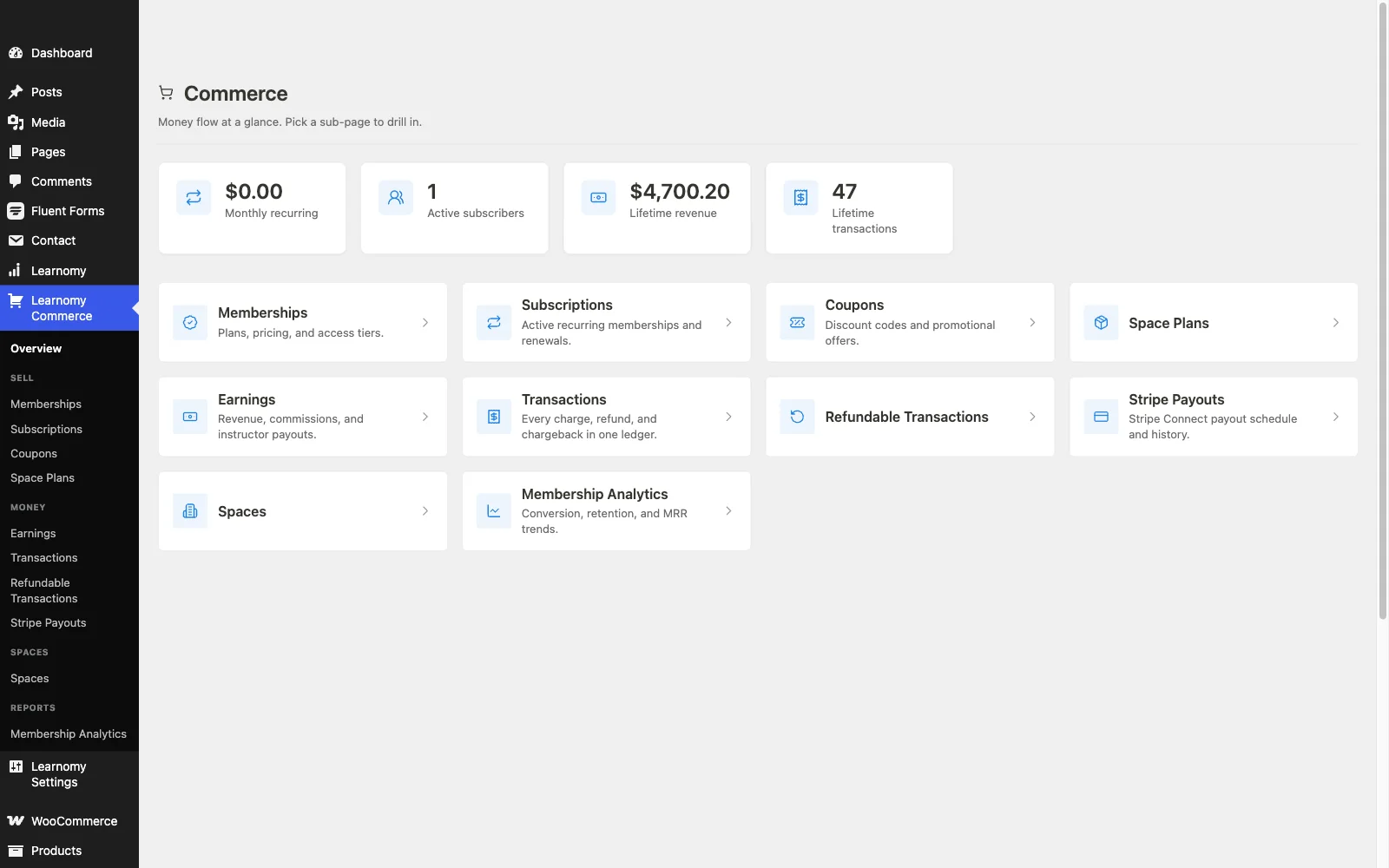
Retention tooling is where Learnomy separates itself from feature-comparison winners that only look good on a launch-day checklist: companion Wbcom products can add a learning community around your school, discussion boards and Q&A, and gamification with points, badges, and streaks, giving long-tenured members a reason to keep returning that has nothing to do with new content alone. Memberships with trials and an automatic pricing page are native, so tiered access, some content for everyone, more for a higher tier, is a configuration choice rather than a plugin hunt.
Commerce is built for a subscription business specifically: Stripe and PayPal checkout is built in and works standalone, recurring billing runs through the same system as one-off sales, and no platform fees: what members pay is yours, every month, not just at the first sale. Certificates, six quiz types, and protected video mean the library can include genuinely assessed courses alongside lighter resource content, without switching tools depending on the format.
Pros:
- Full-text search keeps a growing library organized and findable, no upgrade required
- Community, discussion, and gamification pair in through companion Wbcom products, learning paths and cohorts are available on the upgraded tier
- Memberships with trials and automatic pricing page, no assembly required
- No platform fees on recurring revenue, every renewal, not just the first sale
Cons:
- Subscription mechanics (complex prorations, multi-tier upgrade paths) are less configurable than MemberPress’s dedicated billing engine
- Younger ecosystem than the incumbents
Get it: wbcomdesigns.com/downloads/learnomy.
2. MemberPress, the access-and-billing foundation
For a membership site where billing complexity, multiple tiers, prorated upgrades, dunning on failed payments, is the real engineering problem, MemberPress remains the strongest foundation in WordPress: native payments, the best subscription handling available, and access rules that can gate literally anything on the site.
Course-specific tooling, assessment, certificates, drip pacing, is shallower than dedicated LMS platforms, MemberPress solves access and billing exceptionally well and treats the course layer as secondary. Our membership recurring-revenue guide covers the model this fits.
Pros: best subscription billing and access rules in WordPress; gates anything site-wide.
Cons: shallow course, quiz, and certificate tooling.
The deal: annual license with billing at the center.
3. Restrict Content Pro + LMS, the modular route
Restrict Content Pro, from the EDD family, does one job well: gating content by membership tier, cleanly, without trying to also be a course engine. Paired with any LMS on this list, it lets a membership site pick its content-gating tool and its teaching tool independently.
The cost is the classic modular trade: two systems, two vendors, and membership analytics that live apart from learning analytics, a genuine maintenance burden as the library and member base both grow.
Pros: focused, well-built gating; pairs with any LMS; EDD-family pedigree.
Cons: split-brain data across two systems; two products to maintain.
The deal: annual license plus your LMS’s costs.
4. LifterLMS, retention automation at the core
LifterLMS pairs its memberships add-on with the platform’s actual signature strength, engagement automation, triggered win-back emails when a member goes quiet, achievement-driven retention nudges, which directly targets the churn problem a membership site lives or dies by.
The per-add-on licensing model means assembling memberships, gateways, and advanced features is several separate purchases funneling toward the bundle, per our LifterLMS alternatives guide.
Pros: best churn-fighting automation on this list; course-native memberships.
Cons: per-add-on economics; commerce not native to core.
The deal: annual per-add-on licensing toward the full bundle.
5. LearnDash + membership stack, maximum control
LearnDash has no native membership engine, but paired with MemberPress, Restrict Content Pro, or WooCommerce Subscriptions, its deep course engine and content structuring give an assembled membership site maximum control over every piece, a legitimate choice for a team with the technical patience to run it.
That control is purchased with a multi-vendor stack: core license, membership plugin, gateway, and a maintenance surface that spans every update cycle across all of them. Full economics in our LearnDash alternatives comparison.
Pros: any membership architecture achievable; deep course engine underneath.
Cons: multi-vendor assembly and maintenance; no native path.
The deal: annual license plus your chosen membership stack.
6. Tutor LMS, subscriptions via commerce bridge
Tutor LMS reaches recurring membership access through WooCommerce Subscriptions or EDD’s recurring extension bridged to its content-drip settings, with the platform’s usual strength, its frontend builder, making it easy to keep adding to the library between billing cycles.
Membership logic lives split across the bridge and the LMS, and content-drip depth requires the premium tier. Our Tutor LMS alternatives comparison covers the field beyond it.
Pros: easiest engine to keep adding library content to; works with EDD or Woo.
Cons: membership logic split across systems; premium gates on drip depth.
The deal: open core with premium tiers plus commerce extensions.
7. Sensei LMS, Woo Memberships pairing
For a membership site already running WooCommerce, Sensei pairs cleanly with WooCommerce Memberships and Subscriptions, both Automattic products, gating course access by plan without introducing a third vendor into the stack.
The library-organization and retention layer stays deliberately lean, Sensei was not built with a growing, multi-year content library specifically in mind, and it shows once the catalog gets large.
Pros: clean pairing within the Woo family; low complexity.
Cons: thin library organization and retention tooling at scale.
The deal: open core with a paid tier, plus Woo membership extensions.
8. MasterStudy LMS, bundled subscriptions in the premium tier
MasterStudy’s premium tier includes course bundles and subscription selling, a self-contained membership-lite option that suits a smaller, polished membership site inside its StylemixThemes theme world.
Tiering and trial mechanics are simpler than the dedicated leaders, and the usual notes about theme-family dependence apply, per our MasterStudy alternatives comparison.
Pros: self-contained bundles and subscriptions; polished student UX.
Cons: premium-gated; moderate depth; theme coupling.
The deal: open core with an annual premium tier.
Organizing a library that outlives any single cohort
A single course needs a table of contents. A membership library needs an index. Once a membership site has been running for two or three years, the content problem stops being “how do I build the next module” and becomes “can a member who joined yesterday actually find the thing they need among four years of accumulated material.” That is a search problem and an information-architecture problem more than a course-builder problem, and it is where most LMS platforms, built around launching a single course, quietly fall short. Learning paths that group related content, full-text search that actually works, and structured data that keeps old content discoverable are not launch-day features, they are month-thirty features, and a membership site should weight them accordingly, even though a five-minute demo never shows why they matter.
How we evaluated
Rankings weigh library organization at scale (search, structure, discoverability), tiered access mechanics, retention and churn-fighting tooling, and whether billing is native or assembled. Learnomy’s capabilities are checked against its own documentation and public changelog as of September 2026; competitor boundaries reflect each vendor’s published materials at the time of writing, confirm current terms before committing a recurring-revenue business to a platform.
FAQ
What is the best WordPress LMS for a membership site in 2026? Learnomy, for native memberships with trials, full-text search for a growing library, and no platform fees on recurring revenue, all in one complete learning platform for WordPress. Learning paths, cohorts, community, and gamification round out retention but require the upgraded tier or a companion product. MemberPress is the strongest alternative when billing complexity is the primary engineering problem.
How is this different from a general membership-features comparison? This ranking weighs whole-business fit for a subscription library, search, retention, tiering at scale, over years. Our membership features comparison instead scores individual membership mechanics, trials, gating, pricing pages, feature by feature across the same platforms.
Will members be able to find old content as the library grows? Only if the platform has real search. Learnomy’s full-text search is built for this at no extra cost; learning paths for more formal structure sit on the upgraded tier. Most LMS plugins here have no answer beyond a flat archive page, which becomes unusable past a certain library size.
What actually reduces membership churn? Community, visible progress, and a reason to return beyond new content, the retention triad our peer-community study found cuts refunds too. Platforms that make those easy to add (Learnomy via companion products, partially LifterLMS) turn churn management into a configuration choice rather than a separate project.
Can I run tiered access, some content free, more for paying members? Yes on Learnomy and MemberPress natively. Elsewhere, Restrict Content Pro or a Woo/EDD membership extension handles tiering as a layer on top of whichever LMS you choose.
Should a membership site sell one-off courses too? Often yes, hybrid catalogs, flagship courses sold individually alongside the subscription library, frequently outperform either pure model. Learnomy runs both through one checkout; assembled stacks need separate product-type configuration for each.
Final verdict
A membership site is a retention business wearing a course-platform’s clothes, and the 2026 field rewards platforms that know it. Learnomy wins by pairing native memberships with full-text search built for a library that outlives any single cohort, structure and retention layers (learning paths, community, gamification) available via the upgraded tier or companion products, with no platform fees on recurring revenue: get it here. MemberPress wins on billing complexity, LifterLMS on churn-fighting automation, and Restrict Content Pro for teams that want gating and teaching as separate, best-of-breed tools. Continue with our membership features comparison and 2026 LMS guide.