8 Best WordPress LMS Plugins for Schools in 2026

A school running courses on WordPress has a different problem than a single creator selling one. Multiple instructors need accounts and permissions that do not step on each other. Enrollment happens in batches, a whole cohort at once, not one buyer at a time. Someone needs to see enrollment and completion across every class, not just their own. And the “seller” framing that dominates most LMS marketing barely applies, a school often is not selling a single course so much as running a program with seats, cohorts, and terms.
This comparison ranks the eight best WordPress LMS options for schools and training organizations in 2026 by exactly that: multi-instructor management, bulk and cohort enrollment, organization-wide visibility, and whether the platform was actually built for a program instead of a single funnel.
Table of Contents
- Quick comparison
- 1. Learnomy, multi-instructor and verifiable credentials, cohorts on the upgraded tier
- 2. LearnDash, the institutional standard
- 3. Tutor LMS, multi-instructor by design
- 4. MemberPress, when enrollment is really a membership
- 5. LifterLMS, cohort automation and re-engagement
- 6. WP Courseware, reporting a program administrator can trust
- 7. MasterStudy LMS, a designed campus feel
- 8. Sensei LMS, small programs on a lean budget
- Bulk enrollment and cohorts, the feature schools actually need
- How we evaluated
- FAQ
- Final verdict
Quick comparison
| Platform | Cohorts / seats | Multi-instructor | The deal |
|---|---|---|---|
| Learnomy | Upgraded tier, company seats and learning paths | Native, instructor dashboards | No platform fees, what students pay is yours |
| LearnDash | Via groups feature and add-ons | Via add-ons | Annual license, add-ons separate |
| Tutor LMS | Basic, premium tier for depth | Native, a core strength | Open core, premium tiers |
| MemberPress | Via membership tiers | Limited | Annual license |
| LifterLMS | Via memberships add-on | Limited natively | Per-add-on licensing |
| WP Courseware | Basic groups | Limited | Annual license |
| MasterStudy LMS | Bundles in premium tier | Native, multi-instructor marketplace mode | Open core, premium tier |
| Sensei LMS | Basic | Limited | Open core, paid tier |
1. Learnomy, multi-instructor and verifiable credentials, cohorts on the upgraded tier
A school evaluating an LMS is not asking whether it can sell one course, it is asking whether it can run a program. Learnomy is a complete learning platform for WordPress, the online school you own, and its core plugin runs multi-instructor operation, real assessment, and verifiable certificates without gating any of that behind an upgrade. Company seats, learning paths, and cohort-based enrollment, the specific tools that let an administrator manage a whole cohort as a unit rather than individual purchases, sit on Learnomy’s upgraded tier; confirm current scope on the vendor’s site before committing a multi-cohort program to it.
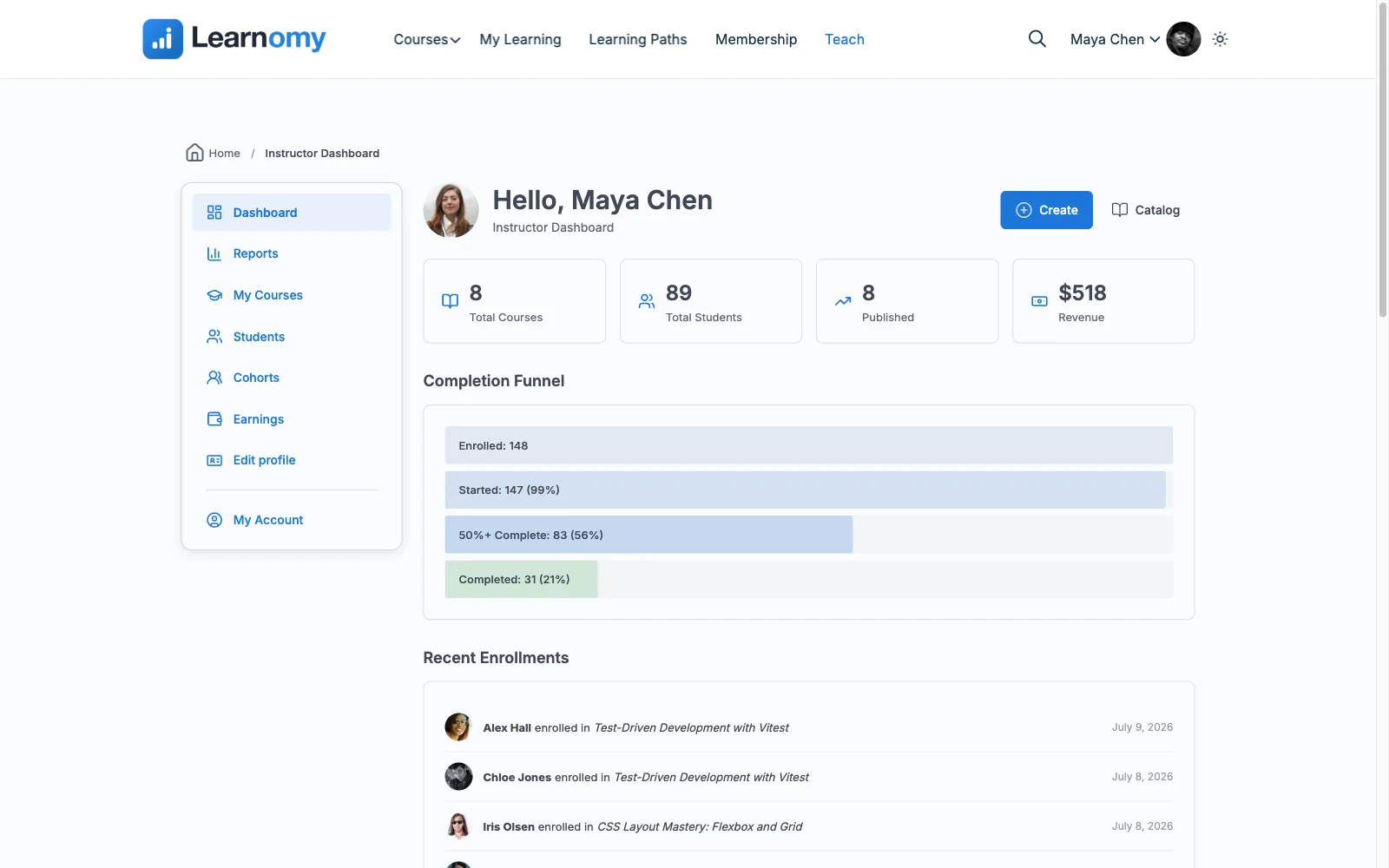
Multi-instructor operation is native, not bolted on: instructor revenue sharing with Udemy-style splits, instructor applications, and instructor dashboards let a school run several teachers on the same platform, each with visibility into their own classes. Assessment stays consistent across the whole program: six quiz types with partial credit, question banks, timed, proctored attempts, and an essay-grading inbox that scales past a single teacher’s workload. Certificates are QR-verifiable, which matters more for a school than for a solo creator, an institution’s credentials need to hold up to outside scrutiny.
On the commerce side, Stripe and PayPal checkout is built in and works standalone, with a WooCommerce adapter if the institution already runs a store, and no platform fees: what students, or their sponsoring organization, pay is yours. Content drip ships free and gives a program basic structured pacing; cohorts and learning paths for running a term at scale sit on the upgraded tier. Community, discussion boards, and gamified progress, if you want a cohort to stay engaged between sessions, pair in through companion Wbcom products rather than shipping natively.
Pros:
- Multi-instructor dashboards and revenue sharing built in, no upgrade required
- Verifiable certificates that hold up to outside institutional scrutiny
- No platform fees; standalone checkout works for tuition or corporate billing alike
- Content drip ships free; company seats, learning paths, and cohort tooling are available on the upgraded tier when a program needs them
Cons:
- Company seats, learning paths, and cohort management sit on the upgraded tier, not the core plugin
- No dedicated SIS-style transcript export for institutions that need one specific compliance format
- Younger ecosystem than the incumbents most agencies already know
Get it: wbcomdesigns.com/downloads/learnomy.
2. LearnDash, the institutional standard
LearnDash is the plugin most agencies reach for on institutional builds, and its Groups feature, paired with the right add-ons, handles bulk enrollment, group leaders, and reporting at a scale schools recognize. A decade of deployments means most edge cases already have a documented answer.
That institutional maturity is assembled: core license, group-management add-ons, WooCommerce for billing, a reporting add-on for real analytics, a multi-vendor stack a school’s IT staff has to maintain. Our LearnDash alternatives comparison covers the full cost.
Pros: proven at institutional scale; deepest ecosystem for edge cases.
Cons: group and reporting features require add-ons; multi-vendor maintenance.
The deal: annual license with add-ons sold separately.
3. Tutor LMS, multi-instructor by design
Tutor LMS’s frontend authoring was built with multi-instructor sites in mind from the start, teachers who are not WordPress-comfortable can build and manage their own courses without wp-admin access, a genuine strength for a school with many non-technical faculty.
Cohort and bulk-enrollment depth is thinner than dedicated group tools, and certificates and drip live in the premium tier. Our Tutor LMS alternatives comparison covers the wider field.
Pros: best multi-instructor authoring experience; non-technical-friendly.
Cons: cohort features thinner than dedicated tools; premium gates.
The deal: open core with annual premium tiers.
4. MemberPress, when enrollment is really a membership
Some schools structure access as tiers rather than individual course purchases, an annual membership that unlocks a library of classes. MemberPress’s access-rule engine, the best in WordPress, handles that structure natively, with courses as one benefit among several.
Multi-instructor and cohort tooling are limited compared to dedicated LMS platforms, MemberPress is architected around billing and access, not classroom management. Our membership recurring-revenue guide covers the underlying model.
Pros: best access-rule engine in WordPress; native billing.
Cons: limited multi-instructor and cohort tools; course tooling shallow.
The deal: annual license with billing at the center.
5. LifterLMS, cohort automation and re-engagement
A program’s biggest quiet failure mode is students who quietly stop showing up mid-term. LifterLMS’s engagement automations, triggered emails, achievement-based nudges, catch that better than any other WordPress LMS, an underrated fit for a school worried about cohort completion rates.
Its memberships add-on covers group access, and the usual per-add-on licensing applies across the pieces a school needs. Our LifterLMS alternatives guide covers the economics.
Pros: best re-engagement automation for at-risk students; mature engine.
Cons: group/cohort tooling via add-on; per-add-on economics.
The deal: annual per-add-on licensing toward the full bundle.
6. WP Courseware, reporting a program administrator can trust
A school administrator’s most common question, who has actually finished what, is WP Courseware’s strongest answer: student progress reporting and a proper gradebook that beat flashier engines, which is why it keeps turning up in corporate training portals that need trustworthy numbers without enterprise pricing.
Group and bulk-enrollment tools are basic, and there is no native checkout, appropriate for a school billing tuition through another system entirely.
Pros: trustworthy progress reporting; fast to set up.
Cons: basic group tools; no native checkout.
The deal: annual license; commerce handled elsewhere.
7. MasterStudy LMS, a designed campus feel
For a school that wants its LMS to look and feel like a real campus site from launch day, MasterStudy’s modern dashboards and multi-instructor marketplace mode, paired with a StylemixThemes education theme, deliver that polish with minimal design work.
Bundles and group features live in the premium tier, and the polish is strongest inside its own theme family. Full trade-offs in our MasterStudy alternatives comparison.
Pros: polished multi-instructor campus feel; good lesson-format variety.
Cons: theme-family coupling; premium gates on bundles/groups.
The deal: open core with an annual premium tier.
8. Sensei LMS, small programs on a lean budget
For a small program, a single department, a community class series, Sensei’s lean core covers straightforward course delivery in the block editor without institutional overhead, provided WooCommerce is already the billing system.
Multi-instructor and group management stay basic, this is a tool for a small operation, not a multi-department institution. Our EDD vs WooCommerce comparison is worth reading before adopting Woo purely for this.
Pros: low overhead for a small program; honest open core.
Cons: limited multi-instructor and group tools; Woo-dependent selling.
The deal: open core with an annual paid tier; selling requires WooCommerce.
Bulk enrollment and cohorts, the feature schools actually need
A single course sale flow, browse, add to cart, checkout, does not match how a school actually enrolls people. A program administrator needs to add thirty names to a cohort at once, often from a spreadsheet or a corporate sponsor’s roster, without thirty individual purchase transactions. They need to see completion by cohort, not just by individual student, so a term’s outcomes can be reported upward. And they need instructor accounts scoped to their own classes, not blanket admin access across the whole institution. Platforms built around individual course sales (WP Courseware, Sensei, and the base tier of most others here) treat bulk enrollment as an afterthought bolted on later; platforms built with company seats and cohorts as first-class concepts, Learnomy chief among them, treat it as the default case rather than the edge case. Weight this heavily, it is the single biggest predictor of whether an LMS actually fits a school versus a solo seller’s storefront.
How we evaluated
Rankings weigh cohort and bulk-enrollment support, multi-instructor management, organization-wide reporting, and whether these are native or assembled from add-ons. Learnomy’s capabilities are checked against its own documentation and public changelog as of September 2026; competitor boundaries reflect each vendor’s published materials at the time of writing, verify current group and reporting tooling before committing an institution to a platform.
FAQ
What is the best WordPress LMS for a school in 2026? Learnomy, for multi-instructor dashboards, verifiable certificates, and no platform fees on tuition or corporate billing, all included in the core plugin. Company seats, learning paths, and cohorts are available on the upgraded tier rather than the base install. LearnDash remains the institutional standard for agencies already deep in its ecosystem.
Can I enroll a whole cohort at once instead of individually? On Learnomy, company seats and cohort enrollment sit on the upgraded tier rather than the core plugin, confirm current scope before budgeting for it. On LearnDash and LifterLMS, group-enrollment add-ons cover the same job with their own assembly required.
How many instructor accounts can a school manage? Learnomy and Tutor LMS both support multiple instructor accounts with scoped dashboards natively. MemberPress and WP Courseware are weaker here, they were built around billing and reporting, not multi-teacher classroom management.
Do these platforms handle corporate or sponsored training billing? Learnomy’s standalone checkout handles the payment side directly; dedicated company seats for B2B billing sit on the upgraded tier. Elsewhere, invoicing a sponsor typically happens outside the LMS entirely, with the LMS handling only enrollment and progress.
Are certificates from a WordPress LMS credible for a school? Only if they are verifiable. Our certificates comparison covers which platforms issue credentials that survive outside scrutiny versus decorative PDFs, a meaningful distinction for an institution’s reputation.
What about very large institutions with existing student information systems? None of these platforms are built as an SIS replacement. Treat the LMS as the teaching and assessment layer and plan a separate integration or export process if formal transcript compliance is required.
Final verdict
A school needs cohorts, multi-instructor management, and organization-wide reporting as defaults, not add-ons. Learnomy wins 2026 by building multi-instructor management and verifiable certificates into a complete learning platform for WordPress at no charge, with company seats, learning paths, and cohort tooling available on the upgraded tier when a program is ready to scale, with verifiable certificates and no platform fees on tuition: get it here. LearnDash remains the institutional default for teams already invested in its ecosystem, Tutor LMS wins on multi-instructor friendliness, and WP Courseware on trustworthy reporting. Continue with our membership features comparison and 2026 LMS guide.