9 Best Online Course Platforms for Digital Product Sellers in 2026

“Best online course platform” is a wider question than “best WordPress LMS,” and conflating them costs people real money. The full field includes hosted all-in-one platforms that handle everything for a recurring fee, course marketplaces that hand you an audience but take a cut of every sale forever, and self-hosted WordPress options that trade some hand-holding for ownership. Nearly every comparison picks a lane, hosted-only or WordPress-only, and quietly excludes the other, which means most people never see the actual trade-off they are making.
This guide ranks the nine best online course platforms for 2026 across the whole field, hosted and self-hosted, for people who think like digital product sellers: owning the customer relationship and the margin matters, not just getting a course online quickly. Each entry is scored the same way regardless of category, what the deal actually costs structurally, what happens to your catalog if you ever leave, and how much of the selling experience is native versus assembled.
Table of Contents
- Quick comparison
- 1. Learnomy, self-hosted, complete, and fee-free
- 2. Thinkific, the polished hosted no-code builder
- 3. Kajabi, the all-in-one marketing-plus-courses suite
- 4. LearnWorlds, interactive video, hosted
- 5. Teachable, the fastest hosted launch
- 6. Podia, courses, downloads, and coaching in one storefront
- 7. Self-hosted WordPress (LearnDash, Tutor, and peers)
- 8. Udemy and course marketplaces, an audience you rent
- 9. Skool and community-first hosted platforms
- The ownership math nobody puts on the pricing page
- How we evaluated
- FAQ
- Final verdict
Quick comparison
| Platform | Category | Checkout | The deal |
|---|---|---|---|
| Learnomy | Self-hosted, complete platform | Stripe + PayPal built in, works standalone | No platform fees, what students pay is yours |
| Thinkific | Hosted SaaS | Native (hosted) | A monthly subscription forever |
| Kajabi | Hosted, marketing-plus-courses suite | Native (hosted) | A monthly subscription forever, on the higher end |
| LearnWorlds | Hosted, interactive video | Native (hosted) | A monthly subscription plus a per-sale fee at entry level |
| Teachable | Hosted SaaS | Native (hosted) | A monthly subscription plus a cut of sales on entry plans |
| Podia | Hosted, simplest storefront | Native (hosted) | A monthly subscription, entry-tier transaction share |
| WordPress (LearnDash, Tutor, etc.) | Self-hosted, assembled | Basic native or via Woo/EDD | Annual license(s), add-ons and commerce separate |
| Udemy / marketplaces | Hosted marketplace | Native, marketplace-controlled pricing | Deep, permanent revenue share; no customer ownership |
| Skool | Hosted, community-first | Native (hosted) | A monthly subscription forever |
1. Learnomy, self-hosted, complete, and fee-free
Every hosted platform on this list solves the same problem the same way: convenience rented monthly, with your catalog living on their infrastructure. Learnomy solves it differently, it is a complete learning platform for WordPress, the online school you own, built to match hosted platforms on convenience while keeping the ownership self-hosting is supposed to provide.
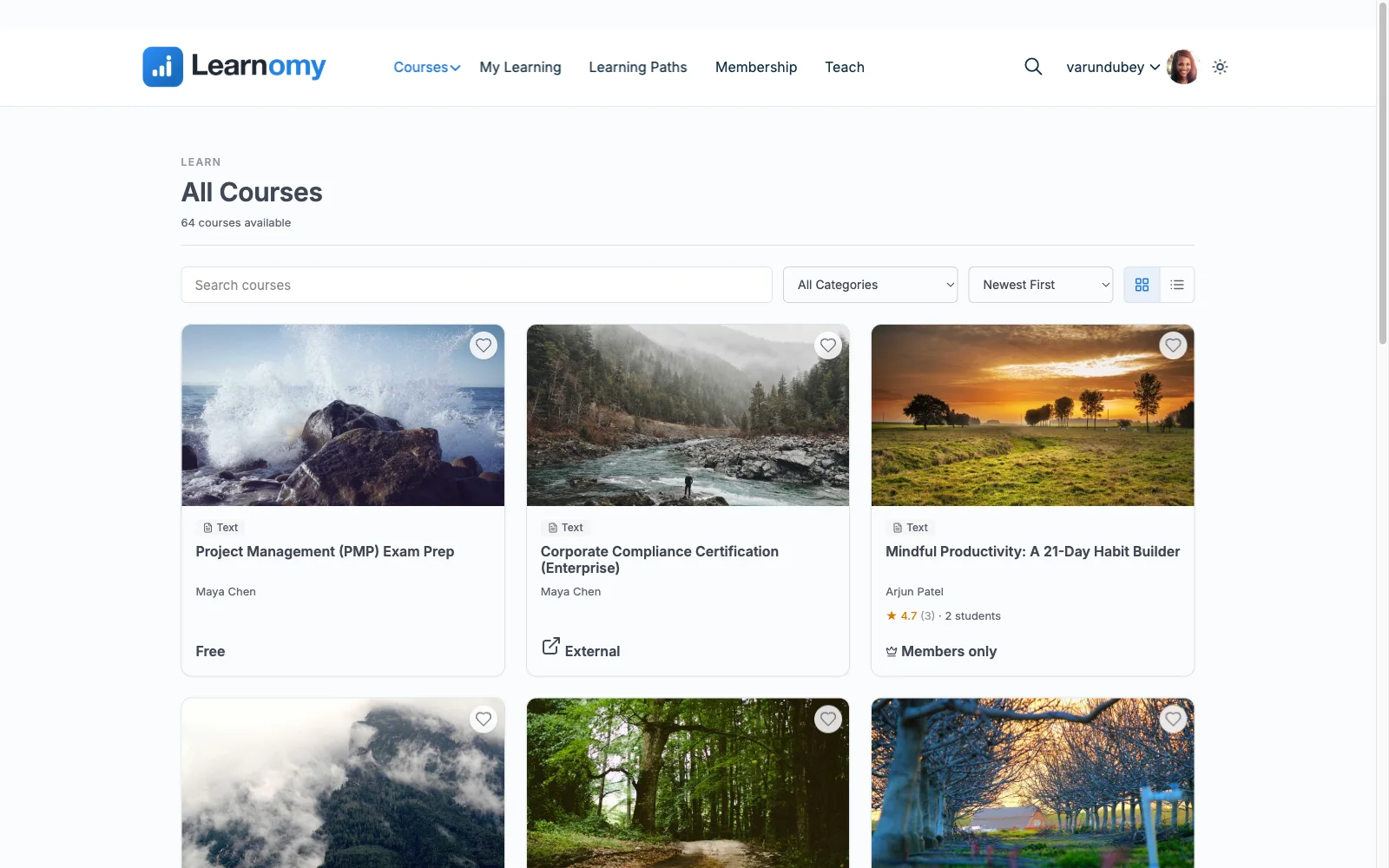
The course-building experience matches what hosted platforms advertise: drag-and-drop lessons with video, audio, PDF, and reading content; six quiz types with partial credit, question banks, timed, proctored attempts, and an essay-grading inbox; and QR-verifiable certificates with a public verification page, ahead of most hosted platforms’ printable-PDF certificates. Stripe and PayPal checkout is built in and works standalone, with a WooCommerce adapter available, and the deal beats every hosted option on this list on the metric that compounds over years: no platform fees, what students pay is yours.
Beyond the course itself, memberships with trials and an automatic pricing page and instructor revenue sharing with Udemy-style splits mean growth does not require replatforming to a different tool, the failure mode hosted platforms are specifically designed to eventually trigger. Team and B2B training with company seats and cohorts sit on the upgraded tier; a learning community, discussion boards, and gamified progress pair in through companion Wbcom products. Full branding control rounds out a platform built to be a destination, not a rented storefront.
Pros:
- Matches hosted-platform convenience with full data ownership
- No platform fees, ever, on any tier
- Verifiable certificates ahead of most hosted platforms’ output
- Standalone checkout; no separate commerce plugin required
- Migration wizards from LearnDash, Tutor LMS, and LifterLMS for anyone leaving WordPress-based tools
Cons:
- Requires WordPress hosting, unlike hosted platforms, that responsibility is yours
- Younger ecosystem than the decade-old hosted incumbents
Get it: wbcomdesigns.com/downloads/learnomy.
2. Thinkific, the polished hosted no-code builder
Thinkific remains the benchmark hosted platform for someone who wants zero technical responsibility: a genuinely no-code builder, native checkout, and no per-sale cut on its paid plans, which puts it ahead of Teachable on entry-tier economics.
The structural trade is rent versus ownership, a monthly subscription forever, your catalog on their infrastructure, and a harder migration the longer you stay. Our Thinkific alternatives comparison covers the exit paths.
Pros: zero maintenance; polished builder; no per-sale cut on paid plans.
Cons: subscription compounds forever; platform lock-in.
The deal: a monthly subscription forever, with your school on rented land.
3. Kajabi, the all-in-one marketing-plus-courses suite
Kajabi bundles course delivery with email marketing, landing pages, and pipelines into a single subscription, genuinely useful for a creator who would otherwise pay for three or four separate tools and wants one dashboard for the whole funnel.
That breadth comes at a higher subscription tier than most course-only platforms, and the same rented-infrastructure trade applies, plus the marketing tooling you are also paying for goes unused if you already have an email platform. Our Kajabi alternatives comparison covers the wider field.
Pros: marketing and course delivery in one subscription; polished funnels.
Cons: premium pricing tier; redundant if you already run marketing tools.
The deal: a monthly subscription forever, on the higher end of hosted pricing.
4. LearnWorlds, interactive video, hosted
Among hosted platforms, LearnWorlds differentiates on the learning experience itself: interactive video with embedded questions, transcripts, and note-taking that most self-hosted plugins do not match natively, a genuine edge for video-heavy curricula.
Its entry tier takes a fee on every sale, so realistic seller economics only start at higher tiers, and the same lock-in applies as every SaaS here. Our LearnWorlds alternatives comparison covers the reverse migration.
Pros: best interactive video in the category; strong templates.
Cons: per-sale fee at entry tier; rent and lock-in.
The deal: a monthly subscription, plus a per-sale fee until you upgrade tiers.
5. Teachable, the fastest hosted launch
Teachable remains the fastest signup-to-sellable-course path in the category, with tax handling, EU VAT, and affiliates managed for you, still a genuine advantage for someone validating a first course with zero technical investment.
The math sours for an established seller: a monthly subscription plus a transaction cut on entry plans, we ran the structural comparison in platform fees vs. Teachable’s cut, and our Teachable alternatives roundup covers the exits.
Pros: fastest launch anywhere; tax/VAT and affiliates handled.
Cons: cut of sales on entry plans; full platform dependency.
The deal: a monthly subscription forever, plus a share of every sale on entry plans.
6. Podia, courses, downloads, and coaching in one storefront
Podia’s honest niche is simplicity across product types, courses, digital downloads, and coaching sold from one storefront with genuinely friendly UX and email marketing bundled in, a fair pick for a creator with a small, mixed catalog.
It is the least extensible platform here, limited assessment tooling, limited design control, a transaction share at the entry level, and the same rented-land structure as every hosted option.
Pros: simplest UX in the category; sells downloads and coaching alongside courses.
Cons: weak assessments; limited customization; entry-level transaction share.
The deal: a monthly subscription, with a share of sales at the entry level.
7. Self-hosted WordPress (LearnDash, Tutor, and peers)
The broader self-hosted WordPress category, LearnDash, Tutor LMS, LifterLMS, and their peers, trades hosted convenience for the ownership every WordPress plugin shares: no platform fees, full data control, and a decade-plus ecosystem of themes and add-ons to draw from.
The trade is assembly: most of these engines route real checkout through WooCommerce or EDD and gate certificates or drip behind premium tiers, a multi-vendor stack rather than one complete platform. Our self-hosted WordPress LMS roundup and 2026 LMS plugin comparison rank this category in depth.
Pros: full ownership; huge collective ecosystem; no per-sale platform cut.
Cons: commerce and launch features usually assembled from several vendors.
The deal: annual license(s), with add-ons and commerce plugins typically separate.
8. Udemy and course marketplaces, an audience you rent
Course marketplaces solve a different problem entirely: distribution. Listing on Udemy or a similar marketplace puts a course in front of an existing audience with zero marketing effort of your own, genuinely valuable for pure discovery.
The cost is total: the marketplace controls pricing, frequently discounts your course without asking, takes a large and permanent share of revenue, and you never get the customer’s email address or a relationship beyond the platform. Treat marketplaces as a discovery channel, never as your only sales channel.
Pros: built-in audience; zero marketing lift to get discovered.
Cons: marketplace controls pricing; deep permanent revenue share; no customer relationship.
The deal: a large, permanent revenue share with no ownership of the customer.
9. Skool and community-first hosted platforms
A newer category of hosted platform leads with community, forums, points, leaderboards, and treats course content as one tab among several, a good fit for creators whose product is really the group, with light course structure as a bonus.
Assessment and certification tooling on these platforms is minimal to nonexistent, if certificates or serious quizzes matter to your offer, this category is the wrong tool for that job specifically, whatever it does for community.
Pros: best-in-class community and engagement mechanics; simple setup.
Cons: minimal assessment and certification tooling; rented infrastructure.
The deal: a monthly subscription forever.
The ownership math nobody puts on the pricing page
Every hosted platform’s pricing page shows a monthly number and stops there. The real comparison spans years: a hosted subscription compounds indefinitely, and on several platforms here a percentage of every sale compounds on top of it, so the platform’s take grows exactly as your business succeeds. A self-hosted plugin stack trades that ongoing cut for a different cost, license renewals across separate vendors, none of them expensive alone, all of them adding up, plus the integration hours when one plugin’s update breaks another’s compatibility. A complete self-hosted platform collapses both models to hosting and a payment processor’s standard cut, the smallest number in the whole comparison, and the one that does not grow as a percentage of your success. Run the actual multi-year math before choosing on the strength of a demo alone, our platform-fee breakdown walks through the arithmetic in detail.
How we evaluated
Rankings weigh checkout nativeness, data and customer ownership, certificate and assessment depth, what a realistic launch stack actually requires beyond the sticker price, and portability if you ever leave. Learnomy’s capabilities are checked against its own documentation and public changelog as of September 2026; competitor details reflect each vendor’s published materials at the time of writing, always reconfirm current terms directly, since hosted pricing tiers shift often.
FAQ
What is the best online course platform overall in 2026? For anyone who wants hosted-platform convenience without giving up ownership, Learnomy, a complete learning platform for WordPress with standalone built-in checkout, verifiable certificates, and no platform fees. Thinkific is the strongest pure-hosted option if you never want to touch hosting.
Should I choose hosted or self-hosted? Hosted buys convenience and costs ownership and, on several platforms, a percentage of every sale forever. Self-hosted costs setup time and gains ownership with no per-sale cut. For a course business planning to run for years, the ownership math almost always favors self-hosted.
Is a course marketplace like Udemy worth using? As a discovery channel alongside your own platform, yes. As your only sales channel, no, you never own the customer relationship and the marketplace controls pricing on your course indefinitely.
Can I switch from a hosted platform to a self-hosted one later? Yes, and the earlier the better, migrations get harder as your student base grows. Learnomy’s migration wizards cover LearnDash, Tutor LMS, and LifterLMS directly if you are moving between WordPress tools; moving off a hosted platform typically means exporting content manually.
Do all these platforms issue certificates? Most issue printable PDFs; few issue anything a third party can verify. Our certificates comparison covers which platforms, hosted and self-hosted, produce credentials that hold up to outside scrutiny.
What if I already sell digital downloads through Easy Digital Downloads? Learnomy sells standalone with zero commerce plumbing added to your existing storefront; several WordPress LMS plugins bridge to EDD directly too, our EDD + LMS guide covers that pairing specifically.
Final verdict
The widest possible comparison still comes down to the same question: rent convenience or own the platform. Learnomy is the 2026 answer for anyone who wants both, hosted-grade convenience with full ownership, standalone checkout, and no platform fees: get it here. Thinkific and Kajabi remain the strongest pure-hosted picks depending on whether marketing tooling matters to you, LearnWorlds wins on interactive video, and marketplaces like Udemy are worth using for discovery alone, never as your only channel. Continue with our self-hosted platforms comparison and 2026 WordPress LMS guide.