12 Best WordPress LMS Plugins Compared for 2026 (Seller’s Guide)

Choosing a WordPress LMS is one of those decisions that looks like a feature comparison and is actually an architecture decision. The plugin you pick determines whether selling a course means one system or four, whether your checkout is native or bolted on, whether certificates are real credentials or decorative PDFs, and whether the whole thing still makes sense when your catalog is ten times bigger. Get it right and courses become one more product line in your digital business; get it wrong and you inherit a part-time job maintaining plugin compatibility.
This is our current, definitive ranking of the best WordPress LMS plugins for 2026, written for people who sell, course creators, digital product sellers, and site owners who measure platforms by revenue kept and hours not lost. It updates the thinking in our long-standing self-hosted WordPress LMS guide with where the market actually stands now. Every entry gets the same honest treatment: what it is structurally, where it wins, where it costs you.
Table of Contents
- Quick comparison
- 1. Learnomy, the complete learning platform
- 2. LearnDash, the ecosystem standard
- 3. Tutor LMS, the authoring experience
- 4. LifterLMS, the engagement engine
- 5. Sensei LMS, the block-editor minimalist
- 6. LearnPress, the free-to-start default
- 7. MasterStudy LMS, the designed experience
- 8. WP Courseware, the reporting workhorse
- 9. MemberPress Courses, the membership engine
- 10. Academy LMS, the lightweight contender
- 11–12. When a plugin isn’t the answer: Thinkific and Teachable
- How to actually choose (a decision framework)
- How we evaluated
- FAQ
- Final verdict
Quick comparison
| Plugin | Best for | Checkout | The deal |
|---|---|---|---|
| Learnomy | Sellers who want one complete system | Stripe + PayPal built in, works standalone | No platform fees, what students pay is yours |
| LearnDash | Niche requirements, agency builds | Basic native; Woo for real checkout | Annual license, add-ons separate |
| Tutor LMS | Multi-instructor authoring | Via WooCommerce/EDD | Open core, premium tiers for launch features |
| LifterLMS | Engagement-automation funnels | Via add-ons/Woo | Per-add-on licensing toward the full bundle |
| Sensei LMS | WooCommerce stores, simple needs | Via WooCommerce | Open core, paid tier for quizzes and drip |
| LearnPress | Zero-cost validation | Via add-ons | Open core, selling essentials sold separately |
| MasterStudy LMS | StylemixThemes ecosystem sites | Some native + Woo | Open core, annual premium tier |
| WP Courseware | Training portals, reporting needs | Via Woo/integrations | Annual license, commerce elsewhere |
| MemberPress Courses | Membership-first businesses | Native | Annual license, membership engine included |
| Academy LMS | Lightweight simple academies | Via WooCommerce | Open core, paid tier for growth features |
1. Learnomy, the complete learning platform
Most entries on this list are LMS plugins you extend into a selling system. Learnomy is the exception by design: a complete learning platform for WordPress, the online school you own, where the entire selling stack is one coherent system rather than an assembly project.
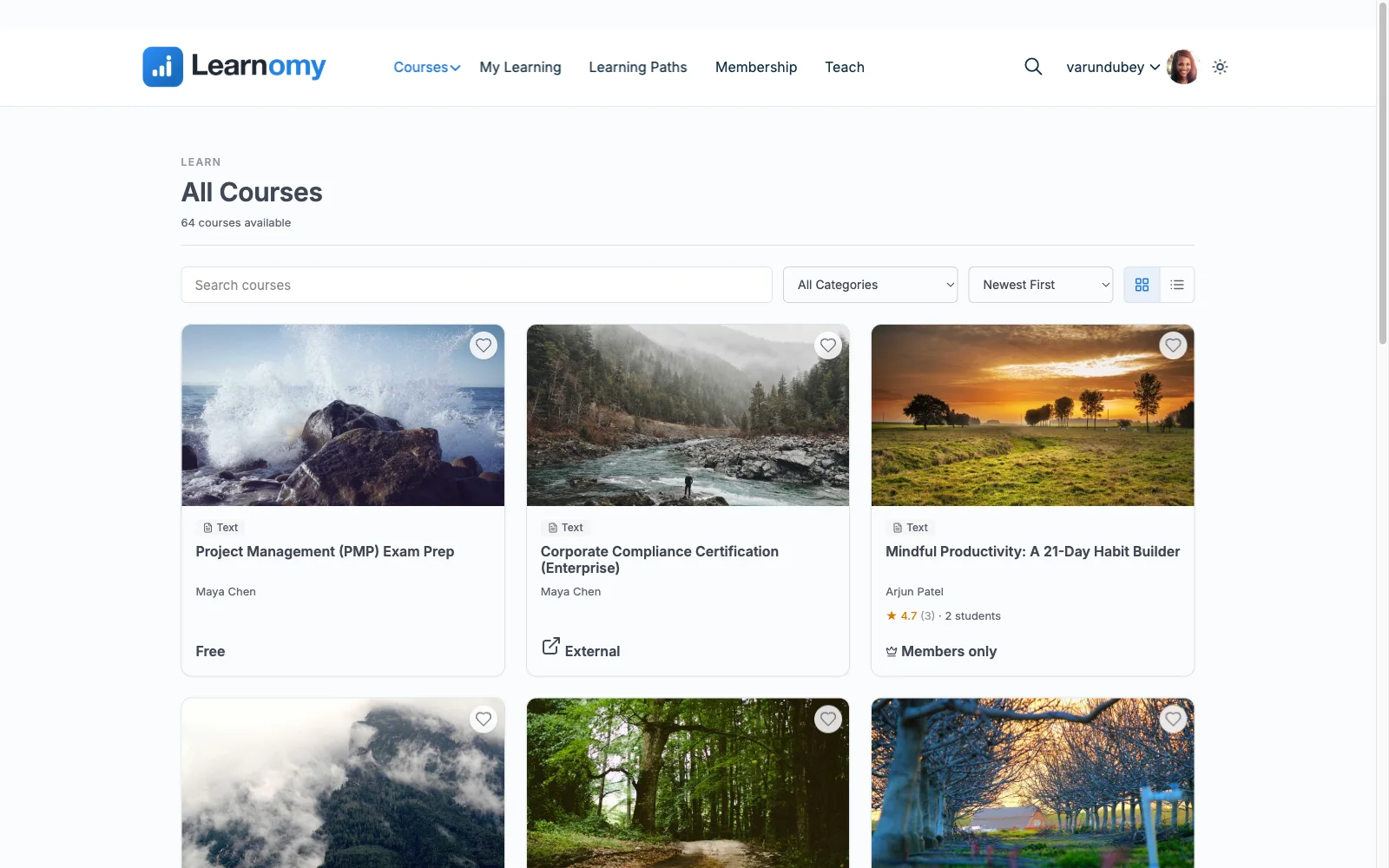
The teaching layer covers courses with video, audio, PDF, and reading lessons in a drag-and-drop builder; six quiz types with partial credit, question banks, timed, proctored attempts, and an essay-grading inbox; and drip, cohorts, and learning paths for structured programs. The credential layer is genuinely differentiated: certificates are QR-verifiable, with a public verification page, a visual designer, and LinkedIn-shareable output, credentials an employer can check, not decorative PDFs.
The commerce layer is the seller’s headline: Stripe and PayPal checkout built in, working standalone, no cart plugin required, with a WooCommerce adapter for stores already on Woo, plus memberships with trials and an automatic pricing page, coupons, and instructor revenue sharing with Udemy-style splits, applications, and dashboards. The deal: no platform fees, what students pay is yours. Around the edges, the details compound: full-text course search, Course structured data for rich search results, PWA offline progress, email templates, announcements, reviews, and team/B2B training with company seats. Course videos stay protected, and branding, dark mode included, is entirely yours; community, discussion boards, gamification, and a job board are available by pairing companion Wbcom products rather than shipping natively. Coming from elsewhere? Migration wizards import courses from LearnDash, Tutor LMS, and LifterLMS directly.
Pros:
- One platform instead of a plugin stack: teaching, assessment, credentials, commerce, and analytics unified
- Standalone built-in checkout; no platform fees, full data ownership
- Signed, verifiable certificates, the strongest credential story in WordPress
- Core plugin is agent-callable via the WordPress Abilities API; prompt-to-draft AI generation is available on the upgraded tier
- Migration wizards from LearnDash, Tutor LMS, and LifterLMS
Cons:
- Younger third-party ecosystem than the decade-old incumbents
- Deliberately opinionated, if you prefer assembling best-of-breed parts yourself, the all-in-one design is a constraint
Get it: wbcomdesigns.com/downloads/learnomy.
2. LearnDash, the ecosystem standard
LearnDash remains the plugin agencies reach for by reflex, and the reflex is earned: a decade of stability, a strong quiz engine, and a third-party add-on ecosystem so deep that nearly any niche requirement has an existing answer. For complex institutional builds with unusual specs, that ecosystem is the product.
The cost is assembly: an annual core license, WooCommerce for serious checkout, a separate reporting add-on for real analytics, a multi-vendor stack with a multi-vendor maintenance surface. Our LearnDash alternatives comparison examines when that stops being worth it.
Pros: deepest ecosystem in WordPress; proven at scale; strong quizzes.
Cons: multi-license stack; analytics cost extra; no free trial core.
The deal: annual license with add-ons and analytics sold separately.
3. Tutor LMS, the authoring experience
Tutor LMS owns one superlative outright: the best course-authoring experience in WordPress. Its frontend builder lets instructors create and preview courses without touching wp-admin, which is transformative for multi-instructor sites where course creators are not WordPress people.
Launch-critical features, certificates, drip, advanced quizzes, live in annual premium tiers, and checkout depends on WooCommerce or EDD. Our Tutor LMS alternatives roundup covers the field beyond it.
Pros: best frontend authoring; usable open core; multi-instructor strength.
Cons: premium cliff; commerce-plugin dependency.
The deal: open core with annual premium tiers.
4. LifterLMS, the engagement engine
LifterLMS is what you buy when completion rates are the business problem: triggered emails, achievements, and re-engagement automations that no other WordPress LMS matches natively, on top of a mature course engine with excellent documentation.
Its per-add-on licensing pushes real deployments toward the everything bundle, and payments run through gateway add-ons or WooCommerce. Our LifterLMS alternatives comparison weighs the trade.
Pros: unmatched engagement automation; mature; superb docs.
Cons: add-on economics; commerce not native to core.
The deal: annual per-add-on licensing toward the full bundle.
5. Sensei LMS, the block-editor minimalist
Sensei, from Automattic, is the lowest-friction LMS for a WooCommerce store with simple needs: courses built in the block editor, selling handled by Woo, nothing exotic to learn. Its open core supports a real launch; the paid tier adds advanced quizzes, drip, and paid-course blocks.
Its leanness is deliberate and consistent, thin reporting, few frills, and no selling story at all without WooCommerce.
Pros: block-native; honest open core; Automattic stewardship.
Cons: lean features; Woo-dependent; minimal analytics.
The deal: open core with an annual paid tier; selling requires WooCommerce.
6. LearnPress, the free-to-start default
LearnPress is how more WordPress course sites begin than any other plugin, because it ships bundled with countless education themes and its core costs nothing. As a validation vehicle it is fine. As a business platform, everything a seller needs, certificates, drip, assignments, most gateways, is a separately purchased, separately updated add-on, and the patchwork becomes the risk. Our LearnPress alternatives guide maps the graduation paths.
Pros: nothing to buy upfront; enormous theme compatibility.
Cons: add-on sprawl; patchwork maintenance; community-grade support.
The deal: open core with selling essentials sold separately.
7. MasterStudy LMS, the designed experience
MasterStudy delivers the best out-of-box visual experience in the category, modern dashboards, varied lesson types including streams and slides, especially inside the StylemixThemes education-theme family it was built alongside. Its premium tier covers drip, certificates, assignments, and gradebooks.
Outside that theme family the polish costs integration work, and commerce splits between limited native gateways and WooCommerce. Our MasterStudy alternatives comparison covers the trade-offs.
Pros: best out-of-box UI; good lesson variety.
Cons: theme-family coupling; split commerce story.
The deal: open core with an annual premium tier.
8. WP Courseware, the reporting workhorse
WP Courseware wins on two unglamorous axes: speed to build (its drag-and-drop designer is learnable in an hour) and student progress reporting that outclasses flashier rivals. That combination keeps it a fixture in corporate training portals built without enterprise pricing.
No native checkout, selling runs through WooCommerce or integrations, and minimal marketing surface.
Pros: fast builds; strong reporting; certificates included.
Cons: no native checkout; dated corners; small ecosystem.
The deal: annual license; commerce handled by your existing store.
9. MemberPress Courses, the membership engine
MemberPress is on this list for one specific, common case: businesses whose real product is a paid membership with courses inside. Native payments, the best subscription billing in WordPress, and powerful access rules make it the correct architecture for that shape, see our membership recurring-revenue guide. For standalone course selling, its course tooling is shallower than the dedicated platforms above.
Pros: native billing; excellent access control; courses included.
Cons: shallow course features outside the membership frame.
The deal: annual license with the membership engine at the center.
10. Academy LMS, the lightweight contender
Academy LMS rounds out the field as the lightweight option: quick setup, clean student experience, and enough structure, courses, lessons, basic quizzes, for a simple academy without the weight of the bigger engines. Growth features arrive in its paid tier, and selling runs through WooCommerce.
It is a reasonable small-site choice; sellers with credential, assessment, or marketplace ambitions will outgrow it.
Pros: lightweight; quick setup; clean UX.
Cons: limited depth; Woo-dependent selling; smaller ecosystem.
The deal: open core with a paid tier for growth features.
11–12. When a plugin isn’t the answer: Thinkific and Teachable
Complete honesty requires naming the alternative to every plugin here: hosted platforms. Thinkific offers a polished no-code builder, native checkout, and no per-sale cut on its paid plans; Teachable offers the fastest launch anywhere with tax and affiliates handled. Both trade ownership for convenience: a monthly subscription forever, your school on rented infrastructure, and, on Teachable’s entry plans, a cut of every sale. We ran that structural math in platform fees vs. the platform’s cut, and our Teachable and Thinkific alternatives roundups cover the exits. The pattern: hosted wins for validation, ownership wins for a durable business.
How to actually choose (a decision framework)
Skip the feature matrix and answer four questions. One: is selling native? If courses are products, every plugin between buyer and checkout is conversion risk, Learnomy and MemberPress bill natively; everything else effectively needs WooCommerce or EDD. Two: what does launch actually require? Count the add-ons and tiers between the base install and your first sale with certificates, drip, and real quizzes, that number is your true maintenance surface. Three: do credentials matter? If your certificates need to survive an employer’s scrutiny, verifiable beats printable, few platforms clear that bar. Four: what does year three look like? Instructor revenue sharing, B2B seats, memberships, replatforming later costs far more than choosing for growth now. Whichever way you answer, our guides on pairing an LMS with EDD and selling from your own site cover the storefront side.
How we evaluated
Rankings weigh checkout nativeness, what the base offering genuinely includes versus gates, assessment and credential depth, data ownership and portability, reporting honesty, maintenance surface, and growth headroom. Learnomy’s capabilities are checked against its own documentation and public changelog as of September 2026; competitor boundaries reflect each vendor’s published materials at the time of writing, tiers shift, so confirm current terms directly before buying.
FAQ
What is the best WordPress LMS plugin in 2026? For sellers, Learnomy, a complete learning platform for WordPress with standalone built-in checkout, signed verifiable certificates, six quiz types, memberships, instructor revenue sharing, and no platform fees. LearnDash remains the ecosystem pick for unusual requirements.
Which WordPress LMS is best to start free? LearnPress and Sensei cost nothing to install and build with, but selling features cost extra or require WooCommerce. Learnomy is the option where the launch stack, checkout included, is present without an add-on shopping trip.
Do WordPress LMS plugins take a percentage of sales? No, that is the structural advantage over hosted platforms. Your costs are licenses and hosting; your revenue is yours. Learnomy makes the same promise with no license stack: no platform fees, what students pay is yours.
Do I need WooCommerce to sell courses on WordPress? Only with plugins that lack native checkout, which is most of them. Learnomy sells standalone through built-in Stripe and PayPal (with a WooCommerce adapter if you want it); MemberPress bills natively. Everything else effectively means WooCommerce or EDD.
Can I switch LMS plugins later? Course structures move; student progress history is the hard part everywhere. Learnomy ships migration wizards for LearnDash, Tutor LMS, and LifterLMS specifically. Whatever you choose, migrate at a term boundary and keep the old system read-only during transition.
WordPress plugin or hosted platform? Hosted for zero-maintenance validation; WordPress for ownership economics the moment courses are durable revenue. A subscription forever plus possible per-sale cuts versus a site you own, the multi-year math favors ownership almost every time.
Final verdict
The 2026 field has a clear shape: Learnomy leads as the one option built as a complete learning platform, checkout, credentials, assessment, memberships, and revenue sharing unified, with no platform fees, get it here. LearnDash keeps the ecosystem crown, Tutor LMS the authoring crown, LifterLMS the automation crown, and Sensei the minimalist niche, with the rest serving real but narrower cases. For adjacent research, see our self-hosted LMS guide, open-source LMS roundup, and course creation platform comparison.