8 Best WordPress LMS Plugins with AI in 2026

Every WordPress LMS has an “AI” line on its feature page in 2026. Almost none of them mean the same thing by it. For one platform, AI means a chatbot bolted onto the admin sidebar that drafts a lesson outline and leaves the rest of the work to you. For another, it means an add-on that generates quiz questions from a block of text, sold separately from the course engine it feeds. For a third, “AI-powered” describes a single button that appears once you have already paid for the tier above the one you are evaluating.
This comparison ranks the eight best WordPress LMS options with AI in 2026 by what the AI actually removes from your workload: the blank-page problem in course planning, the hours spent writing quiz questions, and the grading backlog that piles up behind essay answers. It is written for creators and digital product sellers who want AI to shorten the path from idea to sellable course, not add another vendor to evaluate.
Table of Contents
- Quick comparison
- 1. Learnomy, AI-agent-ready at the core, drafting on the upgraded tier
- 2. Tutor LMS, AI Studio as a premium content generator
- 3. MasterStudy LMS, AI quiz generation inside its theme world
- 4. LearnDash, AI arriving through the add-on ecosystem
- 5. LifterLMS, AI-assisted engagement, not content
- 6. Sensei LMS, Jetpack AI at the edges
- 7. LearnPress, AI as a third-party add-on
- 8. Thinkific, hosted AI course-outline assistance
- Where AI genuinely helps building a course, and where it does not
- How we evaluated
- FAQ
- Final verdict
Quick comparison
| Platform | AI reaches | Checkout | The deal |
|---|---|---|---|
| Learnomy | Agent-callable API at the core; drafting tools on the upgraded tier | Stripe + PayPal built in, works standalone | No platform fees, what students pay is yours |
| Tutor LMS | Content generation via AI Studio | Via WooCommerce/EDD | Open core, AI features in premium tiers |
| MasterStudy LMS | Quiz generation, theme-ecosystem tools | Some native + Woo | Open core, annual premium tier |
| LearnDash | Third-party AI add-ons | Basic native; Woo for real checkout | Annual license, AI add-ons separate |
| LifterLMS | AI-assisted engagement copy via add-ons | Via add-ons/Woo | Per-add-on licensing |
| Sensei LMS | Jetpack AI assistant for content blocks | Via WooCommerce | Open core, paid tier |
| LearnPress | Third-party AI add-on | Via add-ons | Open core, add-ons separate |
| Thinkific | Hosted AI course-outline assistant | Native (hosted) | A monthly subscription forever |
1. Learnomy, AI-agent-ready at the core, drafting on the upgraded tier
Most “AI-powered LMS” claims resolve to one button in one screen, and it is worth separating two different AI stories before ranking anyone. Learnomy is a complete learning platform for WordPress, the online school you own, and its core plugin ships every course, lesson, quiz, and enrollment action registered with the WordPress Abilities API, so an AI agent like ChatGPT or Claude can call those actions directly, create a course, enroll a student, issue a certificate, without a human clicking through the admin screens. That agent-operable layer is included, not an upsell.
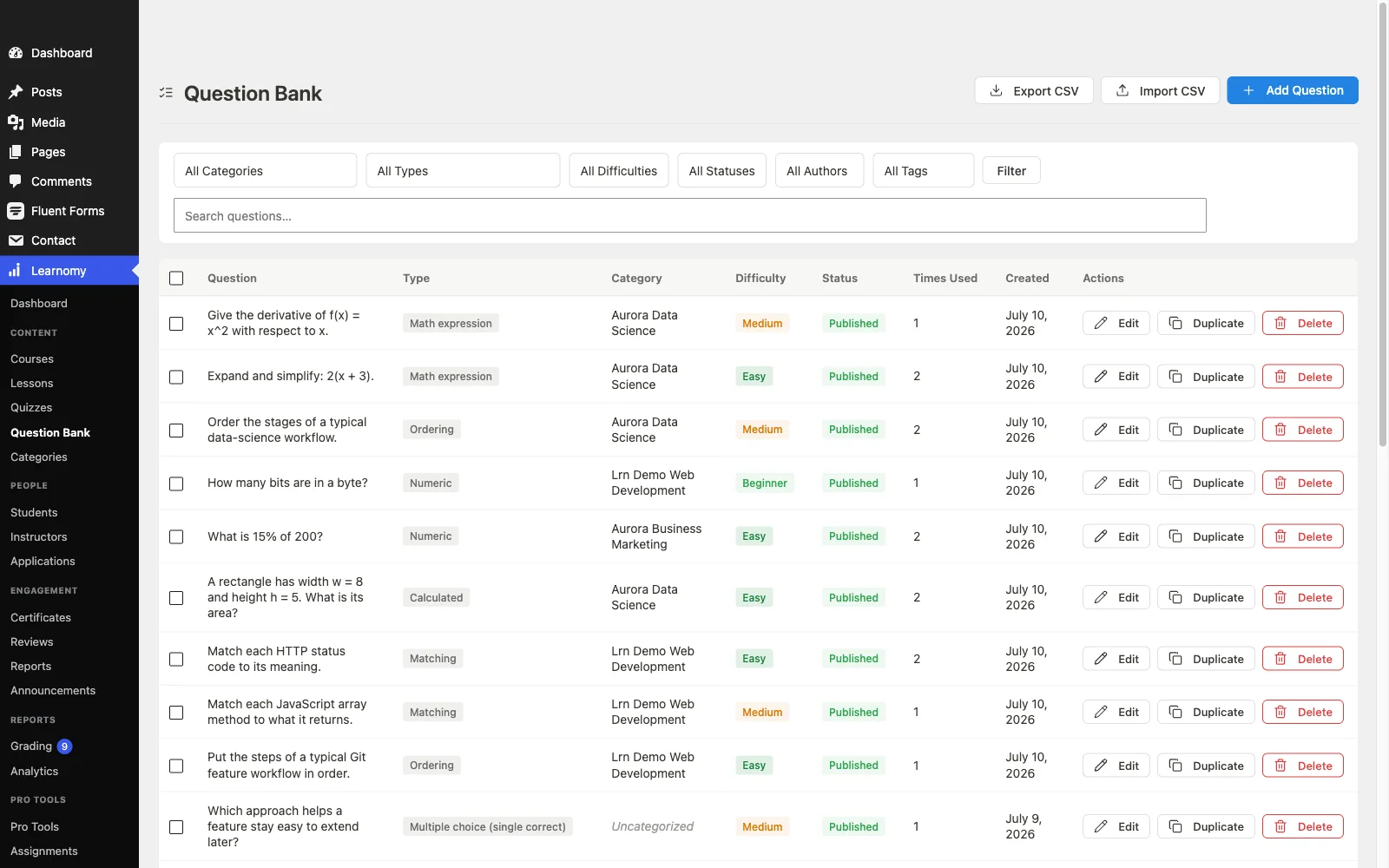
The prompt-to-draft side, generating a structured curriculum, lesson content, or quiz questions from a topic brief, sits on Learnomy’s upgraded tier rather than the core plugin, the same placement Tutor LMS, MasterStudy, and Sensei give their own AI-writing tools. What ships free is the agent-callable API layer above, plus the rest of a platform that was already built to be complete: courses combine video, audio, PDF, and reading lessons in a drag-and-drop builder; quizzes span six types with partial credit, question banks, timed, proctored attempts, and an essay-grading inbox for the answers a machine cannot score; and completion certificates are QR-verifiable, with a public verification page. Confirm current AI-authoring availability directly on the vendor’s site before budgeting for that specific workflow.
The commerce layer matters just as much to a digital product seller evaluating AI tooling: Stripe and PayPal checkout is built in and works standalone, so a course built with or without AI assistance can start selling the same day, with a WooCommerce adapter available if your store already runs on Woo. There are no platform fees: what students pay is yours. The rest of the platform, memberships with trials and an automatic pricing page, instructor revenue sharing, coupons, reviews, announcements, and email templates, means whatever AI tooling you eventually add is not stranded without a way to sell, certify, or grow the course.
Pros:
- Core plugin is agent-callable through the WordPress Abilities API, a different and genuinely free AI story than a single drafting button
- Sits inside a complete platform, so whatever course you build launches with checkout, certificates, and quizzes already in place
- No platform fees and full data ownership
- Built-in standalone Stripe and PayPal checkout
- Direct migration wizards from LearnDash, Tutor LMS, and LifterLMS
Cons:
- Prompt-to-draft course and quiz generation sits behind the upgraded tier, not the core plugin, budget for it if that specific workflow is why you are evaluating AI tools
- Younger third-party ecosystem than the decade-old incumbents
Get it: wbcomdesigns.com/downloads/learnomy.
2. Tutor LMS, AI Studio as a premium content generator
Tutor LMS’s AI Studio is a genuine content-generation tool, course outlines, lesson text, and quiz questions drafted from prompts inside its famously pleasant frontend builder. For instructors who already like Tutor’s authoring flow, adding AI drafting to it is a natural extension.
AI Studio sits in Tutor’s premium tiers alongside certificates and drip, the familiar pattern for this engine, and real checkout still depends on WooCommerce or Easy Digital Downloads. Our Tutor LMS alternatives comparison covers the wider field beyond it.
Pros: genuine AI content generation; best frontend authoring UX.
Cons: AI features and certificates both premium-gated; commerce-plugin dependency.
The deal: open core with annual premium tiers.
3. MasterStudy LMS, AI quiz generation inside its theme world
MasterStudy has leaned into AI tooling for quiz generation, drafting questions from lesson content, which pairs naturally with its modern student dashboard and varied lesson formats. Inside a StylemixThemes education theme, the whole experience feels coherent and current.
AI-assisted quiz generation joins drip, certificates, and assignments in the premium tier, and outside the Stylemix theme ecosystem you inherit more integration work. Full trade-offs in our MasterStudy alternatives comparison.
Pros: AI quiz drafting; modern UI; coherent theme pairing.
Cons: premium-gated; strongest inside its own theme family.
The deal: open core with an annual premium tier.
4. LearnDash, AI arriving through the add-on ecosystem
LearnDash itself ships without deep native AI tooling, but its decade-old add-on ecosystem already has third-party AI content generators and quiz-writing tools built to plug into it, consistent with how LearnDash solves most gaps, an existing add-on rather than a native feature.
That means AI capability on LearnDash is one more line item and one more vendor in a stack that already includes the core license, WooCommerce for real checkout, and a reporting add-on for analytics. Our LearnDash alternatives comparison breaks down the full stack economics.
Pros: AI add-ons exist for nearly any workflow; deepest ecosystem overall.
Cons: AI is a separate purchase and integration; multi-vendor assembly.
The deal: annual license with add-ons, AI included, sold separately.
5. LifterLMS, AI-assisted engagement, not content
LifterLMS’s AI story leans toward its actual strength, engagement automation, with AI-assisted copy suggestions for triggered emails and re-engagement sequences available through its add-on ecosystem, rather than AI-generated course content or quizzes.
If you want AI to draft your curriculum, LifterLMS is not the tool for that job. If you want AI to help write the emails that bring lapsed students back, it is closer to the mark. Economics remain per-add-on, detailed in our LifterLMS alternatives guide.
Pros: AI-assisted engagement copy; best engagement automation underneath it.
Cons: no AI course or quiz generation; per-add-on economics.
The deal: annual per-add-on licensing toward the full bundle.
6. Sensei LMS, Jetpack AI at the edges
Because Sensei is built in the block editor by Automattic, it inherits Jetpack AI Assistant where that is active on a site, drafting general blog-style text blocks inside lessons. It is general-purpose writing help rather than course-structure or quiz-specific AI.
Useful for polishing lesson prose; it does not draft curricula, generate quiz banks, or touch grading. Selling still requires WooCommerce either way.
Pros: block-native AI writing help where Jetpack AI is active; honest open core.
Cons: general writing assistance, not course-specific AI; Woo-dependent selling.
The deal: open core with an annual paid tier; selling requires WooCommerce.
7. LearnPress, AI as a third-party add-on
LearnPress’s marketplace includes third-party AI add-ons for quiz and content generation, consistent with its whole model: the core is free, and every capability beyond the basics is a separately purchased, separately maintained extension.
For a validation-stage course, layering on an AI add-on is a low-commitment experiment. For a real business, it is one more piece in the patchwork our LearnPress alternatives guide maps a way out of.
Pros: low-cost way to experiment with AI generation; huge theme compatibility.
Cons: add-on sprawl; community-grade support underneath.
The deal: open core with selling essentials, AI included, sold as add-ons.
8. Thinkific, hosted AI course-outline assistance
Among hosted platforms, Thinkific offers an AI course-outline assistant that turns a topic into a starting curriculum structure inside its no-code builder, paired with zero-maintenance hosting and native checkout.
The AI convenience comes with the standard hosted trade: a monthly subscription forever, your catalog on their infrastructure, and a harder exit the longer you stay. Our Thinkific alternatives comparison covers the exit paths.
Pros: genuinely useful AI outlining; zero maintenance.
Cons: subscription compounds forever; platform lock-in.
The deal: a monthly subscription forever, with your school on rented land.
Where AI genuinely helps building a course, and where it does not
Sort the AI claims by what they actually remove. Planning is where AI earns its keep most reliably: turning a topic and a rough outline into a structured curriculum draft collapses the paralysis phase into an editing task, and this is the job most platforms ignore in favor of flashier demos. Content drafting is genuinely useful for a first pass on lesson text, less useful the moment your subject matter is specific or technical enough that a generic draft needs a full rewrite anyway. Quiz generation saves real hours, writing forty plausible wrong answers by hand is tedious work AI does well, provided a human reviews for accuracy before students see it. What AI does not do on any platform here: grade essay answers with real judgment (Learnomy’s essay-grading inbox is a workflow, not an autograder), replace your subject-matter expertise, or substitute for the certificate and assessment rigor that make a course credible once it is built. Judge AI claims by which of these jobs they touch, not by whether the word “AI” appears on the pricing page.
How we evaluated
Rankings weigh how much of the actual course-creation workflow AI assistance reaches (planning, content, quizzes) versus a single generic feature, whether AI capability is native or a paid add-on, and how the platform behind the AI tooling scores on checkout nativeness, ownership, and assessment depth. Learnomy’s capabilities are checked against its own documentation and public changelog as of September 2026; competitor feature boundaries reflect each vendor’s published materials at the time of writing, AI feature sets change quickly, so reconfirm current scope on the vendor’s own site.
FAQ
What is the best WordPress LMS with AI in 2026? Learnomy, for a different reason than most people expect: its core plugin is the one in this list built to be operated by AI agents directly, through the WordPress Abilities API, on top of a complete learning platform for WordPress with no platform fees on what you sell. Tutor LMS is the strongest plugin alternative if you specifically want prompt-to-draft AI content generation paired with its frontend builder.
Can AI actually write a whole course for me? No platform here does that responsibly, and none should. AI drafts a structure and a first pass at content and quiz questions; the subject-matter accuracy, teaching judgment, and final edit remain yours. Treat AI output as a fast first draft, not a finished product.
Does AI course generation cost extra? On every platform in this comparison, including Learnomy, prompt-to-draft AI content generation sits in a premium tier or a separate add-on, not the core plugin. What Learnomy includes free is different: the whole platform is registered with the WordPress Abilities API, so an AI agent can operate it directly, a distinct capability from generating course content.
Can AI help with quizzes specifically? Yes, on several platforms here, and it is one of AI’s more reliable uses, generating plausible question variants and distractor answers across a question bank. Review generated questions for accuracy before publishing, particularly for technical subjects.
Is AI-generated course content good for SEO or credibility? Treat AI drafts as raw material, not a finished asset. Courses built on unreviewed AI text read as generic and can undermine the certificate you are trying to make credible, our certificates comparison covers why that credibility matters commercially.
Will AI features replace instructors? Nothing on this list is built to. Every platform here positions AI as a drafting accelerant for the person building the course, not a replacement for subject-matter expertise, grading judgment, or the teaching relationship with students.
Final verdict
AI on a WordPress LMS is worth the most when it touches the actual bottlenecks, planning and quiz writing, and worst when it is a single button justifying a price increase. Learnomy wins 2026 on a different axis than prompt-to-draft content: its core plugin is built agent-ready from the ground up, on top of a complete learning platform for WordPress, with no platform fees on what you earn from the course you build: get it here. Tutor LMS is the strongest plugin alternative for prompt-to-draft AI content generation, MasterStudy for AI quiz drafting, and Thinkific if you want AI outlining with zero hosting responsibility. For the wider decision, continue with our 2026 LMS comparison and course-creation plugin guide.