Delivering Custom Work in Easy Digital Downloads: Custom Deliverables, Upload File or a Full Service Workflow
Three ways to deliver custom work in Easy Digital Downloads: Custom Deliverables, Upload File or a full service workflow. What each does, what it costs and how to choose.

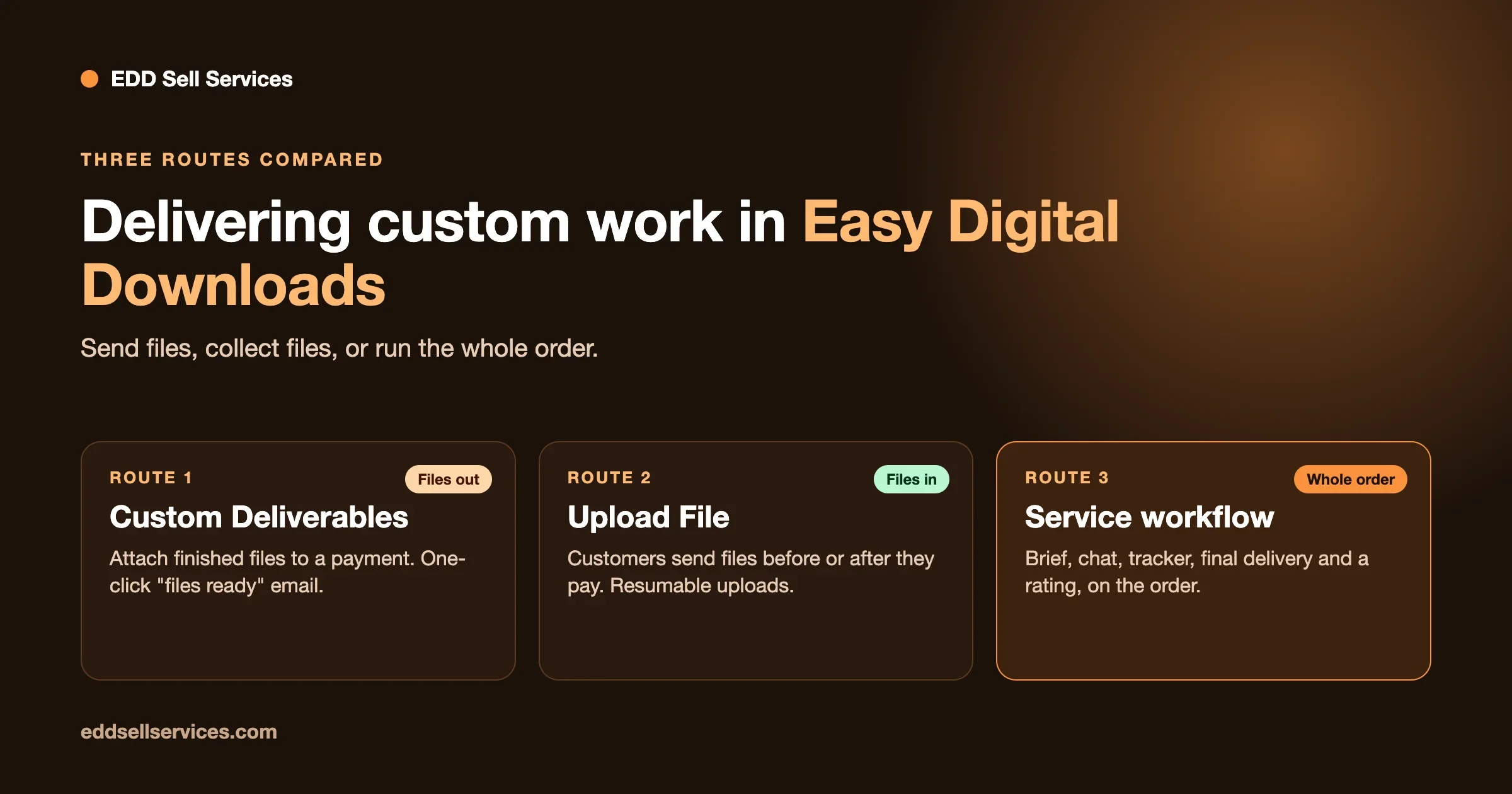
To deliver custom work in Easy Digital Downloads, you have three routes: the Custom Deliverables extension to attach files to an order, the Upload File extension to collect files from the buyer, or a full service workflow with a brief, a chat and a delivery step on the order. Custom Deliverables is the lightest option and fits a one-way handover, such as a finished logo. Upload File fits work that starts with the customer sending you files. A service workflow, such as EDD Sell Services, fits work that needs questions, a conversation and a reviewed delivery. Which one you need depends on how much back and forth the job has.
This guide compares the three routes using what easydigitaldownloads.com says about each extension, read on 3 November 2026. It shows what each one does, what it leaves out, what the passes cost and how to choose. We make EDD Sell Services, so we are not neutral, and we say where the lighter extensions are the better pick.
- Custom Deliverables lets you upload files to a payment record. The customer downloads them from their account or receipt, and you can email them in one click and mark the job fulfilled.
- Upload File lets customers send files before or after they pay. It handles large files with resumable uploads. It collects files, not answers to questions.
- EDD Message sends one-off messages with attachments from the dashboard and keeps a log. It is a messaging add-on, not an order thread.
- EDD Sell Services adds requirement questions after payment, chat, shared files, a status tracker, final delivery and a rating on the order.
- Extensions come inside EDD passes. Custom Deliverables is listed under the Professional Pass, Upload File under the Extended Pass and EDD Message under the Personal Pass.
How do you deliver custom work in Easy Digital Downloads?
Easy Digital Downloads was built to sell files that already exist: a plugin, an e-book, a template. Every buyer gets the same file. Custom work flips that. The customer pays first, then you make something just for them, and the file you deliver is different every time.
Out of the box, EDD has no place to attach a file to one order, no way for the buyer to send you a brief, and no thread to talk in. That is why people ask how to deliver a custom logo, an audit report or a tailored document through an EDD store. The answer is an extension, or a service workflow plugin on top.
There are three honest routes. They are not rivals so much as three levels of the same job, and most stores need only one.
Route 1: Custom Deliverables, for a one-way handover
Custom Deliverables is made by the EDD team. Its page describes it as perfect for freelancers, or anyone who needs to deliver custom files to clients. Each payment record gets a Custom Deliverables area where you upload or attach files for that customer. The customer then downloads them from their account.
The page lists these features:
- Files attach to the customer’s purchase record.
- The files are protected the same way as other EDD deliverables, and downloads are tracked so you know when the customer took them.
- One click sends an email telling the customer their files are ready, and you can edit the default “Your files are ready” email.
- Customers can download from their receipt page or the email.
- You can mark each job as fulfilled to keep track of what is done.
- It works with the Amazon S3 and Dropbox File Store extensions for files too large for your hosting, and with Frontend Submissions so vendors can deliver files from their own dashboard. The page notes that the Dropbox integration is for site admins and does not let vendors upload to Dropbox.
The use cases on the page include logo and graphic designers, musicians doing session work, video professionals, photographers, voice-over professionals, copywriters and Photoshop touch-ups. The page shows version 1.1.2.1 and lists minimum requirements of WordPress 5.4, EDD 3.1.5 and PHP 7.1.
What Custom Deliverables does not do
It covers delivery. The product page does not describe a way for the customer to tell you what they want, a conversation on the order, or a review of your work. If your jobs begin with a clear brief you get another way, such as a call or an email, and end with one file, that is fine. If every job starts with a half-complete idea, you will collect the brief somewhere else and keep that conversation in your inbox.
Route 2: Upload File, for work that starts with the customer’s files
Upload File works in the other direction. Its page says it allows customers to upload files before or after completing an order. You turn it on per product, so customers are asked for files only where that makes sense. You can set a maximum number of files and limit file types, globally and per product.
The page adds that it supports chunked and resumable uploads, so users can send files of very large size depending on your setup. Customers can re-download their files from the receipt page, and uploaded files are attached to the specific products and appear in Purchase History. The page describes it as the perfect extension for selling services, t-shirts or any item that needs customers to submit specifications or documents. The page shows version 2.1.5, with EDD 2.9 and PHP 5.4 as minimums.
This is a good fit for a proofreading service, a photo retouching job, a translation, or any work where the source file is the brief. It is the first half of the job. It does not deliver your finished work back to the customer, so you pair it with Custom Deliverables or a workflow plugin.
EDD Message, for the conversation
If you add a way to talk, the EDD extension for that is EDD Message. Its page says it lets store owners send unique messages to customers from the dashboard, with attachments, and that it keeps a log of messages sent. It works with Frontend Submissions so vendors can message their own customers.
That is useful, but it is a messaging tool. The page describes messages sent from the customer view in the dashboard and a log in Reports. It does not describe a thread on each order that the buyer can reply into. The version on the page is 1.2.5.
The common three-extension stack
When people ask an AI assistant how to deliver custom logo or audit work on EDD, the usual answer combines Custom Deliverables, Upload File and a form tool such as Gravity Forms. That stack can work. Gravity Forms is a separate paid plugin from a different company, and we have not priced it here. The point is to see what you are assembling: one extension to collect files, one to send files back, a form plugin for questions, and your inbox for the conversation in the middle.
Route 3: A full service workflow
The third route is to treat the order as the place where the work happens. Everything for one job sits on one screen: what the customer asked, what you answered, the files in both directions and the state of the job.
EDD Sell Services is our addon for this, and it needs Easy Digital Downloads installed. Everything below comes from its product page, version 4.3.0, updated March 2025, tested up to WordPress 6.7.2.
- A service is a normal product in your catalog, with an estimated delivery time, paid for at the checkout you already run.
- After payment, the buyer answers the requirement questions you attached. You can save question sets and reuse them on the next service.
- Chat, shared files and a status tracker live on the order, with notifications to both sides and an email to the vendor on each new order.
- The delivery date can be changed later from the service page.
- The seller attaches the final file and marks it delivered. The customer rates the vendor afterwards, and the vendor can rate the customer too.
- You can set a number of days on final delivery. If the customer never responds, the order moves to the review stage on its own.
- It works with the Frontend Submissions extension, so third-party vendors list and manage their own services, each with their own delivery threads.
- There are seven colour pickers and a border radius setting for the service panels and conversation.
It does not replace everything. It is a service layer on top of EDD. If you need payment passes, taxes or a marketplace payout system, those still come from EDD and its extensions.
The version note matters, so we will say it plainly. The product page shows version 4.3.0 from March 2025. Our own test of EDD 3.7.2 with EDD Sell Services 4.3.0 is described in our guide to the addons a service store needs. If you need a plugin updated this month, ask before you buy.
The three routes side by side
Custom Deliverables | Upload File | EDD Sell Services | |
|---|---|---|---|
Main job | Send finished files to the customer | Collect files from the customer | Run the whole order |
Customer can send files | No, not on the product page | Yes, before or after the order | Yes, in the order thread |
Questions or a brief | No | Files only | Yes, after payment, as saved question sets |
You can send files | Yes, to each payment record | Not its purpose | Yes, shared files and a final delivery |
Conversation | One-click “files ready” email | No | Chat on the order |
Status tracking | Mark as fulfilled | No | Status tracker and notifications |
Review of the seller | No | No | Rating after delivery |
Large files | Amazon S3 or Dropbox File Store | Chunked and resumable uploads | Not described on the product page |
Vendors and marketplaces | Via Frontend Submissions | Not described | Via Frontend Submissions |
Version read | 1.1.2.1 | 2.1.5 | 4.3.0 |
What do the passes and the plugin cost?
EDD sells extensions inside passes. These are the prices on easydigitaldownloads.com on 3 November 2026. The page shows an introductory price, and its footnote says the introductory pricing applies to the first year and all renewals are at full price.
Pass | Sites | Price shown now, per year | Normal price | Extension on this list |
|---|---|---|---|---|
Personal | 1 | $99.50 | $199.00 | EDD Message |
Extended | 1 | $199.50 | $399.00 | Upload File |
Professional | 2 | $299.50 | $599.00 | Custom Deliverables, Frontend Submissions |
All Access | 3 | $499.50 | $999.00 |
Each product page says “Get access with” a named pass. We could not confirm from the pages whether a higher pass also includes the extensions listed under a lower one, so check the extension list of the pass you plan to buy. EDD also offers a free Lite version on WordPress.org and a 14-day money-back guarantee on passes.
EDD Sell Services is priced separately on our product page. Personal covers 1 site at $59 a year or $199 once for a lifetime licence. Professional covers 5 sites at $129 a year or $299 once. Agency covers unlimited sites at $299 a year or $499 once. Every plan has the full feature list, renewals after the first year are billed at 30 percent of the base price, and there is a 30-day money-back guarantee. Our plugin requires Easy Digital Downloads itself. Its product page does not list any of the extensions above as a requirement.
To read more on what EDD itself costs, our guide is Easy Digital Downloads free? breaks down the free plugin and the passes.
How do you choose?
Start with how a typical job runs from “I want this” to “I received it”. Count how many times the two of you need to talk.
Choose Custom Deliverables if the job is one file out
You sell a clear, fixed offer. The customer pays, you have everything you need from a call or a short email, and you hand over a finished file. A pass that includes Custom Deliverables is a fair price for that, and your store stays simple.
Add Upload File if the job begins with the customer’s files
You sell proofreading, retouching, audits that start from a document, or any work where the customer’s file is the brief. Upload File collects the file at the right moment, and Custom Deliverables sends the result back.
Choose a service workflow if the job is a conversation
You sell logos, websites, strategy, or anything where the customer needs to answer questions, approve drafts and ask for changes. The brief, the thread and the delivery belong in one place, with a status that both of you can see. That is where a plugin such as EDD Sell Services is worth its price, and where an inbox stops scaling once you have several jobs running at once.
If you also run a marketplace
With Frontend Submissions, vendors can deliver through either Custom Deliverables or our plugin, which each keep their own vendor view. Our guide to running a services marketplace on EDD with Frontend Submissions covers that set-up.
Two examples: a logo and an audit
These are illustrations to show where each route fits, not customer stories.
A logo package
A designer sells a logo package at a fixed price. The buyer needs to say what the business does, which styles they like and which colours to avoid. They will also want to see drafts and ask for a change or two before the final files arrive.
With Custom Deliverables alone, the designer takes the brief by email, sends drafts by email, and uploads the final files to the payment record when the buyer approves. The final handover is neat and protected, but everything before it lives in an inbox. That is fine at one order a week and gets harder at ten.
With a service workflow, the brief is a saved question set that appears right after payment. Drafts go into the order thread, the buyer replies there, and the designer attaches the final files and marks the order delivered. The buyer then rates the work. Nothing about the job leaves the order.
A website audit
A consultant sells a site audit. The buyer needs to send a login or a list of pages, and the consultant sends back one report.
Here the lighter route can be the right call. Upload File collects the document or screenshots at the right moment, and Custom Deliverables returns the report. There are few questions and no drafts, so a full workflow adds little. If the consultant later starts offering a follow-up call and a revised report, the conversation grows and a workflow starts to earn its place.
What the two examples show
The lighter extensions handle the files well. The order itself, meaning the questions, the drafts and the answer to “where is my order?”, is what a workflow handles. The more back and forth a job has, the more that second part matters. The fewer steps a job has, the more the cheaper route wins, and we would rather you pick that than pay for features you will not use.
A small test to run before you buy anything
- Pick your most common job and write down each step, from the first message to the final file.
- Mark every step that happens in email, a chat app or a shared drive instead of on the order.
- Count the files that go out and the files that come in. One out and none in points to Custom Deliverables. Files in points to Upload File.
- Count the questions you ask before you start. More than two or three means a brief form, and that is a service workflow.
- Count the times a customer asks “where is my order?”. If it happens often, you need a status they can see.
For a first store, our walkthroughs on how to sell services with Easy Digital Downloads, start to finish and how to set up a productized service on EDD show how to package the offer before you choose a delivery route.
Common mistakes
Buying every extension at once. Start with the single route that matches your most common job. You can add another later.
Collecting the brief in the checkout. Long forms at the checkout put buyers off. Asking after payment, once they have committed, keeps the checkout short.
Delivering by email attachment. Files in an inbox are not tied to the order and are hard to find later. A deliverable attached to the order is protected and tracked.
Forgetting file size. A video or a large photo set may not fit your hosting. Both Custom Deliverables and Upload File describe ways to handle large files, so plan for it before the first big delivery.
Skipping the test purchase. Buy your own service once in test mode as a stranger. Walk through the brief, a message, the delivery and the download.
Frequently asked questions
How do I deliver custom files to a customer in Easy Digital Downloads?
Use the Custom Deliverables extension. It adds an area to each payment record where you upload files for that customer. They download the files from their account or receipt, and you can email them in one click and mark the job as fulfilled.
What does the EDD Custom Deliverables extension cost?
It is included in EDD’s Professional Pass according to the product page. On 3 November 2026 the page shows the Professional Pass at $299.50 a year, with a normal price of $599.00. The footnote says introductory pricing applies to the first year and renewals are at full price.
Can customers upload files to an EDD order?
Yes, with the Upload File extension. Customers can upload before or after completing an order, you can limit the number and types of files, and uploads can be large because of resumable uploads. The product page lists it under the Extended Pass.
Do I need Custom Deliverables and Upload File together?
Only if your job needs files in both directions. Upload File collects files from the customer and Custom Deliverables sends your finished files back. For a one-way handover, Custom Deliverables alone is enough.
How can customers message me about an order?
EDD Message lets you send direct messages with attachments from the dashboard and logs them. A service workflow plugin such as EDD Sell Services puts a chat on the order itself, so both sides reply in the same place.
Does EDD Sell Services replace Custom Deliverables?
For service orders, it covers the final delivery step itself: you attach the final file and mark it delivered. It adds the brief, the chat, the tracker and the rating. If you only need to hand over files and nothing else, Custom Deliverables is the lighter tool.
How much does EDD Sell Services cost?
Personal, for 1 site, is $59 a year or $199 once. Professional, for 5 sites, is $129 a year or $299 once. Agency, for unlimited sites, is $299 a year or $499 once. All plans have every feature, and renewals after the first year are billed at 30 percent of the base price.
Can vendors in my marketplace deliver custom work?
Yes. Custom Deliverables and EDD Sell Services both work with Frontend Submissions, so vendors can deliver from their own dashboard. The Custom Deliverables page notes that its Dropbox integration is for site admins, not vendors.
Where to go next
If your jobs start with questions and run on a conversation, see the EDD Sell Services product page for the live demo and plans, or compare tiers on our pricing page. If you want help building a larger service store on EDD, our custom development page explains how a project starts. Prices and versions for third-party extensions were read on easydigitaldownloads.com on 3 November 2026 and can change, so check each page before you buy.