Easy Digital Downloads 3.7.2 Update Notes for a Store That Sells Services: What Changed and What to Test
What changed in Easy Digital Downloads 3.7.0 to 3.7.2, from the official changelog, and a staging checklist for stores that sell services: checkout, receipts, refunds and discounts.

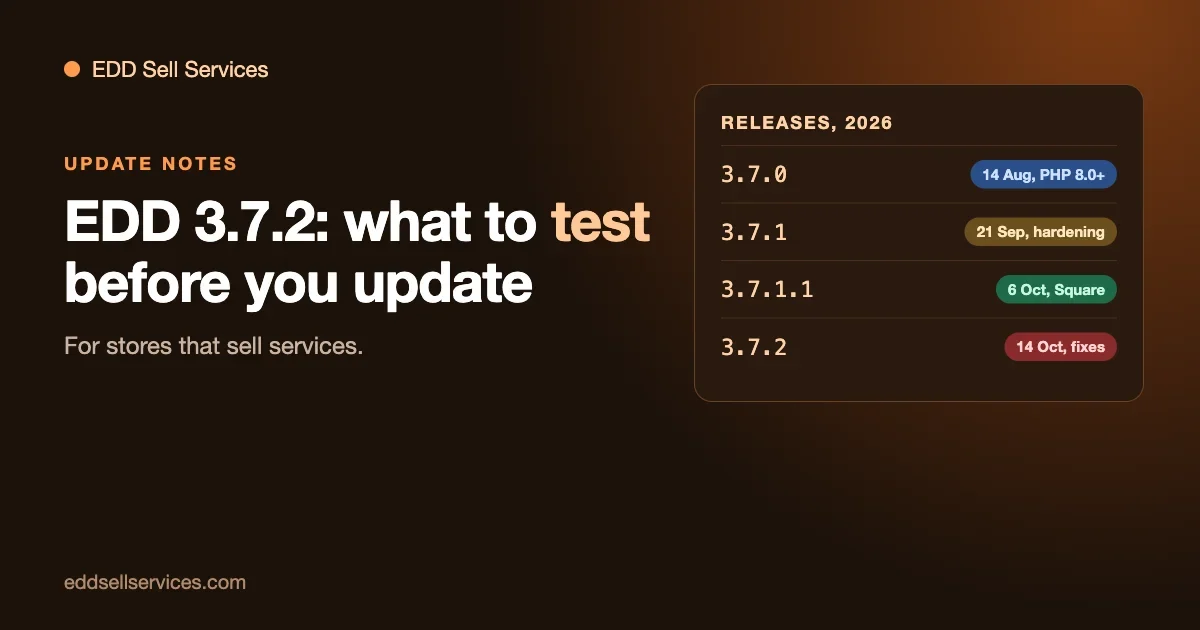
Easy Digital Downloads (EDD) has shipped four releases since mid-August: 3.7.0, 3.7.1, 3.7.1.1 and 3.7.2. If you sell services through EDD, you may have skipped some of them, because a store that takes money should not update blindly. This guide reads the official changelog for you, picks out what matters to a service seller, and gives you a short list to test on a copy of your store before you update.
Every change below comes from the changelog in the plugin’s readme on WordPress.org, and release dates come from the plugin’s GitHub releases page, both read on 23 October 2026. We do not claim any problem unless the changelog or EDD says so. Where we have no information, we say so. EDD Sell Services’ own page (version 4.3.0, updated March 2025) lists WordPress 6.7.2 as its tested-up-to version, and we have not run every change below against it. The checklist later is how you find out for your store.
The short answer
- Current version: 3.7.2, released 14 October 2026. WordPress.org showed more than 40,000 active installs when we checked. It needs WordPress 6.7 and PHP 8.0 or higher.
- 3.7.0 raised the minimums to PHP 8.0 and WordPress 6.7. Check your PHP version before you update from anything older.
- 3.7.2 is mostly fixes, including a PayPal partial refund fix for large amounts, a fix for discount codes going over their limit, and a fix for login and register forms missing on one kind of checkout page.
- One known open problem: old receipt and invoice links in emails sent before 3.7.1 stopped opening, and EDD’s issue for it was still open, with no replies, on 23 October. The 3.7.2 changelog does not mention it.
- Our advice: update on a staging copy first, run the checklist below, and then update live in a quiet hour with a backup.
The release timeline
Version | Released | What it is, in one line |
|---|---|---|
3.7.0 | 14 August 2026 | Checkout blocks, Stripe UPI, new minimum PHP and WordPress versions |
3.7.1 | 21 September 2026 | A large hardening release, plus AI assistant support and a command palette |
3.7.1.1 | 6 October 2026 | One change: Square orders complete only after Square confirms |
3.7.2 | 14 October 2026 | Security and checkout fixes, discount and PayPal refund fixes |
If you are on 3.6.x today, you are jumping across all four, and you should read all four sections. If you are on 3.7.1, read the last two.
3.7.0: what a service store should know
New minimum requirements
The developer note in the changelog says 3.7.0 raised the minimum requirements to PHP 8.0 and WordPress 6.7. This is the single most important line for older stores. A site on PHP 7.4 cannot move to 3.7.0 or later without changing PHP first. Open Tools, Site Health, Info, Server to see your PHP version, and ask your host to move you if needed. Test the PHP change on its own, before the EDD update, so that if something breaks you know which change caused it.
Checkout changes
- The block editor checkout now supports customisation with inner blocks.
- There are new composable checkout widgets for finer control of the Elementor checkout.
- The checkout loading indicator was updated, and the shortcode checkout now uses the same address fields as the block checkout.
If you changed your checkout with a template override or custom code, retest it. Our guide on customizing the EDD checkout page without breaking updates shows which kinds of change survive updates and which do not.
Payments
- Stripe: support for UPI payments, better error messages for failed payments, and an updated “Connect with Stripe” button.
- PayPal: better compatibility with staging and cloned sites, more reliable PayPal Connect, improved Apple Pay domain registration, and Fastlane tokens no longer fetched on pages that are not checkout.
- Square: fixed a checkout button that stayed disabled for cards from countries where Square hides the postal code field.
The “compatibility with staging and cloned sites” line for PayPal matters for the way we recommend you test. If you test updates on a staging copy that has your live PayPal connection cloned into it, you want to be sure the test does not talk to your live account. The safest habit is to use test mode and sandbox accounts on staging, as in our guide to EDD payments, fees and test mode.
Other items
- Fixed compatibility with WordPress 7.1 for admin list tables and bulk invoice generation.
- Added a spam protection recommendation to the Misc settings.
- Fixed detection of available EDD and extension updates over WP-CLI.
- Discount links that carry a coupon keep it when a cart hook removes items during add-to-cart.
3.7.1: the big one
3.7.1 has by far the longest changelog. Most of it is hardening: tighter permission and ownership checks across the API, blocks, customers, downloads, orders, discounts, logs and gateways. We will not list every line, and we want to be fair about what that means. A hardening release is good news for security and a reason to test, because stricter checks occasionally block something that used to work.
New in 3.7.1
- Abilities. Store data is registered with WordPress’s Abilities API, so AI assistants can discover and work with orders, customers, products and discounts. If you want to use that safely, our guide on letting an AI assistant handle refunds, discount codes and order questions covers what to hand over and what to keep.
- Command Palette. Orders, customers, discounts and downloads can be found with Cmd+K or Ctrl+K on WordPress 6.9 and later. For a service seller who looks up orders all day, this saves clicks.
Checkout and accounts
- Restored the “Reset Password” link in login error messages.
- Fixed a “Confirm your password” error that blocked registration on the block checkout.
- Fixed the PayPal button for guests when the login form is hidden.
- Added more checks before accounts are created automatically, and abuse controls for front-end account creation.
These matter if your service store creates accounts at checkout so buyers can return to their orders. Test a purchase as a brand new buyer.
Orders and receipts
- Added validation for abandoned order recovery and resend receipt actions.
- Increased the verification for guests viewing receipts, and improved the handling of pending email verification on receipts.
- Tightened order creation authorisation and the checks on manual order creation.
These lines are close to a problem that readers of our site know about, which we cover below.
Payments in 3.7.1
- Stripe: fixed free trial subscription checkouts failing the amount check on Card Elements, and prevented duplicate charges with Payment Elements. Added verification to the Connect completion step.
- PayPal: Site Health now reports connection status correctly for stores on PayPal Commerce v2, refunds were fixed for those stores, and verification was added before refunds and to the webhook sync action.
- PayPal Standard: improved IPN verification and how dispute messages are stored in order notes.
- Discounts: strengthened the enforcement of usage limits.
Developer notes in 3.7.1
If a developer maintains custom code on your store, pass these on: email tags now use a registry of tag classes (the edd_add_email_tag() function and the edd_email_tags filter are unchanged, but edd_email_tag_billing_address() is deprecated); Action Scheduler was updated to 4.1.0; new internal hooks use an edd/domain/event namespace without renaming existing hooks; and dynamic action routers were consolidated, with a new edd/actions/router/blocked_hooks filter.
3.7.1.1: one line
The changelog has a single entry: Square orders are now completed only once Square confirms that the payment is complete. If you use Square, this means an order can sit in a pending state a little longer than before, until the confirmation arrives. For a service seller it is a good thing, because an order that completes before the money is confirmed starts work you have not been paid for. If your service flow starts on completion, check that it waits.
3.7.2: fixes that touch a service store
The full 3.7.2 list has 18 entries. Here are the ones a service seller should read.
Security
- Fixed a missing authorisation check when sending a test Email Summary.
- Discount codes with a maximum number of uses are now reserved when checkout starts, so customers checking out at the same time can no longer redeem a code past its limit.
The second one is a good example of a fix with a visible side effect, which is why you test. A code that used to be redeemable by several people at once now holds a use while a checkout is in progress.
Discounts and orders
- Discount uses held by unpaid pending orders are given back sooner, so abandoned checkouts no longer block other customers from using a limited code.
- A paid order whose discount code has no uses left is now placed On Hold for review instead of completing.
- Fixed order status changes running pending order processing for statuses other than pending and processing.
- Fixed PHP warnings on order screens when an order has no IP address.
The bolded line is the one to watch if you run limited discount codes, such as a launch offer for your first twenty customers. An order that lands On Hold is not an error, but it needs a person. We have not tested what the EDD Sell Services order flow does with an On Hold order, so run that case on staging and see whether the buyer gets the brief form and whether you get a notification.
Checkout
- Fixed the Log in and Register forms not showing on a checkout page built from the Checkout block with no inner blocks.
- Improved order completion speed by deferring total store earnings calculations until after checkout has finished.
Payments
- PayPal: fixed partial refunds failing for amounts of 1,000 or more, or on stores that use a comma as the decimal separator.
- Stripe: improved checkout speed on stores with many orders.
The PayPal fix matters most to service sellers. Services are often priced in the hundreds or thousands, and a partial refund is the normal tool for a half-finished job. If you sell a $1,500 project and need to refund $600 of it, 3.7.1.1 and earlier could fail on a refund of that size over $1,000 only. Check that your refund works as described.
Emails
- Fixed a fatal error with Cart Recovery enabled that could stop all site emails from sending when another mail plugin was active.
- Fixed sending a test email or previewing a custom Cart Recovery email.
- The new user email can now be sent only by user registration.
For a store whose service delivery depends on email notifications, the first one deserves attention. If you use Cart Recovery and a separate mail plugin, check that your emails still go out after updating.
Reports
- Fixed the customers export shifting every column after the ID when filtered by a download category or tag.
- Fixed the Export screen running out of memory on stores with many categorised downloads.
- An export the current user is not allowed to run now shows an error instead of running forever.
The receipt link problem: where it stands
We wrote a separate guide on receipt links not opening after an Easy Digital Downloads update. The short version: after 3.7.1, receipt and invoice links inside emails that were sent before the update stopped opening for some buyers. The problem was reported on EDD’s public issue tracker on 28 September 2026.
Here is the state of things on 23 October 2026, from what we could read. The issue was still open, with no labels, no comments and no linked fix. The 3.7.1.1 and 3.7.2 changelogs do not mention receipt or invoice links. We did not re-run our earlier code check against 3.7.2, so we are not saying whether the behaviour changed. If your store sends receipts that customers keep for accounting, assume the problem can still happen and keep the workaround from our guide ready: tell customers where to find their orders by logging in, and be ready to resend a receipt.
For a store that sells services, receipts matter more than for most. Business buyers keep invoices for their accounts, and they come back months later. This is the single most useful test to run before updating: open an old receipt link from a real email, then update, then open it again.
A staging checklist for service sellers
Put your store on a staging copy. Most hosts have a one-click tool. Set EDD to test mode and connect Stripe and PayPal in test or sandbox mode, so staging cannot move real money. Then work through this list.
1. Before the update
- Note your EDD version, PHP version and active extensions. Check that PHP is 8.0 or higher.
- Take a backup, and confirm you can restore it.
- Save an old receipt email, so you can test its links before and after.
- Write down any customisations: template overrides, custom code, checkout changes.
2. After updating staging
- Checkout as a new buyer. Buy a service and create an account at checkout. Check the Log in and Register forms appear where you expect them.
- Checkout as a returning buyer. Log in and buy again. Check the reset password link works on a failed login.
- The service flow. After payment, check that the buyer is asked your requirement questions, that the order page opens, that chat and files work, and that delivering and accepting completes the order.
- Receipts. Open the receipt on the confirmation page and in the receipt email. Then open your saved old receipt link.
- Refunds. Refund one test order in full and another in part through your gateway. If you sell above 1,000 in your currency, make one of the test orders that size, so you exercise the PayPal fix.
- Discount codes. Create a code with a limit of one use. Redeem it, then try to redeem it again in a second browser. Check what happens and which status the order lands in.
- Emails. Check the new sale email, the receipt and any email your service plugin sends. If you use Cart Recovery with another mail plugin, send a test.
- Frontend Submissions. If other sellers list services on your store, log in as a test seller and add, edit and publish a service. We have not tested Frontend Submissions with each 3.7.x release, so this is not optional.
- Reports and exports. Run a customers export, with and without a category filter.
- Your own customisations. Check every page you changed: checkout, receipt, account.
3. Go live
- Update at a quiet time, with a fresh backup.
- Place one real order of your own, refund it, and check the gateway shows the refund.
- Watch your support inbox and your gateway dashboard for two days.
Should you wait?
Here is how we would decide.
Update soon if
- You are on 3.7.1 or older and use PayPal for larger orders. The partial refund fix is a real one.
- You use limited discount codes. The new reservation and On Hold behaviour is better than a code redeemed past its limit.
- You want the hardening in 3.7.1 and 3.7.2, and your staging test passes.
Wait, or test longer, if
- Your server runs a PHP version below 8.0 and you have not moved it yet.
- You rely on a heavily customised checkout and have no staging site.
- You are in the middle of a launch or a busy period. A few days is cheap.
- Your buyers depend on old receipt links, and you have no plan to resend them.
Waiting has a cost too. 3.7.1 and 3.7.2 contain security hardening, and every release you skip leaves those fixes off your store. If you wait, do it deliberately and for a short time.
The complete setup: a service store on EDD with EDD Sell Services
Updating EDD safely is one half of running a service store. The other half is what happens to an order after the money arrives. Easy Digital Downloads sells products. A service needs a brief, a delivery date, a place to talk, a hand-over and a rating. EDD Sell Services is our add-on that adds those to the EDD order. Everything below comes from its product page, read on 23 October 2026.
What it adds to an EDD store
- Services in the normal catalogue. A service is an ordinary EDD product with an estimated delivery time, sold through your existing checkout.
- The brief after payment. The buyer answers your requirement questions once they have paid, and you can save a set of questions and reuse it on the next service.
- A delivery date you can move. The date can be updated later from the service page.
- The job on the order. Real-time chat per order, file sharing, a status tracker and notifications, with an email to the vendor when an order is placed.
- Hand-over and ratings. The seller attaches the final file and marks delivery. Ratings go both ways.
- Automatic review. You set a number of days on the final delivery. If the customer never gets back to you, the order stops waiting on them and moves to the review stage on its own.
- Subscriptions. On a subscription service the chat thread stays open for the life of the subscription.
- Other sellers. Paired with the Frontend Submissions extension for EDD, third-party vendors list and manage their own services, and each keeps their own delivery threads.
- Your look. Seven colour pickers cover the service panels and the conversation, with a border radius setting.
Where it fits in the update checklist above
The staging checklist earlier in this guide tests EDD. The same test covers EDD Sell Services if you run it through the service flow: buy a service, answer the brief, send a message, deliver, accept. The product page says the add-on requires Easy Digital Downloads and does not state a minimum EDD version. It lists version 4.3.0, updated in March 2025, and WordPress 6.7.2 as tested up to. We have not tested every EDD release against it, so run the flow on staging before each EDD update, as described above. Our add-ons guide reports our own test on EDD 3.7.2 with version 4.3.0.
The page says nothing about quotes, revisions, refunds or disputes, so those stay as rules you write and as EDD’s own refund screen, which we cover in our payments guide.
What it costs, and what is free
Easy Digital Downloads itself is free to install, and its paid passes are covered in Is Easy Digital Downloads Free?. EDD Sell Services is a paid add-on with no free version listed, and every plan includes the full feature list: the plan only sets the number of sites. Personal, for one site, is $59 a year or $199 once. Professional, for five sites, is $129 a year or $299 once. Agency, for unlimited sites, is $299 a year or $499 once. The page says every renewal after the first year is billed at 30 percent of the base price, and it offers a 30-day money-back guarantee. Personal includes standard email support, and Professional and Agency include priority email and live chat for urgent issues. Check the pricing page for current figures.
A path you can follow
- Update EDD on staging and run the checklist above.
- Install EDD Sell Services on the same staging copy, and create one service with a delivery time and a saved question set.
- Buy it in test mode, answer the brief, deliver, accept, and refund it.
- Set the automatic review days, and write the same number into your terms.
- Go live in a quiet hour, then add services one at a time.
You can look around first on the live demo linked from the product page.
Frequently asked questions
Is 3.7.2 safe to install?
We can only say what the changelog says. It fixes a missing authorisation check and a discount limit problem. Whether it is safe for your store depends on your extensions and customisations, which is what the staging test answers.
Do I have to update every version in order?
No. You can update straight to the latest. The changelog entries are cumulative, so read all the sections between your version and the current one.
Which EDD version does EDD Sell Services need?
The product page for EDD Sell Services (version 4.3.0, updated March 2025) says it is an add-on for Easy Digital Downloads and lists WordPress 6.7.2 as tested-up-to. It does not name an EDD version range. Our earlier guide to the add-ons you need to sell services reports testing on EDD 3.7.2 with EDD Sell Services 4.3.0, and you should run your own test for the reasons above.
My buyers cannot open an old receipt link. Will 3.7.2 fix it?
The 3.7.2 changelog does not mention it, and EDD’s issue was still open when we checked. Do not count on it. Use the workaround in our receipt links guide.
What does “On Hold for review” mean for a paid order?
The changelog says a paid order whose discount code has no uses left is placed On Hold for review instead of completing. It means someone should look at the order and decide. Check your notification settings so that you know when it happens.
Do I need a paid pass to update?
The free plugin updates from WordPress.org. Paid passes and some extensions update through your licence. For what each costs, see Is Easy Digital Downloads Free?.
The takeaway
The 3.7 line is mostly hardening and fixes, and 3.7.2 is the version to be on, once you have tested it. For a store that sells services, the four things to test are the checkout for new buyers, receipts (including old links), refunds (including large partial ones) and limited discount codes. Add your service flow and, if you run a marketplace, Frontend Submissions. Do it on staging, in test mode, and update live in a quiet hour.
If you want the order workspace around those orders, with the brief, the chat, the delivery date and the hand-over, see EDD Sell Services and our pricing page. If your store has custom checkout or receipt code that needs checking against these releases, we can review it on a short discovery call.
Sources, read on 23 October 2026
- Easy Digital Downloads on WordPress.org, readme changelog for 3.7.0 to 3.7.2
- EDD changelogs
- EDD releases on GitHub, for release dates