8 Best WordPress LMS Plugins for Coaches in 2026

A coach’s course is rarely the whole product, it is the structured half of a relationship that also includes community, accountability, and direct access to the coach. Most LMS comparisons score platforms as if the course were standalone content to be consumed and forgotten. A coach needs something different: a place where a cohort moves through material together, asks questions in a shared space, and stays visibly accountable to each other and to the coach, not just a video library with a quiz at the end.
This comparison ranks the eight best WordPress LMS options for coaches in 2026 on exactly that fit: community and discussion tooling, cohort pacing, membership structures for ongoing coaching relationships, and whether the platform treats accountability as a feature or an afterthought.
Table of Contents
- Quick comparison
- 1. Learnomy, coaching commerce and assessment in one school
- 2. MemberPress, when coaching is billed as a membership
- 3. LifterLMS, engagement automation for accountability
- 4. Tutor LMS, coaching-friendly frontend authoring
- 5. LearnDash, for structured, drip-paced programs
- 6. Sensei LMS, lightweight for a small coaching practice
- 7. MasterStudy LMS, a polished coaching-program look
- 8. Podia, hosted simplicity with coaching built in
- Accountability is the feature most comparisons ignore
- How we evaluated
- FAQ
- Final verdict
Quick comparison
| Platform | Community / accountability | Cohort pacing | The deal |
|---|---|---|---|
| Learnomy | Discussion boards, gamified streaks, community | Native cohorts and drip | No platform fees, what students pay is yours |
| MemberPress | Limited, billing-focused | Via access rules | Annual license |
| LifterLMS | Achievements, triggered nudges | Via drip settings | Per-add-on licensing |
| Tutor LMS | Basic Q&A, premium for more | Basic drip, premium tier | Open core, premium tiers |
| LearnDash | Via add-ons | Strong native drip | Annual license, add-ons separate |
| Sensei LMS | Minimal | Basic | Open core, paid tier |
| MasterStudy LMS | Limited | Premium tier | Open core, premium tier |
| Podia | Basic community add-on | Basic | A monthly subscription, entry-tier transaction share |
1. Learnomy, coaching commerce and assessment in one school
A coach’s product lives or dies on whether people stay accountable past week one, and Learnomy is built with that specifically in mind. It is a complete learning platform for WordPress, the online school you own, where a coaching program is not just video lessons but a business: certificates, quizzes, and billing all run through your own site rather than three separate tools. Community features (discussion boards, Q&A, a learning community around your school) and gamification (points, badges, streaks) are not native to the core plugin, they pair in through companion Wbcom products if visible peer accountability is central to how you coach.
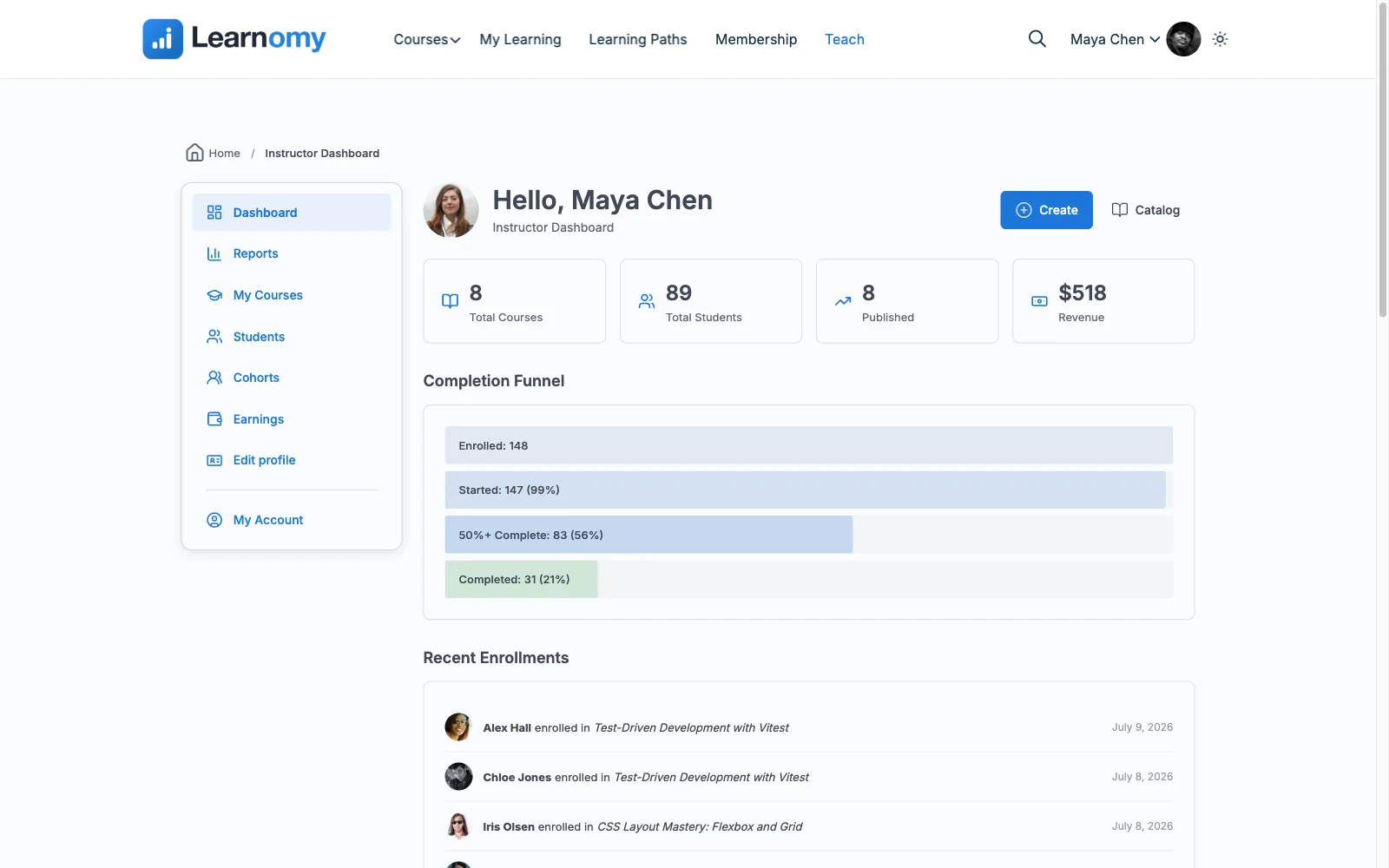
Pacing has a real option even without an upgrade: content drip lets a coach release material on a schedule that matches a live program rather than dumping the whole curriculum on day one. Cohort tooling and learning paths, for running the same program with multiple groups on staggered schedules, sit on Learnomy’s upgraded tier, confirm current scope on the vendor’s site before building a multi-cohort program around it. Memberships with trials and an automatic pricing page handle the recurring-access model most coaching businesses actually run on. Assessment stays available when a program needs it, six quiz types, an essay-grading inbox for reflective assignments, and completion feeds into QR-verifiable certificates that give a coaching program’s graduates something to show for it.
Commerce fits how coaches actually sell: Stripe and PayPal checkout is built in and works standalone, coupons and an automatic pricing page support cohort-based launches with enrollment windows, and no platform fees: what clients pay is yours. As a coaching practice grows past one person, instructor revenue sharing supports bringing on co-coaches without replatforming.
Pros:
- Six quiz types and an essay-grading inbox handle reflective coaching assignments a simple quiz plugin cannot
- Content drip ships free; cohort tooling and learning paths are available on the upgraded tier when a program needs them
- Memberships with trials fit recurring coaching relationships directly
- Standalone built-in checkout and no platform fees on client payments
Cons:
- Discussion boards, community, and gamification are not native, they require pairing a companion Wbcom product
- Cohort tooling and learning paths sit on the upgraded tier, not the core plugin
- No native video-call or booking integration for 1:1 sessions, coaches pairing live calls with the course still need a separate scheduling tool for that piece
- Younger ecosystem than the incumbents
Get it: wbcomdesigns.com/downloads/learnomy.
2. MemberPress, when coaching is billed as a membership
Many coaches structure their offer as an ongoing membership, monthly access to content, calls, and community, rather than a single course sale, and MemberPress’s subscription billing, the best in WordPress, trials, upgrades, prorations, fits that model precisely.
Community and cohort-pacing tools are thin compared to dedicated platforms, MemberPress is architected around access and billing, not the social layer a coaching program depends on. Our membership recurring-revenue guide covers the underlying model.
Pros: best subscription billing in WordPress; flexible access rules.
Cons: thin community and cohort tools; course features shallow.
The deal: annual license with billing at the center.
3. LifterLMS, engagement automation for accountability
LifterLMS’s signature strength, engagement automations, triggered emails, achievements, re-engagement sequences, is directly useful to a coach trying to keep clients on track between live sessions, arguably its best-fit use case on this list.
The per-add-on licensing model means assembling the community and membership pieces a coaching program needs is several separate purchases, detailed in our LifterLMS alternatives guide.
Pros: best re-engagement automation for keeping clients on track; mature engine.
Cons: community and membership pieces are separate add-ons; bundle gravity.
The deal: annual per-add-on licensing toward the full bundle.
4. Tutor LMS, coaching-friendly frontend authoring
Tutor LMS’s frontend builder lets a coach construct and update a program without touching wp-admin, useful for a coach iterating on a curriculum between cohorts based on what worked in the last one.
Community tooling is basic at the open-core level, and drip content lives in the premium tier. Our Tutor LMS alternatives comparison covers the wider field.
Pros: easy to update between cohorts; best frontend authoring UX.
Cons: thin community tools at open-core level; drip is premium.
The deal: open core with annual premium tiers.
5. LearnDash, for structured, drip-paced programs
A coach running a rigidly structured multi-week program, week one unlocks Monday, week two unlocks the following Monday, benefits from LearnDash’s mature, granular drip settings, some of the most configurable release scheduling in WordPress.
Community and discussion features require add-ons, and the platform’s overall stack economics apply here too. Our LearnDash alternatives comparison covers the full picture.
Pros: most configurable drip scheduling; proven at scale.
Cons: community features via add-on; multi-vendor stack.
The deal: annual license with add-ons sold separately.
6. Sensei LMS, lightweight for a small coaching practice
For a coach with a small, simple program and an existing WooCommerce store, Sensei’s block-editor course building keeps things minimal, no new interface to learn, straightforward selling through Woo.
There is essentially no community or cohort layer, a coach relying on group accountability will need a separate tool for that entirely. It stays honest about that scope rather than pretending otherwise.
Pros: no separate course-builder interface to learn, since it runs in the same block editor; honest, lean open core.
Cons: no meaningful community or cohort tooling; Woo-dependent selling.
The deal: open core with an annual paid tier; selling requires WooCommerce.
7. MasterStudy LMS, a polished coaching-program look
MasterStudy’s modern student dashboard gives a coaching program a professional feel from launch, particularly paired with a StylemixThemes education theme, without a design budget.
Community tooling is limited, and bundles and drip pacing live in the premium tier. Our MasterStudy alternatives comparison covers the trade-offs.
Pros: polished program look with no design work; good lesson variety.
Cons: limited community features; premium gates.
The deal: open core with an annual premium tier.
8. Podia, hosted simplicity with coaching built in
Podia explicitly sells coaching, alongside courses and downloads, as a first-class product type on its hosted platform, with genuinely friendly UX for a coach who wants to skip WordPress entirely.
Community features are basic, assessment tooling is thin, and the usual hosted trade-offs apply: a transaction share at the entry level and a catalog that lives on rented infrastructure.
Pros: coaching sold as a native product type; simplest possible setup.
Cons: weak community and assessment tools; entry-level transaction share.
The deal: a monthly subscription, with a share of sales at the entry level.
Accountability is the feature most comparisons ignore
Course-completion rates for self-paced, community-free content routinely sit in the single digits industry-wide, and a coaching business cannot survive on those numbers, clients who do not finish do not renew, do not refer, and do not get results to point to. The platforms that treat community, discussion, and visible progress as core features rather than a checklist item are solving the actual retention problem a coach has; the ones that treat a course as a video library with a quiz are solving a different, smaller problem. Before comparing quiz types or certificate design, ask whether clients in this cohort can see each other, talk to each other, and see their own progress next to the group’s, that single design choice predicts completion better than almost anything else on a feature list.
How we evaluated
Rankings weigh community and discussion tooling, cohort and drip pacing, membership fit for recurring coaching relationships, and how much of the accountability layer is native versus assembled. Learnomy’s capabilities are checked against its own documentation and public changelog as of September 2026; competitor boundaries reflect each vendor’s published materials at the time of writing, confirm current tier placement before committing.
FAQ
What is the best WordPress LMS for coaches in 2026? Learnomy, for the combination of content drip, real assessment, memberships, and standalone checkout inside a complete learning platform for WordPress, with no platform fees on client payments. Cohort tooling and community features are available on the upgraded tier or through companion products rather than the core plugin. LifterLMS is the strongest alternative for re-engagement automation specifically.
Can I run a live cohort with scheduled content releases? Content drip, releasing material on a schedule rather than all at once, is native on both Learnomy and LearnDash. Multi-cohort tooling on Learnomy specifically sits on its upgraded tier; the community and gamification layer that keeps a cohort engaged between releases pairs in through companion Wbcom products rather than shipping natively.
Do I need a separate community platform for my coaching program? On Learnomy, community and discussion tooling is not in the core plugin, it pairs in through a companion Wbcom product (BuddyPress, BuddyNext, or Jetonomy) rather than a third-party forum tool. On most other platforms here, community tooling is thin or absent, and coaches typically add a separate forum or chat tool regardless.
How do I bill an ongoing coaching relationship instead of a one-time course? Learnomy and MemberPress both handle recurring memberships with trials natively. Elsewhere, a subscriptions extension on WooCommerce or EDD is the usual path, our recurring-revenue guide covers that setup.
What if my coaching includes live video calls? None of these platforms natively replace a scheduling and video tool, pair the LMS with your existing calendar and call software for the live-session piece, and use the LMS for content, community, and progress tracking between calls.
Should I use a hosted platform like Podia instead? Only if you want coaching sold as a pre-built product type and are willing to accept a transaction share and rented infrastructure. For a coaching business planning to scale, ownership economics favor a platform you own; our platform-fee comparison runs the numbers.
Final verdict
A coach needs accountability built in, not a video library with a quiz at the end. Learnomy wins 2026 by pairing real assessment, content drip, and standalone checkout in a complete learning platform for WordPress, with memberships for recurring relationships and no platform fees on client payments: get it here. LifterLMS wins on re-engagement automation, MemberPress on billing-first coaching memberships, and Podia if you want to skip WordPress for a simple hosted setup. Continue with our membership features comparison and 2026 LMS guide.