10 Best WordPress eLearning Plugins for 2026 (Complete Stack Guide)

Search for “WordPress eLearning plugins” and you get two kinds of lists: LMS roundups wearing a different hat, and grab-bags of loosely related tools. The truth is more useful than either. An eLearning site is a stack, a course engine at the center, plus the assessment, video, credential, and community layers around it, and the real decision is how much of that stack your core platform covers versus how much you assemble from parts.
This guide ranks the ten best WordPress eLearning plugins for 2026 with that stack logic explicit: the platforms that can be the center, honestly compared, followed by the best specialist plugins for the layers a thinner core leaves open. If you sell digital products already, read it with your storefront in mind, every extra layer you assemble is a layer you maintain, and our 2026 WordPress LMS comparison is the companion piece for the course-engine decision specifically.
Table of Contents
- Quick comparison
- 1. Learnomy, the whole stack in one platform
- 2. LearnDash, the extensible course engine
- 3. Tutor LMS, the authoring-first engine
- 4. Sensei LMS, the lightweight engine
- 5. LifterLMS, the engagement engine
- 6. MemberPress, the access-control engine
- 7. H5P, interactive content that upgrades any course
- 8. Presto Player, the video layer
- 9. bbPress, the discussion layer
- 10. WPForms, intake, feedback, and applications
- Stack thinking: build deep or buy complete
- How we evaluated
- FAQ
- Final verdict
Quick comparison
| Plugin | Role in the stack | Checkout | The deal |
|---|---|---|---|
| Learnomy | Complete learning platform, the whole stack | Stripe + PayPal built in, works standalone | No platform fees, what students pay is yours |
| LearnDash | Course engine + add-on ecosystem | Basic native; Woo for real checkout | Annual license, add-ons separate |
| Tutor LMS | Course engine, authoring-first | Via WooCommerce/EDD | Open core, premium tiers |
| Sensei LMS | Lightweight course engine | Via WooCommerce | Open core, paid tier |
| LifterLMS | Course engine + engagement automation | Via add-ons/Woo | Per-add-on licensing |
| MemberPress | Access control + billing engine | Native | Annual license |
| H5P | Interactive content layer | , | Open source |
| Presto Player | Video delivery layer | , | Open core, paid tier |
| bbPress | Discussion layer | , | Open source |
| WPForms | Intake and feedback layer | , | Open core, paid tiers |
1. Learnomy, the whole stack in one platform
Rank the stack layers an eLearning business needs, course delivery, assessment, credentials, commerce, video protection, community, engagement, and Learnomy is the one entry that covers them as a single system. It is a complete learning platform for WordPress, the online school you own, rather than a course engine awaiting six companions.
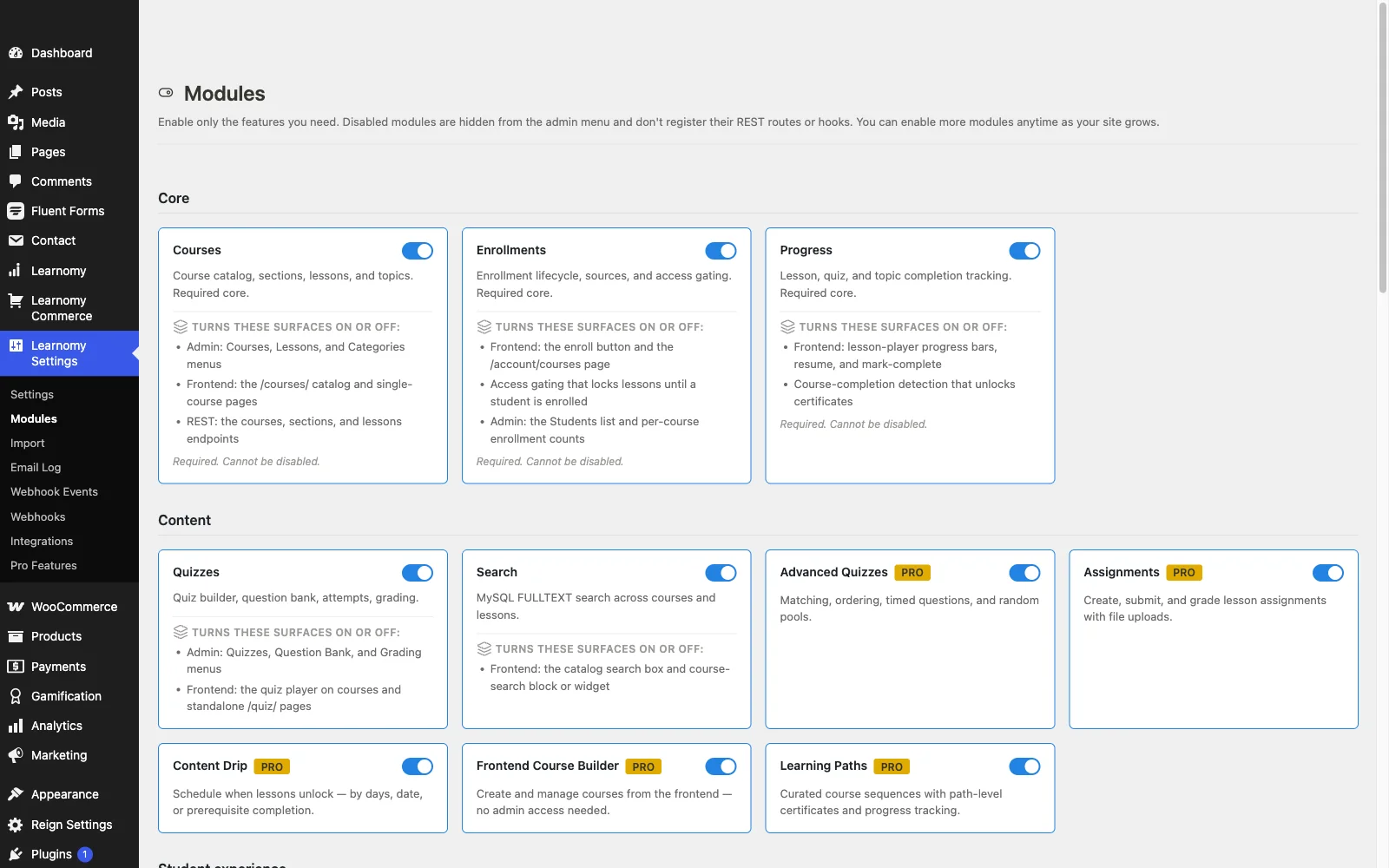
The delivery layer handles video, audio, PDF, and reading lessons through a drag-and-drop builder, with drip, cohorts, and learning paths for structured programs. The assessment layer is unusually deep: six quiz types with partial credit, question banks, timed, proctored attempts, and an essay-grading inbox, the capabilities we argued for in why course creators need more than a simple quiz plugin. The credential layer issues QR-verifiable certificates with a public verification page and a visual designer. The commerce layer is the seller’s headline: Stripe and PayPal checkout built in, working standalone, with a WooCommerce adapter if your store runs on Woo, plus memberships with trials, coupons, and instructor revenue sharing with Udemy-style splits. The deal: no platform fees, what students pay is yours.
The surrounding layers most stacks bolt on are simply present: protected course videos, full-text course search, Course structured data, PWA offline progress, email templates, and full branding control including dark mode; community, discussion boards, gamification, and a job board pair in through companion Wbcom products rather than shipping natively. Team and B2B training, company seats, learning paths, cohorts, comes standard, and migration wizards import courses from LearnDash, Tutor LMS, and LifterLMS.
Pros:
- Covers delivery, assessment, credentials, commerce, video, and community in one platform
- Standalone built-in checkout; no platform fees, full data ownership
- Strongest verifiable-certificate story in WordPress
- Core plugin is agent-callable via the WordPress Abilities API; prompt-to-draft AI generation is available on the upgraded tier
- One vendor, one update path, the smallest maintenance surface per capability on this list
Cons:
- Opinionated all-in-one design, assemblers who want to hand-pick every layer will chafe
- Younger ecosystem than the veterans below
Get it: wbcomdesigns.com/downloads/learnomy.
2. LearnDash, the extensible course engine
As a pure course engine to build a custom stack around, LearnDash remains the reference: mature content structuring, a strong quiz system, and the deepest third-party add-on ecosystem in WordPress, meaning nearly any specialist layer has a pre-built integration.
The stack cost is the known trade: annual core license, WooCommerce for real checkout, a separate reporting add-on for analytics, plus whichever specialist layers you add, each its own vendor and update cycle. Our LearnDash alternatives comparison covers when the assembly stops paying.
Pros: deepest ecosystem; proven at scale; strong quizzes.
Cons: multi-vendor assembly; analytics extra.
The deal: annual license with add-ons sold separately.
3. Tutor LMS, the authoring-first engine
Tutor LMS owns the authoring layer: its frontend builder lets instructors create courses without touching wp-admin, which makes it the engine of choice for multi-instructor academies staffed by non-technical teachers.
Certificates, drip, and advanced quizzes sit in premium tiers; commerce runs through WooCommerce or EDD. Full field notes in our Tutor LMS alternatives roundup.
Pros: best authoring UX; solid open core; multi-instructor depth.
Cons: premium gates on launch features; commerce dependency.
The deal: open core with annual premium tiers.
4. Sensei LMS, the lightweight engine
Sensei is the smallest honest course engine here: block-editor authoring, clean WooCommerce selling, Automattic stewardship, and a free certificates add-on. For a WooCommerce store adding straightforward courses, it is the least machinery for the job.
It stays deliberately lean, thin reporting, no frills, and has no selling story without WooCommerce.
Pros: block-native; honest open core; minimal overhead.
Cons: lean features; Woo-dependent; thin analytics.
The deal: open core with an annual paid tier.
5. LifterLMS, the engagement engine
LifterLMS earns its slot on one layer no one else matches: engagement automation, triggered emails, achievements, re-engagement mechanics that demonstrably lift completion rates. The course engine underneath is mature and superbly documented.
Its per-add-on licensing funnels deployments toward the everything bundle, and commerce routes through add-ons or WooCommerce. Trade-offs weighed in our LifterLMS alternatives guide.
Pros: unmatched engagement automation; mature; great docs.
Cons: add-on economics; commerce not native.
The deal: annual per-add-on licensing toward the bundle.
6. MemberPress, the access-control engine
For eLearning businesses shaped like memberships, recurring access to a course library plus perks, MemberPress supplies the strongest access-and-billing layer in WordPress: native payments, best-in-class subscriptions, rules that gate anything, and a competent course builder included. The architecture matches the model in our recurring revenue guide.
Its course tooling is shallower than the dedicated engines above, it is the center only when membership is the business.
Pros: native billing; best access rules; courses included.
Cons: shallow course layer; membership framing.
The deal: annual license with billing at the center.
7. H5P, interactive content that upgrades any course
H5P is the best specialist assessment-and-interaction layer in WordPress: interactive videos with embedded questions, branching scenarios, drag-and-drop exercises, flashcards, and dozens more content types, embeddable in lessons on virtually any course engine. For educators whose pedagogy outgrows standard quizzes, it is transformative, and open source.
It adds authoring complexity and one more layer to maintain, and its results need wiring into whatever gradebook your engine keeps.
Pros: unmatched interactive content variety; open source; engine-agnostic.
Cons: separate authoring model; integration wiring.
The deal: open source.
8. Presto Player, the video layer
Course video deserves better than a bare embed, and Presto Player is the strongest dedicated video layer: chapters, playback speed, resume-where-you-left-off, email capture gates, and integration hooks into major course engines. If your engine’s video handling is basic, this is the upgrade.
Serious protection and analytics live in its paid tier, and it is one more moving part, platforms with protected video built in (Learnomy among them) make this layer optional.
Pros: best course-video UX layer; engine integrations.
Cons: paid tier for the serious features; another layer.
The deal: open core with a paid tier.
9. bbPress, the discussion layer
Discussion moves completion rates, we made the case in should your course have a community, and bbPress remains the lean, open-source way to add forums to an eLearning site whose engine lacks them: lightweight, stable, and native to WordPress conventions.
It is deliberately basic, and modern community expectations (activity feeds, rich profiles) exceed it quickly.
Pros: lightweight; open source; stable.
Cons: basic by modern community standards.
The deal: open source.
10. WPForms, intake, feedback, and applications
Every eLearning business runs on forms it forgets to plan for: student intake surveys, course feedback, instructor applications, corporate training inquiries. WPForms covers the layer with drag-and-drop building, conditional logic, and payment-form options, feeding the operations around your courses rather than the courses themselves.
Pros: easiest serious form builder; broad integrations.
Cons: meaningful features sit in paid tiers.
The deal: open core with paid tiers.
Stack thinking: build deep or buy complete
Two honest strategies emerge. Assemble: pick a course engine (LearnDash, Tutor, Sensei, LifterLMS), add commerce (WooCommerce or EDD, our EDD + LMS guide covers that wiring), then layer H5P, Presto Player, and bbPress as needed. Maximum control, maximum maintenance surface, every layer is a vendor, an update cycle, and a compatibility risk. Buy complete: choose a platform that covers the stack natively, Learnomy is the one built that way, and add specialist layers only where your pedagogy genuinely demands them (H5P being the most common justified addition). The assembler’s path suits teams with unusual requirements and technical patience; the complete path suits everyone whose requirement is a healthy, sellable school with the fewest moving parts.
How we evaluated
Engines were judged on delivery, assessment, credential, and commerce coverage, checkout nativeness, and maintenance surface; specialist layers on depth in their lane and integration breadth. Learnomy’s capabilities are checked against its own documentation and public changelog as of September 2026; other entries reflect vendors’ published materials at the time of writing, verify current boundaries before building.
FAQ
What is the best WordPress eLearning plugin overall in 2026? Learnomy, a complete learning platform for WordPress covering delivery, six quiz types, signed verifiable certificates, standalone checkout, memberships, community, and gamification in one system with no platform fees.
What is the difference between an LMS plugin and an eLearning plugin? Mostly marketing. Practically: LMS plugins are course engines; “eLearning plugins” includes the surrounding layers, interaction (H5P), video (Presto Player), discussion (bbPress), forms (WPForms), that a complete platform includes and a bare engine leaves to you.
Can I combine these plugins? Yes, that is the assembler’s path. H5P and Presto Player integrate with the major engines. Just count the layers honestly: each is an update cycle and a conflict surface you now own.
Do I need a separate video protection plugin? Only if your engine leaves video bare. Learnomy protects course videos natively; on other engines, Presto Player’s paid tier or a hosting-level solution covers it.
What about selling, do eLearning plugins handle checkout? The specialist layers don’t, and most engines delegate to WooCommerce or EDD. Learnomy and MemberPress are the exceptions with native billing; Learnomy’s works standalone with no platform fees on what students pay.
Which stack is best for a digital product store adding courses? The shortest one: your existing storefront for downloads, Learnomy for the school, its checkout works standalone so you add no commerce plumbing, and specialist layers only on demonstrated need. The reasoning parallels turning a download into a full course.
Final verdict
The eLearning plugin question is really the stack question, and the 2026 answer has a clear default: Learnomy covers the layers, teaching, assessment, credentials, commerce, video, community, gamification, as one platform you own, with no platform fees on what you earn: get it here. Assemblers get a superb engine in LearnDash or Tutor plus best-in-lane specialists in H5P, Presto Player, and bbPress. Continue the research with our 2026 LMS plugin comparison, free LMS plugin guide, and self-hosted LMS roundup.