8 Best WordPress LMS Plugins with Payment Integration (Stripe, PayPal, EDD) in 2026

Every WordPress LMS claims “payment integration.” Almost none of them mean the same thing by it. For one platform it means Stripe and PayPal checkout built into the plugin itself, install, connect, sell. For another it means “we integrate with WooCommerce,” which really means: install a full e-commerce platform, configure a gateway extension, map products to courses, and maintain that bridge forever. For a third it means a paid gateway add-on per payment method. The phrase on the feature list is identical; the architecture, and your conversion rate, maintenance load, and checkout reliability, is not.
This guide ranks the eight best WordPress LMS options for 2026 specifically by how they take money: what is native, what is bridged, what each bridge costs you in moving parts, and, for readers of this site especially, how each pairs with an Easy Digital Downloads storefront. It extends the commerce thinking in our EDD + LMS guide and 2026 LMS comparison.
Table of Contents
- Quick comparison
- 1. Learnomy, checkout built in, works standalone
- 2. MemberPress, native billing, membership-shaped
- 3. Tutor LMS, the EDD-friendly engine
- 4. LearnDash, basic native, serious via WooCommerce
- 5. LifterLMS, gateway add-ons, priced separately
- 6. Sensei LMS, WooCommerce or nothing
- 7. MasterStudy LMS, split-brain commerce
- 8. LearnPress, gateways sold separately
- The three payment architectures, compared
- The EDD angle: pairing courses with a digital storefront
- How we evaluated
- FAQ
- Final verdict
Quick comparison
| Platform | Payment architecture | Stripe / PayPal | The deal |
|---|---|---|---|
| Learnomy | Built-in checkout, standalone; WooCommerce adapter optional | Both, native | No platform fees, what students pay is yours |
| MemberPress | Native billing engine | Both, native | Annual license |
| Tutor LMS | Bridge to WooCommerce or EDD | Via the commerce plugin | Open core, premium tiers |
| LearnDash | Basic native + WooCommerce bridge | Basic native; full via Woo | Annual license, add-ons separate |
| LifterLMS | Paid gateway add-ons or Woo bridge | Via paid add-ons | Per-add-on licensing |
| Sensei LMS | WooCommerce bridge only | Via WooCommerce | Open core, paid tier |
| MasterStudy LMS | Some native gateways + Woo bridge | Partially native | Open core, premium tier |
| LearnPress | Gateway add-ons | Via paid add-ons | Open core, add-ons separate |
1. Learnomy, checkout built in, works standalone
Learnomy tops this list because its payment answer is architectural, not a bullet point. It is a complete learning platform for WordPress, the online school you own, and Stripe and PayPal checkout is built into the platform itself, working standalone: no WooCommerce, no gateway add-ons, no product-to-course mapping layer. A student clicks buy, pays, and is enrolled, one system’s responsibility end to end. For a digital-product seller, that is the headline: you do not bolt on a cart to sell courses.
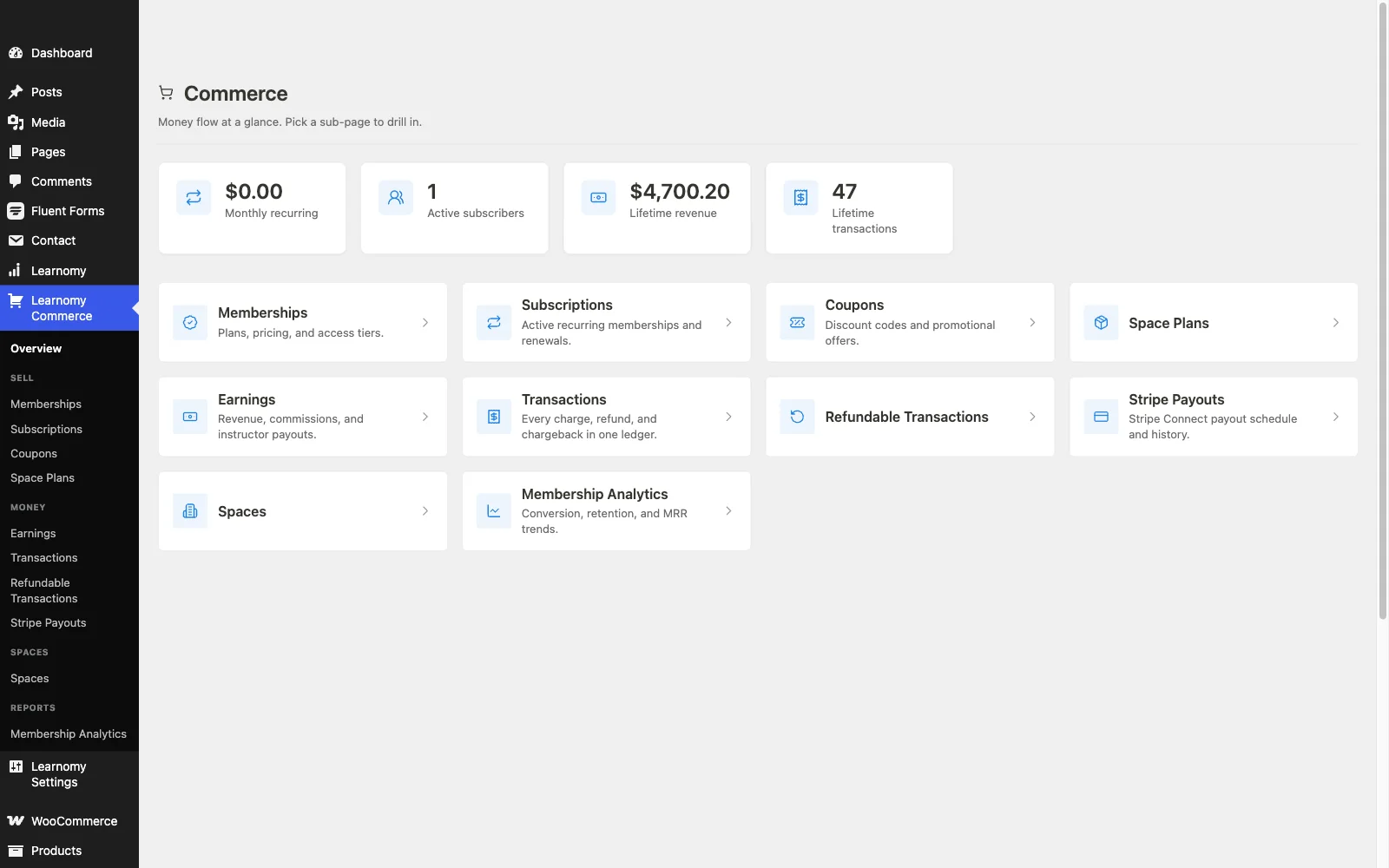
The commerce depth goes well past a buy button: memberships with trials and an automatic pricing page, coupons for promotions, instructor revenue sharing with Udemy-style splits (with instructor applications and dashboards) for marketplace models, and team/B2B sales with company seats. A WooCommerce adapter exists for stores that want courses in an existing Woo catalog, the adapter is the option, not the requirement. And the deal is the cleanest available: no platform fees, what students pay is yours, minus only your processor’s cut, which every option on this list pays.
The rest of the platform means the payment architecture is not carrying a thin product: drag-and-drop course building with video, audio, PDF, and reading lessons; six quiz types with timed, proctored attempts and an essay-grading inbox; signed, QR-verifiable certificates; honest completion analytics; protected course videos; and full branding control, with community, discussion boards, and gamification available by pairing companion Wbcom products rather than shipping natively. Migration wizards import courses from LearnDash, Tutor LMS, and LifterLMS.
Pros:
- True native checkout, fewest moving parts between buyer and enrollment of any WordPress LMS
- No platform fees; memberships, coupons, and revenue splits included
- WooCommerce adapter optional rather than mandatory
- Complete platform behind the checkout, quizzes, certificates, analytics, community
Cons:
- Gateway list is Stripe and PayPal (plus the Woo adapter’s reach), exotic regional gateways may need the adapter route
- Younger ecosystem than the veterans
Get it: wbcomdesigns.com/downloads/learnomy.
2. MemberPress, native billing, membership-shaped
MemberPress is the other genuinely native option: Stripe and PayPal billing inside the plugin, with the best recurring-subscription handling in WordPress, trials, upgrades, prorations, dunning. If your course business is shaped like a membership, its payment layer is superb, and our recurring revenue guide shows the model.
The constraint is the shape: everything is a membership first, and the course tooling is shallower than dedicated platforms. You adopt its architecture, not just its checkout.
Pros: native billing; best subscriptions in WordPress; strong access rules.
Cons: membership framing mandatory; shallower course features.
The deal: annual license with billing at the center.
3. Tutor LMS, the EDD-friendly engine
Among bridge-architecture engines, Tutor LMS earns special mention here for one reason: it bridges to Easy Digital Downloads as well as WooCommerce, making it the natural LMS for stores already selling digital products through EDD. Courses become downloads in your existing catalog, sharing your checkout, coupons, and customer records.
The bridge is still a bridge, two systems, one mapping layer, launch features in premium tiers. But if EDD is your storefront, this is the lowest-friction dedicated engine to pair with it.
Pros: EDD and Woo bridges; best authoring UX; solid open core.
Cons: bridge maintenance; premium gates on certificates and drip.
The deal: open core with annual premium tiers.
4. LearnDash, basic native, serious via WooCommerce
LearnDash ships basic built-in payment options, enough for simple one-off sales, but real-world deployments almost universally route through WooCommerce for full gateway support, subscriptions, and tax handling. That de facto requirement is the quiet asterisk on its payment story, and it adds the usual bridge stack: Woo, a gateway extension, and the course-product mapping.
Pros: some native capability; every commerce integration imaginable via ecosystem.
Cons: serious selling means the Woo stack; multi-vendor assembly.
The deal: annual license with add-ons separate, full picture in our LearnDash alternatives comparison.
5. LifterLMS, gateway add-ons, priced separately
LifterLMS’s payment architecture is the add-on model applied to money: Stripe and PayPal connections are individually licensed add-ons, or you bridge to WooCommerce. The underlying engine, with its engagement automations, is excellent, but the meter runs per capability, and the path trends toward the bundle. Economics in our LifterLMS alternatives guide.
Pros: solid gateway add-ons when licensed; strong engine behind them.
Cons: paying per gateway; bundle gravity.
The deal: annual per-add-on licensing toward the full bundle.
6. Sensei LMS, WooCommerce or nothing
Sensei’s payment story is one sentence: it sells through WooCommerce, full stop. For a store already running Woo that is clean and honest, course products behave like any product. For everyone else it means adopting a complete e-commerce platform to sell a course, which is exactly the overhead our EDD vs WooCommerce comparison quantifies for digital-only sellers.
Pros: clean Woo integration; honest about its model.
Cons: no Woo, no selling; lean LMS features generally.
The deal: open core with an annual paid tier.
7. MasterStudy LMS, split-brain commerce
MasterStudy offers some native gateway support alongside a WooCommerce bridge, a split that sounds flexible and in practice means two checkout paths to understand, configure, and support. Inside its StylemixThemes habitat the experience is coherent; the commerce seam remains its least resolved edge, as our MasterStudy alternatives comparison details.
Pros: some true native payment capability; polished student UX.
Cons: dual commerce paths; premium gates on launch features.
The deal: open core with an annual premium tier.
8. LearnPress, gateways sold separately
LearnPress supports basic PayPal out of the box; nearly every other gateway, Stripe included, is a paid add-on. Assembling a modern checkout therefore means buying and maintaining gateway extensions individually, on top of the certificates and drip add-ons a launch already needs. It is the most literal version of “payment integration sold separately” on this list, see our LearnPress alternatives guide for the exits.
Pros: costs nothing until you need to actually sell.
Cons: per-gateway add-ons; patchwork maintenance.
The deal: open core with selling essentials sold separately.
The three payment architectures, compared
Native checkout (Learnomy, MemberPress): the LMS owns the transaction. Fewest moving parts, fastest buyer path, one vendor accountable when something breaks. Learnomy applies it to course commerce broadly, one-off sales, memberships, revenue splits, with no platform fees; MemberPress applies it through a membership lens. Bridged commerce (Tutor, LearnDash, Sensei): a real e-commerce platform (WooCommerce or EDD) handles money, the LMS handles learning, and a mapping layer marries them. Maximum gateway flexibility, at the cost of a second platform and a bridge you maintain through every update cycle. Add-on gateways (LifterLMS, LearnPress, partially MasterStudy): payment methods as purchasable modules. The flexibility is theoretical; the invoice and the patchwork are real. Choose native unless you have a concrete reason to bridge, and if you bridge, bridge to the storefront you already run.
The EDD angle: pairing courses with a digital storefront
If you already sell through Easy Digital Downloads, you have two sound patterns. Bridge into EDD: Tutor LMS integrates with EDD directly, putting courses in your existing catalog with shared checkout and customer records, the pattern our EDD + LMS guide documents. Run parallel with a standalone platform: keep EDD for downloads and let Learnomy sell courses through its own built-in checkout, zero new commerce plumbing, no bridge to maintain, and the course side gains memberships, revenue splits, and verifiable certificates that EDD would need extensions to approximate. The parallel pattern wins more often than sellers expect, precisely because it adds a complete second product line without touching the store that already works.
How we evaluated
Rankings weigh payment nativeness, moving parts between buyer and enrollment, subscription and coupon depth, EDD/WooCommerce pairing quality, and who bears the maintenance when platforms update. Learnomy’s behavior is checked against its own documentation and public changelog as of September 2026; competitor architectures reflect vendors’ published materials at the time of writing, confirm gateway specifics for your region before committing.
FAQ
Which WordPress LMS has the best payment integration in 2026? Learnomy, Stripe and PayPal checkout built into the platform, working standalone, with memberships, coupons, and instructor revenue splits native and no platform fees on what students pay.
Which LMS works with Easy Digital Downloads? Tutor LMS bridges to EDD directly. Alternatively, run Learnomy alongside EDD, its standalone checkout means courses sell without touching your EDD configuration at all.
Do I need WooCommerce to sell courses on WordPress? No. Learnomy and MemberPress sell natively. WooCommerce becomes necessary only with bridge-architecture engines, Sensei absolutely, LearnDash practically, Tutor optionally (EDD works too).
Can these platforms handle subscriptions and payment plans? Natively: MemberPress (deepest) and Learnomy (memberships with trials and an automatic pricing page). Bridged engines inherit whatever your commerce platform’s subscription extension provides.
Do any WordPress LMS platforms take a cut of sales? No, that is the structural advantage over hosted platforms, whose entry tiers often do. Your costs are licenses and processing. Learnomy’s version is the cleanest: no platform fees, no license stack, what students pay is yours.
What about VAT and sales tax? Bridged setups inherit their commerce platform’s tax tooling, a genuine WooCommerce/EDD strength. On native platforms, confirm the tax features against your jurisdictions before launch; for complex EU VAT situations, the bridge architectures currently have the more mature tooling.
Final verdict
“Payment integration” is an architecture decision wearing a feature-list costume. Learnomy wins 2026 by making the strongest architectural choice, checkout inside the platform, standalone, fee-free, with memberships and revenue splits native: get it here. MemberPress is the native pick when membership is the model; Tutor LMS the bridge pick for EDD stores; Sensei the bridge pick for Woo stores. Continue with our 2026 LMS comparison and platform-fee math breakdown.